

Budgeting And Forecasting In Accounting Powerpoint Presentation Slides




Try Before you Buy Download Free Sample Product
 Impress Your
 Audience
 100%
100% Editable
 Save Hours
 of Time


Are you in charge of making a PowerPoint presentation for account budgeting and forecasting? Our team of expert designers have come up with a 70 slides ready-made Budgeting And Forecasting In Accounting Powerpoint Presentation Slides. This financial forecasting planning and budgeting PowerPoint presentation will help you in showcasing the accounting budget with the help of slides like balance sheet, cash flow statements, financial projections, key financial ratios, liquidity ratios, profitability ratios, activity and solvency ratio analysis, income statement overview, etc. Furthermore, our pre-designed budgeting and forecasting ppt will aid help managers to interpret the organisation’s budget to top management. If you are planning to create a detailed professional presentation on the budget forecast, demand forecast, cash flow prediction, economic forecasting, fiscal modelling, qualitative forecasting etc. then our Budgeting And Forecasting In Accounting PowerPoint Presentation Slides example is what you require. As this visual PPT cover all the crucial slides for this topic. The best part is that all the slides in this PowerPoint presentation slides are editable, and you can easily edit them as per your need. There are multiple icons for the related topic too. Click Download so you can comfortably sail through the mind-bending task of planning everything on your own and from scratch. Grab hold of the day with our budget presentation Slides. Chart out important aims to achieve.
People who downloaded this PowerPoint presentation also viewed the following :
Content of this Powerpoint Presentation
Slide 1: This slide introduces Budgeting And Forecasting In Accounting State Your Company Name and begin.
Slide 2: This slide shows Agenda. You can add the message, meet the team, portfolio and research.
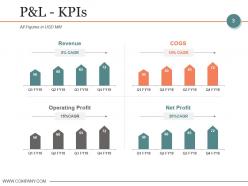
Slide 3: This slide presents P&L - KPIs with these of the four important factors- Revenue, Operating Profit, COGS, Net Profit.
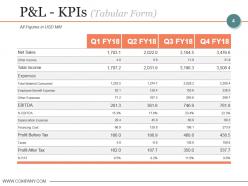
Slide 4: This slide showcases P&L - KPIs (Tabular Form). Add the data in figures.
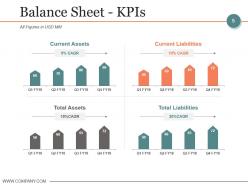
Slide 5: This slide presents Balance Sheet - KPIs with four of the considered points- Current Assets, Total Assets, Current Liabilities, Total Liabilities, All Figures in USD MM
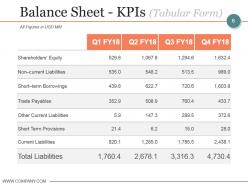
Slide 6: This slide showcases Balance Sheet - KPIs (Tabular Form). Add the data and figures as you want.
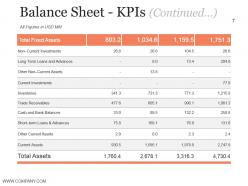
Slide 7: This slide presents Balance Sheet - KPIs and this sis the continuation of the above.
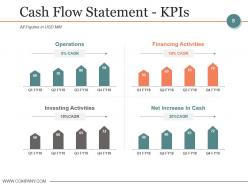
Slide 8: This slide showcases Cash Flow Statement - KPIs which further presents Operations, Investing Activities, Financing Activities, Net Increase In Cash.
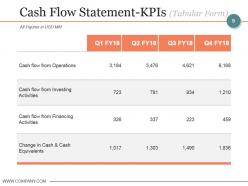
Slide 9: This slide showcases Cash Flow Statement-KPIs (Tabular Form).
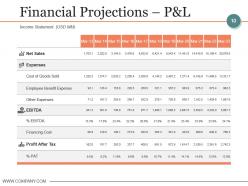
Slide 10: This slide presents Financial Projections – P&L.
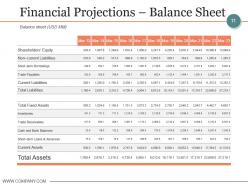
Slide 11: This slide showcases Financial Projections – Balance Sheet. You can add the Balance Sheet (USD MM)
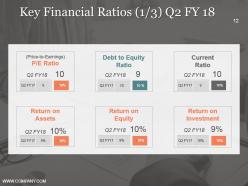
Slide 12: This slide presents Key Financial Ratios (1/3) Q2 FY 18. Add your own information as per requirement.
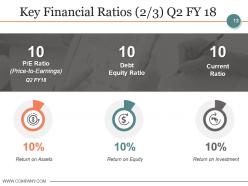
Slide 13: This slide showcases Key Financial Ratios (2/3) Q2 FY 18.
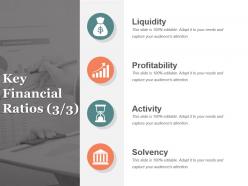
Slide 14: This slide presents Key Financial Ratios (3/3) with these four factors- Liquidity, Profitability, Activity, Solvency.
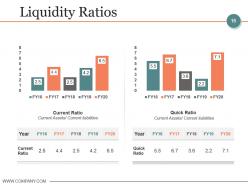
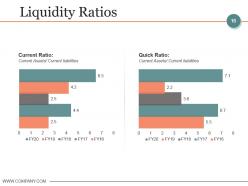
Slide 15: This slide showcases Liquidity Ratios which further showcases with these of the two main benefits- Current Ratio, Quick Ratio.
Slide 16: This slide presents Liquidity Ratios with these of the four types- Current Ratio, Current Assets/ Current liabilities Quick Ratio, Current Assets/ Current liabilities.
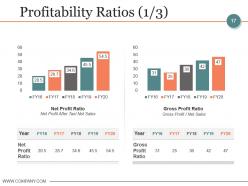
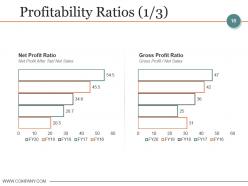
Slide 17: This slide presents Profitability Ratios (1/3) with these four main factors- Net Profit Ratio, Net Profit After Tax/ Net Sales, Gross Profit Ratio, Gross Profit / Net Sales.
Slide 18: This slide presents Profitability Ratios (1/3) with these of the four main categories- Net Profit Ratio, Net Profit After Tax/ Net Sales, Gross Profit Ratio, Gross Profit / Net Sales.
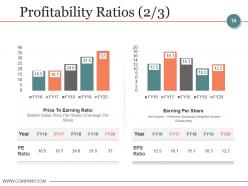
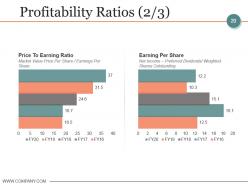
Slide 19: This slide showcases Profitability Ratios (2/3) with these four main categories- Price To Earning Ratio, Market Value Price Per Share / Earnings Per Share, Earning Per Share, Net Income – Preferred Dividends/ Weighted Shares Outstanding.
Slide 20: This slide shows Profitability Ratios (2/3) with these four criterias- Price To Earning Ratio Market Value Price Per Share / Earnings Per Share Earning Per Share Net Income – Preferred Dividends/ Weighted Shares Outstanding
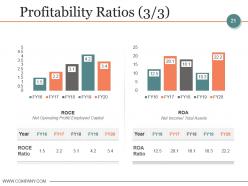
Slide 21: This slide presents Profitability Ratios (3/3) with these parameters- ROCE, Net Operating Profit/ Employed Capital, ROA, Net Income/ Total Assets.
Slide 22: This slide showcases Profitability Ratios (3/3) which further have these stages- ROCE, Net Operating Profit/ Employed Capital, ROA, Net Income/ Total Assets.
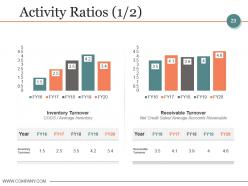
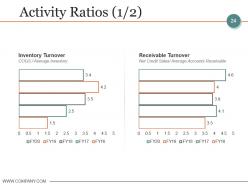
Slide 23: This slide presents Activity Ratios (1/2) with these four main listed factors- Inventory Turnover, COGS / Average Inventory, Receivable Turnover, Net Credit Sales/ Average Accounts Receivable.
Slide 24: This slide presents Activity Ratios (1/2) with these of the four Inventory Turnover, COGS / Average Inventory, Receivable Turnover, Net Credit Sales/ Average Accounts Receivable.
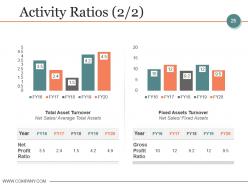
Slide 25: This slide showcases Activity Ratios (2/2) with these four main concerned- Total Asset Turnover, Net Sales/ Average Total Assets, Fixed Assets Turnover, Net Sales/ Fixed Assets.
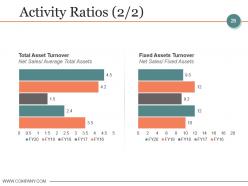
Slide 26: This slide presents Activity Ratios (2/2) with the four of the parameters- Total Asset Turnover, Net Sales/ Average Total Assets, Fixed Assets Turnover, Net Sales/ Fixed Assets.
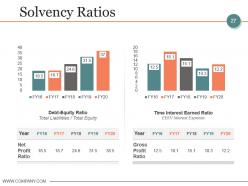
Slide 27: This slide showcases Solvency Ratios with these of the four of the stages- Debt-Equity Ratio Total Liabilities / Total Equity Time Interest Earned Ratio EBIT/ Interest Expense
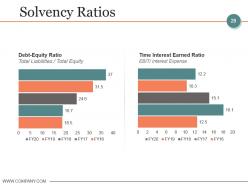
Slide 28: This slide shows Solvency Ratios which further presents Debt-Equity Ratio, Total Liabilities / Total Equity, Time Interest Earned Ratio, EBIT/ Interest Expense.
Slide 29: This slide shows Coffee Break.
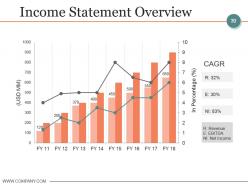
Slide 30: This slide shows Income Statement Overview.
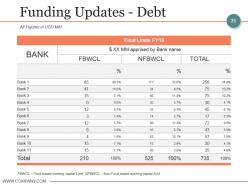
Slide 31: This slide showcases Funding Updates - Debt. Add the data and use it accordingly.
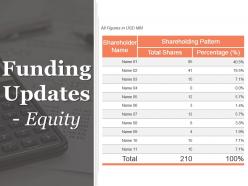
Slide 32: This slide presents Funding Updates - Equity.
Slide 33: This slide presents Icons For Budgeting and Forecasting in Accounting.
Slide 34: This slide is titled Additional Slides.
Slide 35: This slide represents Our Mission. State your mission, goals etc.
Slide 36: This slide helps show- About Our Company. The sub headings include- Creative Design, Customer Care, Expand Company.
Slide 37: This is another slide on Management Team with name, image box and designation.
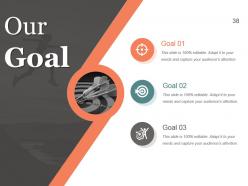
Slide 38: This slide presents a Roadmap For Future goals and aspirations etc.
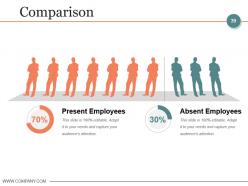
Slide 39: This slide shows Comparison of Positive Factors v/s Negative Factors with thumbsup and thumb down imagery.
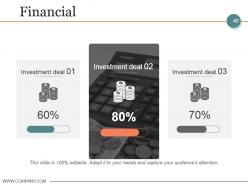
Slide 40: This is a Financial Score slide to show financial aspects here.
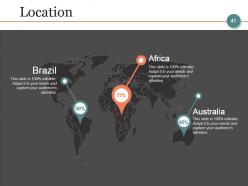
Slide 41: This is a Location slide to show global growth, presence etc. on world map.
Slide 42: This is a Quotes slide to highlight, or state anything specific.
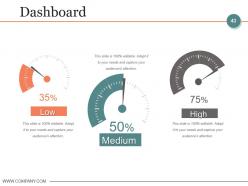
Slide 43: This is a Dashboard slide displaying- Revenue, Purchase Value, Units Sold.
Slide 44: This slide shows an image with text boxes titled Business Person with Post It notes
Slide 45: This is a News Paper slide to flash company event, news or anything to highlight.
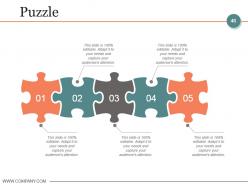
Slide 46: This slide presents a PUZZLE slide with the following subheadings- Integrity and Judgment, Critical and Decision Making, Leadership, Agility.
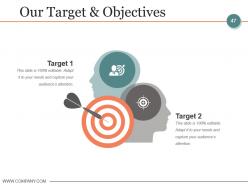
Slide 47: Our Target & Objectives
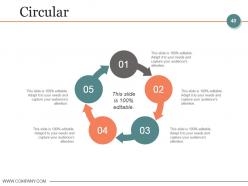
Slide 48: This is a Circular slide to show information, specification etc.
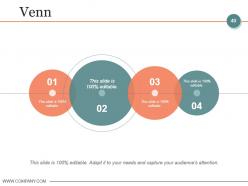
Slide 49: This is a Venn diagram image slide to show information, specifications etc.
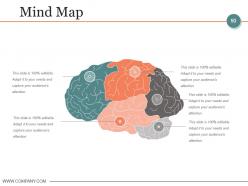
Slide 50: This slide shows a Mind map for representing entities.
Slide 51: This slide displays a Competitive Analysis Matrix Chart with- Product Quality, Product Fidelity, After Sales Service, Customer Service, Price, Shipping Speed.
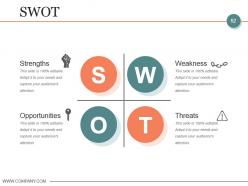
Slide 52: This slide shows Competitive SWOT Analysis to assess the indispensable factors.
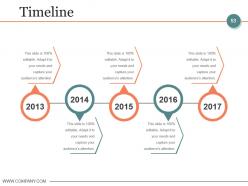
Slide 53: This slide presents a Timeline to show growth, milestones etc.
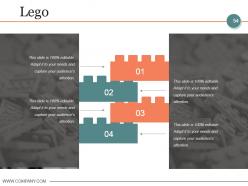
Slide 54: This is a LEGO slide with text boxes to show information.
Slide 55: This is a People's silhouettes slide. Use it the way you want to show solutions etc.
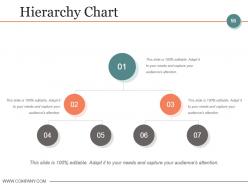
Slide 56: This slide showcases Hierarchy Chart.
Slide 57: This is a Bulb or Idea slide to state a new idea or highlight specifications/information etc.
Slide 58: This slide shows a Magnifying glass with text boxes.
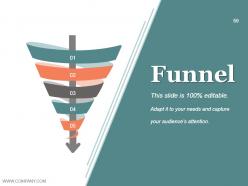
Slide 59: This is a Funnel slide. Showcase the funnel aspect of your team, company, product etc.
Slide 60: This slide is titled Charts & Graphs to move forward.
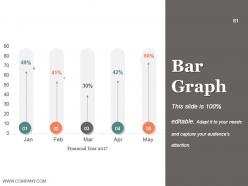
Slide 61: This is a Bar Graph image slide to show product comparison, growth etc.
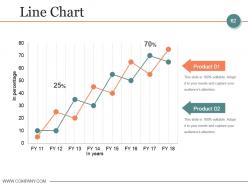
Slide 62: This slide shows a Line Chart for two product comparison
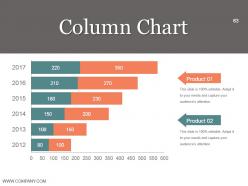
Slide 63: This slide displays a detailed Project Health card in pie charts, column graph with text boxes.
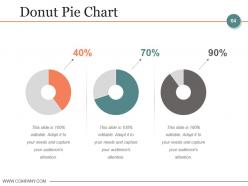
Slide 64: This slide showcases Donut Pie Chart.
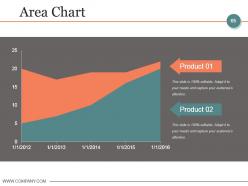
Slide 65: This slide shows Critical areas to be assessed and worked on.
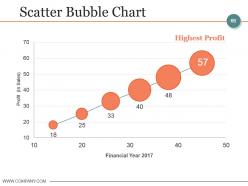
Slide 66: This slide presesnts Scatter Bubble Chart.
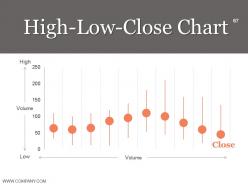
Slide 67: This slide High-Low-Close Chart and use it.
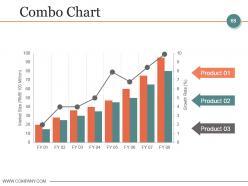
Slide 68: This slide presents Combo Chart.
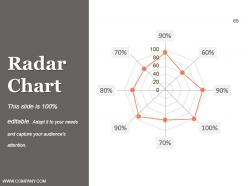
Slide 69: This slide showcases Radar Chart.
Slide 70: This is a Thank You slide with image
Budgeting And Forecasting In Accounting Powerpoint Presentation Slides with all 70 slides:
Further their enjoyment with our Budgeting And Forecasting In Accounting Powerpoint Presentation Slides. Your clients will feel delightfully entertained.









FAQs for Budgeting And Forecasting In Accounting
So basically, budgets are what you plan to spend at the start of the year - like your wishful thinking goals. Forecasts? Those are your "oh crap, here's what's actually happening" updates. You'll want to revise forecasts monthly or quarterly because, honestly, when does anything ever go according to plan? Budgets help you figure out where to put your money initially. But forecasts are what keep you from getting blindsided when revenue tanks or costs spike. They're both planning tools, just serving different purposes at different times.
Start with your big-picture goals, not what you spent last year. Every major expense should connect to something strategic - if it doesn't, cut it. I swear, most companies just slap 5% on everything and wonder why nothing changes. Put more money behind stuff that actually moves the needle, even if you have to slash other areas. The real trick? Getting your department heads to stop thinking like they're just managing expenses and start acting like they own the business. Oh, and check in quarterly so you can adjust when things go sideways.
Honestly, budgeting tech has come so far from those awful Excel days. Now you can automate all the boring data stuff and actually get predictive analytics that spot things coming. Real-time scenario modeling is pretty sweet too - your whole team can jump in and collaborate without the usual chaos. AI catches patterns you'd totally miss doing it by hand. I probably spend like 70% less time on data entry now? Way more brain space for the strategic stuff that actually matters. Start with whatever manual task annoys you most and find something to automate that first.
Monthly forecasts are pretty much the bare minimum - I'd do quarterly budgets too. Some companies go crazy with rolling forecasts every few weeks, which honestly might be overkill unless you're super volatile. The worst performers I've seen? Companies still doing just annual budgets. That's like navigating with a map from last year. Tech and retail need way more frequent updates than something stable like utilities. I'd start monthly and see how jumpy your numbers are. You can always dial it up if things get wild, but at least you'll catch problems before they snowball.
Honestly, most people get way too optimistic about how much money they'll make and totally lowball their expenses. Variable costs are the worst - they sneak up on you. Plus everyone makes budgets without talking to other departments, which is just dumb if you think about it. Don't treat your budget like some sacred document either. Markets change constantly, so copying last year's numbers is pretty useless. I'd build in extra cushion and check it every few months. Trust me on this one.
So variance analysis is basically your reality check - shows you exactly where your guesses were off. Compare what actually happened to your budget and you'll start seeing patterns. Maybe you always lowball marketing spend or get too excited about sales timelines. That stuff is pure gold for next time around. I used to brush off the small variances (mistake!) but they pile up quick. The real trick isn't just noting the numbers - write down WHY things went sideways. Pick your worst 3-5 variance culprits each month and track them religiously. Your forecasting will get way better in like 6 months, trust me.
Honestly, start way earlier than you think - like September for January budgets. Get everyone in the room upfront and be super clear about deadlines. Each department needs to actually understand how their piece fits the whole thing, otherwise they'll just phone it in. I'd skip the email nightmare and use some kind of shared platform where people can see changes happening and comment directly. Oh, and definitely do regular check-ins because problems always get worse if you ignore them. Build in extra time too - someone's always late. The biggest thing though? Decide who gets final say on each section beforehand or you'll be stuck waiting forever.
Ugh, economic trends totally throw off forecasting - learned that lesson hard in 2020 when everything went sideways! Your historical data becomes pretty much useless when inflation spikes or interest rates jump around. Instead of betting everything on one forecast, build a few different scenarios. During crazy volatile times, I'd say shorten your timeline too - like maybe quarterly instead of annual projections. Update your assumptions way more often than you normally would. Oh and definitely track whatever economic indicators actually matter for your specific industry, not just the general stuff everyone talks about.
So basically zero-based budgeting means starting from zero every time instead of just adjusting last year's budget. You have to justify every single expense from scratch - which honestly sounds exhausting but catches a ton of waste. Traditional budgeting is way faster since you're just tweaking existing numbers, but bad spending habits stick around forever that way. I'd probably test it on just one department first because your team will hate you initially (all those extra meetings). But if you actually want to find where money's being wasted, ZBB forces you to question everything instead of going "eh, we spent this much last year."
Dude, scenario planning is a game-changer for forecasting. You're basically building 3-4 different "what if" stories instead of betting everything on one prediction. Best case, worst case, plus some realistic middle ground stuff. It's wild how many teams I've worked with just... completely ignore the downside possibilities? Like, come on. Anyway, it helps you catch risks and opportunities you'd totally miss otherwise. Your stakeholders get a better picture of what could actually happen too. Start with three simple scenarios and plan around each one. Trust me, you'll thank yourself later when things inevitably don't go as expected.
Start with variance tracking - that's your bread and butter. Compare actual vs budgeted spending each month and watch for patterns. Accuracy percentage matters too; see how close your forecasts actually get to reality. Honestly, I used to stress about every tiny variance but realized that's kinda pointless sometimes! Budget cycle time is worth measuring (how long everything takes), plus stakeholder engagement and how often you're revising. If you're constantly tweaking budgets, something's broken in your process. But yeah, variance analysis first - it'll give you the most insight right off the bat.
Get stakeholders involved from day one of budgeting, not after everything's decided. I'd set up feedback sessions with your main departments, customers, maybe investors during planning. They catch stuff you totally miss - our sales team could've saved us from this huge inventory disaster if I'd asked them earlier! Make it formal though, like structured forms or workshops so you get real feedback instead of random complaints. Short sessions work better than marathons. The trick is building it into your actual timeline from the start, otherwise you're just going through the motions when budgets are already locked down.
Dude, rolling forecasts are so much better than those rigid budgets. You're constantly tweaking things based on what's actually going down instead of sticking to some random guesses from a year ago. Market shifts? New deals popping up? Weird stuff happening? You can roll with it. Plus you'll have way clearer picture of your cash flow situation throughout the year - not just during budget season. Honestly, quarterly ones are the sweet spot when you're starting out. Monthly gets pretty intense pretty fast, trust me on that one.
Ugh, global budgeting is such a pain because every culture handles it totally differently. Some teams want every detail mapped out months ahead with tons of documentation. Others just wing it and adapt as they go - which honestly drives the planners crazy. You'll also notice hierarchical cultures funnel everything up to the C-suite for approval, but more egalitarian places let departments decide. Time horizons are weird too. Americans obsess over quarterly numbers while Europeans think way longer term. My advice? Figure out each region's style upfront and build those quirks into your calendar. Otherwise you're constantly fighting their natural workflow.
Honestly, visuals are a game-changer for budget presentations. Raw spreadsheet data just makes everyone's eyes glaze over - trust me, I've been there. Charts and graphs let you spot trends instantly and actually tell a story with your numbers. Bar charts work great for budget vs. actual comparisons. Line graphs are perfect for showing forecasting trends over time. The whole point is making it dead simple for stakeholders to see what's working and what isn't. I always think dashboards beat endless rows of data any day. Start basic though - don't go crazy with fancy stuff right away.
-
Attractive design and informative presentation.
-
Commendable slides with attractive designs. Extremely pleased with the fact that they are easy to modify. Great work!