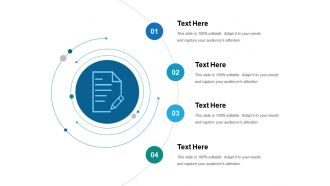
31088417 style essentials 1 agenda 4 piece powerpoint presentation diagram infographic slide
Try Before you Buy Download Free Sample Product
Audience
Editable
of Time
Embellish your thoughts beautifully with our Agenda Ppt Ideas. They will keep heads turning your way.
31088417 style essentials 1 agenda 4 piece powerpoint presentation diagram infographic slide with all 5 slides:
Bring her concerns to the forefront with our Agenda Ppt Ideas. Fight for the female cause.
FAQs for 31088417 style essentials 1 agenda 4 piece powerpoint presentation
For your agenda slide, you'll want clear section titles and realistic time estimates - nobody likes when meetings run over. Add page numbers because people always get lost flipping around. Visual hierarchy matters too, so use bullet points or icons to break things up. Don't cram everything in there; make it scannable. Oh, and put your big topics in the top half since that's where everyone looks first anyway. Consistent formatting throughout obviously, but honestly the main thing is just keeping it simple so people can actually follow along.
Honestly, pick colors that don't make people's eyes bleed. Dark text on light backgrounds works every time - or flip it around. Just avoid those awful combos like red on blue (seriously, why do people do this?). When there's barely any contrast, your audience will give up reading and start checking their phones instead. Oh, and don't forget about colorblind folks - that's like 1 in 12 people who might miss your point if you're only using color to show differences. Test your slides beforehand on a few screens. Trust me on this one.
Honestly, just go with boring fonts like Arial or Calibri. They're not exciting but people can actually read them from across the room. Make your text at least 24pt - I used to do 16pt and watching people squint was painful. High contrast is your friend too. Skip anything fancy or decorative, it looks terrible on projectors anyway. Oh and here's what I always do now - back away from your laptop screen a few feet. Can't read it? Then yeah, your audience is screwed. Trust me, I've sat through way too many presentations where I'm guessing what the slide says.
Honestly, visuals are a game changer for agendas. Try adding little icons next to each item - like a lightbulb for brainstorming or a clock for urgent stuff. Makes everything so much easier to scan quickly. Color-coding different sections works great too, and I've started using progress bars to show timing (though sometimes I forget to update them lol). Your audience will definitely appreciate being able to see what's coming next. Just don't go crazy with fancy graphics - simple and clean beats overdone every time. Trust me on this one.
Dude, whitespace is seriously underrated for agenda slides. Makes everything so much easier to read. I've sat through way too many meetings where the agenda looks like someone just dumped text everywhere - nobody even bothers looking at it. Space things out! At least 1.5x line spacing, decent margins around the edges. Group related stuff together so it doesn't look like chaos. Trust me, people will actually pay attention to your agenda instead of scrolling Instagram under the table. It's such a simple fix but makes a huge difference.
Corporate audiences want bullet points and ROI - they're thinking "what's in it for me?" the whole time. Academics actually like seeing all the nitty-gritty details, methodologies, theoretical stuff. It's honestly kind of refreshing how much they care about the process. Design-wise, keep corporate slides minimal with company colors. Academic presentations can be way more text-heavy without people getting antsy. Oh, and definitely run your agenda by someone from whichever crowd you're presenting to first - saves you from bombing later.
Honestly, just use whatever your team's already on - PowerPoint or Google Slides work fine for most stuff. Canva's where I'd go if you want it to look actually professional without being a designer (their templates don't suck like most places). Figma's cool but way more complicated than you probably need for a simple agenda. Quick tip though - even basic Google Slides looks decent if you pick a clean template. I'd start simple and only switch to Canva later if you're tired of everything looking boring.
OK so basically you want to keep going back to your agenda slide throughout the whole thing. I always add little checkmarks or change the colors when I finish each section - honestly it feels weirdly satisfying lol. Use it as like natural break points between your main topics too. Your audience needs those mental pauses, trust me. Don't just show it once at the start and forget about it. Keep highlighting where you currently are and give them a preview of what's next. Makes the whole presentation feel way more organized and people can actually follow along instead of zoning out halfway through.
Honestly, the worst thing you can do is cram way too much info on there. Makes it look like a hot mess. Keep your bullet points super short - just the main topics, not novel-length descriptions. And please don't use tiny fonts or weird colors that nobody can read from the back row (there's always that one person). Skip the fancy animations too - they just waste time and nobody cares. Oh, and if you're doing it digitally, make each item clickable so you can actually navigate around without scrolling forever.
Throw your company colors on the headers and bullet points - that's the easiest way to start. Logo goes in a corner somewhere, but keep it small because honestly, nobody wants to stare at a giant logo during a meeting. If your brand fonts are actually readable (some aren't, let's be real), use those too. You can add subtle background elements from your style guide, like icons or patterns, just don't go overboard. Keep it consistent with whatever else your team's using. I'd stick to maybe 2-3 brand elements max so it doesn't look cluttered and people can actually focus on the content.
Definitely do progressive disclosure - show agenda items one at a time instead of dumping everything at once. White space is clutch here, don't cram stuff together. Throw in some subtle animations between slides to keep momentum going. Icons next to each point work great, just make sure they match. I've sat through way too many presentations where someone used like 12 different icon styles and it looked ridiculous. Pick a clean color scheme with maybe one accent color. The whole point is making it visually interesting without giving people a headache, you know?
Honestly, people zone out so fast if your agenda looks messy. I always do clean layouts with lots of white space - makes it way easier to scan quickly. Group similar stuff together and use bullet points or numbers so it feels organized. Maybe add some color coding or icons if you're feeling fancy? The goal is someone should be able to glance at it in like 8 seconds and know what's coming. Trust me, I've been in presentations where the agenda was just walls of text and everyone looked confused from minute one. Keep it simple and they'll actually reference it during your talk.
Honestly, agenda slides have gotten so much better lately. Gone are those awful bullet-point lists (finally!). Now it's all about visual storytelling - think timeline designs, icons for each section, and progress bars showing where you are in the presentation. Interactive stuff is everywhere too. Clickable agendas that jump straight to whatever section you want? Game changer. Color coding by topic helps a ton, and some people are even adding little preview images for each part. I've seen presenters do animated reveals which is... kind of extra but works. Your agenda should feel more like a roadmap than grocery list, you know? Try adding some icons or a visual timeline next time.
Just keep it super simple - fade ins or gentle slides work great. I like revealing one agenda item at a time so people aren't reading ahead while you're talking. Honestly can't stand those presentations with spinning graphics everywhere, looks so tacky. Timing should be consistent, maybe half a second to one second max. Skip the fancy zoom effects. Use "appear" or "fade" on click so you control when things show up. That way you can actually explain each section before jumping to the next one. Works way better than automatic transitions.
Honestly, templates are a lifesaver. You just drop your content in and boom - no messing around with colors or fonts that don't match. Most follow solid design principles too, so you'll look professional without being a Photoshop genius. Custom slides give you more freedom, but that's way more work. Unless it's like, a huge client presentation or something super specific to your brand, I'd stick with templates. Find a decent template library first - oh and you can always tweak little things if needed. Saves so much headache.
-
Thanks for all your great templates they have saved me lots of time and accelerate my presentations. Great product, keep them up!
-
Editable templates with innovative design and color combination.