

Circleci Investor Funding Elevator Pitch Deck Ppt Template





Try Before you Buy Download Free Sample Product
 Impress Your
 Audience
 100%
100% Editable
 Save Hours
 of Time


Check out our professionally designed CircleCi Investor Funding Elevator Pitch Deck. This Investor Deck is a continuous integration and delivery platform that helps software teams confidently release code by automating the build, test, and deploy process. Moreover, this Investor Presentation outlines the problems time consuming processes, conflict and integration issues, and manual automation. Further, the Startup Presentation also covers the companys solutions, such as automating procedures and automatically triggering builds whenever modified to the code repository. Also, the investors deck includes company details such as introduction, key facts, products and services offered, USP, significant milestones achieved, business and revenue model, competitors, market potential, etc. Lastly, the Fundraising Deck contains investment ask, fund allocation, funding history, core team, exit strategy, and shareholding pattern. Get access to this powerful template now.
People who downloaded this PowerPoint presentation also viewed the following :
Content of this Powerpoint Presentation
Slide 1: The slide introduces CircleCi Investor Funding Elevator Pitch Deck.
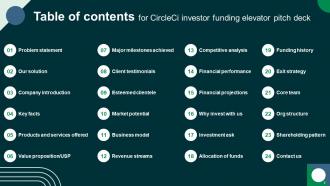
Slide 2: The slide displays Table of contents for CircleCi investor funding elevator pitch deck.
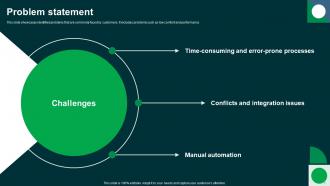
Slide 3: This slide showcases identified problems that are commonly faced by customers.
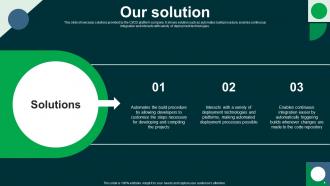
Slide 4: This slide highlights solutions provided by the CI/CD platform company.
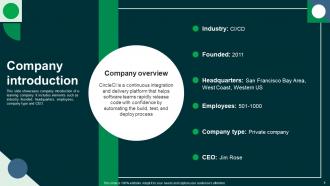
Slide 5: This slide describes company introduction of e-learning company.
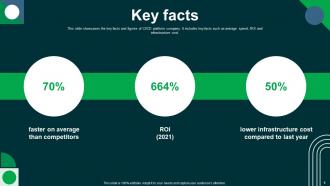
Slide 6: This slide gives an insight about the key facts and figures of CI/CD platform company.
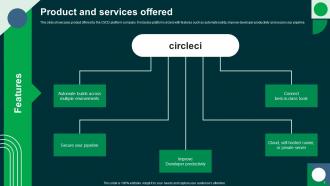
Slide 7: This slide showcases product offered by the CI/CD platform company.
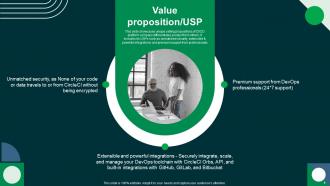
Slide 8: This slide highlights unique selling propositions of CI/CD platform company differentiates product from others.
Slide 9: This slide demonstrates major achievements achieved by CI/CD platform company.
Slide 10: This slide presents glimpse of client testimonials provided by customers for the CI/CD platform company.
Slide 11: This slide illustrates key customers for the CI/CD platform company.
Slide 12: This slide represents esteemed market potential for the growth of the company.
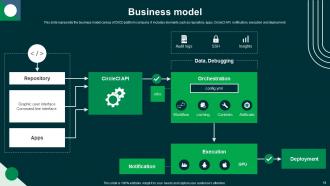
Slide 13: This slide presents the business model canvas of CI/CD platform company.
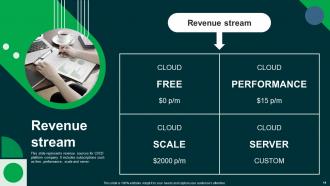
Slide 14: This slide demonstrates revenue sources for CI/CD platform company.
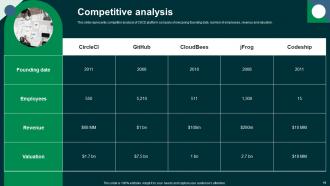
Slide 15: This slide renders competitor analysis of CI/CD platform company showcasing founding date, number of employees, revenue and valuation.
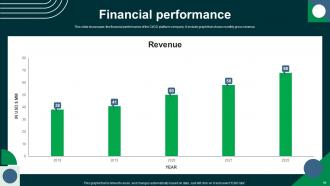
Slide 16: This slide showcases the financial performance of the CI/CD platform company.
Slide 17: This slide depicts forecasted growth of company that will assist investors to determine future potential of business and make investment decision.
Slide 18: This slide shows reason why to choose CircleCI for business communication.
Slide 19: This slide presents information about the funding requirement for the CI/CD platform company.
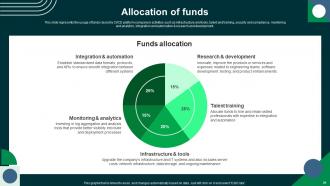
Slide 20: This slide displays the usage of funds raised by CI/CD platform company in activities.
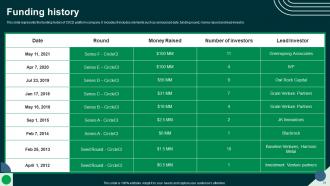
Slide 21: This slide represents the funding history of CI/CD platform company.
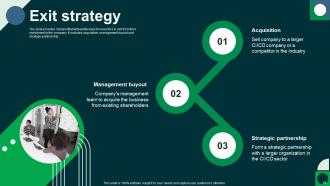
Slide 22: The slide provides most profitable/feasible ways for investors to exit from their investment in the company.
Slide 23: The slide demonstrates key personnel of executive team of CI/CD platform company.
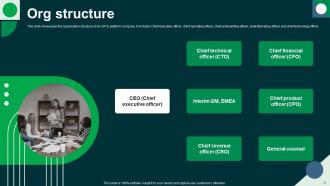
Slide 24: This slide showcases the organization structure of an CI/CD platform company.
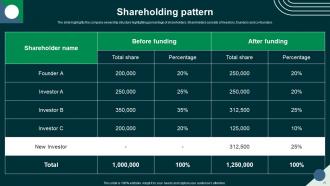
Slide 25: The slide highlights the company ownership structure highlighting percentage of shareholders.
Slide 26: This is a slide with address, contact numbers and email address.
Slide 27: This slide shows all the icons included in the presentation.
Slide 28: This slide is titled as Additional Slides for moving forward.
Slide 29: This is a Location slide with maps to show data related with different locations.
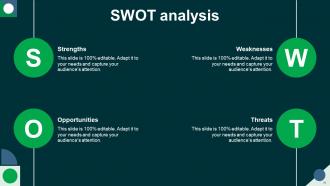
Slide 30: This slide shows SWOT describing- Strength, Weakness, Opportunity, and Threat.
Slide 31: This slide depicts Venn diagram with text boxes.
Slide 32: This slide provides 30 60 90 Days Plan with text boxes.
Slide 33: This is a Quotes slide to convey message, beliefs etc.
Slide 34: This slide presents Roadmap with additional textboxes.
Slide 35: This is a Thank You slide with address, contact numbers and email address.
Circleci Investor Funding Elevator Pitch Deck Ppt Template with all 43 slides:
Use our Circleci Investor Funding Elevator Pitch Deck Ppt Template to effectively help you save your valuable time. They are readymade to fit into any presentation structure.























FAQs for Circleci Investor Funding Elevator Pitch
Oh CircleCI? It's basically this cloud thing that handles all your build and deploy stuff automatically. So you push code to GitHub or whatever, and it just picks it up and runs your tests. If everything looks good, it can deploy straight to production - which honestly saves so much time. You just drop a YAML file in your repo to configure it. The whole point is catching bugs before they become a problem and not having to manually deploy things yourself. I'd definitely try their free tier first - worked great for my last side project. Way better than doing everything by hand.
So CircleCI basically just plugs into GitHub, Bitbucket, or GitLab through their APIs. You connect your repos and boom - builds trigger on every push or PR. First you authorize CircleCI to access your stuff, then drop a `.circleci/config.yml` file in there to set up your pipeline. It'll pull code, run tests, even auto-deploy depending on the branch. Oh and the build status shows up right in your PRs which honestly saves so much time during reviews. I'd start with just one small repo to figure out the config syntax - it's not too bad once you get it.
Honestly, CircleCI is pretty solid - super fast with parallel jobs and decent Docker support. The caching actually works (shocking, I know). What I really like is the orbs thing where you can just grab pre-made configs instead of reinventing the wheel. GitHub integration is smooth, and the YAML setup isn't as painful as other tools. You get 2,500 free credits monthly which goes further than you'd think. Oh, and their CLI lets you test locally before pushing - saves so much headache. Just start with their sample configs though, way easier than figuring it out yourself.
So workflows are basically how you chain together multiple jobs in CircleCI - like making sure your tests run after the build finishes, or running different test suites at the same time to speed things up. Without them you'd just have random isolated jobs doing their own thing, which would be a mess honestly. They give you way better control over your whole CI/CD pipeline. You can set up parallel processes for faster builds, handle complex deployments, get quicker feedback. I'd start by sketching out your current build steps first - then figure out what can run simultaneously. Makes a huge difference once you get it dialed in.
So basically CircleCI saves your dependencies and build stuff between runs using cache keys you set up. When a new build starts, it checks for that key first - finds it? Boom, restores everything instead of re-downloading. Honestly makes a huge difference for npm installs since those take forever otherwise. Docker images too. The key (pun intended lol) is making smart cache keys that break when dependencies actually change - like using your package.json checksum. Just start with caching your node_modules or whatever. You'll notice it right away.
So CircleCI orbs are basically pre-made config packages that'll save you a bunch of time. Instead of writing all your CI/CD stuff from scratch, you just import these things and boom - done. Think templates but way better. There's orbs for AWS deployments, testing, Docker builds, whatever you need. The community has built like hundreds of them, which is pretty cool. I used to spend hours on YAML configs until I found these. Just hit up their orb registry when you're setting up - you'll probably find exactly what you need and cut your work in half.
Hey! So for CircleCI secrets, definitely use their environment variables section in project settings instead of putting that stuff directly in your config. Way safer since everything gets encrypted. I always name mine by environment - like PROD_API_KEY vs STAGING_API_KEY - because mixing those up is honestly a nightmare waiting to happen. Been there, done that, not fun lol. Just go to Project Settings > Environment Variables and dump your sensitive keys there. They're only available during builds which is perfect. Start with your most critical ones first, then move the rest over when you have time.
Caching is your best friend here - start with npm/pip dependencies since that's the biggest bang for your buck. Split your tests across multiple containers if you've got a big suite, it seriously cuts down build time. Docker images should be as lean as possible (multi-stage builds help a ton). Oh, and bump up your resource classes for heavy jobs - more CPU/memory makes a difference. The other thing that helped me was restructuring workflows so jobs run in parallel instead of waiting for each other. Honestly, just tackling dependency caching first will probably solve half your problems.
Yeah so CircleCI workflows let you run jobs at the same time instead of waiting for each one to finish. Super useful for big projects where builds drag on forever. You can split up tests, run different deployment stuff concurrently - whatever makes sense for your setup. The speed boost is pretty dramatic once you get it working. I'd say look at your current pipeline and figure out which jobs don't actually depend on each other. Group those into a workflow and you'll cut your build times way down. Honestly wish I'd done this sooner on my last project.
So CircleCI's API lets you control builds and pipelines programmatically - super useful honestly. Trigger builds, check job statuses, manage environment variables, pull workflow data. All without opening their web interface. Most teams I know use it to connect with Slack notifications or Jira updates. You can build custom dashboards too, or write deployment scripts that react to build results. Pretty much any monitoring tool integration you want. I'd start small though - maybe just trigger a build from a script first, then expand from there. The API docs are actually decent once you dig in.
So CircleCI's Insights is basically your build dashboard - shows trends, success rates, all that good stuff. You can catch which jobs keep failing or dragging on forever. Tracks metrics over time too, which is clutch for spotting when builds start getting sluggish. I totally slept on this feature until our builds hit 20+ minutes regularly (whoops). The credit tracking part is really handy since you'll see exactly where your plan minutes disappear to. I'd check it maybe weekly? Catches performance issues before your whole team starts complaining about slow builds.
Check the logs first in CircleCI's dashboard - they'll tell you exactly what broke. SSH into failed builds if you need to dig deeper (honestly one of CircleCI's better features). Timing tab's great for finding slow spots. Your tests might just be flaky too, so try re-running a couple times. Don't overlook the artifacts tab either - usually has helpful debug stuff. When I'm really stuck, I throw random debug commands like `pwd` or `env` right into the config. Half the time it's just some dumb path issue anyway.
Use CircleCI version 2.1 with orbs - they make AWS deploys and testing so much easier. Cache everything aggressively, especially dependencies. I've literally watched builds drop from 20 minutes to 5 just by splitting tests across parallel jobs. Pin your Docker versions or you'll get random failures that'll drive you crazy. Oh, and use contexts for env variables instead of hardcoding secrets. Their sample configs are actually pretty decent starting points. Workflows should flow logically but honestly, you'll probably restructure them a few times before finding what works.
Yeah CircleCI plays really nice with Docker - just drop a Docker image into your config and you're good to go. Your builds run way faster since dependencies don't get reinstalled constantly. Plus everything stays consistent between your local setup and CI, which honestly saves so much debugging headache. The isolation between projects is solid too. Docker Compose works if you need multiple containers running together. I'd probably start with one of your simpler projects first and see how it goes. The builds end up looking much cleaner once you make the switch.
So basically CircleCI runs your tests automatically whenever you push code or make a pull request. Pretty neat, right? You can throw in unit tests, integration tests, end-to-end stuff, security scans - whatever you've got. The config file is where you set up your pipeline, then it spins up containers and runs everything in parallel which makes it way faster. I love that you get instant feedback when things break. Saves you from shipping broken code to production (been there, done that). Just start with whatever tests you already have and build from there.
-
Innovative and Colorful designs.
-
Easily Editable.
-
Templates are beautiful and easy to use. An amateur can also create a presentation using these slides. It is amazing.
-
Keep doing the good work guys. Surpass the needs and expectations always!!