Cloud Computing Implementation Best Practices
Try Before you Buy Download Free Sample Product
Audience
Editable
of Time
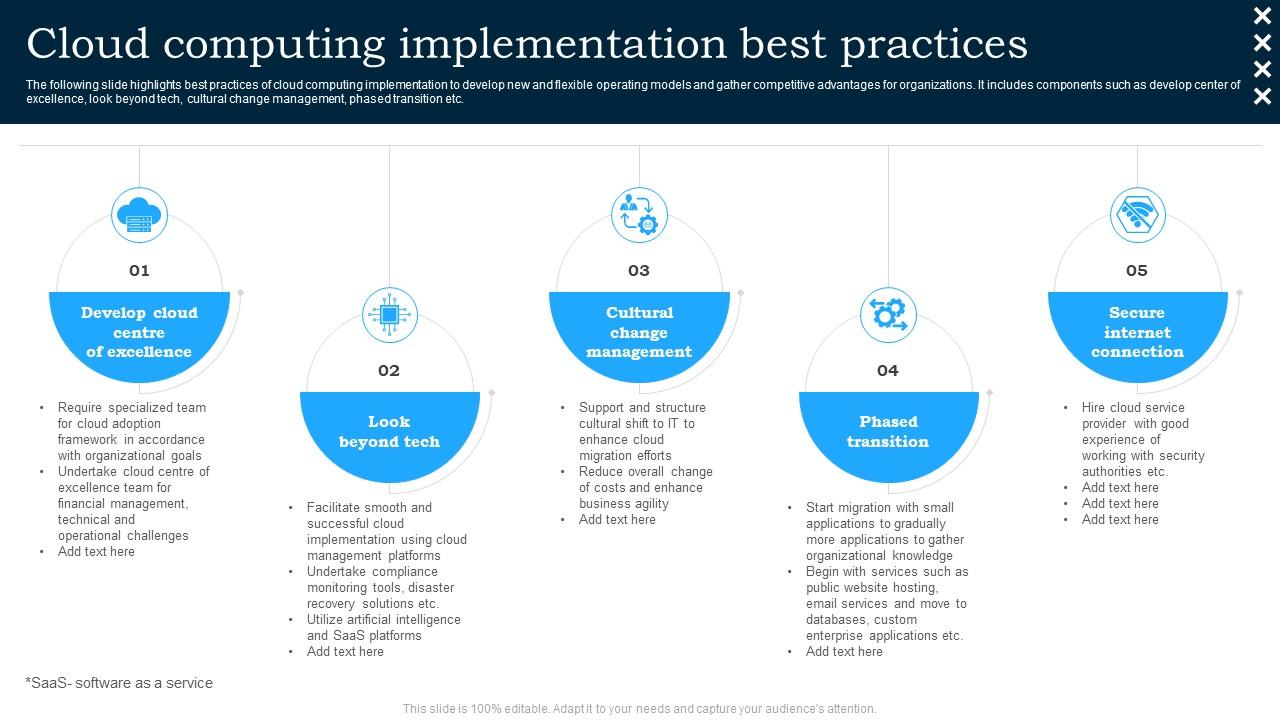
The following slide highlights best practices of cloud computing implementation to develop new and flexible operating models and gather competitive advantages for organizations. It includes components such as develop center of excellence, look beyond tech, cultural change management, phased transition etc.
People who downloaded this PowerPoint presentation also viewed the following :
Cloud Computing Implementation Best Practices with all 6 slides:
Use our Cloud Computing Implementation Best Practices to effectively help you save your valuable time. They are readymade to fit into any presentation structure.
FAQs for Cloud Computing
Dude, you'll save so much money since there's no upfront server costs - just pay for what you use. Scaling up during busy times is instant, which honestly saved my butt last quarter. Your team gets enterprise security and updates handled automatically, no IT headaches. Oh, and remote work becomes super easy since everything's cloud-based. The flexibility alone makes it worth it. Just start with one app first though - don't go crazy and migrate everything at once like I almost did.
Honestly, start with encryption - make sure it's turned on for data moving around AND stored data. Most cloud providers have it but weirdly tons of people forget to actually enable it. Multi-factor authentication is non-negotiable, and don't give users more access than they actually need. Oh, and vet your provider like crazy. I know it seems obvious but so many companies just pick whatever's cheapest. Look at their security certifications, audit reports, how they handle breaches - the whole nine yards. Do a quick assessment of what you've got now first though, so you know where your biggest holes are.
Don't underestimate costs - that's the big one. Planning matters way more than people think, so skip the temptation to just move everything over as-is. Security gets weird fast if you don't figure out permissions beforehand. Honestly, vendor lock-in is scarier than most companies admit, so maybe don't dive headfirst into all their proprietary stuff right away. Your team's gonna be lost without proper training on the new setup. Oh, and actually crunch those monthly numbers before you commit to migrating everything. Start small with a pilot project first.
Think of it like this - IaaS is basically renting raw servers where you handle everything, like AWS EC2. PaaS takes care of the messy infrastructure stuff so you can just worry about your code (Heroku's great for this). SaaS is just ready-to-go apps like Salesforce. Here's what I'd actually do: grab SaaS solutions first for boring business stuff. Custom app? Go PaaS. You'll only need IaaS if you have some weird specific requirements - which honestly, most people think they do but don't really. Don't overcomplicate it from the start. Way easier to move up than down.
Honestly, start with monitoring dashboards - you need to see where your money's actually going. Those surprise AWS bills will make you cry. Auto-scaling is huge for handling traffic without you babysitting everything. Also automate the boring stuff like backups and updates. Here's what kills me though - so many teams run massive VMs they don't even need. Do an audit first and find your biggest money drains. Right-size those instances and review usage monthly. The optimization part comes after you know what you're working with.
Honestly, most people are just burning money on stuff that runs 24/7 for no reason. Right-sizing is huge - like, actually match your resources to what you need instead of overprovisioning everything. Auto-scaling helps too since you're only paying when traffic spikes. For predictable workloads, reserved instances are so much cheaper than on-demand it's not even funny. Oh and storage costs creep up fast - archive old junk and clean out those backup folders you forgot about. Start with an audit of what's actually running and I bet you'll find a ton of waste immediately.
So compliance is basically your safety net when you're using cloud stuff - makes sure you're hitting all those regulatory requirements for whatever industry you're in. First thing? Figure out which frameworks actually apply to you (HIPAA, SOX, GDPR, all that fun stuff). Then pick cloud providers who already have those certs because honestly, building it from scratch is a nightmare you don't want. Here's the thing though - even with a compliant provider, you're still on the hook for data classification and access controls. They handle the infrastructure security part, but configuration mistakes? That's on you. I'd start by auditing what compliance stuff you actually need, then map it to your cloud plan.
Okay so first thing - spread your stuff across multiple regions and zones, that's like your safety net. Auto-scaling groups and load balancers are clutch for handling failures automatically. Health checks too. Backups need to be automated and actually test your recovery process - I can't tell you how many people skip testing and then panic when shit hits the fan. Infrastructure as Code is your friend here, makes rebuilding way faster. Set up monitoring so you catch problems before users start complaining. Honestly, planning for things to break from day one saves you so much stress later.
Start with response time, throughput, and how much CPU/memory you're actually using. Network latency matters a ton since that's what users actually feel. Error rates are huge too - trust me, you don't want to find out your app's broken from pissed off customers blowing up your inbox. Track your cost per transaction and uptime percentages. Set alerts when stuff goes wonky beyond normal limits. Oh, and storage usage helps you figure out if you're overpaying for instances. Get these down first, then worry about the fancy application-specific stuff later.
Honestly, multi-cloud gives you so much more room to work with. You can pick the best tool for each job - like AWS for basic compute, Google when you're doing ML stuff, keep sensitive data on-prem. Vendor lock-in is the worst, especially when they jack up prices out of nowhere. Each workload gets optimized instead of cramming everything into one platform that's maybe not ideal. I'd start small though - pick your most important apps and test where they actually run better. That'll show you if it's worth the complexity.
Okay so backup strategy - you want the 3-2-1 rule. Three copies of everything, two on different storage types, one somewhere else entirely. Automate daily backups if you're in the cloud, and honestly? Test your recovery stuff monthly because I can't tell you how many people find out their backups are trash right when they need them most. Multiple availability zones are clutch. Cross-region replication too for anything critical. Document your recovery times so nobody's guessing. Oh and actually practice restoring - like seriously practice it, not just assume it works.
Dude, open standards are your best friend here. Skip the proprietary stuff whenever you can - I've watched companies get totally screwed over by this. Docker and Kubernetes? Yes. Standard APIs? Absolutely. Make sure your data formats can actually move between platforms without a nightmare migration. Oh, and don't sign anything long-term until you're really sure about them. Contract negotiations should include data portability guarantees. Honestly, the whole thing comes down to having an exit plan before you need one. You don't want to be stuck.
Honestly, you really need to get your team trained up on cloud stuff - I've seen too many companies skip this step and regret it big time. People end up confused, costs spiral out of control, and security gets messy when everyone's just winging it. Your staff has to know the basics: how cloud architecture works, security practices, cost management. The confidence boost alone makes it worth it. Figure out where your biggest knowledge gaps are first, then build some kind of learning plan with actual hands-on practice and maybe some certs. Trust me on this one.
Honestly, cloud tools are a game changer for team stuff. Everyone can edit the same doc at once - no more emailing files back and forth like it's 2005. Real-time updates mean you actually see changes as they happen, plus version control that doesn't suck. Your team can jump in from anywhere too, which is clutch if people work remotely. The chat features are pretty handy since you can discuss things right in the document. Oh, and you'll never deal with those "final_FINAL_version2" file names again! I'd say pick one small project to try it out first.
Data sovereignty is huge - check where your stuff is actually stored and what laws apply. Some countries get really pissy about citizen data crossing borders. Be upfront about what you're collecting too, people hate finding out later. Your cloud provider better have decent security (obviously) and not be doing weird stuff behind the scenes. Honestly, most companies skip the ethics audit but you should probably do one. Oh and get proper consent from users - like actual consent, not those sneaky pre-checked boxes everyone ignores.
-
The Designed Graphic are very professional and classic.
-
Innovative and Colorful designs.