

Communication Plan For Real Estate Development Powerpoint Ppt Template Bundles





Try Before you Buy Download Free Sample Product
 Impress Your
 Audience
 100%
100% Editable
 Save Hours
 of Time


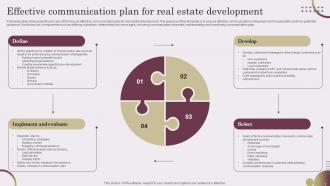
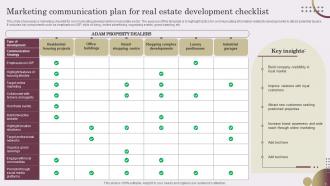
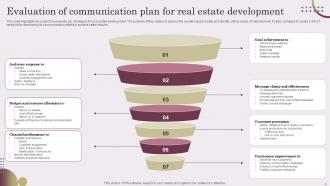
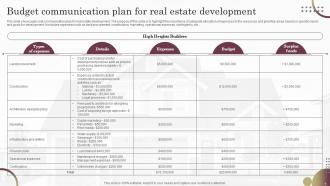
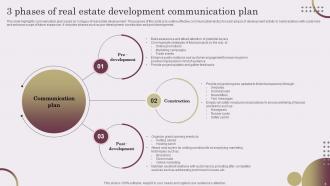
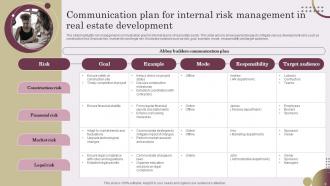
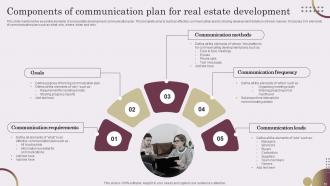
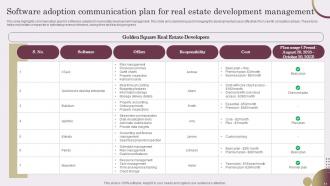
Introducing the Real Estate Development Communication Framework, a comprehensive PowerPoint presentation that unveils an integrated communication plan designed specifically for property development. This dynamic and insightful presentation focuses on the essential components of marketing and communication strategy for real estate development projects. From market research and target audience analysis to branding, advertising, and public relations, this presentation provides a step-by-step roadmap for effective communication throughout the entire development process. With visually engaging slides and expertly curated content, this PowerPoint equips professionals in the real estate industry with the necessary tools to craft compelling messaging, build brand awareness, attract potential buyers or investors, and ultimately achieve success in their property development ventures. Transform your communication approach and elevate your real estate projects to new heights with this indispensable resource.
People who downloaded this PowerPoint presentation also viewed the following :
Communication Plan For Real Estate Development Powerpoint Ppt Template Bundles with all 19 slides:
Use our Communication Plan For Real Estate Development Powerpoint Ppt Template Bundles to effectively help you save your valuable time. They are readymade to fit into any presentation structure.









FAQs for Communication Plan For Real Estate Development Powerpoint
So you'll need clear goals first - like, what are you actually trying to accomplish here? Figure out your audience and what messages they need to hear. Pick your communication channels and set a timeline. Oh, and assign specific people to handle each piece because seriously, "someone will take care of it" never works out. Don't forget feedback loops and ways to measure success. I always start with the end goal and work backwards - keeps you from getting distracted by shiny objects that don't matter.
Honestly, the best thing you can do is just ask people how they want to hear from you. Map out who needs what - your boss probably wants the quick summary, but your team leads need all the messy details. Don't blast everyone with the same updates constantly (so annoying). Set up a rhythm so people know when to expect news from you. Radio silence kills trust faster than anything. Oh, and match the channel to the person - some people live in Slack, others actually check email. It's really about giving the right info to the right people at the right time.
Honestly, audience analysis is everything when it comes to communication planning. Start there before you do anything else - who are these people? What do they actually care about? How do they like getting info? Once you nail that down, everything else falls into place. Your tone, timing, which platforms to use... it all flows from understanding your audience. I learned this the hard way after wasting way too much time on campaigns that totally missed the mark. Create those detailed personas first (I know, sounds boring but trust me). You'll save yourself so much headache later and your messages will actually land.
Honestly, automation tools are game-changers for communication plans. I've been using Asana to schedule messages and set up auto-reminders - saves me so much time. Analytics dashboards will show you who's actually opening your stuff and response rates, which is clutch for catching problems early. Slack workflows are pretty neat for internal team stuff too (maybe I'm just a workflow nerd though). Survey tools let you collect feedback ongoing instead of waiting around for meetings. Oh, and don't try to implement everything at once - pick one tool that meshes with what you're already doing and expand from there.
Track open rates and click-throughs, sure. But honestly? Those numbers can fool you pretty hard. What actually matters is whether people changed their behavior or understood what you wanted them to. Did they complete the action? Surveys help here too. Oh, and make sure you're hitting your audience enough times - frequency matters more than people think. Set your benchmarks upfront though, otherwise you're just guessing if anything worked later.
Monthly check-ins are honestly your best bet, though quarterly works if you're really strapped for time. When big stuff happens - launches, team changes, whatever - update it right away. Don't wait around. The deeper quarterly reviews? That's where you figure out what's actually working vs what just sounded good when you wrote it down. I swear, most communication plans just sit there collecting digital dust because people never revisit them. Set that calendar reminder now and treat these like real meetings. Your comms will thank you later.
Oh man, the worst thing you can do is blast everyone with everything - total information overload. I learned this the hard way when I tried keeping literally everyone in the loop on a project once. What a mess. Figure out who actually needs to know what first. Then work backwards from there instead of just dumping whatever you think is important. Don't be vague about who's doing what either - that's how you end up with those super awkward "wait, I thought YOU were handling this" moments. Set realistic deadlines too. And honestly? Always plan for feedback loops because things will go sideways.
Dude, visual aids are honestly a game changer for getting your point across. People remember stuff way better when they can actually see it - like charts or simple diagrams instead of just reading paragraphs. I've been in so many meetings where one good visual cleared up confusion instantly. Some people on your team are probably visual learners anyway, so you're covering more bases. Even basic slides make you look more put-together. Don't overthink it though - start with simple charts or bullet points. Makes a huge difference in whether people actually get what you're trying to say.
Start by baking this stuff right into your plan from day one. Skip idioms and cultural references - they don't translate well. Some cultures want direct feedback, others prefer a gentler approach. Time zones matter too (seriously, stop scheduling 3am calls). Materials in multiple languages help a ton. Get cultural liaisons or translators for the big stuff. Oh, and definitely test your messaging with a few diverse team members first - they'll catch things you miss. Simple language wins every time.
Honestly, start with message templates everyone can actually use - not the fancy stuff that sits in a folder somewhere. Get your team leads briefed first since they're the ones spreading info anyway. Regular all-hands help but don't make them boring! I'd also pick someone to watch what's going out across different channels because departments love to go rogue with messaging. Train your main spokespeople on the core stuff. Oh, and create some kind of shared hub where people can grab the right language quickly - saves so much confusion later.
Honestly, you've gotta bake feedback into your timeline from day one. After big announcements, schedule check-ins - surveys, team meetings, whatever works. I totally bombed a project once because our messaging was confusing and nobody spoke up until it was too late! Give people different ways to respond since some hate surveys but others won't say anything face-to-face. Anonymous feedback can be gold. The real trick? Actually change things based on what you hear. Don't just collect responses and ignore them - that's worse than not asking at all.
Look, if your comms don't tie back to actual business goals, you're just creating noise. Leadership won't care, stakeholders tune out, and good luck defending your budget later. Map each communication goal to a real business objective – that's how you show impact that matters. When everything connects, suddenly people pay attention because they see the point. Plus you'll have data that actually means something when review time comes around. It's honestly one of those things that seems obvious but so many teams skip this step and wonder why their stuff gets ignored.
Look, don't wait until everything's falling apart to figure out crisis communication. Build it into your regular setup from day one. Get your team roles sorted, have message templates ready to go, and know exactly when to hit the panic button. Most companies are terrible at this - they scramble when stuff hits the fan. Connect your crisis plan to whatever channels you're already using and your stakeholder contacts. Oh, and actually test it! Run those tabletop scenarios every few months so everyone knows what they're doing. Trust me, you'll thank yourself later when something inevitably goes sideways.
Honestly, there are so many good options out there! I'd start with something like Asana or Trello for mapping out your timelines - they're pretty intuitive. Slack keeps everyone on the same page with messaging (trust me, you'll need it). For content stuff, CoSchedule and Hootsuite are solid, but if you're just getting started? Google Workspace can actually work really well and won't break the bank. My advice though - don't go for the shiniest tool. Pick whatever your team will actually stick with consistently.
So basically, figure out who actually needs to talk to who first. Flat orgs are easy - everyone can just chat directly without jumping through hoops. Hierarchical places though? You've gotta think about approval chains and making sure info trickles down properly through all the management layers. Matrix structures are honestly the worst for this since people report to like three different bosses. I'd map out how decisions really get made in your company first, then build your communication around that actual workflow instead of whatever's on the official org chart.
-
I am glad to have come across Slideteam. I was searching for some unique presentations and templates for my business. There are a lot of alternatives available here.
-
If you have visited their site and failed to find the products, try reaching the customer service because it will be the case that you didn't use the search bar well.