Comparison percentage f202 ppt powerpoint presentation pictures gallery

Comparison percentage f202 ppt powerpoint presentation pictures gallery
Slide 1 of 5
Favourites Favourites

Try Before you Buy Download Free Sample Product

Audience Impress Your
Audience
Editable 100%
Editable
Time Save Hours
of Time
The Biggest Sale is ending soon in
0
0
:
0
0
:
0
0
Presenting this set of slides with name Comparison Percentage F202 Ppt Powerpoint Presentation Pictures Gallery. This is a three stage process. The stages in this process are Compare, Marketing, Business, Management, Planning. This is a completely editable PowerPoint presentation and is available for immediate download. Download now and impress your audience.

People who downloaded this PowerPoint presentation also viewed the following :

Content of this Powerpoint Presentation

Description:

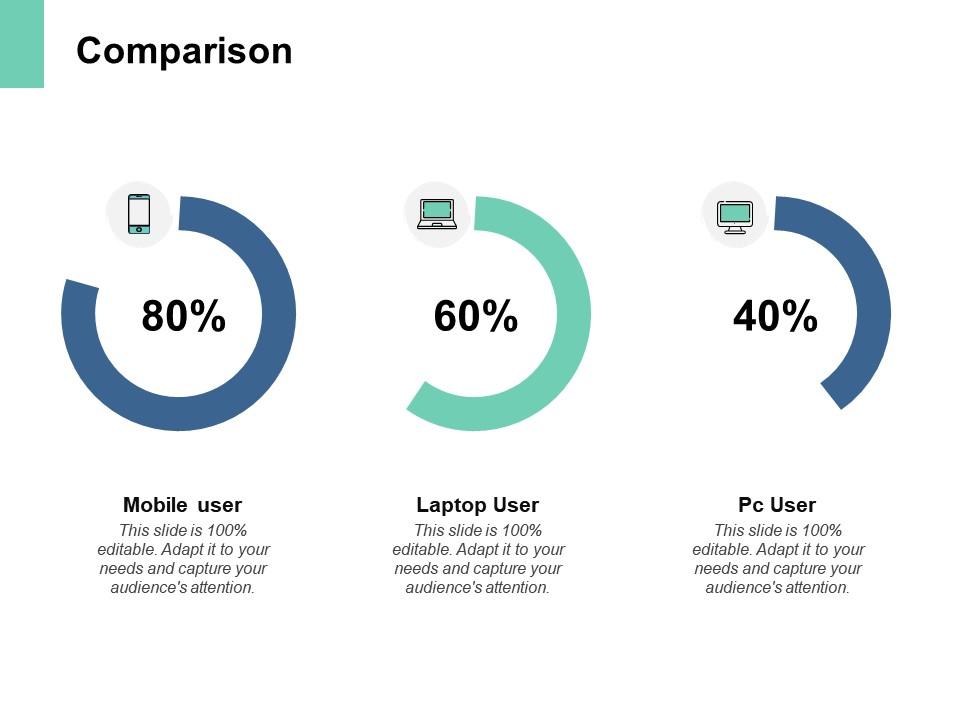
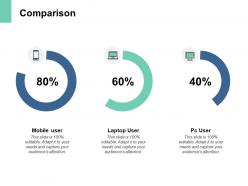
This image appears to be a PowerPoint slide labeled "Comparison" that visually compares percentages associated with different types of users: mobile, laptop, and PC. At the top, we see a title "Comparison," which indicates the slide's focus on comparing different metrics or categories. Each category has a respective icon - a smartphone for "Mobile user," a laptop for "Laptop User," and a desktop computer for "PC User."

Below each icon is a circular progress bar indicating a percentage: 80% for mobile users, 60% for laptop users, and 40% for PC users. These percentages presumably represent a share of a certain metric or user behavior relevant to the topic being discussed.

Use Cases:

This type of slide can find applications across multiple industries where comparisons of user data are relevant:

1. Telecommunications:

Use: Comparing device usage among customers

Presenter: Marketing Manager

Audience: Marketing Team

2. E-commerce:

Use: Presenting preferred shopping devices of site visitors

Presenter: E-commerce Analyst

Audience: Sales and Marketing Department

3. Digital Marketing:

Use: Showcasing traffic sources for online campaigns

Presenter: Digital Marketing Specialist

Audience: Clients or Internal Marketing Team

4. Information Technology:

Use: Illustrating the distribution of devices in an IT infrastructure

Presenter: IT Manager

Audience: Executive Management

5. Market Research:

Use: Demonstrating consumer device preference trends

Presenter: Market Research Analyst

Audience: Product Development Team

6. Education Technology:

Use: Presenting the devices students use to access learning materials

Presenter: Educational Researcher

Audience: Educational Publishers

7. Financial Services:

Use: Analyzing digital banking access trends

Presenter: Data Analyst

Audience: Bank Executives

FAQs for Comparison percentage f202 ppt powerpoint

So F202 percentage comparison basically comes down to three things. First, you need your baseline period - usually whatever timeframe you're comparing against (last month, quarter, etc). Then there's your current comparison period. Third is picking your actual metrics, whether that's revenue or engagement or whatever you're tracking. Honestly, the trickiest part is keeping your data collection exactly the same between both periods. If you change how you measure stuff halfway through, your percentages get all screwy. Been there, done that. Just pick your periods clearly upfront and stick with consistent tracking methods. Otherwise you'll be scratching your head wondering why nothing adds up.

So with F202 metrics, start with your biggest percentage changes - that's where people look first anyway. Break it down to maybe 3-4 key points per slide (nobody wants to squint at a million numbers, trust me). The huge gaps or improvements? Those are your story. Build a flow: what shifted, why anyone should care, what happens next. Honestly, if you lead with your most dramatic percentage change, you'll hook them immediately. Oh and don't try cramming everything into one slide - bite-sized chunks work way better for keeping people engaged.

The percentage points vs percentages thing is huge - seriously trips up so many people. Like if sales jump from 20% to 30%, that's 10 percentage points but actually a 50% increase. Confusing, right? Also watch out for comparing percentages when you're working with totally different sample sizes. Oh and don't cherry-pick your time periods to make things look rosier than they actually are. I've sat through way too many presentations where someone does this without realizing it and just kills their credibility. Show your baseline numbers and be super clear about whether you mean points or percent change.

Honestly, F202 is pretty solid for percentage stuff. It takes your raw data and converts everything to percentages automatically, which saves tons of time. The charts it spits out actually look decent too - bar charts, pie charts, trend lines, whatever you need. What's nice is you can compare multiple data series at once instead of doing them one by one. Oh, and definitely check out their template library first - it'll show you different visualization styles so you don't have to start from scratch. Way better than trying to format everything manually in Excel or whatever.

Just use Excel honestly - it's gonna handle all your F202 percentage stuff no problem. The formulas work great and charting is solid. PowerBI's cool for interactive dashboards but probably overkill unless you're doing fancy presentations. Tableau works but people always make this way more complicated than it needs to be. Excel's waterfall charts are actually perfect for showing percentage changes over time, then you can just throw them into PowerPoint later. I'd start there - covers like 90% of what you'll need anyway. Plus everyone already knows how to use it.

Honestly, visual stuff is your best friend here. Most people just zone out when you throw abstract percentages at them - I do it too sometimes lol. Break everything down step by step using examples they actually know, like their department's budget or sales numbers they've seen before. When you show them "hey, that 15% increase means $3,000 more for your team," suddenly it makes sense. Charts help a ton. Make sure you explain the difference between percentage points and percentage change though - that trips people up constantly. Give them practice problems with workplace scenarios they recognize and you'll be golden.

Look, F202 percentages are totally useless without knowing the baseline and what they're actually measuring. I learned this the hard way last year - thought I was comparing apples to apples but the reference periods were completely different. Sample size matters too, obviously. Here's the thing that trips people up: everyone assumes these percentages use the same standards, but they really don't. Industry benchmarks vary like crazy, plus you've got seasonal stuff and regional differences throwing everything off. So yeah, always dig into the methodology notes first. A 15% jump could mean nothing or everything depending on context.

So basically F202 benchmarks show you what "normal" looks like so you're not pulling numbers out of thin air. Like, instead of promising a 25% improvement when industry standard is actually 12%, you'll know what's realistic vs. what's just wishful thinking. They help you spot when your results are actually impressive too - hitting 15% sounds meh until you realize most people only get 12%. Honestly, they're a lifesaver for avoiding those cringe conversations with your boss later. "Why are we only at 15%?" Well actually, we're beating industry average by 3 points, Karen. Set expectations upfront using these benchmarks and you'll look way more credible.

Just use the basic formula: ((new value - old value) / old value) × 100. Watch out for zeros or negatives in your baseline though - they'll completely screw up everything. I learned this the hard way last month! Double-check that baseline data first because one messed up entry ruins the whole thing. When you're comparing different time periods, absolute percentage change works better. For longer series, try index values where you set your base period to 100. Oh, and definitely spot-check a few calculations manually against what you expect to see. Catches formula mistakes way faster than staring at spreadsheets for hours.

Honestly, you'll see F202 comparisons everywhere these days - retail, manufacturing, financial services. Companies love using it for year-over-year or quarterly performance stuff. Retail tracks sales growth with it. Manufacturing uses it for production efficiency. Financial firms do investment comparisons. It's pretty much standard now if you're working with big datasets that need consistent comparison frameworks. Oh, and definitely check if your current reporting system already handles F202 formatting before you go building new workflows from scratch. Could save you some headache.

Honestly, charts and graphs are a game-changer for F202 percentage stuff. People's eyes just glaze over when you hit them with raw numbers. Bar charts are perfect for side-by-side comparisons, and pie charts show proportions really well - though I swear some people act like pie charts killed their dog or something. Your audience will process the info way faster with visuals. They'll actually remember it too, instead of forgetting five minutes later. Clean, simple charts with your F202 data will definitely boost engagement. Trust me on this one.

So F202 comparisons are actually pretty solid for retail pricing and budget stuff. Target uses them in earnings reports - like when they beat sales by 15.2%. Healthcare places track patient outcomes with them too. The finance people I know really like F202 for monthly budget reviews because it handles seasonal swings way better than regular percentages. Honestly, it's one of those things that sounds complicated but isn't. Start with your most unpredictable metrics first - that's where you'll notice the biggest difference in how accurate your decisions are.

So your F202 can actually get smarter if you set up feedback loops right. Track when your percentage comparisons are spot-on versus when they're way off. Then feed that data back so the algorithms can adjust - kinda like how Netflix learns what movies you'll hate after you rate a few duds. You gotta stay on top of it though, can't just collect the data and forget about it. I'd probably automate the feedback collection if you can swing it, but honestly even doing manual reviews once a month will help those accuracy rates improve over time.

First slide should have the full "F202 Comparison Percentage" label, then just stick with "F202" after that. Don't forget to cite your data source and when it was collected - trust me, someone will ask. I've watched people get roasted for mystery metrics lol. The tricky part is explaining what the percentage actually measures since most people have no clue how F202 methodology works. Oh, and throw a footnote on slides with major F202 findings showing the calculation method. Saves you from awkward questions later.

Yeah, F202 percentages get weird across different cultures. A 15% jump might look amazing in some places but totally average in others - depends on what people are used to seeing. Some cultures obsess over the actual numbers instead of percentages anyway, which throws everything off. Honestly, I'd just give both the percentage AND the real numbers so nobody gets confused. Different regions have totally different ideas of what's "normal" growth. Oh, and always mention what the local benchmarks are - saves you from awkward explanations later when someone thinks your data looks wrong.

Ratings and Reviews

0% of 100
Write a review
Most Relevant Reviews

No Reviews