

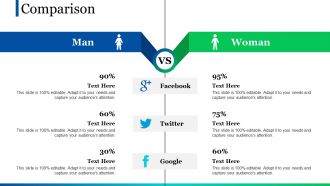
Comparison ppt pictures shapes






Try Before you Buy Download Free Sample Product
 Impress Your
 Audience
 100%
100% Editable
 Save Hours
 of Time


Get them to agree with our Comparison Ppt Pictures Shapes. They will be convinced by the force of your argument.
People who downloaded this PowerPoint presentation also viewed the following :
Comparison ppt pictures shapes with all 5 slides:
Confidence comes from deep down with our Comparison Ppt Pictures Shapes. Derive it from your genes.
FAQs for Comparison
So basically, comparatives are for two things going head-to-head, while superlatives crown a winner from three or more. Like "Q3 beat Q2" versus "Q3 was our best quarter all year." I swear, people butcher this constantly in work presentations - drives me nuts! Use comparatives when you're doing side-by-side analysis. Superlatives work great for highlighting your top performers or biggest disasters. Oh, and here's something that helps: if you can't figure out what you're actually comparing it to, your sentence probably needs work. That's saved me from sounding like an idiot more times than I'd like to admit.
Honestly, visuals beat bullet points every time. Your brain processes images like 60,000x faster than text (which is kinda insane when you think about it). Bar charts work great for comparing quantities, before/after shots are perfect for showing transformations. Side-by-side images? Chef's kiss for highlighting differences. Pick whatever format actually matches what you're comparing - don't just throw random charts at people. I'd start simple with one clear comparison per slide, then add more once you get the hang of it. Trust me, people will actually remember your points instead of glazing over.
Okay so comparison slides - just do side-by-side or a simple table. People need to spot the differences immediately without squinting at microscopic text. Pick 3-5 things that actually matter to your audience: price, features, timing, whatever. I swear, some of these slides look like someone barfed up an Excel sheet. If there's a clear winner, use colors that make it pop. Start with what they care about most - not what you think is cool. Oh and definitely run it by someone else first. If it takes them longer than 10 seconds to get it, you've overcomplicated things.
Yeah, this is huge actually. Japanese and Korean audiences hate direct competitive comparisons - comes off super aggressive. Americans though? They want you to trash-talk the competition, basically. Colors are tricky too - red screams "danger" here but means good luck in China. Some cultures think "we're the best!" messaging is just tacky. Research your audience first, but honestly when I'm unsure, I just focus on our strengths instead of pointing out what competitors suck at. Way safer approach.
Honestly, visuals are a game-changer when you're comparing stuff. Raw numbers just make people's eyes glaze over - trust me on this one. But throw the same data into a chart? Boom, suddenly everyone gets it instantly. You can spot trends, see what's winning, all that good stuff. Bar charts are clutch for basic comparisons, while line graphs kill it for tracking changes over time. I learned this the hard way trying to explain sales data with just spreadsheet numbers once... never again. Just pick whatever visual actually matches the story you're telling and you're golden.
Dude, animated transitions are seriously a game changer. Your audience can actually follow what's happening to each data point instead of staring at two different charts trying to figure out what changed. Like when a bar grows or shrinks, people see the journey - not just random before/after shots. It's honestly way easier for our brains to process that smooth motion than playing spot-the-difference between static images. Think of it like watching a movie vs. looking at screenshots, you know? Start with just one simple animation and you'll get it immediately.
Honestly, PowerPoint's built-in stuff is pretty decent for comparison charts - you can do side-by-side layouts and add animations to reveal data bit by bit. Tableau and Power BI are amazing if you want something really interactive and clickable, but fair warning, there's definitely a learning curve there. Prezi's cool too, or even Canva has some nice comparison templates that don't require much skill. Sometimes though? A basic before/after setup works just as well without all the bells and whistles. I'd start with whatever platform you're already using and see if that does the trick first.
Don't dump everything on them at once - break it into chunks they can actually follow. Use colors or highlighting so people know exactly what you're comparing right now. I swear, half the presentations I sit through are just people machine-gunning through feature lists while everyone zones out. Give them breathing room between points. Ask stuff like "make sense so far?" before jumping to the next thing. Your audience will actually stay with you instead of checking their phones. Oh and pause more than feels natural - what seems like forever to you is probably just right for them.
Don't cram everything onto one slide - people's brains just shut down when there's too much. I made the mistake of using super similar colors once and nobody could tell what was what, so learn from my fail lol. Stick to maybe 3-5 key differences that actually matter. Also resist dumping every data point you have just because it exists. Make sure you're comparing things that make sense together - nobody wins when you're comparing totally different stuff. Your slide needs to clearly show why one option beats the others. Oh, and use colors that are actually different from each other!
Numbers are boring, but stories stick in people's heads. Like instead of "Option A costs 30% less," tell them about that startup who went with the cheaper route and crushed it. Stories just hit different than spreadsheets, you know? You can do before/after stuff, walk through what a customer actually experiences, or even make up scenarios. Keep it short though - nobody wants a novel. I swear, the second you turn data into a quick story, people actually start paying attention. It's weird how well it works.
For presentations, stick with before/after scenarios, competitor breakdowns, and cost-benefit stuff. Before/after is honestly my go-to because it's visual and people actually feel something when they see the difference. With competitor comparisons, don't go crazy - pick maybe 2-3 things that really matter instead of listing every single feature. Cost-benefit gets tricky though. Everyone thinks about money but time savings can be way more compelling. Oh, and analogies work but don't overdo them. One good analogy beats five mediocre ones. Keep everything simple and back it up with real numbers.
Dude, here's the thing - nobody remembers abstract comparisons. But throw in a real example? Game changer. Instead of "Option A is faster," try "Option A processes invoices like scanning a QR code, while Option B is like manually typing in a 20-digit serial number." Your audience gets it instantly. Pick examples from their world though - stuff they actually do or know about. I always ask myself what my audience deals with daily that feels similar. Works way better than boring feature lists, trust me.
Okay so don't just dump your numbers and quotes next to each other - that looks messy. What I do is give the chart like 60% of the slide, then pick 2-3 really good quotes that actually explain what those numbers mean. Color-coding is honestly a game changer here, makes everything way clearer. Oh and callout boxes are clutch for connecting specific data points to quotes. The whole thing should feel like one story, not two different presentations fighting each other. Sometimes I get a bit obsessed with the color matching but it's worth it.
Honestly, it depends on what kind of data you're working with. PowerPoint and Keynote work fine for basic stuff - tables, simple charts - but they get messy fast with anything complex. For heavy data analysis, Tableau and Power BI are where it's at. You can build these interactive dashboards that actually let people click around and explore the metrics themselves, which is pretty cool. Google Slides is clutch if you need multiple people editing at once. I always forget how useful that real-time collaboration thing is until I need it. Bottom line: match the tool to your data complexity.
So there's basically three things that mess with people's heads when they're comparing stuff. Anchoring is huge - whatever they see first becomes their measuring stick for everything else. Loss aversion is even weirder though, people will do crazy things to avoid losing something vs. gaining the same thing. Oh and here's the kicker - too many choices actually make people freeze up. I learned this the hard way trying to pick a Netflix show last week, lol. Anyway, stick to 3-4 options max. Pro tip: put your best option first and show what they'd miss out on with the others.
-
good