Cs three staged organizational chart with icons flat powerpoint design

Rating:
90%
Slide 1 of 4
Favourites Favourites

Try Before you Buy Download Free Sample Product

Audience Impress Your
Audience
Editable 100%
Editable
Time Save Hours
of Time
The Biggest Sale is ending soon in
0
0
:
0
0
:
0
0
Rating:
90%
User friendly and amendable PowerPoint templates. Images do not pixelate when projected on wide screen. Professionally equipped and aesthetically designed visuals. Compatible with Google slides. Total freedom to any sort of manual editing. Effortless conversion into PDF/ JPG format. Easy insertion of company trade name/ logo. Beneficial for entrepreneurs, business owners, investors, business analysts, marketers and financiers, researchers, etc. Can be easily downloaded.

People who downloaded this PowerPoint presentation also viewed the following :

Content of this Powerpoint Presentation

Description:

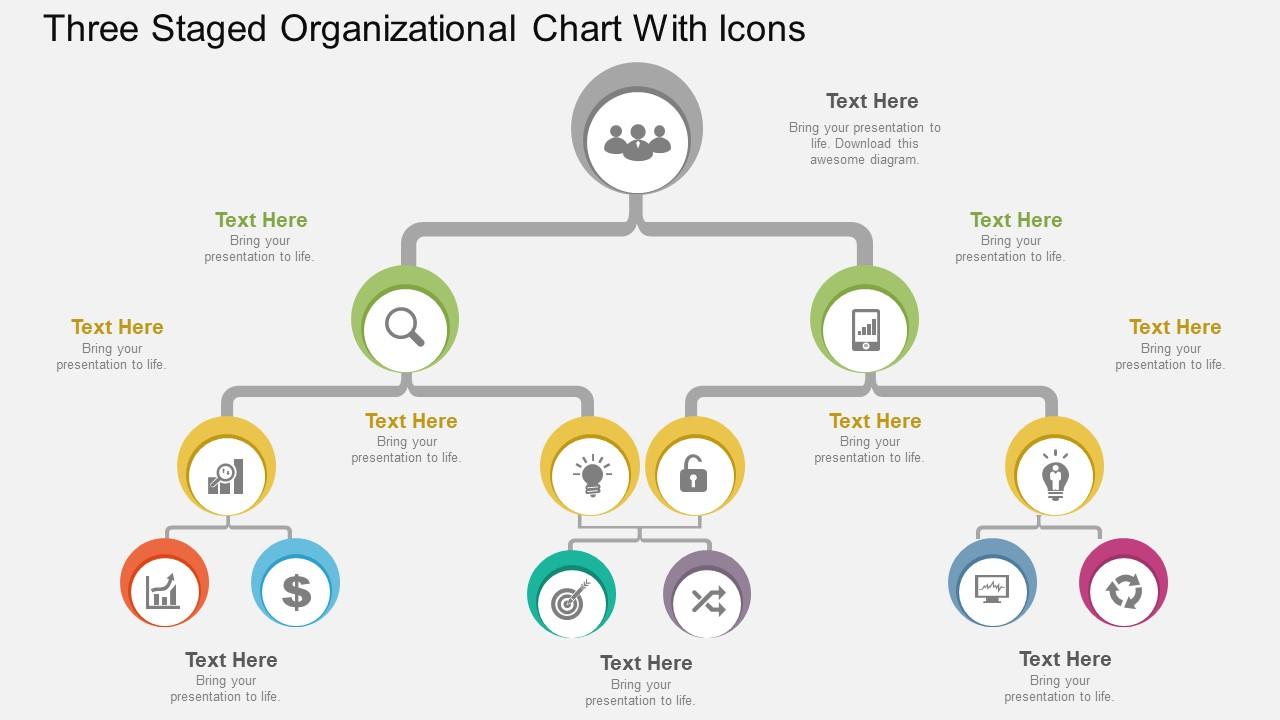
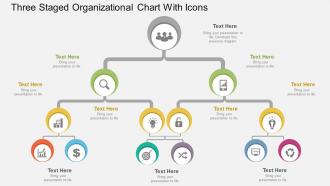
The image is a PowerPoint slide titled "Three Staged Organizational Chart With Icons." It features a three-tiered structure, each tier connected by lines, suggesting a hierarchical or process flow. The top tier shows a single circle with a group icon, representing a team or department. The middle tier has three circles, each with a different icon: a magnifying glass for research or analysis, a light bulb for ideas or innovation, and a lock for security or stability. The bottom tier expands to six circles, with icons representing finance (dollar sign), analytics (bar chart), inspiration (light bulb), safety (padlock), goal achievement (target), and logistics (airplane). Each icon is accompanied by a placeholder for text, implying that the presenter can insert specific information related to each icon's theme.

Use Cases:

Such a diagram is instrumental in displaying organizational structures, workflows, or systems across various sectors:

1. Healthcare:

Use: Displaying departmental roles and responsibilities

Presenter: Hospital Administrator

Audience: Medical Staff

2. Education:

Use: Outlining administrative and academic support structure

Presenter: Dean

Audience: University Personnel

3. Technology:

Use: Demonstrating product development process

Presenter: CTO

Audience: Engineering Teams

4. Finance:

Use: Illustrating financial operations hierarchy

Presenter: CFO

Audience: Finance Department

5. Retail:

Use: Organizing store management and operations

Presenter: Operations Manager

Audience: Store Managers

6. Manufacturing:

Use: Depicting production line management and workflow

Presenter: Plant Manager

Audience: Production Staff

7. Hospitality:

Use: Mapping out hotel management and service delivery system

Presenter: General Manager

Audience: Hotel Staff

FAQs for Cs three staged organizational chart with icons

Dude, three-stage org charts are honestly a game changer. New people can actually figure out where they belong instead of staring at some confusing mess for twenty minutes. Decision-making gets way quicker too since everyone knows the chain of command. You'll spot communication problems and bottlenecks so much faster - like when Sarah from marketing has been emailing the wrong person for weeks about budgets. Just take what you've got now and try grouping everyone into three clear levels. Way better than those spaghetti charts that make zero sense.

So you basically split your company into three tiers - exec level, middle management, then everyone else doing the actual work. Makes it super easy to see who reports to who without getting lost in some crazy complicated chart. The best part? No more of those weird moments where nobody knows who's supposed to make the call on something. Each level has its own responsibilities and you can actually track how decisions flow down. I swear, most companies would save themselves so much drama if they just did this. Map out what you've got now and see where people are getting confused - bet you'll spot the problem areas right away.

Honestly, three-staged org charts are perfect for big changes - like when you're growing fast, restructuring, or going through mergers. The stages show where you are now, the messy transition period, and where you'll end up. Super helpful when people don't know who they're reporting to anymore (which happens more than you'd think). Stakeholders love seeing the full picture too. I'd definitely use one whenever your changes will take more than a few weeks. It keeps everyone from freaking out about the uncertainty.

So basically you've got your CEO/President at the very top. Then middle management - department heads, directors, that whole crew - sits in the second tier. Bottom layer? That's where us regular folks live lol - all the front-line staff and individual contributors. Works great for smaller companies or when you need to simplify some massive org chart for a presentation (nobody wants to squint at 500 tiny boxes). My advice? Focus on who reports to who and the main decision-makers. Don't get bogged down trying to squeeze every single role in there.

Oh this is actually super useful! So basically you create three snapshots: where you are now, where you're heading next, and your end goal. Way better than trying to figure out some massive jump all at once. You can spot problems early, plan out who's moving where, and spread the budget impact over time instead of getting hit with everything. Plus your team and investors will actually understand what's happening - which honestly matters more than people think. I always sketch these out on a whiteboard first before making it official.

Honestly, don't try cramming every tiny detail in there - you'll create a hot mess nobody can read. Keep your hierarchy simple and consistent. Never skip levels either (like going straight from CEO to regular employees). I know it's tempting, but avoid getting fancy with weird fonts or rainbow colors. Basic formatting wins every time. Oh, and actually update the thing! Nothing's more embarrassing than someone asking about Jim when he quit months ago. Start at the top, work your way down systematically. Double-check who reports to whom before you share it around.

Look, every industry just tweaks those three stages to match what they actually do. Tech companies go crazy with the development part - like endless testing rounds. Manufacturing? They're all about that production stage with constant quality checks. Healthcare drags out planning forever because of compliance stuff (seriously, the paperwork is insane). Retail moves fast though, especially during busy seasons. The whole point is making the framework work for YOU, not the other way around. Check out what successful companies in your field are doing and steal their best ideas.

For three-level org charts, I'd go with Lucidchart or Visio first - they're really good at making clean, professional hierarchies. Google Drawings works if you're already using their stuff, but honestly it's pretty bare-bones. Canva's actually not bad either, especially if you want something that doesn't look super corporate. Oh, and I always forget about Visio being expensive until I try to use it. Start with Lucidchart's free version to mess around, then you can upgrade later if you need fancy exports or whatever.

Honestly, three-staged org charts are game changers for communication. Everyone knows exactly who they report to - no more of that awkward "do I email the big boss or my manager?" thing. Mixed messages disappear because there's a clear chain. Info flows up and down way smoother too since each level knows their job in passing stuff along. I'd start by looking at how your team currently talks to each other (probably a mess, right?). Then figure out where a clearer hierarchy would cut the confusion. It's like having GPS for office conversations instead of wandering around lost.

Honestly, think of it as a talent roadmap that shows where everyone sits career-wise. Map out your current team across the three stages first - you'll probably notice some weird clustering patterns. The visual aspect is clutch for those awkward "where am I going?" conversations because you can actually point to progression paths. Plus it makes planning training and stretch assignments way more straightforward. You can spot succession planning holes before they bite you later. I'd start there and see what development gaps jump out at you. Makes the whole "who needs what skills to advance" question much clearer when it's laid out visually.

So basically add arrows going both ways between your three stages instead of just one direction. Map out what info each level actually needs from the others first - that's honestly the part most people skip. Then build those specific channels. Your frontline people should be able to ping strategy directly, middle management adjusts based on what's actually happening, leadership pivots when they get real feedback from the ground. Set up weekly reports, monthly check-ins, maybe some dashboards if you're fancy. Think of it like everyone gets a "reply all" button instead of just passing notes upward.

Apple's the classic example here - they've got exec leadership at the top, then functional VPs for stuff like hardware and software, with individual product teams under that. Google works pretty much the same way. C-suite, then big divisions like Search and YouTube, then the actual product groups. Most big tech companies are obsessed with this setup because it cuts down on bureaucracy while letting teams specialize. What's smart about it is you don't end up with like 47 layers of managers slowing everything down. If you're thinking about changing things up, I'd map out what you have now first and see where you can cut out some of those middle management spots.

So basically you'd create three org charts - where you are now, the messy in-between phase, and your end goal. Makes it super clear which roles you actually need to hire for and when. I've found the visual part is clutch because executives love seeing everything laid out like that. You can spot skill gaps way easier this way. Plus it helps you figure out if certain positions are just temporary band-aids or permanent hires. Honestly saves so much time on writing job descriptions too since you know exactly what each role needs to accomplish. Start with mapping what you have now, then work backwards from your 12-18 month target.

Honestly, just add horizontal layers where you're actually seeing growth happen. Don't go crazy adding boxes everywhere just because it looks organized - that's how you end up with weird org charts nobody understands. Split big departments into smaller specialized teams, or throw in some team lead roles between managers and regular employees. The trick is keeping those reporting lines clean so people aren't confused about who they answer to. Oh, and update it regularly instead of letting it get completely out of whack. People should still be able to see how they can move up.

Honestly, those three layers can be a real pain for getting departments to work together. Communication gets super slow because everything has to go up the chain first before reaching other teams. Departments start acting like their own little fiefdoms - middle managers become these weird gatekeepers who filter everything. Sometimes they care more about their own team's goals than what's actually good for the company. My advice? Set up some unofficial channels where people can just talk directly to each other. Cross-functional teams work great too since they skip all that hierarchy nonsense.

Ratings and Reviews

90% of 100
Write a review
Most Relevant Reviews
  1. 80%

    by Charlie Jackson

    Helpful product design for delivering presentation.
  2. 100%

    by Darius Webb

    Perfect template with attractive color combination.

2 Item(s)

per page: