Customer Journey Map M3291 Ppt Powerpoint-Präsentationshintergründe

Rating:
93%
Slide 1 of 2
Favourites Favourites

Try Before you Buy Download Free Sample Product

Audience Impress Your
Audience
Editable 100%
Editable
Time Save Hours
of Time
The Biggest Sale is ending soon in
0
0
:
0
0
:
0
0
Rating:
93%

Funktionen dieser PowerPoint-Präsentationsfolien:

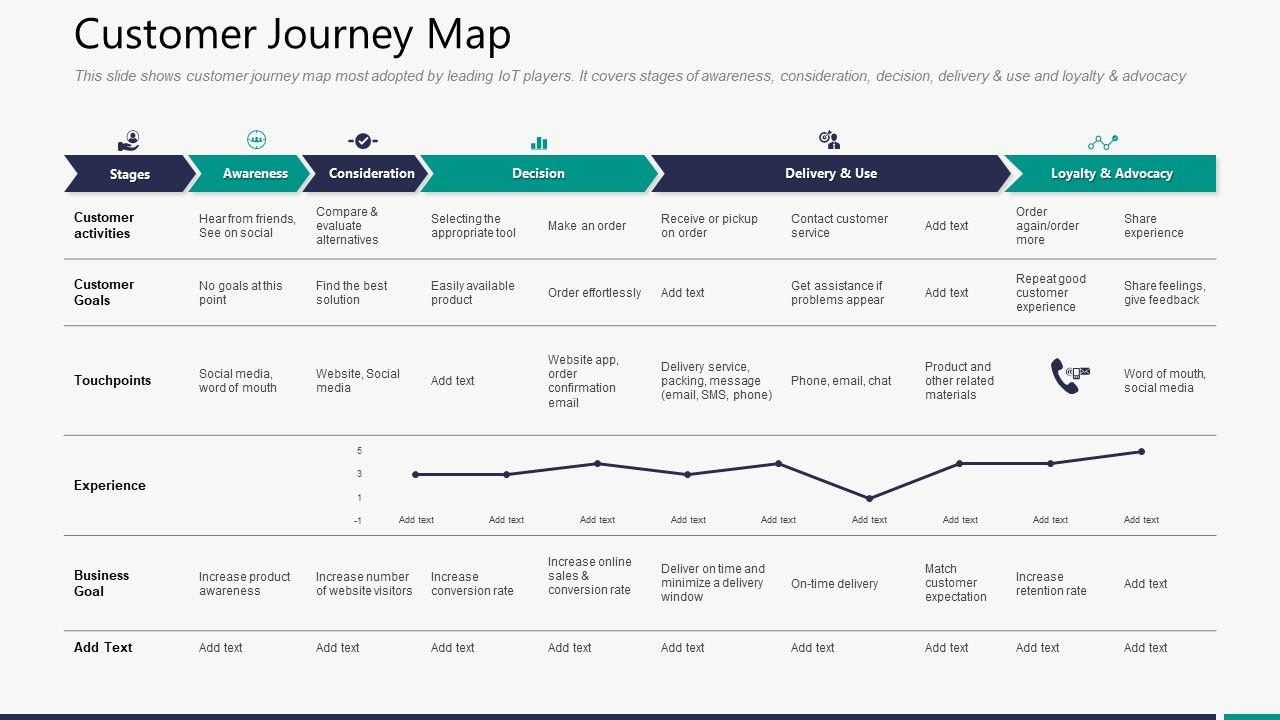
Diese Folie zeigt eine Customer Journey Map, die von führenden IoT-Playern am meisten angenommen wird. Es umfasst die Stufen des Bewusstseins, der Überlegung, der Entscheidung, der Umsetzung und des Gebrauchs sowie der Loyalität und des Eintretens. Präsentation dieses Foliensatzes mit dem Namen Customer Journey Map M3291 Ppt Powerpoint Presentation Backgrounds. Die in diesen Folien behandelten Themen sind Kundenziele, Erfahrungsgeschäftsziel, Bekanntheit und Loyalität. Dies ist eine vollständig editierbare PowerPoint-Präsentation und steht zum sofortigen Download zur Verfügung. Jetzt herunterladen und Ihr Publikum beeindrucken.

FAQs for Customer journey map m3291 ppt

Start simple - pick one customer type and map their journey from first hearing about you to buying (and after). List every single place they interact with your brand. Document what they're doing, feeling, and getting frustrated with at each step. This part gets chaotic quickly, fair warning! Look for gaps and missed opportunities once you've got it all down. Then figure out what to fix first based on what'll actually move the needle. Trust me, don't try mapping five different personas right away - you'll just overwhelm yourself and probably give up halfway through.

Personas totally change the game with journey mapping. You're not dealing with some vague "customer" anymore - you're following Sarah the frazzled mom or Mike who counts every penny for his startup. Their pain points are completely different at each step. Sarah just wants things fast, while Mike's gonna compare prices for like an hour (we've all been there). This specificity is clutch because you'll catch actual problems instead of made-up ones. I'd start with your top 2-3 personas and map them separately. Then see where they all hit the same roadblocks - fix those first.

Miro and Mural are your best bets - both have journey map templates and work great for team collaboration. UXPressia's worth checking out if you want something built specifically for customer experience stuff. But honestly? I've seen killer maps made in Figma or even PowerPoint (I know, I know). The tool matters way less than getting your team to actually use it together. My advice: start with whatever you're already using at work, then maybe upgrade later if you hit any walls or need fancier features.

Honestly? I'd say every 6 months minimum, but it really depends on your industry. Tech companies probably need to do it quarterly since everything moves so fast. Definitely update them when you launch something new or redesign your site. Oh, and whenever you're seeing weird patterns in your analytics - that's usually a sign something shifted. I always tell people to do quick check-ins after customer feedback sessions too. The worst thing is having outdated maps that don't reflect reality anymore. Set a calendar reminder or you'll totally forget (I learned this the hard way). Quick updates beat perfect ones you never actually do.

Honestly, you can't skip customer feedback when building journey maps - it's what keeps you grounded in reality instead of making stuff up. I've watched teams create these gorgeous maps that totally missed what customers actually go through. Feedback shows you pain points hiding in plain sight and tells you which touchpoints genuinely matter to people. Pull insights from surveys, interviews, reviews, support tickets - whatever you can get your hands on. Then actually use that data to update your map every few months. Otherwise you're just creating pretty wall art that doesn't help anyone.

Colors are your best friend here - use different ones for touchpoints, emotions, and pain points so people can spot issues fast. Icons help too (phone symbols for calls, sad faces for complaints, whatever). I actually prefer simple charts over paragraphs any day. You want someone to glance at your map and instantly get what's happening without needing a full presentation. Time spent at each stage? Show it visually. Satisfaction scores? Graph them. The goal is making it so clear that even your boss can understand the customer's journey while walking past your desk.

Track metrics for each stage but don't go overboard. Website traffic and social engagement work for awareness. Then demo requests, email opens - that consideration stuff. Conversion rate is honestly your golden metric here. After purchase, watch NPS scores and how many people stick around. Oh and support tickets - nobody wants angry customers flooding in. Customer lifetime value shows if you're actually making money from all this effort. Pick maybe 2-3 metrics per stage max. Otherwise you'll drown in data and lose focus on what's actually helping your business grow.

Think of emotional touchpoints as those moments that make customers either love you or never come back. A frustrating checkout experience? They'll bounce. Amazing customer service response? They're telling everyone about you. Here's the crazy thing - emotions usually beat logic when people make decisions. Price and features matter less than you'd think. I'd map out your customer journey and spot where people get stressed or confused. Then tackle those problem areas first since one bad moment can kill everything else you've done right.

Don't assume you know what customers do - actually talk to them first or you'll map complete fiction. Trying to document every single touchpoint is a nightmare and pretty pointless tbh. Focus on one main journey to start. The emotional stuff matters way more than people think. Like, mapping out 50 process steps won't help if you miss where people get pissed off. Keep your personas grounded in reality too, not some made-up perfect customer who doesn't exist. Validate everything with real people before building it out further.

Honestly, journey maps are like giving everyone a shared reality check about what customers go through. Your marketing team finally sees how their campaigns actually play out when support has to deal with confused customers daily. Breaks down those stupid departmental walls fast. Everyone can look at the same visual and go "okay, THIS is where we're screwing up." I've watched teams go from blaming each other to actually fixing stuff together - it's pretty wild. Oh, and don't just hand people a finished map to review. Get reps from each team to build it with you from the start.

Dude, B2B journey mapping is a total nightmare compared to regular consumer stuff. You've got like 5 different people making decisions - procurement folks, actual users, IT guys, executives. Each one cares about completely different things. The sales cycle drags on forever too, sometimes years honestly. What makes it really tricky is mapping out how all these people influence each other during the buying process. Oh and the pressure's way higher since these purchases can make or break entire departments. Best approach? Start by figuring out who's typically involved in your deals and actually talk to each person individually.

Dude, journey maps are basically like having a blueprint of where your customer service sucks. Map out every single touchpoint - calls, emails, transfers between teams, whatever. You'll catch stuff like ridiculous wait times or that awkward moment when customers hang up because nobody knows what's happening. Honestly, some companies are shocked by how messy their process actually looks on paper. Pick one typical customer problem and trace it from beginning to end. Then fix the worst parts first - could be better training, or just getting rid of that awful hold music everyone hates.

Honestly, tech totally changes the game for customer journey mapping. Instead of guessing with sticky notes, you're pulling actual behavioral data from analytics and heatmaps. AI spots patterns you'd miss completely. Your whole team can jump in and add insights through collaborative platforms - which is clutch. The interactive maps actually get updated too, unlike those static ones that just sit there forever (we've all been there). Oh, and start by hooking up whatever data sources you already have to your mapping tool. Way less painful than starting from scratch.

Journey maps are game-changers for spotting where customers actually get stuck or annoyed. You'll see patterns in your biggest complaints once you map them to specific stages - checkout issues, confusing onboarding, whatever. The emotional ups and downs really jump out too, which honestly surprised me when I first tried this. Focus on those drop-off moments first since that's where you're bleeding money. Short bursts of frustration add up fast. Once you fix the obvious friction points, customers stick around way longer and actually finish what they started.

Oh, there's actually some solid examples out there! Starbucks totally revamped their mobile ordering after mapping the journey - wait times dropped and customers were way happier. LEGO did something similar with their online store and boosted conversions by 25%, which is pretty nuts. Then there's Airbnb - they cut their host onboarding from weeks down to just days by figuring out where people were getting stuck. The smart move all these companies made? They didn't try to fix everything at once. Pick one problem area first and really dig into that specific touchpoint.

Ratings and Reviews

93% of 100
Review Form
Write a review
Most Relevant Reviews
  1. 100%

    by Devin Daniels

    Informative presentations that are easily editable.
  2. 100%

    by Jacob Brown

    Easy to edit slides with easy to understand instructions.
  3. 80%

    by Dion Dunn

    Excellent Designs.

3 Item(s)

per page: