

Digital Learning Platforms Investor Funding Elevator Pitch Deck Ppt Template




Try Before you Buy Download Free Sample Product
 Impress Your
 Audience
 100%
100% Editable
 Save Hours
 of Time


Introducing Digital Learning Platforms Investor Funding Elevator Pitch Deck, Empowering Parents and Enriching Childrens Lives. Our dynamic E-learning platform deck is designed to captivate potential investors by showcasing the unique value proposition of ActivityHero. Additionally, our EdTech platform template provides increased visibility and access to a growing customer base. It also provides a solution to Parents in the form of ActivityHero, a one-stop solution for parents seeking convenient and reliable options to engage their children in meaningful activities. Moreover, our Course Management System CMS module covers a user-friendly interface and intuitive features that ensure a seamless experience, allowing parents to explore, compare, and book activities effortlessly. It further enables parents to discover a diverse range of options tailored to their childs interests, location, and schedule, hence helping in Investment funding. Lastly, with our Educational Events Enrollment PPT, you may unlock unlimited business potential and shape a thriving future for your entrepreneurship. Get access to it right away.
People who downloaded this PowerPoint presentation also viewed the following :
Content of this Powerpoint Presentation
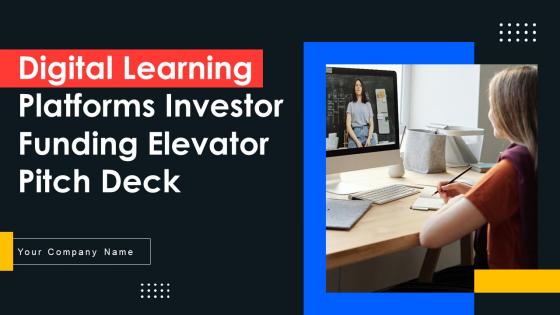
Slide 1: This slide introduces Digital Learning Platforms Investor Funding Elevator Pitch Deck. State Your Company Name and begin.
Slide 2: This slide shows a Table of Contents for the presentation.
Slide 3: This slide caters to details about several problems in the market faced by prospects.
Slide 4: This slide entails to details about solutions rendered by the Company.
Slide 5: This slide highlights details about the company offering educational technology platforms.
Slide 6: This slide illustrates to the details related to the number of people visiting and engaging on the educational technology platforms.
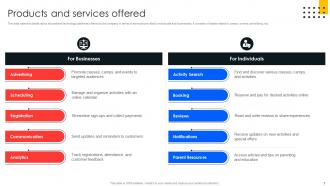
Slide 7: This slide describes the details about educational technology platforms offered by the company.
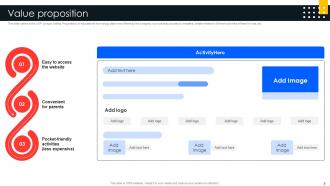
Slide 8: This slide demonstrates the USP (Unique Selling Proposition) of educational technology platforms offered by the company.
Slide 9: The slide covers particular objectives or goals that the organization intends to attain.
Slide 10: This slide portrays to the details related to the client's feedback based on their experiences.
Slide 11: This slide describes to the details related to some of the esteemed clients of the education technology service industry.
Slide 12: This slide shows the details related to the company's market potential leading to development in the global education technology market.
Slide 13: The purpose of this slide is to highlight the business model used to understand the operational details of the company.
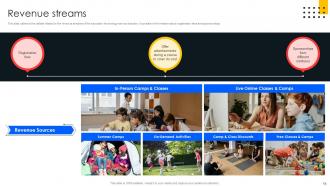
Slide 14: This slide illustrates the details related to the revenue streams of the education technology service industry.
Slide 15: This slide entails the major competitors of the Company existing in the market.
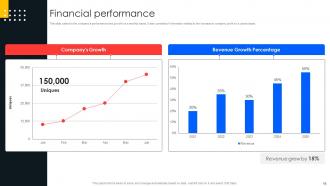
Slide 16: This slide perviews the company’s performance and growth on a monthly basis.
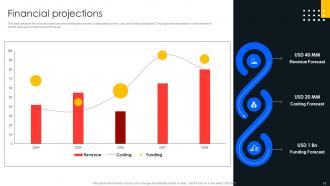
Slide 17/b>: This slide presents the financial projections showcasing the company's anticipated growth, cost, and funding forecasted.
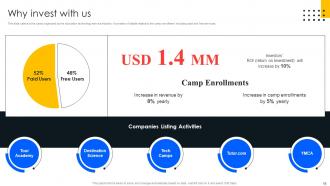
Slide 18: This slide caters to the camp organized by the education technology service industry.
Slide 19: This slide contains details about the company offering education technology services and organizing events.
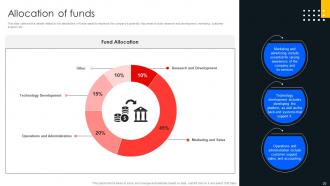
Slide 20: This slide illustrates the details related to the distribution of funds raised to maximize the company's potential.
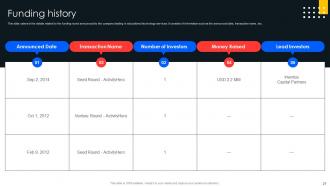
Slide 21: This slide presents to the details related to the funding round announced by the company dealing in educational technology services.
Slide 22: This slide represents exit strategies such as IPOs that enable the entrepreneur to liquidate their position.
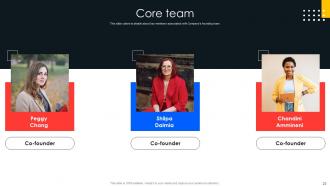
Slide 23: This slide caters to details about key members associated with Company’s founding team.
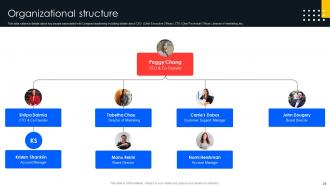
Slide 24: This slide focuses the details about key people associated with Company leadership.
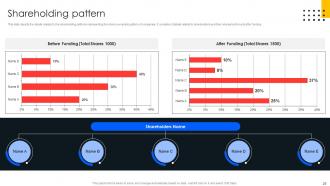
Slide 25: This slide depicts the details related to the shareholding patterns representing the share ownership pattern of companies.
Slide 26: This is a Contact Us slide. Add your Email Address, Contact, Social Media Handles, and Address.
Slide 27: This slide shows all the icons included in the presentation.
Slide 28: This slide is titled Additional Slides for moving forward.
Slide 29: This slide depicts a Venn diagram with text boxes.
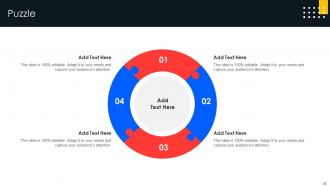
Slide 30: This slide contains a Puzzle with related icons and text.
Slide 31: This slide is Our Target slide. State your targets here.
Slide 32: This slide shows SWOT describing- Strength, Weakness, Opportunity, and Threat.
Slide 33: This slide shows Post-It Notes. Post your important notes here.
Slide 34: This slide presents a Roadmap with additional text boxes.
Slide 35: This slide is a thank-you slide with address, contact numbers, and email address.
Digital Learning Platforms Investor Funding Elevator Pitch Deck Ppt Template with all 43 slides:
Use our Digital Learning Platforms Investor Funding Elevator Pitch Deck Ppt Template to effectively help you save your valuable time. They are readymade to fit into any presentation structure.



















FAQs for Digital Learning Platforms Investor Funding Elevator Pitch
Honestly, you want something that works for everyone - different learning styles, accessibility needs, all that. Captions and screen reader stuff is basic but crucial. Mobile-friendly is obvious these days. Interactive features beat boring text walls every time (I've sat through enough of those to know). Discussion forums are clutch for keeping people engaged. Multiple assessment options matter too since not everyone's great at traditional tests. Oh, and adaptive pacing is huge - some people fly through content while others need more time. Look for platforms with good analytics so you can actually see what's working. Customization options are your friend here.
Honestly, kids just respond better to screens - they're already on them 24/7 anyway. Interactive stuff like gamified quizzes and instant feedback hooks them way more than lectures. Shy kids actually speak up more through discussion boards too, which is pretty cool. The personalized learning paths are huge - students can replay videos or slow down when they're struggling. Real-time progress tracking keeps them motivated. Oh, and don't dump everything on them at once! Start with maybe one interactive feature, see how it goes. The engagement difference is night and day compared to traditional classrooms.
So AI basically watches how you learn and adjusts everything to match your style. Pretty neat honestly. It'll notice if you're struggling with certain topics and dial back the difficulty, or maybe switch to more visual stuff if that's how your brain works. Think of it like a tutor that actually pays attention - tracks your pace, figures out what formats click for you, creates custom practice problems. Oh and it never gets tired or annoyed when you ask the same question twice lol. When you're shopping around for platforms, just make sure they'll show you the data behind their personalization features.
So first thing - check if your pre and post assessment scores actually improved. That's the obvious stuff. But also dig into the platform analytics for engagement patterns, like where kids are getting stuck or bailing out completely. Honestly though? High engagement doesn't always equal learning, which is annoying but true. Built-in formative assessments are where you'll find the real insights. Student surveys help too - they'll tell you straight up what sucks. I'd definitely pilot it small first, get both the numbers and the honest feedback, then expand from there. Way less messy that way.
Honestly, just pick one or two tools that actually match what you're teaching - don't go crazy trying to change everything. Map those digital activities to your real curriculum goals instead of just throwing tech at stuff randomly. The training part is huge (seriously, so many schools skip this and wonder why teachers hate the new system). You'll need decent tech support too because things will break. I'd focus on platforms that play nice with whatever you're already using - nobody wants to juggle five different logins. Oh, and get feedback from both students and teachers super early. Way easier to pivot when you haven't invested months into something that's not working.
So most platforms have discussion boards, breakout rooms, and shared whiteboards built right in. Students can edit documents together in real-time which is pretty cool. Chat features are clutch for quick questions - honestly saved me so many times when I was teaching. You can also set up virtual study groups and peer reviews. Oh, and creating smaller communities within big classes really helps kids feel less lost in the crowd. My take? Don't go crazy with every single feature right away. Pick one or two collaboration tools first, then add more once they're comfortable.
Ugh, tech anxiety is SO real - plus nobody has time to learn another platform when you're drowning in grading already. Time constraints kill everything. Most teachers just feel overwhelmed by the learning curve, which honestly makes total sense. Start with literally one feature and ignore the rest for now. Don't try to do everything at once or you'll hate it. Schools usually help with peer mentoring or quick workshops during planning periods. Your IT people should stick around for support too, not just disappear after setup. Oh, and only bother with stuff that'll actually save you time - skip anything that creates more work.
Okay so basically these analytics show you what's really going on in your classes. Students struggling with certain topics? You'll see it. Where they're getting bored and clicking away? That shows up too. Honestly, the engagement stuff is probably the most useful - tells you how long people spend on activities, quiz scores, all that. I love that you can zoom out for class-wide patterns or focus on individual kids who need help. Oh and definitely peek at your dashboard before planning your next lesson. Sounds nerdy but it actually helps you figure out what bombed last time.
Yeah, this stuff is way more serious than people think. Learning platforms collect tons of data - grades, personal details, even how long your kids spend on each problem. Pretty creepy when you think about it. The big risks? Data breaches exposing everything, plus random companies getting access to student records without parents really knowing. I'd definitely check what info your platform's actually collecting and read their privacy policy (I know, boring but worth it). Also teach the kids about strong passwords - basic stuff but it helps.
So most platforms now have screen readers for visually impaired kids, plus closed captions for deaf/hard of hearing students. There's keyboard navigation too for motor disabilities. You can usually adjust text size and contrast - honestly the voice-to-text stuff has gotten pretty decent lately. Oh, and they'll do alternative assignment formats and extended time settings. My advice? Actually test these features yourself before committing to anything. Some platforms say they're accessible but then you try it and it's clunky as hell. You want something that actually helps, not just checks boxes.
Honestly, AI stuff is everywhere now - automated grading, learning paths that actually adjust to how fast kids pick things up. Microlearning's pretty solid too, chopping up content so students aren't sitting through endless lectures. VR's creeping in but it's still kinda expensive for most schools. What's really cool is the analytics showing teachers exactly where kids get stuck, like immediately. Oh and if you're looking at new platforms, definitely go for ones with decent AI and good dashboards. That's where you'll actually see results instead of just burning budget.
So it really comes down to how comfortable people are with tech, you know? Kids pick up navigation fast but honestly they need way more bells and whistles to stay engaged - their attention spans are brutal. College kids are probably the easiest to work with since they grew up with this stuff and can figure things out themselves. Adults though... they might fumble around at first (my mom still calls me for every new app lol) but once they get the hang of it? They're actually super focused because they have real goals. The main thing is just making sure the design isn't confusing and there's decent help when people get stuck.
Dude, gamification works because it hits that competitive streak we all have. People actually get excited about earning points and badges - sounds silly but it totally works. Your completion rates will jump when learners can see their progress on a bar or climb up leaderboards. Makes the whole thing feel less like studying and more like... well, a game I guess? Plus they remember stuff better afterward compared to boring traditional training. Oh and retention goes up too since people stay engaged longer. I'd start simple - just throw in some points or a progress tracker and see how it goes.
Honestly, online learning platforms are a game changer - you can finally ditch those rigid classroom schedules and learn whenever works for you. The courses are usually broken into short chunks, which is perfect when work gets crazy. I've noticed most of them track what you're doing and suggest related stuff, which is actually pretty helpful. Certificates from these platforms look decent on your resume too. Way cheaper than traditional training, obviously. Oh, and definitely check if your company already pays for something like LinkedIn Learning or Coursera first - mine does and I had no idea for like two years.
Dude, mobile apps are seriously a game-changer for learning. You can literally study anywhere - on the train, during lunch, whenever. Most let you download stuff offline too, which is clutch when your wifi sucks. The whole interface is way better than trying to use the regular website on your phone. Push notifications actually help with deadlines (though sometimes they're annoying). Plus everything syncs between your devices automatically. I was skeptical at first, but I probably learn twice as much now just because it's so convenient. Download your platform's app if you haven't already - you'll actually use it way more than you think.
-
SlideTeam is the way to go when you are in a time crunch. Their templates have saved me many times in the past three months.
-
The Designed Graphic are very professional and classic.