

Electronic information security powerpoint presentation slides




Try Before you Buy Download Free Sample Product
 Impress Your
 Audience
 100%
100% Editable
 Save Hours
 of Time


Information security is the process of protecting electronic devices such as computers, servers, mobile gadgets, data, electronic systems, and networks from cyber-attacks. Here is an efficiently designed template on Electronic Information Security that illustrates important details about cybersecurity. Incorporating this PPT, you can present and share details on the common threats against data and information systems. This network security presentation will be helpful to throw light on the current scenario of the organization, the requirement of security in different sectors, and it works. In addition, information security PPT contains the critical elements of security, risk identification and assessment, steps to mitigate those risks, and benefits of security, along with automations role in information security. Further, this data security presentation comes with a checklist to implement in the organization, a 30-60-90-day plan to manage security, and the budget to implement the same. The Information Security deck also showcases a roadmap to monitor security and a timeline to implement in the organization. Lastly, this PPT shows the effects of security implementation on the organization and dashboard for threat tracking in security. Get access now.
People who downloaded this PowerPoint presentation also viewed the following :
Content of this Powerpoint Presentation
Slide 1: This slide displays title i.e. 'Electronic Information Security' and your Company Name.
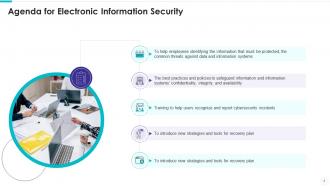
Slide 2: This slide presents agenda.
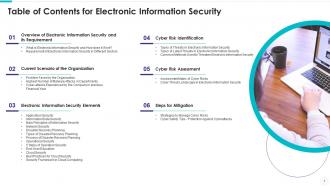
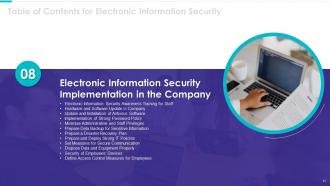
Slide 3: This slide exhibits table of contents.
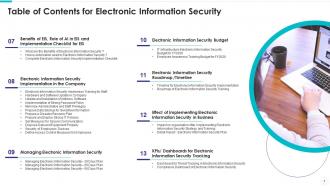
Slide 4: This slide also shows table of contents.
Slide 5: This slide depicts title for two topics that are to be covered next in the template.
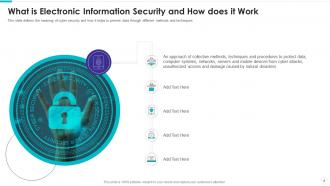
Slide 6: This slide defines the meaning of cyber security and how it helps to prevent data through different methods and techniques.
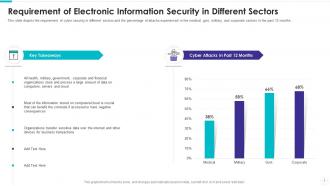
Slide 7: This slide depicts the requirement of cyber security in different sectors and the percentage of attacks experienced in the medical, etc.
Slide 8: This slide depicts title for three topics that are to be covered next in the template.
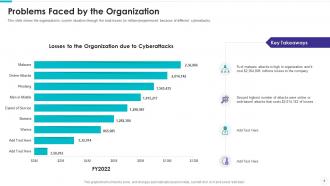
Slide 9: This slide shows the organization's current situation through the total losses (in millions)experienced because of different cyberattacks.
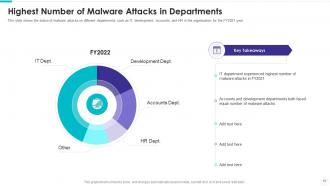
Slide 10: This slide shows the status of malware attacks on different departments such as IT, development, accounts, and HR in the organization for the FY2021 year.
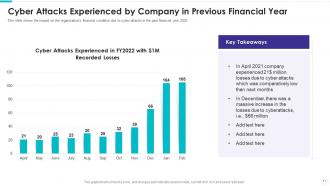
Slide 11: This slide shows the impact on the organization's financial condition due to cyber attacks in the past financial year 2022.
Slide 12: This slide depicts title for fourteen topics that are to be covered next in the template.
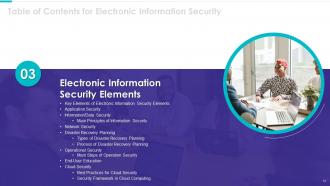
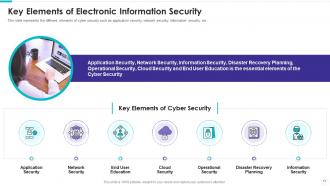
Slide 13: This slide represents the different elements of cyber security such as application security, network security, information security, etc.
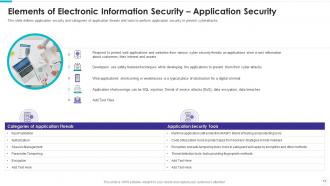
Slide 14: This slide defines application security and categories of application threats and tools to perform application security to prevent cyberattacks.
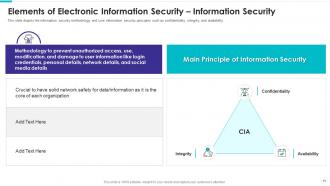
Slide 15: This slide depicts the information security methodology and core information security principles such as confidentiality, integrity, and availability.
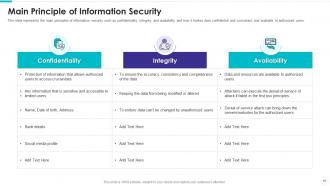
Slide 16: This slide represents the main principles of information security such as confidentiality, integrity, and availability, etc.
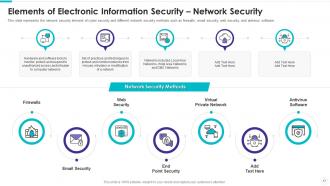
Slide 17: This slide represents the network security element of cyber security and different network security methods such as firewalls, etc.
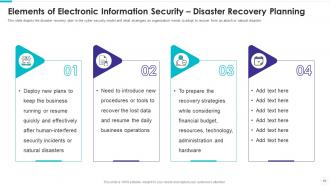
Slide 18: This slide depicts the disaster recovery plan in the cyber security model and what strategies an organization needs to adopt.
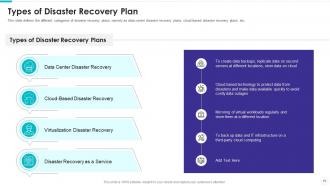
Slide 19: This slide defines the different categories of disaster recovery plans, namely as data center disaster recovery plans, etc.
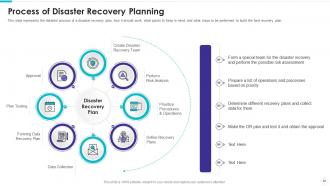
Slide 20: This slide represents the detailed process of a disaster recovery plan, how it should work, what points to keep in mind, etc.
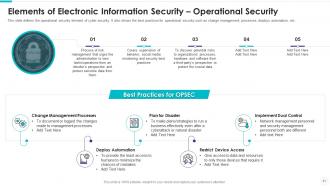
Slide 21: This slide defines the operational security element of cyber security. It also shows the best practices for operational security.
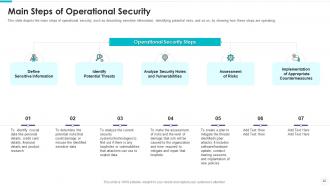
Slide 22: This slide depicts the main steps of operational security, such as describing sensitive information, identifying potential risks, etc.
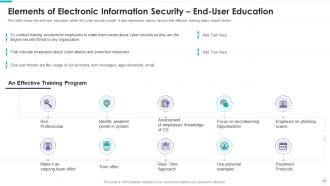
Slide 23: This slide shows the end-user education within the cyber security model. It also represents various factors that effective training plans should involve.
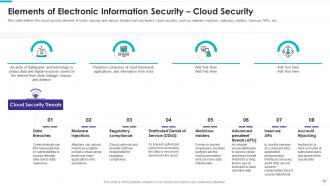
Slide 24: This slide defines the cloud security element of cyber security and various threats that can breach cloud security, etc.
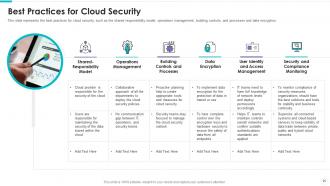
Slide 25: This slide represents the best practices for cloud security, such as the shared responsibility model, operations management, etc.
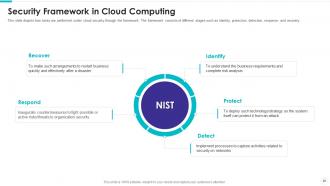
Slide 26: This slide depicts how tasks are performed under cloud security through the framework. The framework consists of different stages.
Slide 27: This slide depicts title for three topics that are to be covered next in the template.
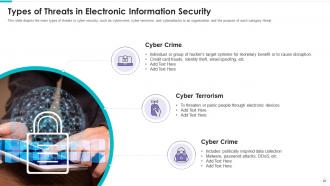
Slide 28: This slide depicts the main types of threats in cyber security, such as cybercrime, cyber terrorism, and cyberattacks.
Slide 29: This slide depicts the categories of recent threats that recently emerged in the United States, United Kingdom, and Australia in previous years.
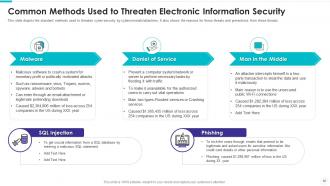
Slide 30: This slide depicts the standard methods used to threaten cyber-security by cybercriminals/attackers.
Slide 31: This slide depicts title for two topics that are to be covered next in the template.
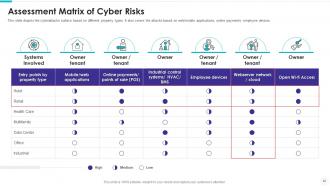
Slide 32: This slide depicts the cyberattacks surface based on different property types.
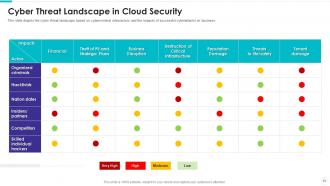
Slide 33: This slide depicts the cyber threat landscape based on cybercriminal roles/actors and the impacts of successful cyberattacks on business.
Slide 34: This slide depicts title for two topics that are to be covered next in the template.
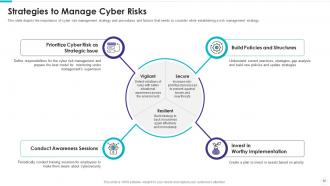
Slide 35: This slide depicts the importance of cyber risk management strategy and procedures and factors that needs to consider.
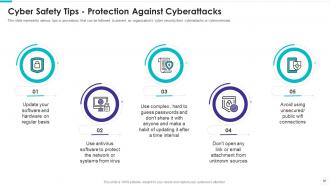
Slide 36: This slide represents various tips or procedures that can be followed to prevent an organization's cyber security from cyberattacks or cybercriminals.
Slide 37: This slide depicts title for three topics that are to be covered next in the template.
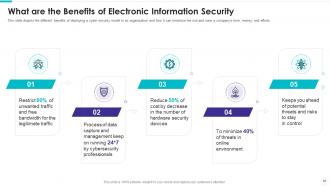
Slide 38: This slide depicts the different benefits of deploying a cyber security model in an organization and how it can minimize the risk.
Slide 39: This slide depicts the cyber protection of an organization through artificial intelligence and how it can be helpful in threat detection, etc.
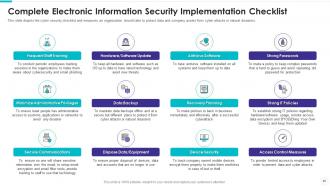
Slide 40: This slide depicts the cyber security checklist and measures an organization should take to protect data.
Slide 41: This slide depicts title for twelve topics that are to be covered next in the template.
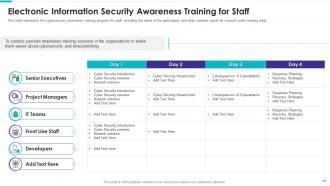
Slide 42: This slide represents the cybersecurity awareness training program for staff, including the name of the participants.
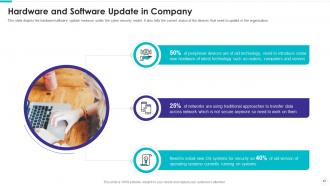
Slide 43: This slide depicts the hardware/software update measure under the cyber security model.
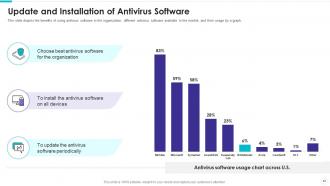
Slide 44: This slide depicts the benefits of using antivirus software in the organization, different antivirus software available in the market, etc.
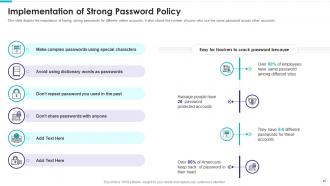
Slide 45: This slide depicts the importance of having strong passwords for different online accounts.
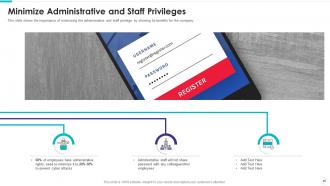
Slide 46: This slide shows the importance of minimizing the administrative and staff privilege by showing its benefits for the company.
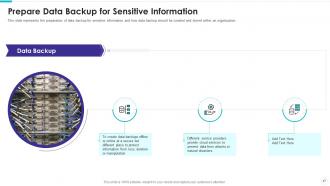
Slide 47: This slide represents the preparation of data backup for sensitive information and how data backup should be created and stored within an organization.
Slide 48: This slide depicts what factors will be considered while preparing a recovery planning of an organization to come back to business quickly and effectively.
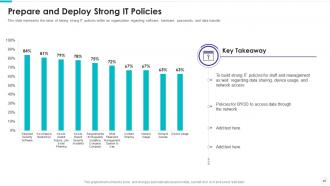
Slide 49: This slide represents the value of having strong IT policies within an organization regarding software, hardware, passwords, and data transfer.
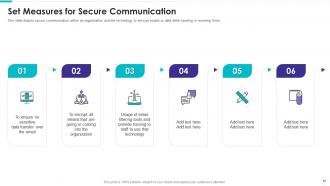
Slide 50: This slide depicts secure communication within an organization and the technology to encrypt emails or data while sending or receiving them.
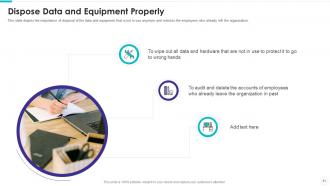
Slide 51: This slide depicts the importance of disposal of the data and equipment that is not in use anymore.
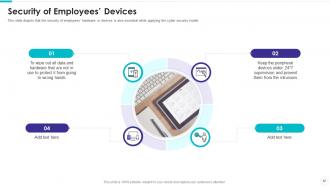
Slide 52: This slide depicts that the security of employees’ hardware or devices is also essential while applying the cyber security model.
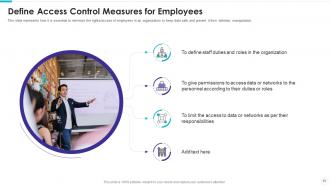
Slide 53: This slide represents how it is essential to minimize the rights/access of employees in an organization to keep data safe.
Slide 54: This slide depicts title for three topics that are to be covered next in the template.
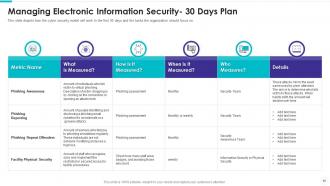
Slide 55: This slide depicts how the cyber security model will work in the first 30 days and the tasks the organization should focus on.
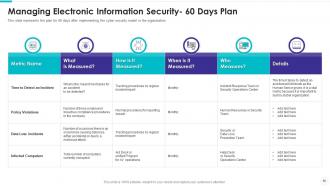
Slide 56: This slide represents the plan for 60 days after implementing the cyber security model in the organization.
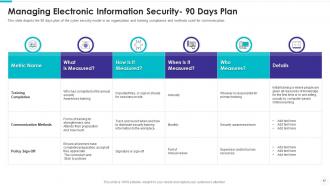
Slide 57: This slide depicts the 90 days plan of the cyber security model in an organization and training compliance and methods used for communication.
Slide 58: This slide depicts title for two topics that are to be covered next in the template.
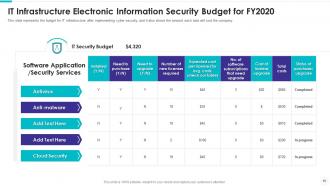
Slide 59: This slide represents the budget for IT infrastructure after implementing cyber security, and it also shows the amount each task will cost the company.
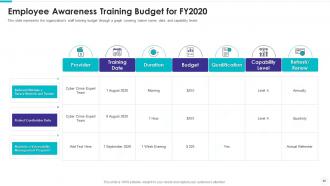
Slide 60: This slide represents the organization's staff training budget through a graph covering trainer name, date, and capability levels.
Slide 61: This slide depicts title for two topics that are to be covered next in the template.
Slide 62: This slide shows the timeline for cyber security model implementation in an organization and the tasks to be performed every month.
Slide 63: This slide depicts the cyber security training roadmap. It also shows the plan and guidelines to conduct an effective training program.
Slide 64: This slide depicts title for two topics that are to be covered next in the template.
Slide 65: This slide depicts the impact of cyber security training on an organization.
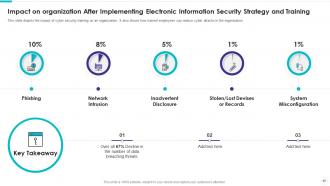
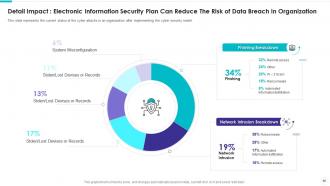
Slide 66: This slide represents the current status of the cyber attacks in an organization after implementing the cyber security model.
Slide 67: This slide depicts title for two topics that are to be covered next in the template.
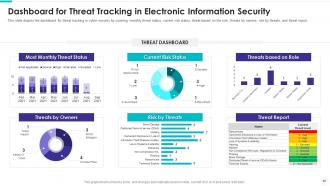
Slide 68: This slide depicts the dashboard for threat tracking in cyber security by covering monthly threat status, current risk status, etc.
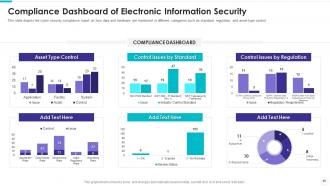
Slide 69: This slide depicts the cyber security compliance report on how data and hardware are monitored in different categories such as standard, regulation, etc.
Slide 70: This is the icons slide.
Slide 71: This slide presents title for additional slides.
Slide 72: This slide shows about your company, target audience and its client's values.
Slide 73: This slide shows details of team members like name, designation, etc.
Slide 74: This slide presents your company's vision, mission and goals.
Slide 75: This slide depicts posts for past experiences of clients.
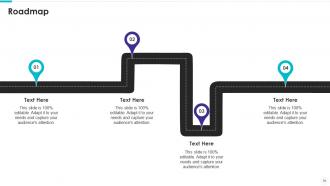
Slide 76: This slide shows roadmap.
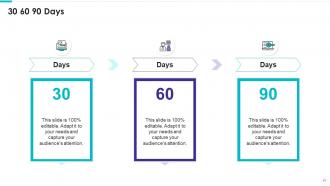
Slide 77: This slide depicts 30-60-90 days plan for projects.
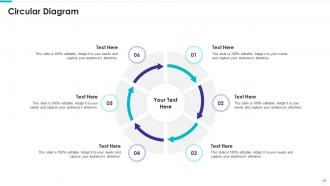
Slide 78: This slide presents circular diagram.
Slide 79: This slide shows goals of the company.
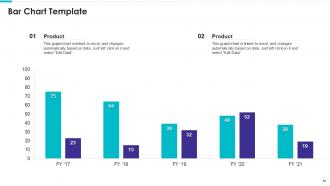
Slide 80: This slide exhibits yearly bar charts for different products. The charts are linked to Excel.
Slide 81: This is thank you slide & contains contact details of company like office address, phone no., etc.
Electronic information security powerpoint presentation slides with all 89 slides:
Use our Electronic Information Security Powerpoint Presentation Slides to effectively help you save your valuable time. They are readymade to fit into any presentation structure.















FAQs for Electronic information security
So the main thing is CIA - Confidentiality, Integrity, and Availability. Keep your sensitive stuff private, make sure nobody can mess with it, and people who need access can actually get it. There's also authentication (proving you're really you), authorization (what you're allowed to touch), and non-repudiation - basically you can't pretend you didn't do something later. Honestly, I'd start by figuring out what data you actually care about protecting. Some stuff just isn't that critical, you know? Then you can prioritize which security measures are worth implementing first instead of trying to do everything at once.
Start with a solid vulnerability assessment - scan your systems, networks, and apps to find weak spots. Automated tools like Nessus or OpenVAS catch the obvious issues, but they're honestly pretty limited. Get some pen testing done too where ethical hackers actually try breaking in. Don't skip the boring stuff either - policy reviews and checking if your employees can spot phishing emails. Oh, and physical security matters more than people think. Someone just walking out with hardware is still a massive problem. Run these assessments quarterly and definitely after big system updates.
Encryption's like having a bodyguard for your data - it scrambles everything so hackers just see gibberish even if they get their hands on it. Only people with the right "key" can actually read what's there. Banking apps, email, pretty much everything uses it now. The math behind it is actually fascinating but probably more than you need to know lol. Just make sure you're using strong stuff like AES-256 for files and TLS when things get sent over the internet. Most decent tools do this automatically these days, which is nice since it used to be way more complicated to set up properly.
So GDPR basically makes you beef up everything security-wise. Better encryption, tighter access controls, tons more documentation about data handling - the whole deal. The privacy by design thing is huge too - you can't just slap security on later, it's gotta be built in from the start. Oh and those breach notifications? 72 hours to report or you're screwed, which honestly sounds terrifying. But here's the thing - following GDPR actually strengthens your security overall. First step is mapping out where your personal data goes. Trust me, just seeing that flow will show you weak spots you didn't know existed.
Okay so you're mainly looking at malware, phishing, ransomware, and data breaches. Malware's the nasty stuff - viruses and trojans that'll steal your data or mess up systems. Phishing emails are honestly getting crazy good at fooling people into handing over passwords. Ransomware's probably the worst though - locks everything up until you pay. Don't forget insider threats from sketchy employees and DDoS attacks that basically flood your servers. Oh, and I'd definitely start with email training for your team since that's where most attacks begin. Keep everything updated too.
Skip the death-by-PowerPoint approach and do hands-on stuff instead. Phishing simulations work great - test people quarterly and coach whoever gets tricked. Cover the basics: sketchy emails, strong passwords, social engineering tricks. I swear, half these breaches happen because someone clicks that "urgent CEO email" on Friday night. Make it relevant to your actual job, not some generic scenario. Oh, and don't do it once a year then forget about it. Security awareness needs to be ongoing, otherwise people just tune out completely.
Dude, zero-trust is huge right now - basically you don't trust anyone or anything by default, even inside your network. AI threat detection is getting ridiculously good at catching weird patterns. Companies are also prepping for quantum computers that'll break today's encryption (probably won't happen for years but whatever). Passwordless stuff is finally working - fingerprints, hardware keys, all that. Honestly the biometric thing still creeps me out a bit but it's way more secure. I'd definitely look at your current setup and see how it stacks up against zero-trust principles first.
Dude, you absolutely need an incident response plan - trust me on this one. The difference between having one and winging it? Hours vs weeks of chaos while hackers party in your network. Your team needs to know who's doing what, how to talk to each other, and the exact steps when shit hits the fan. I've seen companies without plans just... panic, basically. Cover detection, containment, getting rid of the threat, then recovery. Oh and run practice drills regularly - tabletop exercises work great. You don't want people figuring out their jobs during an actual breach.
Okay so first things first - turn on multi-factor authentication everywhere. I can't stress this enough, it's like having actual locks on your doors. Encrypt your data when it's moving around and when it's just sitting there. Set up access controls so people can only see their own stuff, not everything. Most cloud providers have decent security tools built in, but honestly they're pretty much worthless if you don't set them up right. Oh and definitely turn on logging so you can spot sketchy activity before it gets bad. Start with MFA and encryption though - those two will cover like 80% of your problems right there.
So zero trust is basically "don't trust anyone, verify everything" - even stuff inside your own network. Gone are the days of trusting everything behind your firewall. Every user and device has to prove who they are for each request, which honestly sounds exhausting but makes way more sense security-wise. You'll want to start with multi-factor auth everywhere (seriously, everywhere) and figure out what your most critical stuff is first. The whole thing monitors activity constantly and only gives people the bare minimum access they actually need. Total headache to set up initially, but your future self will thank you.
Oh man, yeah that's risky. Your personal phone doesn't have all the security stuff work devices do - no encryption, remote wipe, secure email apps, etc. Super messy when you leave too because they'll need to separate work data from your personal photos and texts (awkward much?). Device gets stolen? Work stuff is just sitting there exposed. Honestly the whole BYOD thing is kind of a nightmare for everyone involved. Check if your company even allows it first, then make sure you're only using their approved apps with security settings cranked up.
Honestly, data destruction is way more complicated than people think. Get DoD-approved software to wipe hard drives multiple times - don't just delete files. Physical shredding works too if you've got the budget. SSDs are annoying because they hold onto data even after wiping, so encrypt everything first. People always forget about printers and USB drives, but those store data too! Your IT folks should keep destruction certificates for audits. Oh, and mobile devices - yeah, those need special handling. Just make a checklist for each type and train everyone properly.
Dude, first thing - make sure you're using TLS 1.3 minimum for any sensitive stuff. Multi-factor auth is a lifesaver too. I can't believe how many people still email passwords in plain text (like seriously??). Public WiFi is basically asking for trouble, so avoid it for anything important. SFTP or encrypted messaging apps work great for confidential files. Oh, and double-check your certificate validation is actually working. Honestly, just audit what sensitive data you're sending right now - you'll probably find some scary stuff you didn't realize was happening.
So basically these scammers are really good at messing with your head. They'll pretend to be your boss needing something "urgent" or fake IT support asking for your password. What's sneaky is how they target normal human stuff - like you don't want to seem rude or get in trouble, right? They create fake emergencies to make you panic and act fast. Honestly the psychology behind it is kinda fascinating in a creepy way. Best thing you can do is just pause and double-check through another way - call them back or whatever - before handing over anything important.
Dude, AI is totally flipping cybersecurity on its head right now. The good news? You can catch threats super fast and even predict attacks before they hit. Some systems will auto-patch vulnerabilities which is honestly pretty sweet. But here's where it gets messy - hackers are using AI too. They're creating way more convincing phishing attempts and discovering exploits at crazy speeds. If you're still running old-school security, you're basically screwed. Your defenses need AI backing them up or you'll get steamrolled. I'd start looking into AI threat detection for whatever systems you're running.
-
Informative design.
-
Amazing product with appealing content and design.