


Escalation matrix escalation level designation email desk phone escalate





Try Before you Buy Download Free Sample Product
 Impress Your
 Audience
 100%
100% Editable
 Save Hours
 of Time


Our Escalation Matrix Escalation Level Designation Email Desk Phone Escalate don't allow falsehoods to get across. They can act as a good filter.
People who downloaded this PowerPoint presentation also viewed the following :
Content of this Powerpoint Presentation
Description:
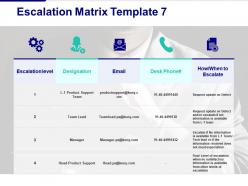
The image shows a PowerPoint slide titled "Escalation Matrix Template 7," designed to outline a structured process for escalating issues within an organization. The slide is formatted as a table with five columns, each providing critical information for each level of escalation:
1. Escalation level:
Enumerates the levels from 1 to 4, indicating a hierarchy or order of escalation.
2. Designation:
Specifies the job title associated with each level, such as L-1 Product Support Team, Team Lead, Manager, and Head-Product Support.
3. Email:
Provides the email addresses for contacting individuals at each escalation level.
4. Desk Phone#:
Lists the phone numbers for direct communication.
5. How/When to Escalate:
Describes the circumstances under which to escalate to each level, from requesting updates on defects to the final escalation step if satisfactory information is not received.
Use Cases:
This escalation matrix is a crucial tool for issue resolution and can be used in various industries:
1. Information Technology:
Use: Managing technical support queries and IT issues.
Presenter: IT Support Manager
Audience: IT staff, all employees
2. Healthcare:
Use: Addressing patient care incidents or operational concerns.
Presenter: Clinical Operations Manager
Audience: Medical staff, administration
3. Finance:
Use: Handling client account issues or service interruptions.
Presenter: Customer Service Manager
Audience: Support staff, financial advisors
4. Telecommunications:
Use: Resolving network outages or service degradation.
Presenter: Network Operations Center Manager
Audience: Technical support team, customer service
5. Retail:
Use: Dealing with product complaints or service feedback.
Presenter: Retail Operations Head
Audience: Store managers, customer relations team
6. Hospitality:
Use: Responding to guest services and accommodation issues.
Presenter: Hotel General Manager
Audience: Front desk, service staff
7. Manufacturing:
Use: Escalating production line or equipment problems.
Presenter: Plant Manager
Audience: Maintenance team, production supervisors
Escalation matrix escalation level designation email desk phone escalate with all 5 slides:
Our Escalation Matrix Escalation Level Designation Email Desk Phone Escalate fortify belief. Feel assured that you can handle it.



FAQs for Escalation matrix escalation level designation email
Think of an escalation matrix as your emergency contact list for when projects blow up. You map different problems to the right people - budget issues go here, tech problems go there, angry stakeholders over there. Trust me, when you're panicking at 2pm on a Friday, you don't want to be figuring out who handles what. It stops you from bugging the CEO about tiny stuff or trying to fix massive issues with your teammate who can't actually do anything about it. Oh, and definitely include response times so people know what to expect. Set it up early!
Dude, it's basically a roadmap for who should handle what when stuff hits the fan. No more random Slack messages to whoever you think might know something (guilty as charged lol). Clear channels mean faster fixes since people aren't just passing problems around like hot potatoes. Your matrix should spell out response times too - otherwise Karen from accounting will still email the CEO about her printer. Honestly, the biggest challenge is getting people to actually use it instead of their usual chaos. But when it works? Way fewer things slip through the cracks.
So you need the severity levels first - P1 critical stuff down to P4 minor issues. Then map out your timeframes for each one and who gets contacted when. Don't forget the criteria for what actually counts as each level, because people will debate everything otherwise. Communication methods matter too - sometimes you gotta call, not just send an email into the void. Show the whole chain from your boss up to the big bosses, plus any specialists for weird technical problems. Oh and update those contact lists! I've seen people try escalating to someone who quit ages ago. Awkward.
So basically, IT escalates when systems break - network crashes, boom, straight to the senior guys. Healthcare? Totally different game. Patient safety drives everything, so even small stuff can blow up fast if there's any risk. Healthcare timelines are insane too - you're looking at minutes, not hours. Honestly, I'd skip copying someone else's matrix structure. Better to figure out what actually triggers escalations in your specific industry first. Each field has its own weird priorities that don't translate well.
Think of an escalation matrix as your "oh shit" roadmap for when risks blow up. It shows you exactly who to call at different severity levels - your boss for medium stuff, the VP for disasters (pray that never happens lol). Without one, you're basically improvising during a crisis, which... yeah, that goes poorly. The matrix gives clear decision authority at each level so nothing slips through. Honestly, I've seen too many projects crash because nobody knew who was supposed to handle what when things went sideways. Set yours up now and drill everyone on their roles - you'll thank yourself later when you're not scrambling.
Yeah, escalation matrices are seriously helpful for crisis stuff. When everything's going sideways, you'll know exactly who to call instead of panicking about whether to bug your manager or go straight to the VP. Honestly, I've watched teams waste like 2 hours just figuring out who should handle what - it's painful to see. The matrix basically gives you clear triggers for each escalation level. Just make sure your team actually knows it exists and can find it fast. We keep ours pinned in Slack, but whatever works for you guys.
Don't make your escalation rules too strict - like forcing everything through level 1 first. That's a nightmare when something's actually on fire. Also define your triggers clearly because nobody knows when "urgent" becomes "drop everything NOW." Training matters too, otherwise people will either panic-escalate tiny issues or let real problems fester. Set time limits for each level. Honestly, I've seen teams argue for 20 minutes about whether something counts as critical while the issue gets worse. Start basic with obvious triggers and deadlines, then adjust when you see what actually breaks.
Basically you want to create a matrix - impact vs urgency. System outage hitting everyone? That's instant Level 3. One person can't reset their password? Level 1 is fine. I'd put business impact on one side, time sensitivity on the other. But here's the thing - sometimes you gotta escalate based on your team's skills too. A "minor" database issue might jump levels because your Level 1 folks have no clue about SQL stuff. Start with your most common problems and map those out first. Then actually test it with real scenarios - you'll probably tweak it a bunch once you see how it works in practice.
Depends what you're already using tbh. Excel or Google Sheets are perfect for basic stuff - everyone knows how to use them. Project management tools like Asana or Monday.com are better if you want automated alerts and tracking. ServiceNow's great for customer support escalations specifically. Oh, and Zendesk too if that's your thing. Honestly though? I've watched teams build these crazy elaborate systems and then never touch them again lol. My advice is start with whatever your team's comfortable with first, then get fancier later if you actually need it.
Honestly? Check it every quarter minimum. But here's the thing - whenever someone leaves your team or joins a project, update it right away. Contact info goes stale so fast it's ridiculous. I can't tell you how many times I've watched issues sit there because people were calling someone who quit like 3 months ago. Super frustrating. After any big incident, take a look too - did the escalation actually work or was it a mess? Set a reminder and make someone own it. Trust me, you'll thank yourself later when stuff actually flows where it needs to go.
So you'll want to hit three main things: teach them the matrix structure, help them spot when escalation's actually needed, and nail down the protocols. Honestly, most people assume it's just about having the right phone numbers - but figuring out *when* to escalate is way trickier. Have them practice identifying how severe issues are, what the response times should be, plus proper documentation before they pass things up. Role-playing works great for this stuff. Oh, and make sure everyone's got backup contacts too, not just the main ones. Start with a solid workshop, then maybe refresh quarterly or something.
So feedback loops basically stop your escalation process from being this rigid, one-way thing. Track what happens after each escalation - did it actually get fixed? How long did it take? Right people involved? You'll start seeing patterns emerge. Maybe your team's jumping the gun on certain issues way too fast (happens more than you'd think). The data shows you where to tweak your escalation rules and timing. Plus you might catch training gaps you didn't know existed. Just start simple - track resolution times and outcomes for each level you're using.
Track your resolution times first - escalated stuff should get fixed way faster. Also watch how often people are escalating things. Too much probably means your front desk team needs more training, but if nobody's escalating anything, they might be too scared to speak up. Customer satisfaction for those escalated cases tells you a lot too. Oh, and measure how long it takes to get issues to the right department - nobody wants their problem ping-ponging around forever. I'd pull these numbers monthly so you can actually spot what's working and what isn't.
Honestly, your escalation matrix is only as good as your company culture. People won't escalate stuff if they think they'll get blamed or look stupid - been there, seen that happen way too many times. But when leadership actually responds and treats escalations like normal problem-solving (because that's what they are), people use them. The key? Don't build some perfect system and hope people follow it. Look at how your team actually behaves first. Then design something that works with their tendencies, not against them. Otherwise you're just creating fancy documentation nobody will touch.
So Amazon's got this super tight escalation system - chat support bumps issues to supervisors, then specialized teams, all with specific time limits. That's why they're always so quick to respond. IT helpdesks do this constantly too, moving tickets from basic support up to actual engineers based on how complex things get. Banks are huge on this for fraud stuff - suspicious transactions get passed through like three different approval levels. Oh and here's what matters most: the good systems have clear triggers, like time deadlines or severity ratings, plus solid handoff processes. Otherwise stuff just gets lost in the shuffle.
-
Visually stunning presentation, love the content.
-
Content of slide is easy to understand and edit.