Resumo executivo Powerpoint Slide Background Image
Try Before you Buy Download Free Sample Product
Audience
Editable
of Time
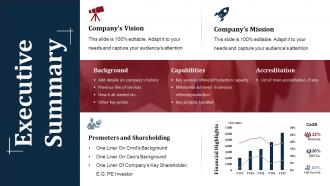
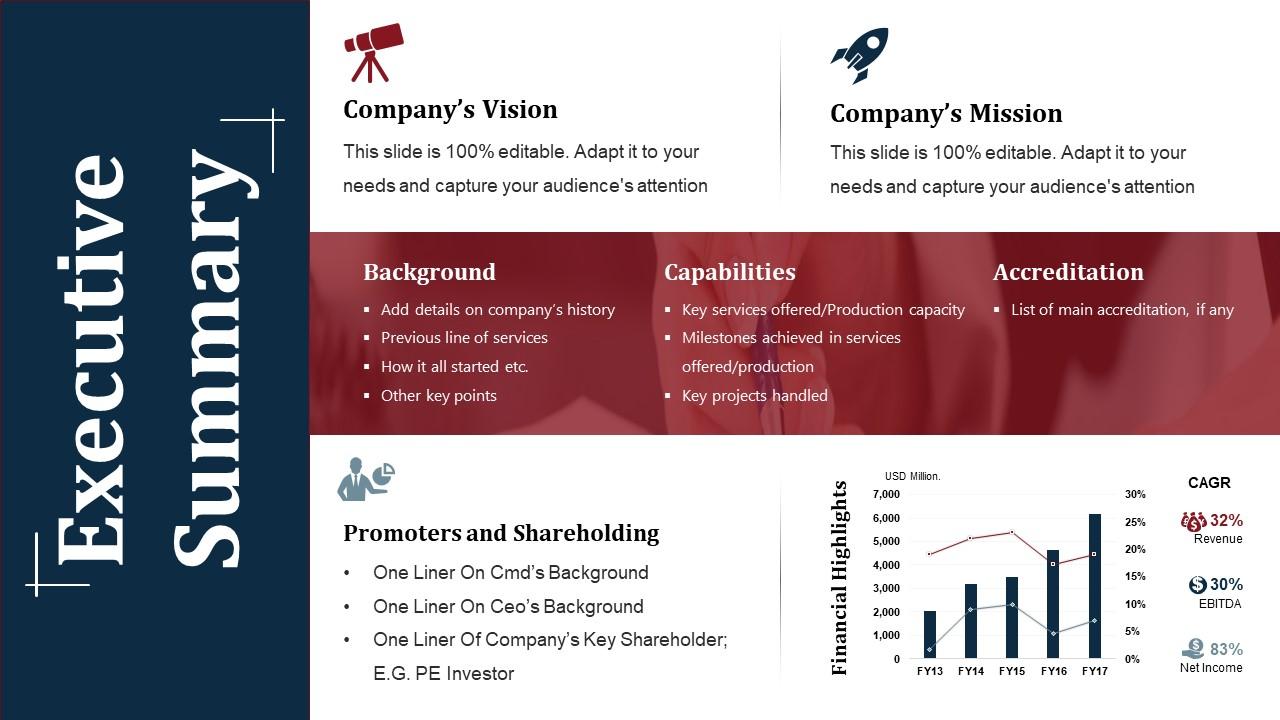
Todos nós sabemos que o resumo executivo é um resumo rápido dos principais pontos de um relatório detalhado; e por isso precisa ser claro e nítido. Nossa imagem de plano de fundo do slide PowerPoint de resumo executivo bem projetado é nosso único slide de apresentação, que serve como um modelo predefinido para seus dados, fatos e números relacionados à missão, visão, histórico, capacidades, credenciamento, acionistas, promotores e destaques financeiros da empresa. O gráfico do modelo de resumo executivo PPT exibe informações suficientes para que o palestrante e o público se familiarizem com o relatório detalhado da empresa de maneira precisa e fácil de entender. O exemplo de slide de resumo executivo do PowerPoint projetado pela equipe de slides é único e apropriado o suficiente para familiarizar o apresentador e o público com o relatório detalhado de maneira precisa e nítida. Crie um grupo que tenha uma influência dominante com nossa imagem de plano de fundo do slide de PowerPoint de resumo executivo. Ajuda a formar alianças formidáveis.
Recursos desses slides de apresentação do PowerPoint:
Apresentação da imagem de plano de fundo do slide de resumo executivo em PowerPoint. • Download gratuito de tensão possível. • Depois de baixada, a apresentação pode ser modificada para qualquer formato como JPG, JPEG, PDF, etc. • Também é compatível com vários softwares e slides do Google. • O modelo de apresentação PPT de resumo executivo fornecido pode ser facilmente usado isoladamente ou como parte de sua apresentação pré-construída. • Fique feliz em personalizar e personalizar a apresentação com as especificações da empresa. • Não há incômodo quando algum fato, figura ou texto deve ser incluído ou excluído da apresentação. • Qualidade de imagem compatível com exposição em tela ampla. • Muito apreciado e utilizado por executivos, profissionais, alunos e professores.
People who downloaded this PowerPoint presentation also viewed the following :
Resumo executivo Imagem de plano de fundo do slide do PowerPoint com todos os 5 slides:
Aconselhe pessoas criativas com nossa imagem de fundo do slide do PowerPoint com resumo executivo. Oriente-os sobre como exibir a criatividade.
FAQs for Executive summary powerpoint
Keep your exec summary background super simple - white or light gray works great. Company colors are fine too, just nothing bold. I learned this the hard way when my boss couldn't read half my slides because I used some fancy textured background (rookie mistake lol). Dark text on light backgrounds is your safest bet. Honestly, execs scan slides so fast that busy patterns just get in the way. Test it on a few screens first since colors look different everywhere. The content should grab attention, not your background. Simple template = happy executives.
Color psychology is huge for exec summaries - people judge your data before you even speak. Blue's your best friend for financial stuff since it screams trustworthy. Red works for urgent calls-to-action, but don't overdo it or you'll look like you're panicking. Green's solid for growth metrics and positive trends. Honestly, yellow drives me crazy - it's impossible to read and looks cheap on slides. Stick with 2-3 colors tops and make sure they actually match what you're trying to say. Test your presentation beforehand too, because sometimes colors that seem perfect end up being distracting as hell.
Honestly just go with Calibri, Arial, or Helvetica - they're clean and won't give anyone a headache trying to read your slides. Skip anything decorative because executives hate that stuff. I made this mistake once with some "elegant" font that looked awful when we projected it (never again lol). Body text should be 24pt minimum, headers 32pt or bigger so the people stuck in back rows can actually see. Oh and if your company has standard presentation fonts, just use those. Way easier than overthinking it and you won't accidentally break brand rules.
Honestly, less is more with backgrounds. I'd go with super light watermarks or maybe some faint shapes - basically anything that won't fight your text for attention. Your company colors work great, just dial the opacity way down to like 10-20%. I made this mistake once where my gradient was too bold and you could barely read the slides! Simple geometric lines are solid too. Here's the test: step back from your laptop. Can you still read everything without squinting? If your background is more interesting than what you're actually saying, tone it down.
Go with visuals that scream success - upward arrows, mountain peaks, city skylines, that kind of stuff. Execs eat up charts and data viz since they're obsessed with numbers that actually mean something. Skip anything too artsy or cluttered though. These people are busy and honestly pretty impatient. Clean geometric patterns work well for showing growth. Handshakes, targets, even simple abstract shapes in your brand colors will back up your points without being distracting. Just don't throw in random images that have nothing to do with what you're saying - that's amateur hour.
So basically make a master template first - lock down your colors, fonts, logo spot, all that stuff. Save it as a .potx file so nobody can mess it up later. Keep your margins and text consistent across slides. Oh and don't go crazy with different backgrounds halfway through (I see people do this ALL the time and it looks terrible). Two or three colors max, same header/footer everywhere. Once you're done, flip through the whole thing super quick to catch any weird slides that don't match the rest.
Keep your logos tiny - like 1-2 inches max. Stick them in a corner or along the top edge where they won't fight with your content. I've literally watched presentations where massive logos hijacked half the slide real estate (so painful). If you've got multiple partner logos, line them up horizontally instead of stacking them. Consistency across slides is clutch. Your text and charts should be doing the heavy lifting, not the branding. Pro tip: try dropping the logos to 10-15% opacity if they're still grabbing too much attention.
Oh yeah, super easy to customize those! First thing - go to View > Slide Master, that's honestly a game changer because whatever you change there applies to everything. Swap the colors to match your brand, throw in your logo, and definitely replace those boring generic icons with ones that actually fit your industry. The fonts matter too - pick something that matches your company vibe. I always mess with the background textures a bit, makes it feel less... templat-y? You can restructure the whole layout if needed. Way better than doing each slide individually, trust me.
Dude, whitespace is a game changer for exec summaries. Your slide needs room to breathe - cramped text makes leadership's eyes glaze over immediately. I always go way overboard with margins at first (feels weird but trust me). Don't jam everything together. White space guides people's attention naturally through your key points. It's like... you know when someone pauses while talking? Same concept but visual. You can tighten things up later if needed, but start loose. Way better than overwhelming them with a wall of text.
Honestly, less is more with charts. Stick to 1-2 metrics max - I learned this the hard way after watching people zone out during presentations. Big trend lines work great, or simple bar charts. Those multi-axis things? Total eye-glazers. Your colors should match the slide background, and definitely add a headline that spells out what people should notice. Place charts where they support your story, not distract from it. The 5-second rule is real - if someone can't get it that fast, you've overcomplicated things.
Ugh, the worst thing you can do is pick some crazy busy pattern or neon colors. Executives will literally hate you for making them squint. I learned this the hard way lol. Dark backgrounds look cool but they're awful when you need to print handouts (which always happens last second). Skip gradients too - they make charts impossible to read. Just go with clean white, light gray, or maybe your company colors if they're not too loud. Your actual content needs to shine, not the background. Oh and definitely test it on the projector first! Colors look totally different projected vs on your laptop screen.
Keep it clean but not boring - that's the sweet spot. Subtle gradients work great, maybe some minimal shapes or one accent color. Flashy stuff just makes people zone out (learned this the hard way). Your content's the main event, so don't go overboard with design elements. A sleek sidebar here, professional icons there, consistent brand colors throughout. I always test designs by thinking: would this look good printed out AND in a conference room? If yes, you're golden. Trust me, polished beats disco ball every time.
Most people are going with clean, minimal stuff right now - white or light gray backgrounds are your safest bet. You'll see some companies doing subtle gradients or geometric patterns, which can look pretty sharp if they match the branding. Dark backgrounds? They look cool but honestly, I'd avoid them unless you know nobody's printing anything out. Some folks are doing soft color overlays too. Just don't pick something that fights with your actual data - executives want to focus on the numbers, not wonder what's happening behind them. Keep it simple and you can't really go wrong.
Honestly, contrast is everything for exec summary slides - shoot for at least 4.5:1 between your text and background colors. Solid colors work way better than busy images that make people squint. Don't rely just on color either since colorblind folks won't catch it. I'm weirdly obsessive about testing slides in grayscale first - saved me so many times. Keep your fonts big (18pt minimum) and stick with clean ones like Arial. Oh, and use those online contrast checker tools! They're actually pretty helpful and you won't have to redo everything later.
Honestly, PowerPoint's designer thing has gotten way better - I'd try that first. Canva's solid if you want templates that don't scream "corporate template
-
Perfect template with attractive color combination.
-
Commendable slides with attractive designs. Extremely pleased with the fact that they are easy to modify. Great work!