Exemples de présentation PPT de résumé exécutif

Rating:
85%
Executive summary ppt presentation examples
Slide 1 of 5
Favourites Favourites

Try Before you Buy Download Free Sample Product

Audience Impress Your
Audience
Editable 100%
Editable
Time Save Hours
of Time
The Biggest Sale is ending soon in
0
0
:
0
0
:
0
0
Rating:
85%

Caractéristiques de ces diapositives de présentation PowerPoint :

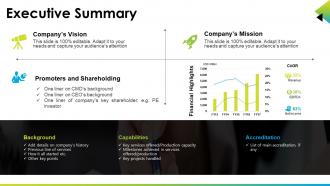
La conception de présentation haute résolution est facile à représenter et à partager avec le public. Le diagramme PPT est facile à modifier car des éléments tels que la police, les couleurs et la forme sont modifiables. Le téléchargement est hâtif, ce qui permet d'économiser du temps et des efforts. Adaptez-le en injectant le nom commercial et la conception de la société. Affichage au format Standard et Widescreen. La conception de la présentation est totalement réactive avec les diapositives Google. La diapositive PowerPoint PPT est livrée avec une approche créative et professionnelle.

Contenu de cette présentation Powerpoint

FAQs for Executive summary

Ok so hit these five things: problem, solution, benefits with actual numbers, timeline, and what you need from them. Make the problem super clear first - why should they care? Then your solution, but keep it simple. Executives eat up ROI data, so throw in real numbers if you've got them. Show a timeline with major milestones (honestly this part always feels like guesswork but they want it). End with your ask - money, people, whatever. Each section should be max 2 slides because their attention spans are terrible. If you can't pitch it in 10 minutes, you're overthinking it.

Dude, visuals are a game-changer for exec summaries. Nobody wants to stare at a wall of text when they're trying to understand your data quickly. Charts show trends instantly. Graphs make comparisons obvious. Your boss can scan an infographic in seconds instead of hunting through paragraphs for the good stuff. I always use the 5-second test - if someone can't get your main point that fast, your visual is too complicated. Dashboards work great for showing key metrics at a glance. Honestly, I've seen people completely ignore reports without visuals, but they'll actually engage when you make the info easy to digest.

Honestly, stick to 5-7 minutes max. Executives are crazy busy and their minds wander fast - I've watched people lose rooms in like 3 minutes flat. If you can't hit your main points in under 10 minutes, you're probably trying to cram too much in there. Keep it to 3-5 slides tops: problem, solution, impact. That's it. Oh, and definitely practice timing yourself beforehand because nothing's worse than rushing through your ending or going way over. I learned that one the hard way lol. Trust me, shorter is always better with these presentations.

Yeah, each industry has its own obsessions when it comes to exec summaries. Tech bros want all the metrics - user growth, engagement rates, product timelines. Healthcare? They're paranoid about compliance and patient outcomes (rightfully so). Finance people live and breathe ROI projections and risk analysis. Retail focuses on customer demos and seasonal patterns. Honestly, pharma execs only care if you're hitting FDA deadlines, while startup founders just want engagement numbers. The trick is figuring out what your specific audience loses sleep over, then give them exactly that data.

Honestly, storytelling makes all the difference in exec presentations. Nobody wants another data dump - they'll zone out completely. Structure it like you're telling a friend about something that happened: "We had this problem, discovered some crazy stuff, here's what we're doing about it." That progression keeps them hooked way better than just throwing random insights at them. Build some tension around the challenge first, then your solution feels like the obvious next step instead of just another recommendation they might ignore. Makes the whole thing stick in their heads too.

Your charts need to actually tell the story, not just look pretty on slides. Pick 2-3 visuals max that back up your main points - revenue trends, market share, whatever matters most. Bar charts and line graphs are your friends here. Pie charts? Skip them - nobody wants to decode tiny slices during a presentation. Keep everything clean with simple labels and don't go crazy with colors. Here's the test: can someone get your point in 5 seconds? If not, simplify it. Oh, and save those detailed data tables for the appendix. Always lead with your insight first, then show the chart.

Honestly, the worst thing you can do is cram everything in there like you're writing a novel. Executives hate dense walls of text - they'll just skip right over your main points. Start with your big recommendation right up front, not some boring background stuff. And please don't make it 15 slides long! I've seen people do this and call it an "executive summary" which is just... no. Keep it under 6 slides max. Also ditch the corporate speak - nobody wants to decode your jargon when they're already pressed for time. You've basically got 3 minutes to sell your idea, so make every word count.

Figure out who's actually making the decisions first - could be executives, department heads, whoever has final say on your topic. Then think about what keeps them up at night: usually money, risk, or big picture strategy stuff. Don't ignore the people who whisper in their ear though! Those influencers matter more than you'd think. Once you know the crowd, match your presentation to their world. Executives want high-level impact, while technical folks need the nitty-gritty details. Oh, and definitely get that attendee list ahead of time - nothing's worse than realizing you prepped for the wrong audience when you're already standing there.

Honestly, just do a clean one-pager. Hit the basics: problem, solution, market size, business model, traction, team, and your funding ask. Two to three bullet points per section – investors have zero attention span these days, it's wild. Skip the fancy graphics unless you have killer numbers that actually matter. Make it scannable, not some dense report nobody wants to read. Most startups that get funded use either a simple slide deck or just a well-structured doc. Oh, and lead with your traction and metrics if they're solid – that stuff needs to jump out immediately.

Start with your big "aha" moment and what they should do about it. Nobody cares about your process - they want the headline first. Pick your top three findings, give one solid piece of proof for each, then boom - next steps. Honestly, I've seen too many presentations die because people think more slides = more impressive. Wrong. Cut anything that doesn't directly prove your point. It's like breaking news to a friend - you don't start with "so I was walking to the store..." You lead with "guess what happened!" Then wrap up with actions they can actually take tomorrow.

Mix up how you deliver stuff and get them involved. Throw in rhetorical questions, use that rule of three thing for main points, and share quick stories - executives eat that up honestly. Don't just read off slides like a robot. Pause for effect, make eye contact. I throw in "show of hands" moments or quick polls to break things up when it gets heavy. Stay energetic even if you're freaking out inside. Watch their faces - if they're checking phones, you're losing them. Oh, and always have a shorter version ready because meetings never go as planned.

Honestly, anonymous surveys work best - ask specific stuff like pacing and clarity, not just "how was it?" Right after presenting, do quick verbal check-ins while it's fresh. Here's what I've learned though: asking "what would you cut?" gets you way better feedback than generic questions. Super useful. Follow up with a few people individually within the week to dig deeper. Don't make some crazy long evaluation form - just 3-4 targeted questions so people will actually fill it out. The easier you make it for them to be honest, the better insights you'll get.

Honestly, just go with PowerPoint. Yeah it's boring but execs are used to it and it handles charts/graphs without being weird about it. Google Slides is solid if your team needs to jump in and edit stuff together. Oh and Canva - don't sleep on it, their templates actually look professional even if you have zero design skills. Sometimes I wonder how I survived presentations before finding it lol. Prezi's cool for fancy storytelling but only if you want to stand out. My take? Use whatever software they're already comfortable with. Last thing you want is technical difficulties when you're presenting Q3 numbers.

So basically you're taking your full report and cramming it into like 5-10 slides. Skip all the methodology stuff and detailed analysis - executives honestly don't have time for that anyway. Just hit your main findings, what you concluded, and what they should do about it. Think elevator pitch version of your research. Same basic structure as the full thing, but you're cutting maybe 80% of the detail? I learned this the hard way after watching people's eyes glaze over during a 35-slide presentation once. Focus on decisions that need to happen and next steps. That's really what they care about.

Look at Airbnb's Series A deck - they jumped straight into market size and traction numbers. Smart move. Healthcare pitches hit different though; 23andMe nails it by opening with patient stories instead of boring stats. Finance is trickier (regulatory stuff is painful but investors need it). Retail? Lead with unit economics and customer acquisition costs every time. Honestly, format doesn't matter as much as solving whatever problem keeps your audience awake at 3am. Find a deck from someone in your space and just steal their opening slide structure. Works way better than overthinking it.

Ratings and Reviews

85% of 100
Review Form
Write a review
Most Relevant Reviews
  1. 80%

    by Sreeroop Sen

    Excellent
  2. 80%

    by William King

    Nice and innovative design.
  3. 80%

    by O'Kelly Phillips

    Out of the box and creative design.
  4. 100%

    by ryan basly

    to work

4 Item(s)

per page: