

Firewall As A Service Fwaas Powerpoint Presentation Slides




Try Before you Buy Download Free Sample Product
 Impress Your
 Audience
 100%
100% Editable
 Save Hours
 of Time


This Firewall-as-a-Service FWaaS PPT includes a traditional firewall overview, limitations, and potential threats in modern network security. This Next-Generation Firewalls PowerPoint presentation demonstrates the key features, global market analysis, emerging trends, and benefits of Firewall-as-a-Service. Additionally, it covers the different types of services FWaaS security technology provides. This cloud firewall PPT also demonstrates the difference between Firewall-as-a-Service and other security technologies such as traditional firewalls, cloud firewalls, etc. It discusses the advantages of opting for FWaaS over next-generation firewalls. Furthermore, the Ingress traffic module explains the architecture and working of Firewall-as-a-Service in cloud security. It discusses the logical components of FWaaS implementations and their relationship with Secure Access Service Edge SASE. Moreover, this Egress traffic template covers cloud security using an FWaaS deck containing sections about threat mitigation through FWaaS, ingress and egress traffic flow, configuration, and different versions of FWaaS. It also illustrates a complete plan to integrate Firewall-as-a-Service into organizations, along with the budget, training, best practices, and top solution providers of FWaaS. Lastly, this virtual firewall deck comprises a roadmap, a 30-60-90-day plan, a timeline, a checklist for implementing FWaaS in the organization, and a dashboard to monitor their performance. Download our 100 percent editable and customizable template, also compatible with Google Slides.
People who downloaded this PowerPoint presentation also viewed the following :
Content of this Powerpoint Presentation
Slide 1: This slide introduces Firewall-as-a-Service (FWaaS). State your company name and begin.
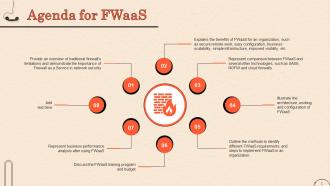
Slide 2: This is an Agenda slide. State your agendas here.
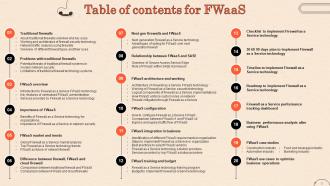
Slide 3: This slide shows Table of Content for the presentation.
Slide 4: This slide shows title for topics that are to be covered next in the template.
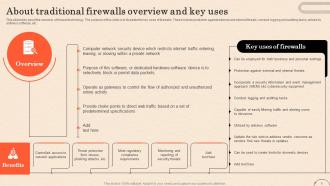
Slide 5: This slide talks about the overview of firewall technology. The purpose of this slide is to illustrate the key uses of firewalls.
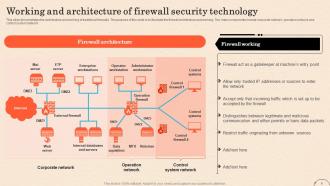
Slide 6: This slide demonstrates the architecture and working of traditional firewalls. The purpose of this slide is to illustrate the firewall architecture and working.
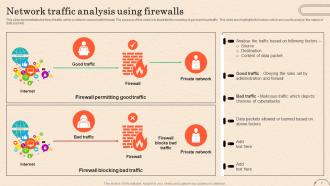
Slide 7: This slide presents the flow of traffic within a network secured with firewall. The purpose of this slide is to illustrate the meaning of good and bad traffic.
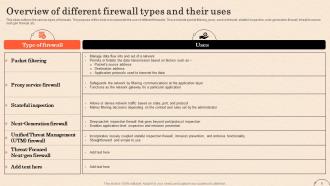
Slide 8: This slide outlines the various types of firewalls. The purpose of this slide is to elaborate the use of different firewalls.
Slide 9: This slide shows title for topics that are to be covered next in the template.
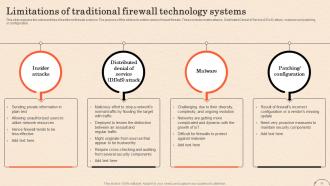
Slide 10: This slide highlights the various limitations of traditional firewall systems. The purpose of this slide is to outline the different issues of traditional firewalls.
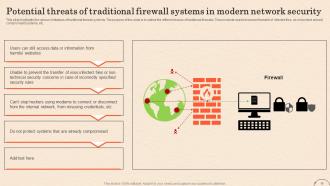
Slide 11: This slide explains the vulnerabilities of traditional firewall systems. The purpose of this slide is to outline various firewall threats.
Slide 12: This slide shows title for topics that are to be covered next in the template.
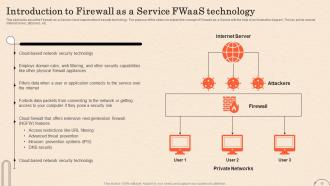
Slide 13: This slide talks about the Firewall-as-a-Service cloud-based network security technology.
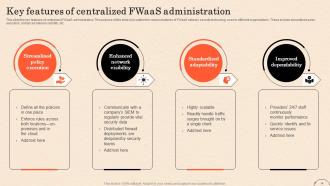
Slide 14: This slide the key features of centralized FWaaS administration. The purpose of this slide is to outline the various features of FWaaS network security technology.
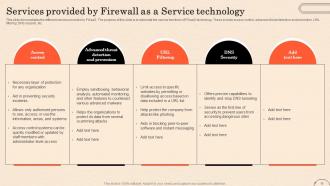
Slide 15: This slide demonstrates the different services provided by FWaaS. The purpose of this slide is to elaborate the various functions of FWaaS technology.
Slide 16: This slide shows title for topics that are to be covered next in the template.
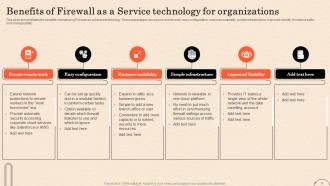
Slide 17: This slide demonstrates the benefits of employing Firewall-as-a-Service technology.
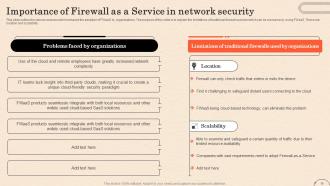
Slide 18: This slide outlies the various reasons which enhance the adoption of FWaaS by organizations.
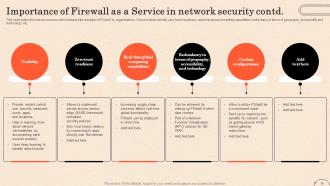
Slide 19: This slide presents the various reasons which enhance the adoption of FWaaS by organizations.
Slide 20: This slide shows title for topics that are to be covered next in the template.
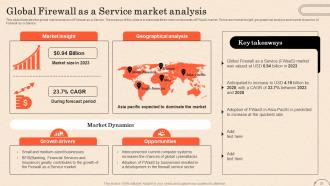
Slide 21: This slide illustrates the global market analysis of Firewall-as-a-Service.
Slide 22: This slide outlines the top Firewall-as-a-Service trends. The purpose of this slide is to briefly explain the top current FWaaS trends.
Slide 23: This slide shows title for topics that are to be covered next in the template.
Slide 24: This slide demonstrates the difference between regular firewalls and Firewall-as-a-Service.
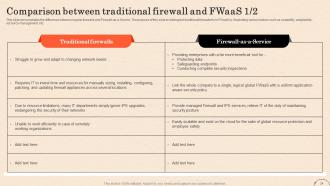
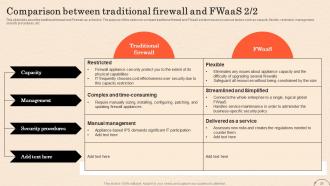
Slide 25: This slide talks about the traditional firewall and Firewall-as-a-Service. The purpose of this slide is to compare traditional firewall and FWaaS solution.
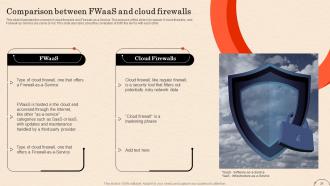
Slide 26: This slide illustrates the concept of cloud firewalls and Firewall-as-a-Service.
Slide 27: This slide shows title for topics that are to be covered next in the template.
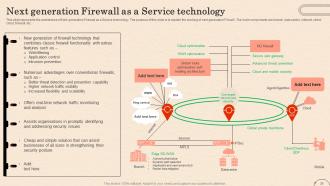
Slide 28: This slide represents the architecture of Next generation Firewall as a Service technology.
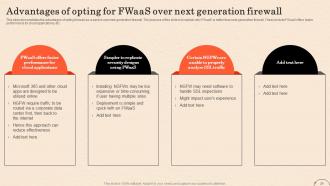
Slide 29: This slide demonstrates the advantages of opting firewall-as-a-service over next-generation firewall.
Slide 30: This slide shows title for topics that are to be covered next in the template.
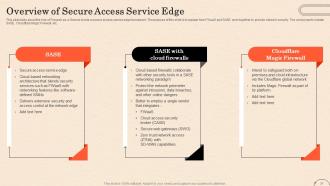
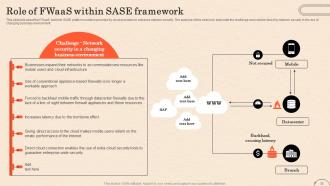
Slide 31: This slide talks about the role of Firewall-as-a-Service inside a secure access service edge framework.
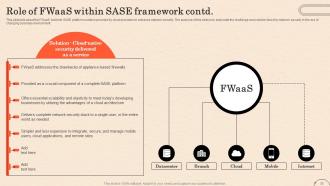
Slide 32: This slide talks about the FWaaS built into SASE platform solution provided by cloud providers to enhance network security.
Slide 33: This slide describes FWaaS built into SASE platform solution provided by cloud providers to enhance network security.
Slide 34: This slide shows title for topics that are to be covered next in the template.
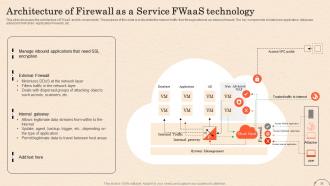
Slide 35: This slide discusses the architecture of FWaaS and its components. The purpose of this slide is to illustrate the network traffic flow through external an external firewall.
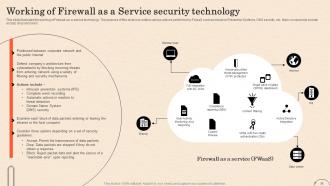
Slide 36: This slide illustrates the working of Firewall-as-a-service technology.
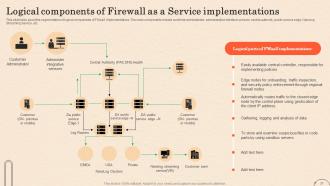
Slide 37: This slide talks about the segmentation of logical components of FWaaS implementations.
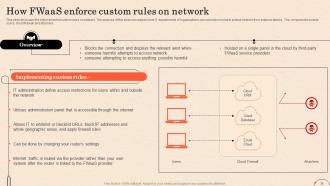
Slide 38: This slide discusses the enforcement of custom rules on network. The purpose of this slide is to explain how IT departments of organizations can set custom rules.
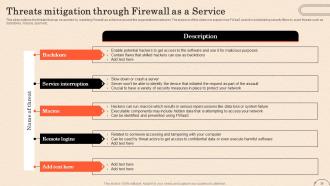
Slide 39: This slide outlines the threats that can be avoided by installing Firewall-as-a-Service around the organizational networks.
Slide 40: This slide shows title for topics that are to be covered next in the template.
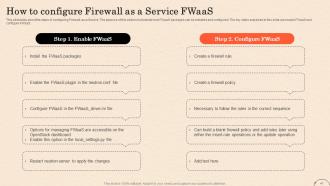
Slide 41: This slide talks about the steps of configuring Firewall-as-a-Service.
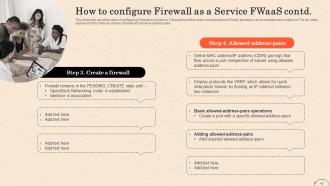
Slide 42: This slide also talks about the steps of configuring Firewall-as-a-Service.
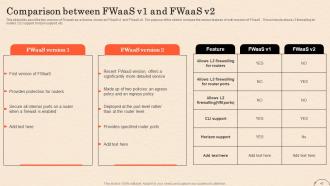
Slide 43: This slide presents about the two versions of Firewall-as-a-Service, known as FWaaS v1 and FWaaS v2.
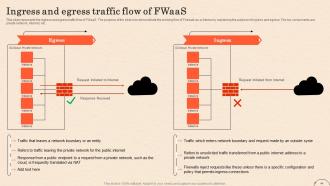
Slide 44: This slide represents the ingress and egress traffic flow of FWaaS. The purpose of the slide is to demonstrate the working flow of Firewall-as-a-Service.
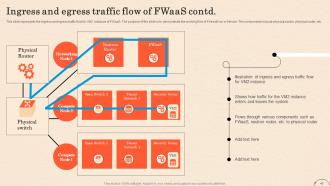
Slide 45: This slide presents the ingress and egress traffic flow for VM2 instance of FWaaS.
Slide 46: This slide shows title for topics that are to be covered next in the template.
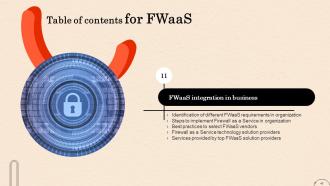
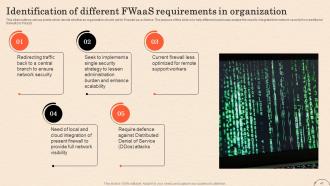
Slide 47: This slide outlines various points which decide whether an organization should opt for Firewall-as-a-Service.
Slide 48: This slide demonstrates the implementation of Firewall-as-a-Service (FWaaS) technology with careful planning and execution.
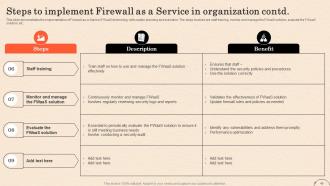
Slide 49: This slide also demonstrates the implementation of Firewall-as-a-Service (FWaaS) technology with careful planning and execution.
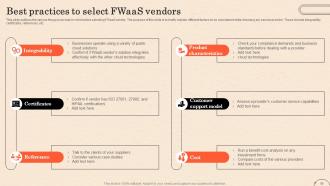
Slide 50: This slide outlines the various things to be kept in mind before selecting FWaaS vendor.
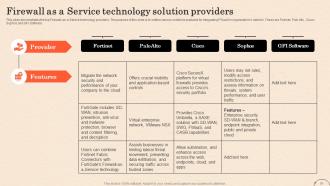
Slide 51: This slide demonstrates the top Firewall-as-a-Service technology providers.
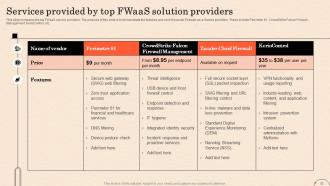
Slide 52: This slide compares the top FWaaS service providers. The purpose of this slide is to demonstrate the features and cost of popular Firewall-as-a-Service providers.
Slide 53: This slide shows title for topics that are to be covered next in the template.
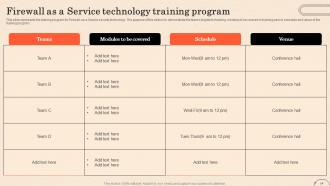
Slide 54: This slide represents the training program for Firewall-as-a-Service security technology.
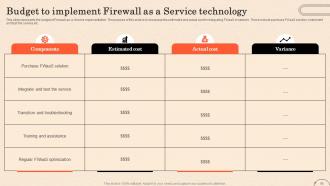
Slide 55: This slide represents the budget of Firewall-as-a-Service implementation.
Slide 56: This slide shows title for topics that are to be covered next in the template.
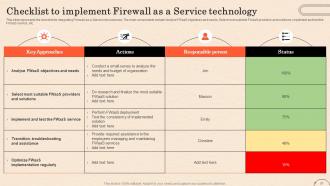
Slide 57: This slide represents the checklist for integrating Firewall-as-a-Service into business.
Slide 58: This slide shows title for topics that are to be covered next in the template.
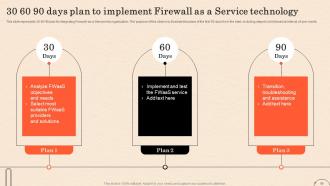
Slide 59: This slide represents 30-60-90 plan for integrating Firewall-as-a-Service into organization.
Slide 60: This slide shows title for topics that are to be covered next in the template.
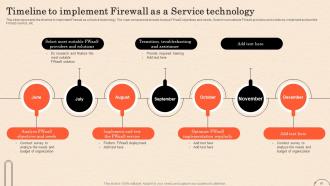
Slide 61: This slide represents the timeline to implement Firewall as a Service technology.
Slide 62: This slide shows title for topics that are to be covered next in the template.
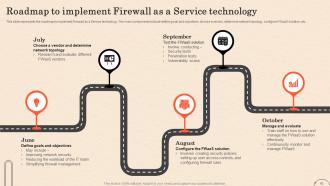
Slide 63: This slide represents the roadmap to implement Firewall as a Service technology.
Slide 64: This slide shows title for topics that are to be covered next in the template.
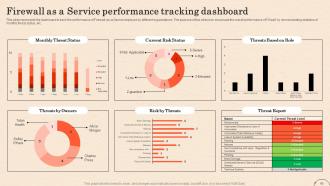
Slide 65: This slide represents the dashboard to track the performance of Firewall-as-a-Service deployed by different organizations.
Slide 66: This slide shows title for topics that are to be covered next in the template.
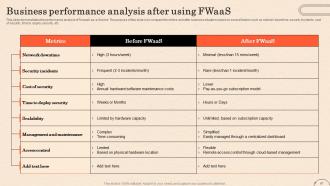
Slide 67: This slide demonstrates the performance analysis of Firewall-as-a-Service.
Slide 68: This slide shows title for topics that are to be covered next in the template.
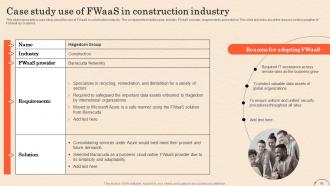
Slide 69: This slide represents a case study about the use of FWaaS in construction industry.
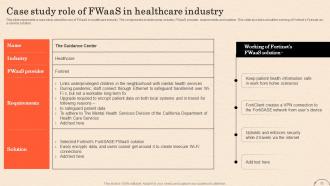
Slide 70: This slide presents a case study about the use of FWaaS in healthcare industry.
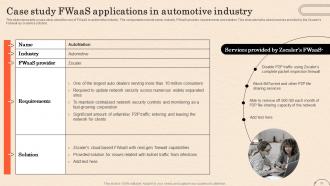
Slide 71: This slide displays a case study about the use of FWaaS in automotive industry.
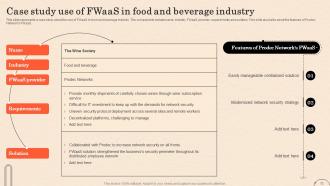
Slide 72: This slide represents a case study about the use of FWaaS in food and beverage industry.
Slide 73: This slide displays a case study about the use of FWaaS in healthcare industry.
Slide 74: This slide shows title for topics that are to be covered next in the template.
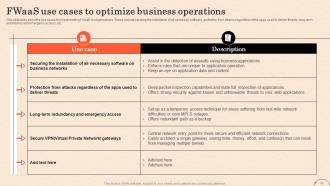
Slide 75: This slide talks about the use cases for implementing FWaaS in organizations.
Slide 76: This slide shows all the icons included in the presentation.
Slide 77: This slide is titled as Additional Slides for moving forward.
Slide 78: This is Our Target slide. State your targets here.
Slide 79: This slide contains Puzzle with related icons and text.
Slide 80: This slide shows Post It Notes for reminders and deadlines. Post your important notes here.
Slide 81: This slide presents Roadmap with additional textboxes.
Slide 82: This is a Timeline slide. Show data related to time intervals here.
Slide 83: This is a Thank You slide with address, contact numbers and email address.
Firewall As A Service Fwaas Powerpoint Presentation Slides with all 88 slides:
Use our Firewall As A Service Fwaas Powerpoint Presentation Slides to effectively help you save your valuable time. They are readymade to fit into any presentation structure.













FAQs for Firewall As A Service Fwaas
Honestly, FWaaS is pretty sweet compared to those old hardware firewalls. No more buying expensive equipment or dealing with maintenance headaches - the cloud handles all that stuff. Scaling up or down happens instantly, which is clutch when your needs change. Your remote team gets protected no matter where they work, and updates just happen automatically without breaking anything. The cost difference alone might shock you when you compare it to what you're spending now. I mean, who wants to babysit physical hardware anymore? Just crunch the numbers first - bet you'll see some serious savings there.
Dude, FWaaS is honestly a game changer - you get enterprise-grade security without having to babysit it constantly. Your team won't be stuck doing manual updates or chasing patches anymore. The coverage is consistent whether people are working from home, the office, or wherever. Plus your security policies stay uniform across everything, which is huge. I mean, beats the hell out of trying to manage a bunch of different firewalls that don't talk to each other. Your guys can actually focus on strategy instead of just keeping the lights on. Oh, and definitely map out your current weak spots first - that'll show you exactly where this thing can help most.
Honestly, I'd focus on three main things with FWaaS providers. Performance is huge - you want low latency and solid uptime because slow networks are the worst. Security features matter too, like intrusion detection and good policy controls. Also check if they handle whatever compliance stuff your industry needs (assuming that applies). Integration is where a lot of people mess up though. Test their API first and see how it works with your current security tools. No point picking something that'll fight with everything else you're running. Oh and make sure their threat intel is actually decent - some providers are pretty weak there.
So most FWaaS connects through APIs and syslog - pretty standard stuff. Your SIEM can pull in those firewall logs live. Honestly, the pre-built connectors for Splunk and QRadar are a lifesaver compared to building custom integrations (been there, not fun). You can pipe threat intel feeds to your IDS too for better correlation. Main thing is checking that your FWaaS supports whatever data formats your current security tools expect. Oh, and definitely test it in a lab first - trust me on that one. Nothing worse than breaking production because of some weird compatibility issue you didn't catch.
Honestly, FWaaS by itself won't cut it against sophisticated APTs. These attacks are way too sneaky - they blend in with normal traffic and slip right past basic firewall protection. You definitely need it as part of your defense, but stack it with endpoint detection and user behavior monitoring too. Oh, and don't skip security training for your team (people click on stuff they shouldn't). APTs require that whole layered approach. Just make sure whatever FWaaS provider you pick has solid threat intelligence and plays nice with your other security tools.
Start with subscription costs - that's gonna be your biggest expense. Monthly or yearly fees vs what you're spending now on hardware, licensing, maintenance. But honestly, the sneaky costs are what'll get you - team training, downtime during switchover, getting it to play nice with your current systems. At least you'll save money on hardware upgrades and probably won't need a dedicated firewall guy anymore (unless you really like having one around). Get quotes from a few vendors and throw together a 3-year comparison spreadsheet. That'll show you what you're really looking at.
So FWaaS is actually pretty solid for GDPR and HIPAA stuff. You get all the logging and monitoring built right in, plus automated compliance reports - honestly beats building that mess yourself. Most providers already have their certifications locked down, so you basically piggyback off their compliance work. The encryption and audit trails are there by default, which regulators love seeing. Oh, and the permission controls let you get super specific about who accesses what. I'd definitely check if they have those pre-made policy templates for your industry though - saves you time figuring out all the requirements.
Dude, scalability is what makes FWaaS actually worth it. Traditional firewalls? They basically fall apart when traffic spikes hit. You're stuck ordering new hardware and praying it arrives in time - such a headache. With FWaaS, it just grows with you automatically. Doesn't matter if you've got 50 employees or 5,000, your security stays rock solid. No more guessing how much capacity you'll need next year or buying way too much equipment upfront. Honestly, it's nice finally focusing on running your business instead of constantly babysitting your firewall infrastructure.
So basically your traffic gets sent up to the cloud for inspection instead of happening right at your network edge. That adds some latency since packets have to make that extra trip - something you don't get with on-prem boxes sitting directly in your data flow. You'll also lose some of that real-time visibility, though honestly the scalability gains usually make up for it. Instead of your own dedicated hardware doing the work, it's shared cloud resources running preset policies. Oh and definitely test latency with your critical apps first - learned that one the hard way.
Honestly, FWaaS can be a pain with latency since your traffic has to bounce through their cloud first. Costs get weird too - they charge by throughput so heavy usage gets expensive fast. You're also kinda stuck if their service goes down, which happened to us last year and wasn't fun. The control isn't as tight as on-prem either. Vendor lock-in is real. I'd maybe try a mixed setup first? Keep your important stuff behind your own firewalls and test FWaaS on the less critical workloads to see how it feels.
So you can push updates instantly through the management console whenever you need to - no waiting around. The provider handles all the backend stuff automatically too, which honestly saves so much headache compared to dealing with physical firewalls. How often you update really depends on what you're working with. Some places are tweaking policies daily, others maybe once a month. I'd definitely set up some kind of process with your team though, otherwise you'll have people stepping on each other's changes. Way better than the old days of manually patching everything yourself.
Yeah, FWaaS will add some latency - your traffic's gotta bounce through their cloud infrastructure first. It's like adding another stop on the route. High-traffic stuff or real-time apps? You'll definitely feel it, especially if you're far from their edge servers. Most enterprise providers are pretty solid though and offer performance guarantees. Honestly, I've seen companies get burned by not checking where the provider's edge locations actually are first. Pick someone with good coverage near your users and don't skimp on bandwidth planning.
FWaaS is clutch for remote work - protects your people everywhere, not just at the office. No more forcing everyone through slow VPN tunnels back to HQ (seriously, who has time for that?). Your security policies just follow users around automatically. Coffee shop, home office, wherever. Way better than trying to manage a bunch of physical firewalls across different locations. You can cover all your branch offices and remote workers from one spot. I'd start by figuring out where your remote access is weakest right now. Then see if your FWaaS can extend there.
Yeah, so basically you get stuck when your firewall setup becomes totally dependent on one provider's specific features and APIs. Switching later becomes this massive headache - and expensive too. Your security policies get so tangled up with their platform that you're basically trapped. Document everything in neutral formats from the start, that's huge. Try sticking with open standards when you can, and honestly? Don't go crazy with their fancy proprietary stuff if there's no equivalent anywhere else. Oh, and get data portability written into your contract - you'll thank yourself later. Trust me on this one.
Start with deny-all, then only allow what you actually need - seriously, going backwards from overly open rules is such a nightmare. Group similar stuff together instead of writing individual policies for every single thing. I learned this the hard way when I had like 200 random rules to manage. Document your exceptions because future you will have zero memory of why you did something weird. Use whatever automation tools your FWaaS provider has for updates and audits. Test everything in staging first - production breaks are the worst. Oh, and set up alerts so you're not finding out about issues from angry users.
-
Informative presentations that are easily editable.
-
Good research work and creative work done on every template.