


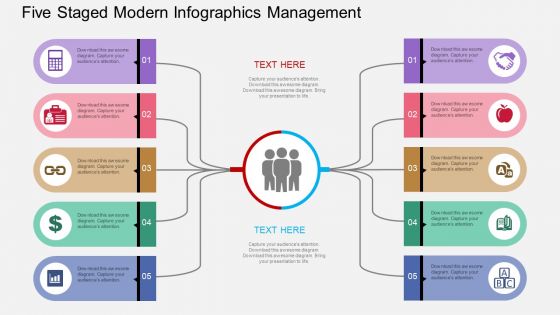
Five Staged Modern Infographics Management Flat Powerpoint Design





Try Before you Buy Download Free Sample Product
 Impress Your
 Audience
 100%
100% Editable
 Save Hours
 of Time


PowerPoint presentation is the most winning and arresting way to present the ideas and information. It is the most useful way to create and present visuals. Bearing this in mind we have come up with presentation slide designs of management. We have designed PPT infographics of management related data representation. Our experts have conceptualizing readymade management five staged modern infographic management flow especially for the executive looking for exploring their knowledge related to business and management. Don’t wait now Just click on the presentation design and spur the light to understand management.
People who downloaded this PowerPoint presentation also viewed the following :
Five Staged Modern Infographics Management Flat Powerpoint Design with all 4 slides:
Display your genius with our Five Staged Modern Infographics Management Flat Powerpoint Design. Dazzle them with exceptional acumen.
FAQs for Five Staged Modern Infographics Management
Good infographics are all about visual hierarchy - make sure there's a clear path for your eye to follow. Use minimal text because honestly, people barely glance at these things for more than 10 seconds. Colors should actually mean something, not just look random (though yeah, make it pretty too). I always sketch mine out on paper first - saves me from redesigning everything later when I realize the flow is garbage. Strong contrast between sections helps a ton. Your main point needs to be obvious right away. Keep text super scannable and punchy.
Honestly, color theory is a game changer for infographics. Pick complementary colors to create contrast and pull people's eyes exactly where you want them. I'd go with one main color for your theme, then maybe two accent colors for highlights. Red and orange are perfect for grabbing attention on important stats - they just pop. Blues and greens work better for background info since they're more chill. Don't make my rookie mistake though and use like 7 different colors because it'll look messy as hell. Three colors max is usually the sweet spot. Adobe Color or Coolors.co will save you from picking colors that clash horribly.
Ugh, the worst thing you can do is cram everything onto one slide - nobody can read that mess. Also those tiny fonts? Useless if people can't see them from more than 2 feet away. I always stick to 3-4 colors max because rainbow graphics literally hurt my eyes lol. Make sure you cite sources too or you'll look sketchy. Keep charts simple - I've seen some truly bizarre ones that confused everyone including the presenter. Focus on one clear message per graphic. Oh and definitely test it on someone who doesn't know your topic first!
Honestly, data storytelling is a game changer for infographics. You're basically turning boring number dumps into stories people actually give a damn about. Picture yourself as a tour guide instead of just slapping a map on the wall and walking away. Start with a problem your audience deals with, then show how your data fixes it. The whole beginning-middle-end thing works because people connect emotionally with narratives - they'll remember your info way longer. I learned this the hard way after making tons of charts that nobody looked at twice.
Oh man, typography can totally make or break your infographic! First thing - create a clear hierarchy with different font sizes so people know what to read first. Sans-serif fonts are usually your best bet since they stay readable when small, but honestly I've seen some beautiful serif ones work too. Don't go crazy with font choices though - stick to 2-3 max or it'll look messy. Make sure your text actually stands out against the background colors. Oh, and definitely check how it looks on mobile since that's where most people will see it anyway!
Each platform wants different sizes - Instagram's all about square (1080x1080) or vertical, but LinkedIn prefers horizontal layouts. Twitter's honestly the worst because they crop images weirdly, so put your important stuff dead center. Text size is huge though. What looks fine on your laptop screen becomes ant-sized on phones. I usually break long infographics into carousel posts for Instagram and LinkedIn - people actually engage more that way. Just make one master version first, then resize it for each platform. Way easier than starting over every time.
Canva's honestly where I'd start - their templates are pretty decent and you won't feel totally lost. Adobe Illustrator is what all the pros use if you're serious about design, but fair warning, there's definitely a learning curve there. Piktochart and Venngage sit somewhere in between - more flexibility than Canva but way less intimidating than Adobe. I'd probably mess around with Canva first to figure out what looks good, then maybe graduate to Illustrator once you've got your bearings. Oh, and don't feel bad about using templates initially - everyone does it.
Layout basically controls where people look first, then next, and so on. For processes or timelines, top-to-bottom works perfectly. Z-patterns are great for data comparisons since that's how we read anyway. Circular designs show relationships really well, but honestly they can look like a mess if you overdo it. Don't just pick what looks cool - match your layout to what you're actually showing. Like, if it's step-by-step instructions, a scattered design will confuse people. Quick test: watch someone scan your layout for five seconds. You'll immediately see if it flows right.
For social media and print stuff, just go static - loads fast, works everywhere, zero headaches. Interactive's cool when you've got complex data that people actually need to dig into. But let's be real, most of the time it's totally unnecessary if your point is simple. Quick visual = easy sharing and people get it instantly. Save interactive for when you have layers of info or want folks exploring different angles. I'd honestly ask yourself this first: do they need to click around to understand your data? If not, keep it clean and simple. Way less hassle too.
So basically infographics take all that messy data and turn it into something people can actually understand. You know how everyone's eyes glaze over when you show them a spreadsheet? Yeah, don't do that. Charts and icons work way better - they help people see patterns they'd totally miss otherwise. I always start with figuring out my main point first, then build everything around that. It's like making a map through all the numbers. Honestly, I think more companies should do this instead of just throwing data at people and hoping it sticks.
Stick to solid sources - government sites, academic papers, legit organizations. Random blogs are a no-go. Cite everything at the bottom in small print. I've watched people get absolutely roasted for using sketchy data! Trace back to the original dataset too, not just some article about it. Your numbers should actually back up whatever point you're making (sounds obvious but you'd be surprised). Oh and keep a separate doc with all your links - saves you from scrambling later when someone asks where you got something.
Honestly, infographics are clutch for brand storytelling. They mix data with visuals in a way that actually sticks. I've seen brands use them to map out their whole journey or show customer wins with real numbers backing it up. Way better than those boring bullet-point decks that put everyone to sleep, you know? Plus they're super shareable, which helps your presentation spread beyond just the room. Complex stuff becomes digestible. Try doing a timeline one for your next pitch – shows evolution and builds credibility without being preachy about it.
Honestly, animations are game-changers for infographics. They guide people's eyes exactly where you want them to look. Instead of dumping all your data at once, reveal it piece by piece - way less overwhelming that way. Smooth transitions between sections keep people scrolling instead of bouncing off your page. I learned this the hard way after making some pretty boring static charts last year. Just don't go overboard with flashy effects that distract from your actual message. Keep each transition under 2 seconds and you'll be golden.
Right now everyone's doing interactive stuff - like animated charts and those scroll things where data appears as you move down the page. Those are actually pretty addictive to play with. Bold minimal layouts are huge too. Dark mode is basically standard now, which honestly looks way cooler than the old white backgrounds. People want their data personalized - you can filter based on what you care about instead of getting overwhelmed with everything at once. Oh and 3D visualizations are popping up everywhere. The trick is making it feel like you're telling a story, not just dumping numbers. Start with one killer visual that grabs attention, then build everything else around that.
Match your visuals and language to who you're targeting. Younger crowds love bold colors and casual tone - make it mobile-friendly too. Older audiences? They want cleaner designs with more explanation and traditional layouts. I bombed hard once using a super trendy design for B2B executives lol. Don't forget cultural stuff matters - colors mean different things everywhere. Focus on data points each group actually gives a damn about. Oh, and definitely test small samples first before going all-in. Saves you from major embarrassment later.
-
Easily Editable.
-
Out of the box and creative design.