


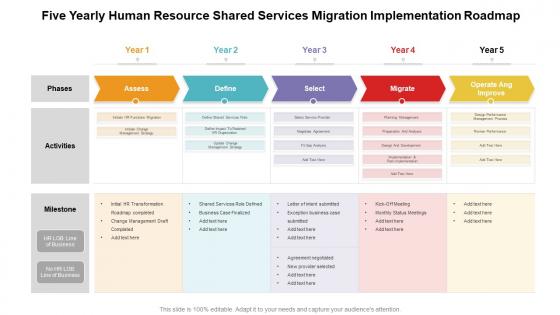
Five yearly human resource shared services migration implementation roadmap





Try Before you Buy Download Free Sample Product
 Impress Your
 Audience
 100%
100% Editable
 Save Hours
 of Time


A cohesive work plan is essential for achieving the desired target. Communicate your vision and lay a firm ground in front of your audience with our PowerPoint layout. Align your project milestones, budgets, deliverables, deadlines, and all the requisite information for a dynamic presentation by employing this amazingly designed Five Yearly Human Resource Shared Services Migration Implementation Roadmap. Maximize team efficiency and streamline a work plan efficiently by introducing our ready made roadmap PowerPoint theme. You can quickly establish coordination between different activities across the organization and present an insight to your colleagues by utilizing this useful business tool. Color code specific tasks, prioritize, and keep a close eye on the deadlines with the help of our eye catchy PowerPoint template. Download our Five Yearly Human Resource Shared Services Migration Implementation Roadmap for excelling at productive management.
People who downloaded this PowerPoint presentation also viewed the following :
Five yearly human resource shared services migration implementation roadmap with all 2 slides:
Give your audience a fulfilling experience. They will find our Five Yearly Human Resource Shared Services Migration Implementation Roadmap elevating.
FAQs for Five yearly human resource shared services
So you gotta start by figuring out where you are now, then map out where you want to be. Data migration is honestly a nightmare - like, budget way more time than you think you'll need. Run both systems side by side for a bit to catch the inevitable screw-ups. Oh, and communication is huge here. People freak out about change, so over-communicate everything. If you can swing it, try piloting with a small group first. Way easier to fix problems when it's just 10 people instead of your whole company losing their minds.
Start with a full process audit - sounds boring but trust me on this one. Map everything from hiring to payroll and find where things get messy. Document who does what, how long stuff takes, and where things get stuck. Your HR team probably has tons of complaints about the current setup, so ask them! Also check your data quality and how systems talk to each other since that'll make or break your migration. Oh, and don't forget to survey employees too - they see problems you might miss. Be honest about what's actually broken so you can fix it right.
So first thing - definitely track your SLAs like response times and resolution rates. Employee satisfaction is huge too since people hate change (especially HR stuff, ugh). Keep an eye on data accuracy during the transfer, system uptime, any bottlenecks. Cost metrics are key - you gotta prove this thing's actually worth it financially. I'd do a weekly dashboard with all these KPIs so you can spot problems before they blow up. Honestly, the trick is measuring both the tech side and how employees are actually feeling about everything. That's where most migrations fail.
Cloud solutions are seriously perfect for HR shared services migration. They make everything more scalable and way cheaper than the old-school approach. Your HR data gets centralized across locations without dealing with complicated on-premise stuff - honestly such a relief. The integration tools are actually decent too, connecting systems much easier than before. Most platforms come with analytics dashboards so you can see if your shared services are working or just burning money. Resources adjust as you go, which is clutch. Oh, and definitely map out which tools match your current processes first. Don't just jump in blindly.
Dude, communication is everything with this stuff. I've watched migrations crash and burn because leadership just assumed people would roll with it. Start talking to your team early - like, way before you flip the switch. People hate surprises, especially when it messes with their daily routine. Be honest about what's getting better and what might suck for a while. Give them regular updates on timing, and definitely create some way for them to give feedback. Trust me, if they feel ignored, they'll resist the new system even when it's objectively better than the old one.
Honestly, data migration is always messier than you think it'll be. Different formats everywhere, duplicate records - the usual nightmare. Your legacy systems probably won't connect smoothly with newer stuff either. The biggest pain though? Getting people to actually use the new setup. Everyone's attached to their old workflows, even when they suck. Timeline-wise, just double whatever estimate you have right now. Start by mapping your current data flows - figure out where the worst bottlenecks are gonna be. Way better to tackle that stuff early when you're not already stressed about deadlines.
First things first - do a full data audit to figure out what employee info you're dealing with and how sensitive it is. Get your legal team involved early because they'll know which regulations apply (GDPR, local privacy laws, all that fun stuff). Your new provider needs solid security certifications - don't just take their word for it, make them prove their compliance game is strong. Draft super specific data handling agreements covering transfers, storage, access rights. Oh and document literally everything as you go. Trust me, you'll thank yourself later if you get audited. It's tedious but worth it.
Honestly, you gotta get everyone talking the same language right from the start. Have HR walk through their actual day-to-day stuff - not what they think IT wants to hear. Then IT explains the tech limitations without all the nerdy speak. I've watched so many of these projects crash because teams just assumed they knew what the other side needed. Set up regular check-ins and pick specific people to be the go-between for each team. Oh, and definitely celebrate the small stuff that goes right - you'll need that goodwill when everything goes sideways later (and it will).
Start with the basics everyone needs - system navigation, core processes. Then break into role-specific stuff. Honestly, I'd dump the heavy material early because people forget everything anyway! Daily tasks first - case management, employee queries, whatever they'll actually use right away. Advanced features can wait a few weeks. Skip the death-by-PowerPoint approach. Do hands-on practice instead. Pair up your experienced people with newbies - works way better than formal mentoring programs. Oh, and definitely keep all your training docs somewhere easy to find after launch. Trust me, they'll be frantically searching for that "how do I..." guide when they're knee-deep in real work.
Honestly, start with multiple ways for people to reach you - email, hotline, maybe some walk-in hours. I've watched this blow up when employees couldn't get quick answers! Your transition team needs training on the common concerns so everyone's saying the same thing. Keep pushing out timeline updates and what's happening next. Here's the thing though - be upfront when you don't know something yet instead of dancing around it. That vague corporate speak just makes people more anxious. Oh, and definitely do a simple FAQ that you update weekly based on whatever questions keep coming up.
So you wanna know if your migration actually worked? Track the obvious stuff first - cost per transaction, processing times, error rates. Compare those to your old numbers. Employee satisfaction surveys matter too, honestly more than people think. Monthly dashboards are your friend for the first year. Watch how much time your HR folks spend on actual strategy vs boring admin work now. Service consistency across locations is huge. Oh, and definitely survey employees every quarter - they'll tell you what the numbers won't. Processing times should drop like crazy once everything's smooth.
Honestly, people are gonna hate it at first - nobody wants to give up calling Susan in HR for everything. Your whole company will start pushing self-service portals and digital processes instead. The culture definitely shifts toward data-driven decisions and standardized stuff, which makes things efficient but way less personal. Local HR teams turn more analytical than relationship-focused, which is kinda sad actually. Resistance is totally normal though. My advice? Go hard on change management upfront and communicate like crazy about why you're doing this. Once people adjust, it usually works out fine.
Definitely map out your employee personas first - managers need different stuff than regular employees, remote workers vs office people, tech folks vs the ones who still print emails (we all know someone). Survey your actual workforce instead of guessing what they want. Some love self-service portals and chatbots, others will always call or want face-to-face help. Create different service tiers and channels based on those segments. Multiple touchpoints are key since everyone's got their preferred way of getting help.
Asana or Monday.com are solid for tracking all your migration tasks - way better than spreadsheets for that stuff. Workday's migration toolkit works well if you're going that route, same with SuccessFactors' data loader. Excel's gonna be your go-to for mapping old fields to new ones (I know, I know, but it actually works). Teams or Slack keeps everyone updated when things get messy. Here's the thing though - stick with tools your team already uses. Learning new software during a migration is asking for trouble. Oh, and definitely test everything with a small pilot group first. Trust me on that one.
Yeah, HR migrations are rough on retention short-term. People get frustrated learning new systems, wait times go up, and change just sucks honestly. Most employees adapt pretty fast though if you're upfront about what's happening. I'd say communication is everything - tell people the timeline, explain why you're doing it, don't sugarcoat the bumps. Your change management folks need to jump on complaints right away too. The stress usually dies down once everyone gets used to the new setup, but those first few months can be dicey if you're not careful about keeping people in the loop.
-
Nice
-
Nice