

Fundamentals Of Convolutional Neural Networks Training Ppt





Try Before you Buy Download Free Sample Product
 Impress Your
 Audience
 100%
100% Editable
 Save Hours
 of Time


This set of slides provides an overview of Convolutional Neural Networks. ConvNet, is a Deep Learning network design that learns from data without the requirement for human feature extraction. CNNs are beneficial for recognizing objects, faces, and settings by looking for patterns in images. These slides also explain the working of CNNs and their layers.
People who downloaded this PowerPoint presentation also viewed the following :
Content of this Powerpoint Presentation
Slide 1
This slide gives an overview of Convolutional Neural Networks. ConvNet, is a deep learning network design that learns from data without the requirement for human feature extraction. CNNs are beneficial for recognizing objects, faces, and settings by looking for patterns in images.
Slide 2
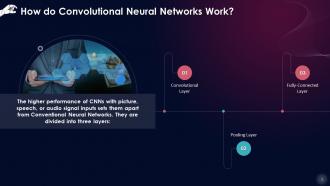
This slide describes how Convolutional Neural Networks work. CNNs are divided into three layers that are convolutional layer, pooling layer, and fully-connected layer.
Slide 3
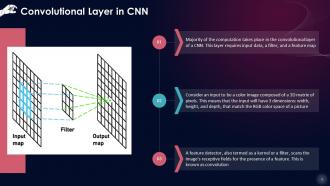
This slide depicts the Convolutional Layer in a Convolutional Neural Network. The majority of the computation takes place in the convolutional layer of a CNN. This layer requires input data, a filter, and a feature map.
Slide 4
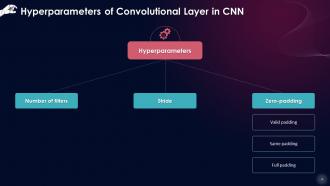
This slide describes hyperparameters of the Convolution layer in a CNN. These parameters are number of filters, stride, and zero-padding which is further divided into valid padding, same padding, and full padding.
Instructor’s Notes:
- Number of filters: The depth of the output is determined by the amount of filters used. Three distinct filters, for instance, would result in three distinct feature maps, resulting in a depth of three
- Stride: The stride of the kernel is the number of pixels traversed over the input matrix. Despite the fact that stride values of two or more are unusual, a longer stride means less output
- Zero-padding: Zero-padding is used when the filters don't fit the input image. All members outside the input matrix are set to zero, resulting in a larger or equal-sized output. Padding is of three types
- Valid padding: This is also referred to as "no padding." If the dimensions do not align, the last convolution is discarded
- Same padding: This padding guarantees that the size of the output layer and input layer is the same
- Full padding: This type of padding enhances the output's size, By padding the input's border with zeros
Slide 5
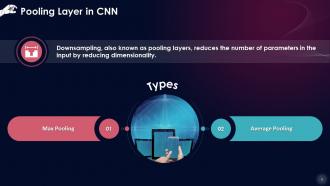
This slide depicts the Pooling Layer in a Convolutional Neural Network. Downsampling, also known as pooling layers, reduces the number of parameters in the input by reducing dimensionality. Max Pooling and Average Pooling are its two types.
Instructor’s Notes: The pooling process sweeps a filter across the entire input, similar to the convolutional layer, except that this filter has no weights. Instead of populating the output array with values from the receptive field, the kernel uses an aggregation function.
- Max Pooling: The filter chooses the pixel with the highest value to transmit to the output array as it advances across the input. In comparison to average pooling, this strategy is employed more frequently
- Average Pooling: The average value inside the receptive field is determined as the filter passes over the input and is sent to the output array
Slide 6
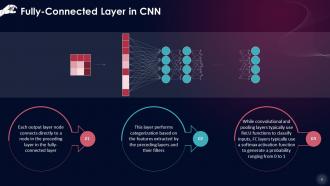
This slide depicts the Fully-Connected Layer in a Convolutional Neural Network. Each output layer node connects directly to a node in the preceding layer in the fully-connected layer. This layer performs categorization based on the features extracted by the preceding layers and their filters.
Fundamentals Of Convolutional Neural Networks Training Ppt with all 19 slides:
Use our Fundamentals Of Convolutional Neural Networks Training Ppt to effectively help you save your valuable time. They are readymade to fit into any presentation structure.














FAQs for Fundamentals Of Convolutional Neural
So basically, CNNs scan your data with filters instead of connecting every single neuron to everything else like regular networks do. Way smarter approach, honestly. They're built to catch local stuff like edges and textures without getting confused by where pixels are positioned. Plus they share weights across the whole image - saves you from dealing with millions of parameters. Regular neural nets would be a nightmare for image work. I tried that once and... yeah, don't. CNNs are just better for visual stuff, trust me.
Think of conv layers like little pattern-hunting windows that slide across your image. They multiply pixels, add them up, boom - feature maps. Early ones spot basic stuff like edges. Deeper layers? They're hunting for actual objects and complex shapes. During training, each filter learns what to look for - some get obsessed with curves, others with textures. You'll want multiple filters per layer since one can't catch everything. Honestly, the coolest part is peeking at what your filters learned later. Sometimes they pick up weird patterns you'd never expect, which is super helpful for debugging.
So pooling layers are pretty clutch - they shrink your feature maps which saves you computation time. Max pooling grabs the strongest activations and ditches the weak stuff, which is why everyone uses it. You get translation invariance too, so if your input shifts around a bit the model still works. Usually you'll stick them after conv layers to downsample as you go deeper. Yeah, you lose some spatial detail but honestly it's worth it to prevent overfitting. Most people just use 2x2 but I've had decent luck with 3x3 depending on the dataset. The parameter reduction alone makes them worthwhile.
So data augmentation is basically making fake training examples from your real ones - like rotating images, flipping them, changing brightness, that stuff. Your CNN gets way more variety to learn from instead of just memorizing the same photos over and over. Makes it handle real-world messiness better too. I mean, who actually takes perfectly straight photos anyway? Start with simple stuff like horizontal flips and small rotations first. You'll probably see your validation accuracy jump pretty quick. The whole point is forcing your model to learn actual features instead of weird pixel quirks.
So stride is basically how many pixels your filter jumps each time - stride 1 moves pixel by pixel, stride 2 skips every other one. Bigger strides = smaller output maps. Padding just stuffs zeros around your input edges so you don't lose border info (I honestly thought this was dumb at first but it's actually super useful). Your output keeps shrinking without padding after each conv layer. Most frameworks default to "same" padding to keep dimensions, though "valid" gives you no padding. Oh and stride handles your downsampling while padding keeps spatial details intact.
So ReLU fixes this annoying thing called vanishing gradients - basically your network can actually learn because the gradients don't shrink to nothing during backprop. It's just max(0,x) which is crazy simple and way faster than sigmoid stuff. The non-linearity lets your CNN pick up complex patterns while keeping those gradients strong for positive values. I've found standard ReLU sometimes kills too many neurons though. If that happens, definitely try Leaky ReLU - it's a game changer when you're getting dead spots in your network.
So you've got LeNet for handwriting stuff, then AlexNet kicked off the whole image classification boom. VGG uses those tiny 3x3 filters but goes super deep - it's actually really solid for transfer learning since the design is so straightforward. ResNet though? Game changer. Those skip connections solved the vanishing gradient mess that was plaguing deep networks. Inception (aka GoogLeNet) does this cool multi-scale thing where it captures different sized features at once. Honestly, don't build from scratch for your first project. Just grab a pre-trained ResNet or VGG and fine-tune it - you'll save yourself weeks of headaches.
So grab a pre-trained CNN like ResNet or VGG as your starting point. Freeze those early layers - they've already figured out edges, textures, all that good stuff that works everywhere. Just swap out the final layer for your classes and train that bit first. Seriously, try this before doing anything fancy - it'll probably work way better than you expect! If you need more juice later, then fine-tune the whole thing with a tiny learning rate. Oh and ImageNet features are weirdly good at transferring to random stuff. Like, way better than they should be theoretically.
Honestly, dropout's your best friend here - it randomly shuts off neurons so your model doesn't get too attached to specific patterns. Data augmentation is super solid too, just flip and rotate your images to basically fake having more training data. You could also try L1/L2 regularization (adds penalties to the loss function) or batch normalization, which stabilizes things. Oh, and definitely use early stopping - watch your validation loss and bail when it starts climbing again. I'd probably start with dropout and data augmentation first since they're pretty straightforward to code up and usually work well together.
Yeah so most CNNs need the same input size every time - ResNet, VGG, all those classics expect like 224x224 pixels. You've got two main options: resize while keeping the aspect ratio (pad with zeros), or just stretch everything to fit. Stretching can make things look weird though. There's some newer stuff with adaptive pooling that's more flexible, but honestly? Just pick one preprocessing method and stick with it from the start. I learned that the hard way - trying to get fancy with it later just creates headaches.
So batch normalization normalizes inputs to each layer, which stabilizes training big time. You can crank up learning rates without everything exploding. Works by making each mini-batch have zero mean and unit variance - sounds fancy but it's pretty straightforward. Your gradients flow smoother, training goes faster, plus you get some free regularization thrown in. I usually stick BatchNorm after conv layers but before activations. Makes your network way less picky about weight initialization too, which honestly saves so much headache. It's one of those things that just works.
Think of kernel size as your filter's "vision range" - bigger kernels see more of the image at once. 3x3 kernels are honestly the sweet spot for most stuff since they catch local details without being parameter-heavy. You can stack a few 3x3s and get the same coverage as one massive 7x7, but way more efficient. Larger kernels do grab broader patterns though, so maybe throw a 5x5 in your first layer if you're dealing with images that have important large-scale features. Most of the time I just stick with 3x3 everywhere - it's become the standard for good reason.
Yeah totally! For video, try 3D convolutions that move through time + space, or just run 2D CNNs on each frame then slap an LSTM on top. Audio's where it gets fun though - convert your sound to spectrograms first (they're like visual maps of frequency over time) and boom, now you can use regular 2D convolutions like with images. Some folks go straight 1D convolutions on raw audio but that's trickier. Honestly, spectrograms are your best bet starting out since you already know image CNNs. Just match your convolution dimensions to whatever data structure you're working with.
Honestly, EfficientNets and Vision Transformers are crushing it right now. EfficientNets do this smart compound scaling thing - they balance depth, width, and resolution way better than older models. ViTs are kinda crazy because they just threw out convolutions completely and went full attention mechanisms, but man do they need huge datasets. MobileNets and RegNets are also solid if you're doing mobile stuff. For your project though? Just start with EfficientNet-B0. It's not flashy but the performance per parameter ratio is actually insane, and you won't hate yourself debugging it later.
Dude, hyperparameter tuning is seriously where you'll see the biggest jumps in your CNN performance. Learning rate is probably the most crucial - mess that up and you're either crawling toward convergence or completely overshooting. Batch size changes how your gradients behave, plus it affects memory. Then you've got architecture stuff like filter counts that control your model's capacity. I'd start with grid search on the basics first. Bayesian optimization is cool if you have tons of compute, but honestly grid search works fine for most cases. Don't go crazy tuning everything simultaneously though - focus on learning rate and architecture choices first, then worry about the rest.
-
The PPT layout is great and it has an effective design that helps in presenting corporate presentations. It's easy to edit and the stunning visuals make it an absolute steal!
-
I was never satisfied with my own presentation design but SlideTeam has solved that problem for me. Thank you SlideTeam!