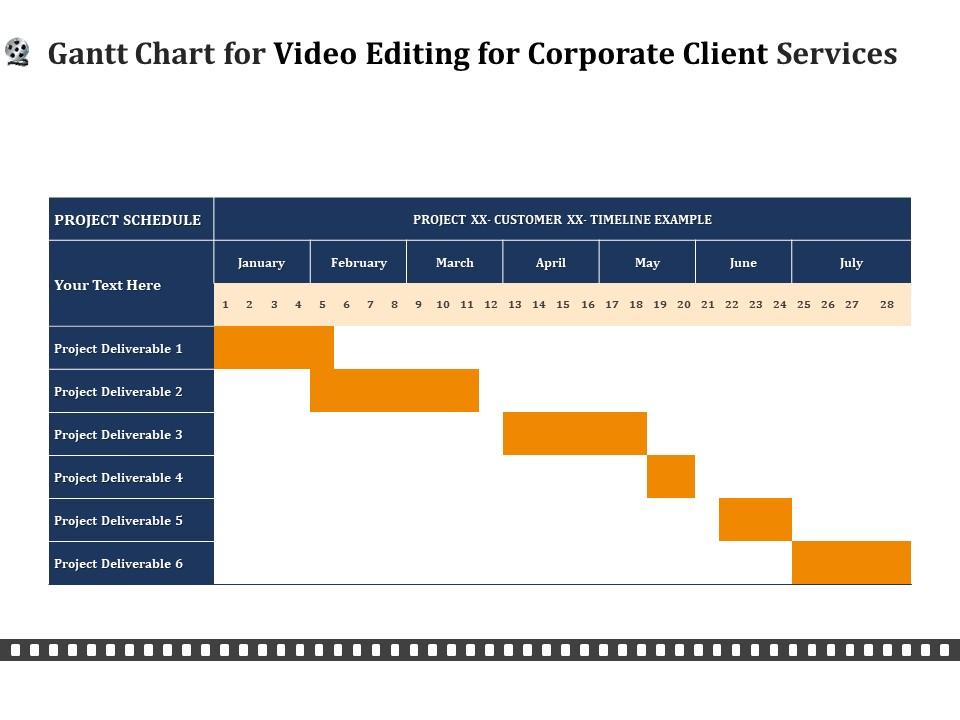
Gantt-Diagramm für die Videobearbeitung von PPT-Dateiformaten für den Unternehmenskundendienst

Rating:
93%
Gantt chart for video editing for corporate client services ppt file formats
Slide 1 of 2
Favourites Favourites

Try Before you Buy Download Free Sample Product

Audience Impress Your
Audience
Editable 100%
Editable
Time Save Hours
of Time
The Biggest Sale is ending soon in
0
0
:
0
0
:
0
0
Rating:
93%

Merkmale dieser PowerPoint-Präsentationsfolien :

Verwalten Sie Ihre komplexen Projekte und organisieren Sie sie gleichzeitig mit dieser detaillierten Gantt-Diagramm-PowerPoint-Vorlage. Verfolgen Sie Ihre Meilensteine, Aufgaben, Phasen, Aktivitäten, Teilaufgaben und andere Bestandteile, die Ihnen ein aktualisiertes Bild Ihres Projekts geben. Reflektieren Sie Ihren Planungshorizont und erfassen Sie Ihren Veröffentlichungsplan in einer Ansicht mit dieser Gantt-Diagramm-PowerPoint-Präsentationsvorlage. Sie können verschiedene Abhängigkeiten direkt in diesem PowerPoint-Präsentationslayout der Zeitleiste darstellen, um zu sehen, welche Aufgaben noch in der Pipeline sind und wie sich die Verzögerungen darin auf die Zeitpläne und Fristen des Projekts auswirken. Abgesehen davon können Sie dieses aktualisierte Bild auch mit Ihren Teammitgliedern und Interessenvertretern teilen, wodurch es zu einem einfallsreichen Werkzeug wird, das in Ihre Geschäftsstruktur integriert werden kann. Nicht nur das, sondern auch das bearbeitbare Layout dieser Folie hilft Ihnen, Ihre Daten und Statistiken nach Belieben hinzuzufügen.

FAQs for Gantt chart for video editing for corporate client services

Key benefits include enhanced timeline visualization, improved resource allocation, streamlined collaboration among editors and producers, better deadline management, and efficient task sequencing for complex post-production workflows. These project management advantages enable video production teams to coordinate multiple editing phases, track render times, and manage client feedback cycles more effectively, ultimately delivering higher-quality content while reducing production costs and meeting tight broadcast or release schedules.

A Gantt chart streamlines video editing workflows by visualizing project timelines, tracking task dependencies, and coordinating team responsibilities across pre-production, editing, and post-production phases. This approach enables production teams to minimize bottlenecks, allocate resources efficiently, and meet delivery deadlines, with many studios finding that structured timeline management reduces project completion time by 30-40%.

A Gantt chart for video editing should include pre-production planning, script development, footage capture, audio recording, rough cut assembly, detailed editing phases, color correction, sound mixing, and final rendering. These elements enable production teams to coordinate workflows across multiple departments, track asset dependencies, and manage client review cycles, ultimately delivering projects on schedule while maintaining quality standards and budget control.

Estimating timeframes for video editing tasks requires analyzing project complexity, content volume, revision rounds, and team experience levels across pre-production, production, and post-production phases. Successful studios typically factor in buffer time for client feedback, technical challenges, and quality control processes, with many finding that detailed task breakdown and historical project data ultimately deliver more accurate schedules and smoother project workflows.

**INPUT**: What software tools are best suited for creating Gantt charts in video editing? **OUTPUT**: Top software tools for video editing Gantt charts include Microsoft Project, Asana, Monday.com, Trello with timeline views, and specialized platforms like StudioBinder. These project management solutions streamline pre-production planning, resource allocation, and deadline tracking, with many post-production studios finding that integrated scheduling ultimately delivers faster turnarounds and enhanced client communication.

A Gantt chart assists video editing collaboration by visualizing task dependencies, tracking individual editor assignments, and coordinating shared resources like footage and review cycles. Through timeline synchronization, teams can seamlessly manage parallel editing workflows, avoid file conflicts, and maintain consistent project momentum, with many production studios finding that structured scheduling reduces revision cycles and accelerates final delivery timelines.

Common pitfalls include underestimating revision cycles, failing to account for rendering time, overlooking client feedback loops, not scheduling buffer time for technical issues, and inadequately mapping asset dependencies. These oversights can derail video production timelines, with many creative agencies finding that realistic time allocation, clear milestone definitions, and flexible scheduling ultimately deliver smoother workflows and better client relationships.

A Gantt chart helps track video editing progress by visualizing timeline dependencies, shot completion rates, review cycles, and milestone deadlines across pre-production, production, and post-production phases. Through color-coded task bars and progress indicators, editors streamline workflow coordination, identify potential bottlenecks, and ensure timely delivery, while enabling seamless collaboration between directors, editors, and clients throughout complex projects.

Yes, Gantt charts integrate seamlessly with project management tools like Asana, Trello, Monday.com, and specialized video production platforms such as Frame.io and Shotgun. This strategic combination streamlines workflow coordination, resource allocation, and deadline tracking across pre-production, filming, and post-production phases, with many video production companies finding that integrated systems deliver enhanced collaboration, faster project delivery, and improved client communication.

When unexpected changes occur during video editing, adjust your Gantt chart by reassessing task dependencies, reallocating resources, and updating timeline milestones to reflect new priorities and deadlines. This flexible approach enables production teams to maintain project momentum while accommodating client revisions, technical challenges, or creative pivots, ultimately delivering quality content within revised parameters and ensuring stakeholder alignment throughout the editing process.

Audience feedback influences video editing Gantt charts by requiring timeline adjustments for revision cycles, content modifications, and quality improvements based on viewer responses. Production teams typically build buffer periods into their schedules to accommodate feedback integration, with many studios finding that early audience testing prevents major timeline disruptions, ultimately delivering more engaging content while maintaining project deadlines.

Dependencies in video editing Gantt charts are visually represented through connecting lines, arrows, color coding, and overlapping bars that show task relationships and sequencing. These visual elements clearly illustrate how pre-production feeds into filming, editing depends on footage completion, and post-production tasks like sound mixing and color grading interconnect, ultimately enabling production teams to identify bottlenecks and optimize workflows.

Best practices for updating a Gantt chart during video editing include tracking daily progress against milestones, adjusting timelines based on actual editing speeds, communicating delays immediately to stakeholders, and updating resource allocations as projects evolve. These practices enable production teams to maintain realistic schedules, prevent bottlenecks in post-production workflows, and deliver projects on time, with many studios finding that consistent updates enhance client communication and operational efficiency.

A Gantt chart enhances client communication by providing visual project timelines, clear milestone tracking, and transparent progress updates throughout the video editing process. This structured approach enables clients to understand delivery schedules, anticipate review periods, and provide timely feedback, while production teams can proactively address concerns and manage expectations, ultimately delivering smoother project workflows and stronger client relationships.

Short-form video editing Gantt charts focus on rapid turnaround with condensed timelines, simplified task sequences, and minimal review cycles, while long-form projects require detailed milestone tracking, extensive collaboration phases, and complex post-production workflows. Long-form charts accommodate multiple editing rounds, color correction, audio mixing, and client feedback cycles, with many production studios finding that structured scheduling ultimately delivers faster project completion and better resource allocation across teams.

Ratings and Reviews

93% of 100
Review Form
Write a review
Most Relevant Reviews
  1. 100%

    by Diego Gardner

    It saves your time and decrease your efforts in half.
  2. 80%

    by Deon Warren

    Top Quality presentations that are easily editable.
  3. 100%

    by Li Stewart

    Excellent template with unique design.

3 Item(s)

per page: