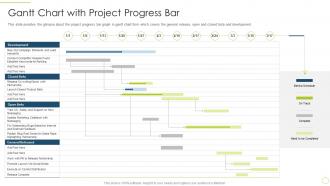
Gantt chart with project progress bar approach avoidance theory
Try Before you Buy Download Free Sample Product
Audience
Editable
of Time
This slide provides the glimpse about the project progress bar graph in gantt chart form which covers the general release, open and closed beta and development.
People who downloaded this PowerPoint presentation also viewed the following :
Gantt chart with project progress bar approach avoidance theory with all 6 slides:
Use our Gantt Chart With Project Progress Bar Approach Avoidance Theory to effectively help you save your valuable time. They are readymade to fit into any presentation structure.
FAQs for Gantt chart with project progress bar
Gantt charts enhance project planning by providing visual timeline representation, task dependencies mapping, resource allocation tracking, and milestone identification in a single comprehensive view. Through this visual approach, project managers streamline scheduling decisions, identify potential bottlenecks early, and communicate progress effectively to stakeholders, ultimately delivering improved coordination and faster project completion rates.
Key components of an effective Gantt chart include task lists, timelines, dependencies, milestones, resource assignments, and progress indicators. These elements work together by providing visual project oversight, enabling timeline management, and facilitating resource coordination, with many project managers finding that well-structured Gantt charts streamline communication and enhance deadline accountability across teams.
Gantt charts facilitate team collaboration by providing visual project timelines, clarifying task dependencies, enabling real-time progress tracking, and establishing clear accountability through assigned responsibilities. Through shared dashboards, teams can coordinate workflows, identify bottlenecks early, and maintain transparent communication, with many organizations finding that centralized project visibility ultimately streamlines decision-making and enhances overall team productivity.
Gantt charts can be updated through modern project management software by adjusting task durations, shifting start and end dates, modifying dependencies, and reallocating resources in real-time. These dynamic updates automatically recalculate critical paths and milestone dates, with many project managers finding that cloud-based platforms enable seamless collaboration and instant visibility across teams, ultimately delivering improved project control and stakeholder communication.
**INPUT**: What software tools are recommended for creating and managing Gantt charts? **OUTPUT**: Recommended Gantt chart software includes Microsoft Project, Asana, Trello, Monday.com, Smartsheet, and Wrike, each offering varying levels of complexity and integration capabilities. These platforms streamline project scheduling, resource allocation, and timeline visualization, with many organizations finding that cloud-based solutions like Asana and Monday.com deliver enhanced collaboration and real-time updates for distributed teams. [Word count: 56 words]
Gantt charts excel at timeline visualization and dependency mapping, while Kanban boards focus on workflow optimization and task status tracking in real-time. Gantt charts work best for complex, sequential projects like construction or software development, whereas Kanban suits agile environments and continuous workflows, with many organizations finding that combining both approaches delivers enhanced project visibility and team productivity.
Common pitfalls include overcomplicating timelines, failing to update progress regularly, creating unrealistic dependencies, neglecting resource constraints, and micromanaging every minor task. While Gantt charts streamline project visualization, many organizations find that maintaining flexibility, focusing on critical milestones rather than excessive detail, and ensuring team buy-in ultimately delivers better project outcomes and enhanced collaboration.
Gantt charts enhance resource allocation by visualizing task dependencies, timeline overlaps, and workload distribution across team members and departments. Through clear scheduling frameworks, project managers can identify resource conflicts, optimize personnel assignments, and prevent bottlenecks, with many organizations finding that strategic resource planning ultimately delivers improved project efficiency and reduced operational costs.
Strategies to simplify complex Gantt charts include grouping related tasks into phases, using summary bars for high-level overviews, color-coding by department or priority, filtering views by timeline or responsibility, and breaking large projects into smaller sub-charts. These approaches streamline project visualization by reducing visual clutter, enhancing team comprehension, and enabling focused tracking, ultimately delivering clearer communication and improved project coordination across organizations.
Gantt charts prove most beneficial for complex projects with interdependent tasks, tight deadlines, and multiple stakeholders requiring clear visibility into progress and timelines. They excel in construction, software development, and manufacturing environments where sequential dependencies are critical, enabling project managers to identify bottlenecks early, optimize resource allocation, and maintain stakeholder alignment throughout project lifecycles.
Gantt charts enhance stakeholder communication by providing clear visual timelines, milestone tracking, progress updates, and dependency mapping that everyone can easily understand. Through intuitive graphics and real-time status indicators, project managers can streamline reporting processes, reduce lengthy status meetings, and enable stakeholders to quickly assess project health, ultimately delivering greater transparency and more informed decision-making across organizations.
Dependencies form the strategic backbone of Gantt chart effectiveness by establishing task relationships, identifying critical paths, preventing resource conflicts, and enabling realistic timeline forecasting. These interconnections streamline project coordination by automatically adjusting schedules when delays occur, highlighting bottlenecks before they impact delivery, and ensuring team alignment, with many project managers finding that well-mapped dependencies ultimately deliver faster execution and reduced risks.
Gantt charts integrate with Agile methodologies by visualizing sprint timelines, tracking epic progress across iterations, and providing stakeholder communication tools while maintaining flexibility for scope changes. Many software teams combine traditional Gantt visualization with Agile practices like daily standups and retrospectives, enabling better resource planning and milestone tracking while preserving Agile's adaptive approach to delivery.
Best practices for presenting Gantt charts during team meetings include highlighting critical path milestones, focusing on current sprint progress, addressing resource conflicts, explaining task dependencies clearly, and using color coding for different project phases. These visual strategies streamline communication by emphasizing actionable insights, minimizing information overload, and enabling teams to quickly identify bottlenecks, ultimately delivering more focused discussions and faster decision-making across project timelines.
Project managers use Gantt charts for risk management by identifying potential bottlenecks, visualizing task dependencies, tracking critical path delays, and monitoring resource allocation conflicts. These visual tools enable proactive mitigation through timeline adjustments, buffer scheduling, and contingency planning, with many organizations finding that Gantt charts streamline communication about risks while ultimately delivering improved project outcomes and stakeholder confidence.
-
Use of icon with content is very relateable, informative and appealing.
-
Best Representation of topics, really appreciable.