


Goal setting timeline powerpoint templates





Try Before you Buy Download Free Sample Product
 Impress Your
 Audience
 100%
100% Editable
 Save Hours
 of Time


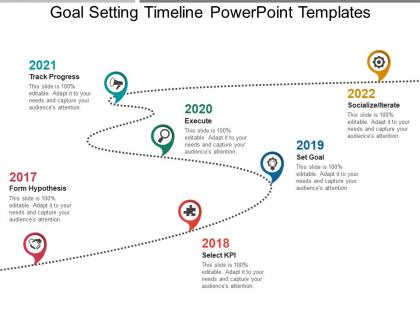
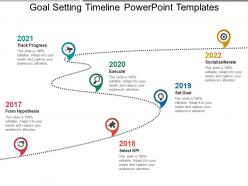
Set goals for your company with our professionally designed goal setting timeline PowerPoint template. This business goal timeline PPT design will the management to plan as well use their business resources in an effective manner. It will work as an important controlling tool for the company to manage their business activities in such a manner to enhance the business success. Further this goal setting process PPT diagram motivates your business teams to work with more precision so that to achieve the set business objectives. This goal setting roadmap timeline PowerPoint layout will also help you to manage as well control all your future business risks. Define the stages of setting the timeline for your company goals with this business timeline PPT template. It starts from clarifying the things which needs to be accomplished, selecting the KPI, setting goals to the process of implanting and executing the same till the final phase of measuring the company growth. Thus, maintain the efficiency of your company goals by simply downloading this professional goal timeline PPT layout design. Absorb the impact of adverse circumstances with our Goal Setting Timeline Powerpoint Templates. Be able to address the jinx.
People who downloaded this PowerPoint presentation also viewed the following :
Goal setting timeline powerpoint templates with all 5 slides:
Harness their energies with our Goal Setting Timeline Powerpoint Templates. They will all act in your favor.


FAQs for Goal setting
Start with specific, measurable goals and realistic deadlines - this stuff actually matters. Break big goals into smaller steps because honestly, staring at a massive project just paralyzes you. Track your progress and write down what's blocking you. Don't forget dependencies (like what has to finish before other things can start) and build in buffer time. Life happens, right? Set regular check-ins with yourself so you can pivot if things go sideways instead of realizing you're screwed at the last minute.
Honestly, visuals are a game-changer for timelines. Color-coding different goals makes everything so much easier to scan quickly. Progress bars are clutch for showing where you're at - there's something weirdly satisfying about watching them fill up! Icons and symbols help your brain process stuff way faster than just reading text. You can use checkpoints or little badges for milestones, different font sizes for priorities. Just don't go overboard though - I made that mistake once and it looked like a rainbow exploded. Start simple with maybe color-coding and one other thing, then add more if you want.
Honestly, timelines work great when your goal has actual steps that build on each other - like launching a project or training for something specific. Hard deadlines make them even better. But vague stuff like "get healthier"? Total nightmare for timelines. You'll just frustrate yourself. "Train for a marathon by October" though - now that's timeline gold. You need goals where you can mark real progress along the way. I always ask myself: does this thing have natural phases, or am I just trying to force it? If timing doesn't actually matter for your success, skip the timeline format entirely.
Okay so first thing - figure out what's actually urgent versus what's just important. Most people get this backwards and chase whatever feels pressing instead of what'll actually make a difference. Look at which goals depend on others finishing first, then think about your real constraints - time, money, how much your team can handle. I always rank stuff by potential impact because honestly, why burn energy on things that won't move the needle much? Once you've got that sorted, map everything into a timeline but leave buffer room between big milestones. Things always shift around anyway.
Honestly, there are so many good options! Canva's probably your best bet if you want something simple - just drag and drop templates. Adobe Express works great too. PowerPoint actually isn't terrible for this stuff (don't judge me lol). Want something fancier? Figma gives you way more control over design. For interactive ones that update automatically, Notion or Airtable are solid since they let you build custom timeline views. Even Google Sheets can look pretty decent with some formatting tricks. My advice? Just start with whatever you already know how to use, then switch later if you need more bells and whistles.
Honestly, timeline templates are game-changers because they chop your big scary goals into bite-sized pieces with actual deadlines. You'll know right away if you're crushing it or totally behind schedule. The visual part is what really gets me though - like suddenly you notice you always hit a wall around month three, or certain milestones just take way longer than you thought. I mean, it's basically GPS for goals (wish someone told me this years ago lol). Set up monthly check-ins so you can tweak things when life inevitably gets messy.
Honestly, deadlines are like having a friend who won't let you procrastinate forever. They turn your "I should probably do this" thoughts into actual commitments. Without them? Your goals just sit there collecting dust while you tell yourself you'll start Monday (spoiler: you won't). The trick is working backwards from your big deadline and creating smaller ones for each step. Makes everything feel less overwhelming, plus you get those little wins to keep you motivated. I learned this the hard way in college - turns out "eventually" isn't a timeline that works.
Okay so the big thing is coordination gets messy with teams. You're dealing with way more moving pieces and people need to know what everyone else is doing. Weekly check-ins become crucial, plus you gotta map out who owns what and which tasks depend on others. Individual timelines? Way easier - you can go weeks without formal checkpoints since it's just you managing yourself. Same basic template works for both, but team versions need extra columns for owners and dependencies. Oh and definitely figure out what can happen at the same time versus what needs to wait. Trust me on that one.
Oh man, don't make my mistake of thinking you can bang out a novel in two weeks - total disaster. Your milestones shouldn't be super vague either or spaced months apart, you'll just lose steam. Buffer time is clutch for when life inevitably gets messy. Monthly check-ins are actually game-changing though most people skip this part completely. Seriously, sit down once a month and see if your timeline still makes sense. Priorities change, stuff comes up. I learned this the hard way after stubbornly sticking to impossible deadlines way too long.
Monthly reviews are the bare minimum, but I personally do mine every two weeks since everything moves so crazy fast now. Weekly works too if you're swamped with deadlines. The whole point is spotting problems before they spiral - quarterly reviews are basically useless for this. Just set a calendar reminder and don't skip it! When you sit down to review, figure out what's actually blocking you instead of automatically pushing dates back. Oh, and be realistic about new deadlines or you'll just end up stressed again next month.
Honestly, just block out time every 2-4 weeks to actually look at how things are going. I do three kinds of check-ins: solo reflection time, quick chats with whoever's invested in the outcome, and getting other people's take on it. Here's the thing though - you gotta put these on your calendar like real appointments, not just hope you'll remember. Oh, and add a notes section somewhere to capture those random "oh wait" moments that pop up. Those little insights are actually super valuable if you bother writing them down. Start with scheduling something in the next two weeks.
Break your big goal into smaller wins - I usually do checkpoints every 2-4 weeks or you'll lose steam. Make them specific and measurable, not just "make progress" type stuff. Here's the thing though - you HAVE to celebrate when you hit them. Sounds cheesy but it actually works when the finish line still feels forever away. Oh, and don't be rigid about the timeline. If life happens and you need to push a milestone back, just adjust. Each checkpoint should obviously build toward your main goal, but the key is keeping that momentum going with regular victories.
Color coding your timelines is a game changer, trust me. Your brain picks up on the patterns super fast - way quicker than reading through everything. I usually do red for urgent stuff, green when things are done, maybe blue for different projects or whatever. Don't go crazy with too many colors though, like 4-5 max or it gets messy. Once you get consistent with it, you'll spot problems and deadlines instantly. Actually saves me so much time when I'm trying to figure out what's behind schedule or what needs attention first.
You and your accountability partner should use the same template - makes it way easier to compare where you're both at. Schedule weekly or bi-weekly check-ins (put them in your calendar or you'll forget, trust me). During these meetings, update your milestones and talk through whatever's blocking you. Having someone else see your progress is honestly brutal but effective - you can't really BS your way out of it. The template becomes like your shared report card. Oh, and make sure you celebrate the wins together too, not just focus on what went wrong.
Honestly, there are so many good examples out there! Fitness people love showing their transformation timelines - like hitting certain weight milestones each week. Business folks do the same thing with quarterly revenue targets when they're launching something new. I've seen cool career change stories too, where someone went from marketing to tech by tackling one coding language per month. Authors are probably my favorite though - they'll map out writing each chapter over like six months. Makes it feel way more doable when you can actually see the timeline, you know? Just search "goal timeline case studies" and you'll find templates to steal from.
-
Easy to edit slides with easy to understand instructions.
-
Great quality slides in rapid time.