


Green IT Powerpoint Presentation Slides




Try Before you Buy Download Free Sample Product
 Impress Your
 Audience
 100%
100% Editable
 Save Hours
 of Time


Check out our professionally designed Green IT PowerPoint presentation, which briefly explains green cloud computing, including its importance, advantages, top providers, techniques, and green data centers. In this Eco-Friendly Computing PPT, we have covered the overview of green cloud computing, including its characteristics, objectives, and components. In addition, this Carbon Free Computing deck contains how green cloud computing can improve security and compares hazardous and state-of-art recycling technologies. Also, the Solar Computing Powerpoint includes the certifications and education in green cloud computing and techniques used to make the cloud green. Furthermore, this Sustainable IT template caters to green data centers and their types, primary components, metrics, and working of them. Moreover, this Green IT module comprises industrial efforts and restrictions of green computing, architecture, functioning of green computing, training, and budget. Lastly, this Green Computing presentation contains the impacts of green cloud computing on the environment, applications in different areas, and a case study. Download our 100 percent editable and customizable template, which is also compatible with Google Slides.
People who downloaded this PowerPoint presentation also viewed the following :
Content of this Powerpoint Presentation
Slide 1: The slide introduces Green IT.
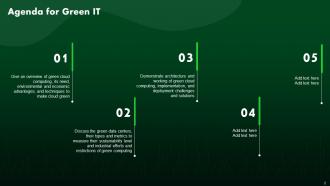
Slide 2: This is an Agenda slide. State your agendas here.
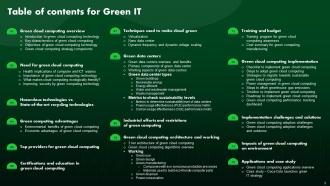
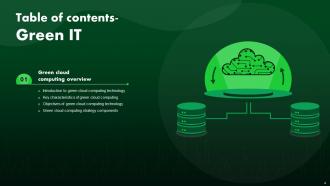
Slide 3: The slide displays Table of contents for presentation.
Slide 4: The slide continues table of contents.
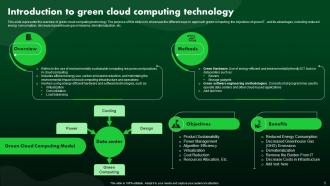
Slide 5: This slide presents the overview of green cloud computing technology.
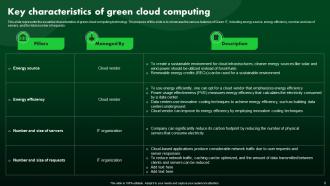
Slide 6: This slide represents the essential characteristics of green cloud computing technology.
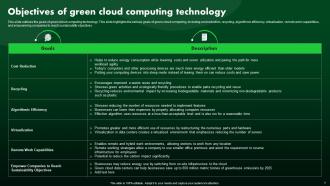
Slide 7: This slide outlines the goals of green cloud computing technology.
Slide 9: The slide highlights title of contents which is to be discussed further.
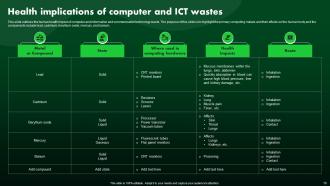
Slide 10: This slide exhibits the human health impact of computer and information and communication technology waste.
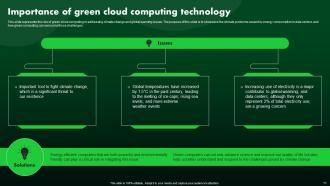
Slide 11: This slide represents the role of green cloud computing in addressing climate change and global warming issues.
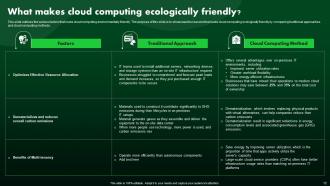
Slide 12: This slide describes various factors that make cloud computing environmentally friendly.
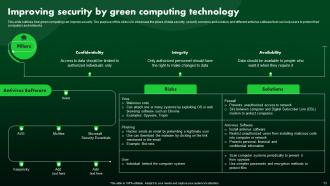
Slide 13: This slide outlines how green computing can improve security.
Slide 14: The slide depicts another title of contents.
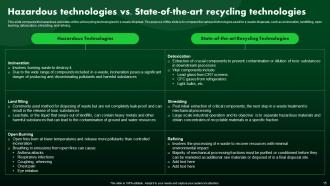
Slide 15: This slide compares the hazardous and state-of-the-art recycling technologies for e-waste disposal.
Slide 16: The slide also renders title of contents.
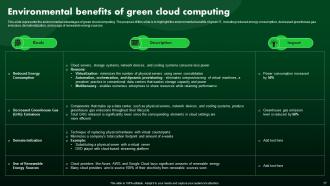
Slide 17: This slide represents the environmental advantages of green cloud computing.
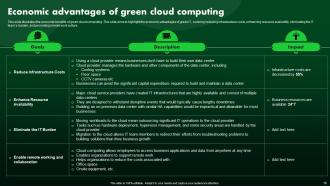
Slide 18: This slide illustrates the economic benefits of green cloud computing.
Slide 19: The slide again contains title of contents.
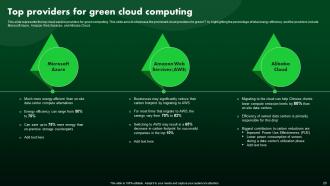
Slide 20: This slide presents the top cloud service providers for green computing.
Slide 21: The slide shows title of contents further.
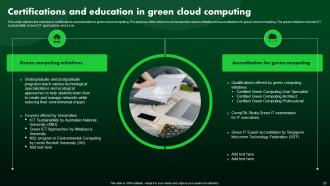
Slide 22: This slide outlines the overview of certifications and education in green cloud computing.
Slide 23: The slide showcases title of contents further.
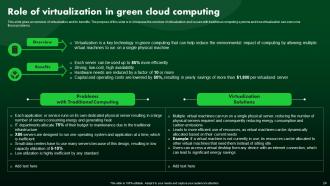
Slide 24: This slide gives an overview of virtualization and its benefits.
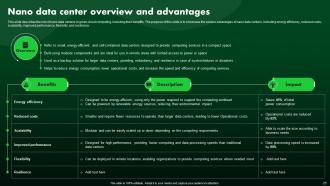
Slide 25: This slide describes the role of nano data centers in green cloud computing, including their benefits.
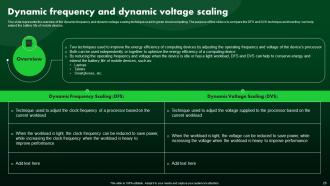
Slide 26: This slide represents the overview of the dynamic frequency and dynamic voltage scaling technique used in green cloud computing.
Slide 27: The slide demonstrates title of contents further.
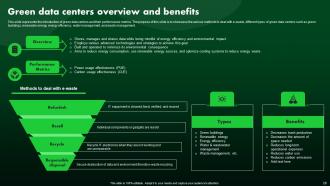
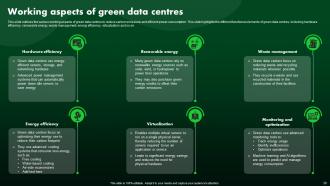
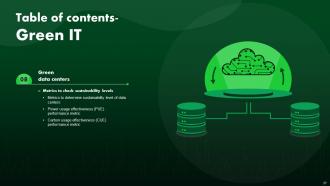
Slide 28: This slide represents the introduction of green data centers and their performance metrics.
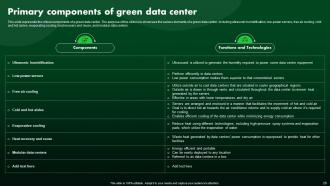
Slide 29: This slide represents the critical components of a green data center.
Slide 30: This slide continues the critical components of a green data center.
Slide 31: The slide renders another title of contents.
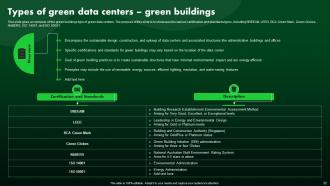
Slide 32: This slide gives an overview of the green buildings type of green data centers.
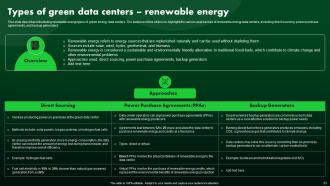
Slide 33: This slide describes introducing renewable energy types of green energy data centers.
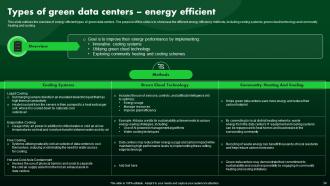
Slide 34: This slide outlines the overview of energy efficient types of green data centers.
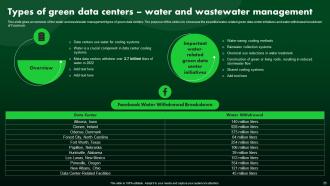
Slide 35: This slide gives an overview of the water and wastewater management types of green data centers.
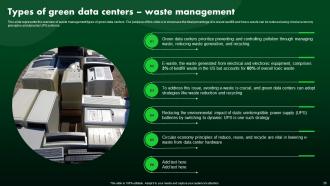
Slide 36: This slide represents the overview of waste management types of green data centers.
Slide 37: The slide again contains title of contents.
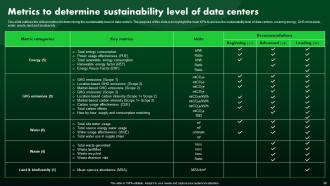
Slide 38: This slide outlines the critical metrics for determining the sustainability level of data centers.
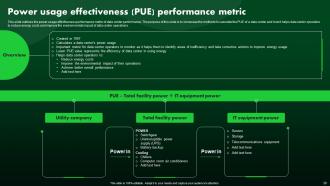
Slide 39: This slide displays the power usage effectiveness performance metric of data center performance.
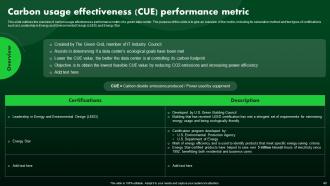
Slide 40: This slide highlights the overview of carbon usage effectiveness performance matric of a green data center.
Slide 41: The slide highlights another title of contents.
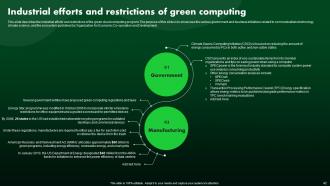
Slide 42: This slide describes the industrial efforts and restrictions of the green cloud computing program.
Slide 43: The slide displays title of contents which is to be discussed further.
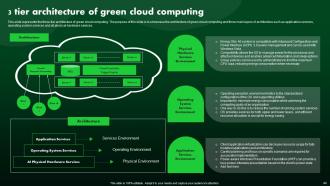
Slide 44: This slide represents the three-tier architecture of green cloud computing.
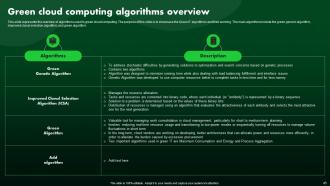
Slide 45: This slide presents the overview of algorithms used in green cloud computing.
Slide 46: Th slide again exhibits title of contents.
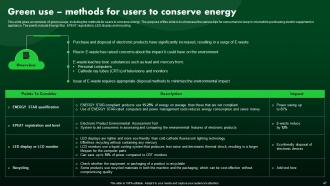
Slide 47: This slide gives an overview of green usage, including the methods for users to conserve energy.
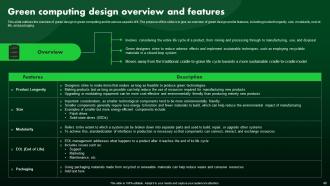
Slide 48: This slide outlines the overview of green design in green computing and its various aspects of it.
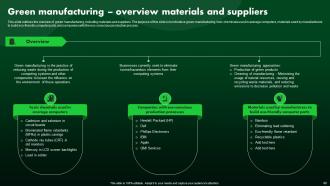
Slide 49: This slide depicts the overview of green manufacturing, including materials and suppliers.
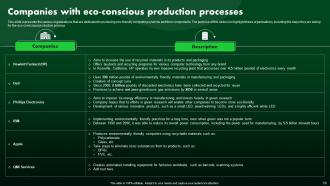
Slide 50: This slide represents the various organizations that are dedicated to producing eco-friendly computing systems and their components.
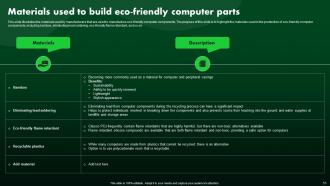
Slide 51: This slide illustrates the materials used by manufacturers that are used to manufacture eco-friendly computer components.
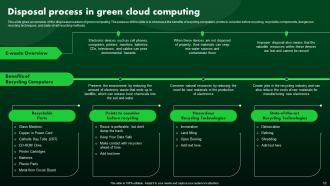
Slide 52: This slide gives an overview of the disposal procedure of green computing.
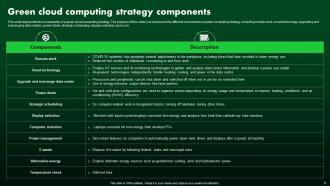
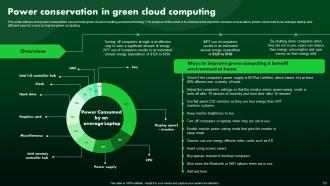
Slide 53: This slide outlines how power conservation can promote green cloud computing and prevent energy.
Slide 54: The slide illustartes title of contents further.
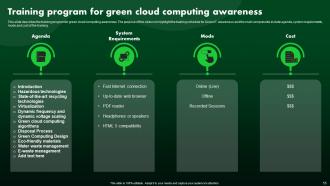
Slide 55: This slide describes the training program for green cloud computing awareness.
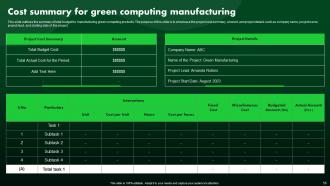
Slide 56: This slide outlines the summary of total budget for manufacturing green computing products.
Slide 57: The slide describes title of contents further.
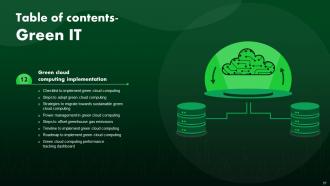
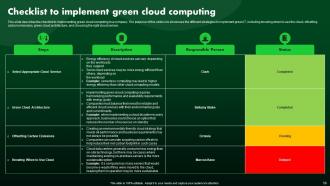
Slide 58: This slide illustrates the checklist to implementing green cloud computing in a company.
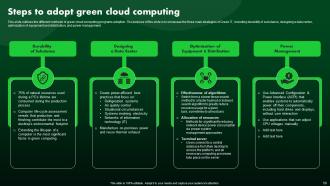
Slide 59: This slide outlines the different methods of green cloud computing programs adoption.
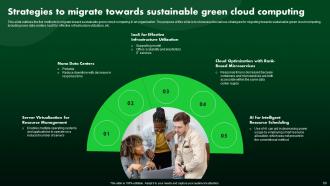
Slide 60: This slide shows the five methods to migrate toward sustainable green cloud computing in an organization.
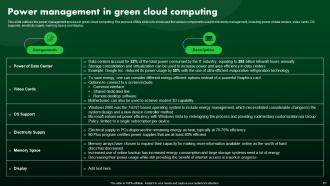
Slide 61: This slide displays the power management process in green cloud computing.
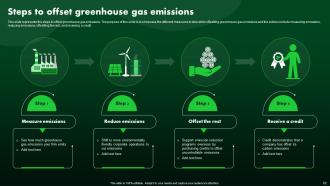
Slide 62: This slide represents the steps to offset greenhouse gas emissions.
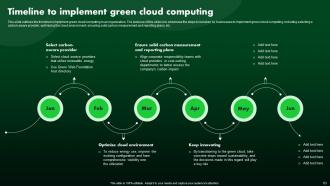
Slide 63: This slide outlines the timeline to implement green cloud computing in an organization.
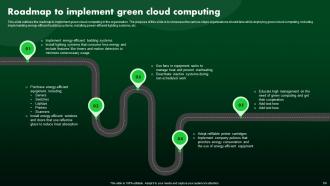
Slide 64: This slide renders the roadmap to implement green cloud computing in the organization.
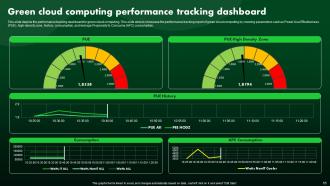
Slide 65: This slide describes the performance tracking dashboard for green cloud computing.
Slide 66: The slide depicts another title of contents.
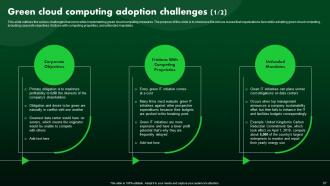
Slide 67: This slide outlines the various challenges that come while implementing green cloud computing measures.
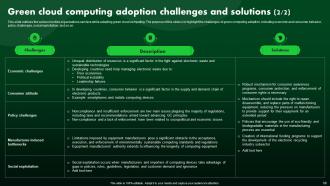
Slide 68: This slide shows the various hurdles organizations can face while adopting green cloud computing.
Slide 69: The slide exhibits another title of contents.
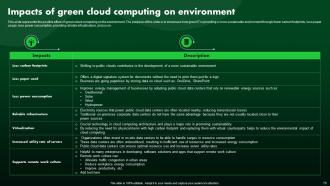
Slide 70: This slide represents the positive effect of green cloud computing on the environment.
Slide 71: The slide renders title of contents further.
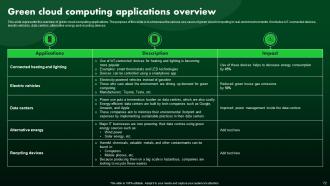
Slide 72: This slide presents the overview of green cloud computing applications.
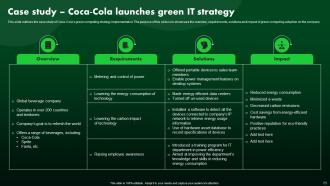
Slide 73: This slide outlines the case study of Coca-Cola’s green computing strategy implementation.
Slide 74: This slide shows all the icons included in the presentation.
Slide 75: This slide is titled as Additional Slides for moving forward.
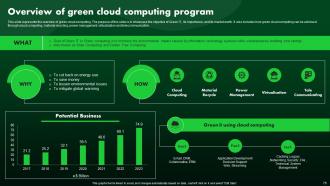
Slide 76: This slide represents the overview of green cloud computing.
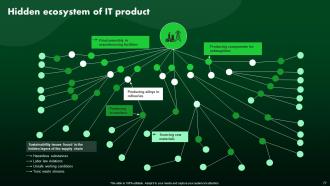
Slide 77: The slide describes Hidden ecosystem of IT product.
Slide 78: This is Our Mission slide with related imagery and text.
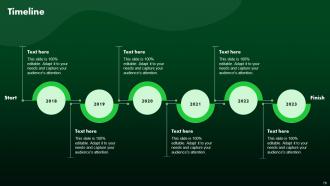
Slide 79: This is a Timeline slide. Show data related to time intervals here.
Slide 80: This slide showcases Magnifying Glass to highlight information, specifications etc.
Slide 81: This slide provides 30 60 90 Days Plan with text boxes.
Slide 82: This is Our Target slide. State your targets here.
Slide 83: This slide shows Post It Notes. Post your important notes here.
Slide 84: This slide depicts Venn diagram with text boxes.
Slide 85: This slide shows SWOT describing- Strength, Weakness, Opportunity, and Threat.
Slide 86: This is a Thank You slide with address, contact numbers and email address.
Green IT Powerpoint Presentation Slides with all 91 slides:
Use our Green IT Powerpoint Presentation Slides to effectively help you save your valuable time. They are readymade to fit into any presentation structure.










FAQs for Green IT
So Green IT is basically three things: cut energy use, reduce e-waste, and make your resources work smarter. Server virtualization and cloud computing are your best friends here. Data centers sitting idle burn insane amounts of power - it's honestly ridiculous when you see the numbers. Try to stretch your equipment's life longer, set up decent recycling programs, and design stuff that sips energy instead of chugging it. You'll slash your carbon footprint AND your electric bill, which is pretty sweet. Oh, and definitely audit what you've got first to find the worst energy hogs.
Start with tracking energy use across your servers, data centers, and network gear. Microsoft Sustainability Manager works pretty well, or grab any carbon accounting tool that converts your kilowatt usage to CO2 based on your grid's carbon intensity. Cloud dashboards from AWS, Azure, and Google all show carbon footprints now too. Getting clean data from all your systems is honestly the hardest part - but even rough numbers beat guessing. Oh, and don't skip end-user devices, they add up. Focus on your biggest energy hogs first.
So basically virtualization lets you cram multiple virtual machines onto one physical server instead of buying separate hardware for everything. I've seen places go from like 15 servers down to just 2-3 machines - way less power bills and cooling costs. The cool part is you can shift resources around based on what actually needs them, instead of having servers just sitting there doing nothing (which happens embarrassingly often tbh). Most data centers see 20-50% energy savings. Oh, and start with your most underused servers first - they're the easiest wins.
Find a certified e-waste recycler first - they'll break down components and grab valuable stuff like gold. Most major brands (Dell, HP, Apple) have take-back programs too, some even give you credit which is actually pretty nice. Best Buy and Staples do drop-offs for smaller items. Wipe your data first though, obviously. Oh and pull out batteries if you can. I'd start by figuring out how much e-waste you're generating monthly - makes it way easier to pick the right disposal partner.
First thing - check what hardware you've got and figure out what's guzzling the most power. ENERGY STAR servers and laptops are solid picks, they'll slash your energy bills without being sluggish. SSDs over hard drives is a no-brainer too. The initial cost kinda sucks, I won't lie, but you'll see savings pretty quick. Virtualization helps cut down on physical servers (less clutter, less power). Oh, and power management settings - most people totally ignore these but they can drop consumption by like 20-30%. Maybe start with one department first?
So basically, cloud companies run their data centers way more efficiently than you ever could - like 60-80% capacity vs your measly 15-20%. They've got fancy cooling systems and can actually afford renewable energy (which is honestly pretty expensive for smaller setups). The thing is, they're always upgrading to newer, less power-hungry hardware while you're stuck with whatever you bought three years ago. But here's the catch - you gotta pick providers who actually walk the walk on green stuff, not just the ones with nice marketing campaigns.
Okay so basically when you optimize your code, you're automatically cutting energy use. Better algorithms mean less CPU work, less memory hogging, faster processing - all that drops your power consumption. I always tell people to start with their heaviest apps first, profile those suckers. Fix memory leaks, kill unnecessary background stuff. Your servers work smarter instead of harder. At scale this gets crazy good - like a 10% efficiency bump can seriously slash both your carbon footprint and electric bills. It's one of those rare situations where performance gains directly equal greener computing.
Dude, remote work is a game changer for going green. Your office energy bills drop like crazy - less AC, lighting, all that stuff. Fewer people means you don't need as many computers and printers either. People just use their own laptops at home. The commuting thing is huge too, honestly didn't think about that impact until recently. Try running the numbers on your current energy costs per person. Even if your team only works from home 2-3 days a week, you'll see real savings. It's wild how much electricity an empty office doesn't use.
Honestly, sustainable IT procurement is a win-win situation. Your energy bills drop because the equipment's way more efficient. Clients love working with companies that actually care about the environment - it's becoming a real differentiator. The gear lasts longer too, which saves money over time. Plus you can negotiate better deals with vendors who focus on green practices. Oh, and you won't deal with as much e-waste headache later. Just add energy efficiency requirements to your next RFP along with recycling stuff. Way easier than it sounds, trust me.
Start with hands-on workshops - show people the basics like power settings and cloud storage stuff. Those email blasts? Total waste of time, nobody reads them. Lunch sessions work way better since people can actually ask about their real work situations. Make some quick reference sheets they can save, like "5 ways to cut your digital footprint." Honestly, the success stories from other teams are what really get people interested. You want this to feel like something that'll actually help them, not just another box to check off. Keep it tied to what they're already doing daily.
Honestly, there's three things that are total game-changers right now. AI energy optimization can cut your power usage by like 30-40% automatically - it just adjusts everything in real-time which is pretty sick. Liquid cooling is way more efficient than regular air systems, plus some setups actually capture the waste heat for building heating (random but cool). Edge computing's huge too since you're processing stuff closer to users instead of relying on massive centralized data centers. I'd start with an energy audit first, then look into AI optimization tools. Way easier than you'd think to implement.
Yeah, regulations definitely push companies toward Green IT, but it's all over the map depending on your industry. Finance and healthcare get hit hard with data center efficiency rules they can't ignore. Manufacturing deals with emissions reporting that basically forces them into greener tech. The EU is honestly crushing it with their energy directives - they're making everyone else play catch-up. Consumer brands usually jump on board even without strict rules because they're terrified of bad PR. If your company's dragging their feet, just look up what standards apply to your sector. Makes for solid ammo when you're fighting for budget.
Energy Star ratings are basically a cheat code for buying efficient IT stuff. You'll save like 20-30% on electricity bills compared to regular equipment. Yeah, it costs a bit more upfront, but those savings hit your wallet pretty quick. Most companies require Energy Star compliance now anyway, so you're kinda stuck with it. Go for the certified gear since it sips way less power when it's running or just sitting there. Oh and here's the thing - actually read the energy numbers on the label. Don't just trust the star rating because different product categories have totally different efficiency standards.
Green IT is honestly a great move for showing you're serious about sustainability. Switch to energy-efficient hardware and cloud services that run on renewable energy. Remote work policies help too since they cut down commuting emissions. The cool thing? Most tech upgrades actually save money, so it's like a win-win situation. Make sure you document the carbon footprint reductions - investors eat that stuff up in sustainability reports. Oh, and get your IT team tracking the digital environmental footprint regularly. They can be surprisingly helpful with broader CSR goals once they're involved.
Honestly, the money thing hits first - green tech costs a ton upfront even though you save later. Your IT people will need training too, and they're already swamped. Then there's the whole nightmare of making old systems work with new energy-efficient stuff. Half the time they just don't mesh well. Stakeholders will push back hard if they can't see the ROI immediately or think sustainability is just trendy BS. Start small though - do a pilot project first. Way easier to get buy-in once people see actual results instead of just promising them.
-
Excellent design and quick turnaround.
-
A fantastic collection of templates. I'll likely use this as my go-to resource for future templates and support.