Hiring plan sample powerpoint ideas

Rating:
90%
Hiring plan sample powerpoint ideas
Slide 1 of 5

or

Favourites Favourites

Try Before you Buy Download Free Sample Product

Audience Impress Your
Audience
Editable 100%
Editable
Time Save Hours
of Time
The Biggest Sale is ending soon in
0
0
:
0
0
:
0
0
Rating:
90%
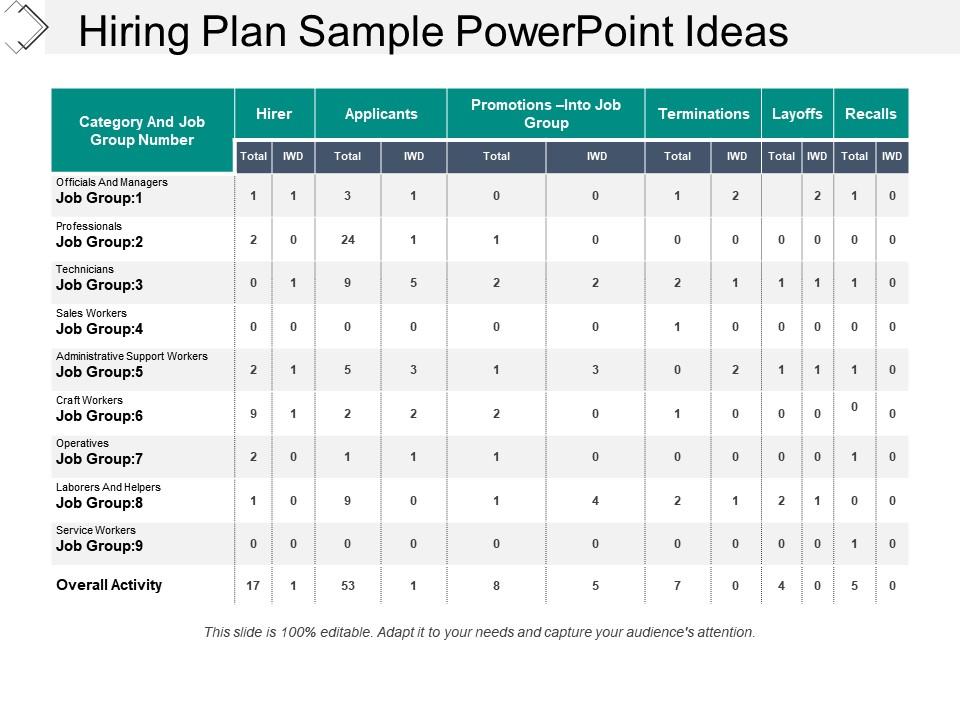
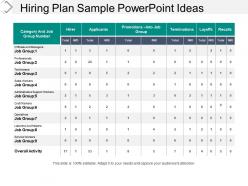
Presenting hiring plan sample PowerPoint ideas. PPT template is useful for HR managers, business professionals. Design template can easily be edited. With an opportunity to include customized content over text place holders and options for changing font type, color, size, shape, background and other elements. Easy and swift downloading is available. High-resolution icons have been used to explain the concept of hiring plan and process. Design can be downloaded into JPEG and PDF formats.

FAQs for Hiring plan

Okay so first things first - nail down your job requirements, timeline, and budget. Who's interviewing? What skills do you actually need vs what would be nice to have? I'd also figure out your sourcing strategy now before you're stressed later. Document the boring stuff too like approval workflows and interview logistics. Honestly, this part sucks but you'll be grateful when three great candidates want to interview the same week. Map out salary ranges and your ideal start date. Having everything written down means you won't make random decisions when you're rushing to fill the role.

Honestly, just scale the approval stuff up or down based on your company size. Small teams? One approval, done. Bigger companies are gonna need like 3-4 people signing off and way longer timelines - it's annoying but that's corporate life. Your budget section needs tweaking too. Startups throw equity around, established places focus on health insurance and PTO. The core stuff like job requirements and where you'll find candidates doesn't really change though. Start by figuring out who actually approves hires at your place first. Then adjust your headcount planning - planning for 5 people vs 500 is totally different math.

So workforce planning is basically figuring out who you need before you start hiring. Look at your current team first - what skills are missing? Then think about where your business is headed in the next 6-12 months. Honestly, most companies just panic-hire when someone quits, but that's backwards. Map out your headcount against actual business goals and you'll spot patterns in turnover too. It's like having GPS instead of wandering around lost. Without this step, your hiring template is just busy work - you're filling seats instead of building the right team.

Honestly, having a solid hiring template is a game-changer. It stops all those annoying mix-ups about budgets and timelines that always seem to happen. Your managers will actually know who's doing what - from posting jobs to making offers. Plus it forces you to hash out the important stuff early, like salary ranges and what skills you really need (instead of figuring it out halfway through). I learned this the hard way at my last job. Find one template that fits your company vibe, then stick with it across all departments. Trust me, it'll save you so many headaches down the road.

Honestly, you need to track both speed and quality - otherwise you're flying blind. Time-to-fill and offer acceptance rates show if your process is efficient. For quality, check performance reviews and retention at 90 days and one year. Don't obsess over application numbers though - they're basically meaningless vanity metrics. What matters is getting good people hired quickly without blowing your budget. Oh, and definitely track hiring manager satisfaction scores. They'll tell you real quick if candidates are actually meeting expectations once they start working.

Honestly, tech can make your hiring template way less of a headache. ATS systems automatically track where candidates are in the process, which saves so much time. Calendar tools handle interview scheduling without the back-and-forth emails (thank god). Analytics dashboards show you real-time data on your hiring funnel - I got weirdly obsessed with checking conversion rates when I first set mine up. Your whole team can update everything at once with collaboration tools, so no more "which version are we using?" confusion. Just pick whatever fixes your biggest problem first, then add more stuff later.

So honestly, the best thing about hiring plan templates is you can bake diversity goals right into the process from day one. Track your progress as you go instead of crossing your fingers and hoping it works out. Add sections for sourcing from different channels, write inclusive job descriptions, and - this part's key - build in bias checks at every interview stage. Your whole team stays on the same page because everything's standardized. I'd start small though - just add a diversity sourcing checklist and some basic demographic tracking to whatever template you're already using. Way easier than overhauling everything at once.

Honestly, the worst thing you can do is be super vague about what you actually need and when. I've seen so many companies just grab whoever's available instead of the right fit. Also, please don't copy-paste those generic job descriptions - we can all tell! Your budget needs to cover way more than just salary too. Oh, and don't try to rush everything with crazy tight deadlines. Get the hiring managers involved from the start since they're the ones who'll actually use your template. Trust me on this - pilot it with just one role first. Way easier than fixing a mess across the whole company later.

Okay so basically a hiring plan template stops you from just throwing job postings up randomly. It makes you think through which roles actually move the needle for your business goals - like revenue targets or whatever you're trying to achieve this year. I've seen too many companies hire just because they feel busy, but that's expensive. The template helps you prioritize based on real impact and time things right around launches or busy periods. My advice? Start with your top 3 business goals and work backwards. Figure out which specific roles would directly help you hit those targets. Way more strategic than hiring because you're overwhelmed.

Honestly, just start with a Google Form - super easy and you'll actually get responses. Send it to hiring managers and recruiters who've been using your template. One-on-ones with HR folks work great too. I'd definitely do focus groups because people LOVE venting about bad templates, so the feedback will be brutally honest (which is what you want). Oh, and don't forget to look at your metrics - did time-to-hire improve after rolling it out? Also worth asking candidates about their experience, though they're sometimes less candid. Mix of surveys and face-to-face convos usually gives you the full picture.

Check it monthly right now, honestly. Markets are crazy volatile and what worked three months ago is probably already stale. Quarterly reviews used to be fine but not anymore - remote work stuff and salary expectations shift way too fast. Watch competitor job postings and actually listen when new hires give feedback about your process. Struggling to fill roles? Time for an update. Industry reports help too, though half of them are pretty obvious if you're paying attention. Just set a calendar reminder or you'll totally forget.

Honestly, you've gotta track the important stuff from the get-go - time-to-hire, cost-per-hire, where your best candidates come from, and quality scores. Build it right into your template so you're not scrambling later (learned that the hard way). Track conversion rates at each funnel stage too. Candidate experience scores matter more than people think. Compare against industry benchmarks and your past performance. The game-changer? Actually using this data every quarter to tweak your sourcing and budget instead of just winging it.

So here's the thing - your hiring plan basically becomes your onboarding blueprint before you even find someone. You map out what skills they need, how the team works, all that stuff upfront. Then boom, you've got a roadmap for training them. Honestly, it saves you from those awkward "wait, we never wrote this down anywhere" moments that happen literally every time. The job requirements you already wrote? Just flip those into your 30-60-90 day checklist. Plus new hires actually know what success looks like instead of just guessing.

Honestly, you've got to make it so departments literally can't skip your process. First get the higher-ups on board - without leadership backing you, forget it. Then bake the template right into whatever hiring system you use so people physically can't move forward without completing each step. Train managers regularly on why this stuff matters (they forget fast). I'd also set up random check-ins to catch the teams who think they're too cool for rules. Oh, and assign someone in each department to be your "process person" - makes a huge difference having an internal champion. Maybe tie compliance to reviews if people keep ignoring you?

Build the location stuff right into your template from day one. Include fields for work arrangement preferences, required office days, time zones - all that good stuff. Honestly, I've watched teams completely panic when they realize they haven't thought this through mid-hire. It's a disaster. Also capture what remote people need - equipment, collaboration tools, salary differences by location. Document which roles actually need butts in seats vs. fully remote ones. Oh, and make sure hiring managers aren't just winging it - nobody wants that mess.

Ratings and Reviews

90% of 100
Review Form
Write a review
Most Relevant Reviews
  1. 80%

    by Damian Martin

    Great quality product.
  2. 100%

    by James Lee

    It saves your time and decrease your efforts in half.

2 Item(s)

per page: