


In store marketing powerpoint presentation slides




Try Before you Buy Download Free Sample Product
 Impress Your
 Audience
 100%
100% Editable
 Save Hours
 of Time


Our In Store Marketing Powerpoint Presentation Slides are topically designed to provide an attractive backdrop to any subject. Use them to look like a presentation pro.
People who downloaded this PowerPoint presentation also viewed the following :
Content of this Powerpoint Presentation
Slide 1: This title slide introduces In-Store Marketing. Add the name of your company here.
Slide 2: This is the Agenda slide for In Store Marketing.
Slide 3: This slide contains the Table of Contents. It includes - About Us, Major Challenges, New Retail Business Checklist, Types of Retail Store and Business Selection, etc.
Slide 4: This is a table of content slide introducing About Us.
Slide 5: This slide presents the Company Overview. It covers the company details such as business introduction, mission, vision, service areas of the business, offerings, and major clientele.
Slide 6: This slide presents Our Product Line. It covers the product line of the company including product types, product names, and series of the products. It also covers product line depth, the width of product line, and length of product line
Slide 7: This slide presents the Company Financials. It covers an overview of revenue, gross profit net profit, and earnings per share of the company from FY 19 to FY 21.
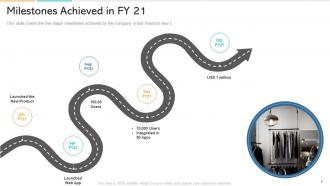
Slide 8: This slide presents the Milestones Achieved in FY 21. It covers the five major milestones achieved by the company in the last financial years.
Slide 9: This is a table of content slide introducing the Market Overview.
Slide 10: This slide presents the Retail POS Terminals Market Size, By Application, 2016 & 2024 (USD Million). It covers the Retail Market size was estimated at over USD 15 billion in 2016 and is predicted to grow at over 10% CAGR from 2017 to 2024.
Slide 11: This slide presents the Emerging Market Trends. It covers the market trends related to the retail sector for convenience stores, drugstores or pharmacies, and departmental stores.
Slide 12: This is a table of content slide introducing the Major Challenges.
Slide 13: This slide presents the Major Challenges to Overcome in Retailing. It covers the challenges in retail management such as lack of space, changing customer lifestyle, lack of infrastructure customer awareness, and many more.
Slide 14: This slide presents the New Retail Business Checklist. It covers the new retail start-up checklist which includes self-assessment and business choice, overall business plan, financial plan, organizational details plan.
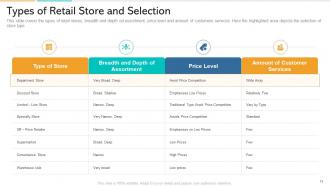
Slide 15: This slide presents the Types of Retail stores and Selection. It covers the types of retail stores, breadth, and depth of assortment, price level, and amount of customers services.
Slide 16: This is a table of content slide introducing the Business Model.
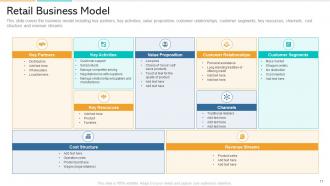
Slide 17: This slide presents the Retail Business Model. It covers the business model including key partners, key activities, value proposition, customer relationships, customer segments, key resources, channels, cost structure, and revenue streams.
Slide 18: This slide presents the Market Selection (1/2). It covers the market selection matrix which includes existing and new market forms such as market penetration, market development and expansion, retail format development, and diversification.
Slide 19: This slide presents the Market Selection (2/2). It shows the four retail markets type from where highlighted one is according to targeted market and products.
Slide 20: This is a table of content slide introducing the Market Targeting.
Slide 21: This slide presents the Target Market Criteria. Here we have mentioned the criteria that we have considered while targeting our markets such as the size of segment, growth rate, sales potential, and many more.
Slide 22: This slide presents the Target Market Strategies. The purpose of it is to identify which strategic feature adopted by the retailers has been most influencing. It covers target marketing strategies.
Slide 23: This is a table of content slide introducing the Retailing Strategies.
Slide 24: This slide presents the Retail Location Analysis Strategy. It covers the analysis for retail store location such as market research, real estate planning, performance measurement, and site selection.
Slide 25: This slide presents the Retail – Locational Positioning. It covers the primary and secondary factors in different parameters that were kept in mind while selecting retail locations such as drive time population, competitors' floor space, walking distance, and many more.
Slide 26: This slide presents the Retail Location Factor Rating (1/2). It signifies that a company can rate each site with a value from the range based on the costs and benefits offered by the alternative locations and multiply this value by the appropriate weight.
Slide 27: This slide presents the Retail Location Factor Rating (2/2). It covers the retail location rating factors along with its weightage, score and, weighted score. Some of the major factors are parking space, customer accessibility, etc.
Slide 28: This is a table of content slide introducing the Merchandising.
Slide 29: This slide presents the Merchandising Process. It covers the process of merchandising starting from understanding customer needs, identifying and sourcing, planning, price deciding, communication, and feedback.
Slide 30: This slide presents the Merchandising Strategy- Premium Placement. It covers the merchandising strategy such as placement of products in Z- pattern and horizontally which will likely be more profitable for the retailer.
Slide 31: This slide presents the Visual Merchandising Strategy. It covers visual merchandising strategies such as using catchy colors, creating a focal point, exposing customers to max products, properly using empty space, and storytelling.
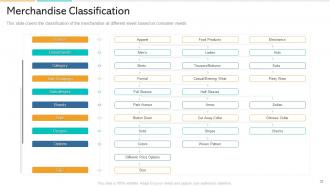
Slide 32: This slide presents the Merchandise Classification. It covers the classification of the merchandise at different levels based on consumer needs.
Slide 33: This is a table of content slide introducing the Pricing.
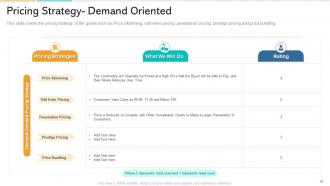
Slide 34: This slide presents the Pricing Strategy- Demand Oriented. It covers the pricing strategy of the goods such as Price Skimming, odd-even pricing, penetration pricing, prestige pricing, and price bundling.
Slide 35: This slide presents the Pricing Strategy- Cost Oriented. It covers the cost-based pricing strategy of the products such as cost-plus pricing and mark-up pricing along with its rating.
Slide 36: This slide presents the Retail Pricing Strategy and Maturity Stages. It covers the unified pricing effectiveness along with the maturity level.
Slide 37: This is a table of content slide introducing the Marketing.
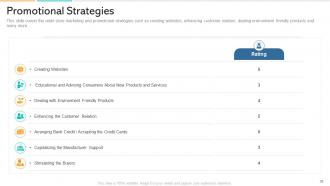
Slide 38: This slide presents the Promotional Strategies. It covers the retail store marketing and promotional strategies such as creating websites, enhancing customer relations, dealing with environment-friendly products, and many more.
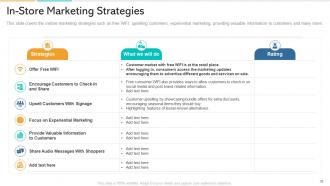
Slide 39: This slide presents the In-Store Marketing Strategies. It covers in-store marketing strategies such as free WIFI, upselling customers, experiential marketing, providing valuable information to customers, and many more.
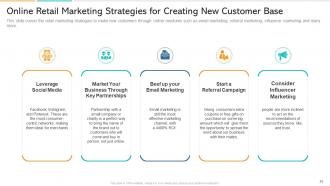
Slide 40: This slide presents the Online Retail Marketing Strategies for Creating New Customer Base. It covers the retail marketing strategies to make new customers through online mediums such as email marketing, referral marketing, influencer marketing, and many more.
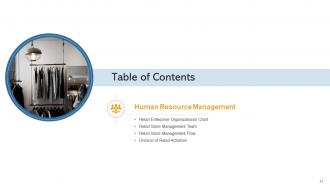
Slide 41: This is a table of content slide introducing Human Resource Management.
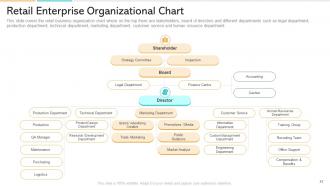
Slide 42: This slide presents the Retail Enterprise Organizational Chart. It covers the retail business organization chart where on the top there are stakeholders, board of directors, and different departments such as legal department, production department, technical department, marketing department, customer service, and human resource department.
Slide 43: This slide presents the Retail Store Management Team (1/2). It covers the retail store organization chart including controller, public manager, merchandising manager, store manager, etc.
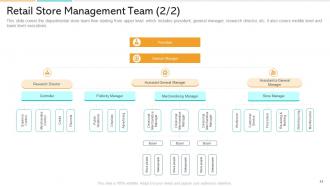
Slide 44: This slide presents the Retail Store Management Team (2/2). It covers the departmental store team flow starting from the upper level which includes the president, general manager, research director, etc.
Slide 45: This slide presents the Retail Store Management Flow. It covers the retail store management flow such as who will perform what activities. Some of the activities are strategic management, merchandise management, store management, and administrative management.
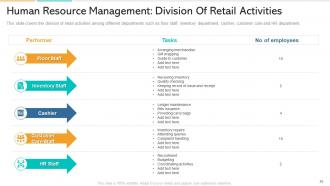
Slide 46: This slide presents the Human Resource Management: Division of Retail Activities. It covers the division of retail activities among different departments such as floor staff, inventory department, cashier, customer care, and HR department.
Slide 47: This is a table of content slide introducing the Financial Strategy.
Slide 48: This slide presents the Retail Financial Strategy. It covers the retailing financial strategies such as level of organization, outputs, inputs, and productivity
Slide 49: This is a table of content slide introducing the Distribution Types.
Slide 50: This slide presents the Distribution Types. It covers the distribution types such as exclusive distribution, intensive distribution, and selective distribution. Where intensive distribution has been selected.
Slide 51: This slide presents the Relationship Management Among Retailers and Suppliers. It covers the relationship of the manufacturer wholesaler and retailer regarding the distribution of brands.
Slide 52: This is a table of content slide introducing the Information and Distribution System and Omnichannel Retail Supply Chain.
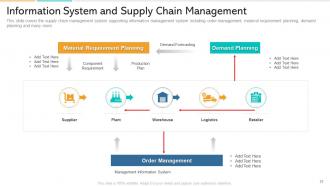
Slide 53: This slide presents Information System and Supply Chain Management. It covers the supply chain management system supporting information management system including order management, material requirement planning, demand planning, and many more.
Slide 54: This slide presents the Omnichannel Retail Supply Chain. It covers the total cost to serving an omnichannel consumer which can be broken down into three parts: the costs to position products to be ready for order fulfillment activities—including inventory carrying costs, the costs associated with fulfilling the order to the consumer and, when applicable, the costs associated with products being returned.
Slide 55: This is a table of content slide introducing the Retail Management Dashboard and Customer Relationship Management.
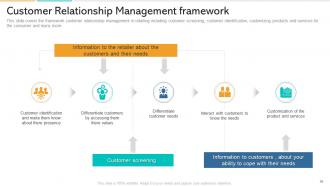
Slide 56: This slide presents the Customer Relationship Management framework. It covers the framework of customer relationship management in retailing including customer screening, customer identification, customizing products and services for the consumer, and many more.
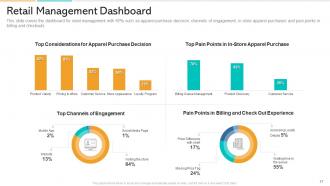
Slide 57: This slide presents the Retail Management Dashboard. It covers the dashboard for retail management with KPIs such as apparel purchase decisions, channels of engagement, in-store apparel purchases, and pain points in billing and checkouts.
Slide 58: This is the In Store Marketing – Icons Slide.
Slide 59: This slide presents the Additional Slides.
Slide 60: This slide shows an Area Chart that compares 2 products’ sales in millions.
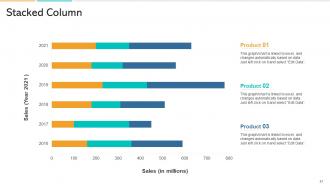
Slide 61: This slide shows a Stacked Column that compares 3 products’ sales over a timeline of years.
Slide 62: This slide provides the Mission for the entire company. This includes the vision, the mission, and the goal.
Slide 63: This is the Puzzle slide to showcase the parts that make up a concept whole.
Slide 64: This slide presents a Magnifying Glass to give more details about the individual steps in a project.
Slide 65: This slide contains the information about the company aka the ‘About Us’ section. This includes the Valued Clients, the Target Audience, and Preferred by Many.
Slide 66: This slide is a Timeline template to showcase the progress of the steps of a project with time.
Slide 67: This slide introduces the overall Target of the company as well as smaller targets within that main Target.
Slide 68: This slide contains Post-It Notes that can be used to express any brief thoughts or ideas.
Slide 69: This is a table of content slide introducing the Comparison between the percentages of males and females for given criteria.
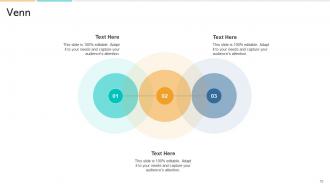
Slide 70: This slide provides a Venn diagram that can be used to show interconnectedness and overlap between various departments, projects, etc.
Slide 71: This is a Thank You slide where details such as the address, contact number, and email address are added.
In store marketing powerpoint presentation slides with all 71 slides:
Use our In Store Marketing Powerpoint Presentation Slides to effectively help you save your valuable time. They are readymade to fit into any presentation structure.






















FAQs for In store marketing
Think of visual merchandising as your store's wingman - it does all the selling without saying a word. Good product placement and displays literally guide people where you want them to go. Window displays are what get them through the door in the first place. Then your interior setup keeps them wandering around discovering stuff. Honestly, I've seen stores double their sales just by moving a few mannequins around (sounds crazy but it works). Map out how customers move from entrance to checkout, then build your displays around that flow. It's all about making the experience feel natural while you're secretly directing the whole thing.
So basically you wanna see where people actually walk and hang out in your store. Heat mapping is cool, but honestly just watching customers works too. Find your "golden triangle" - that sweet spot everyone hits - and stick your best money-makers there. Dead corners? That's where essentials go (grocery stores are genius putting milk way in the back). I'd move slow sellers out of prime real estate and switch things up monthly. The real trick is tracking how long people spend in each area and what they actually buy. Then tweak based on what you see, not what you think should work.
Honestly, interactive stuff is where it's at - AR try-ons, sampling stations, live demos where people actually do things instead of just looking around. Gamification works crazy well too. I've seen stores do scavenger hunts with QR codes that unlock discounts and people eat it up. Make it feel like a destination, not just another place to buy stuff. Those Instagram-worthy displays that rotate monthly? Gold. Or set up corners where customers can create something - even something small. I'd start with just one thing though, see what your crowd actually likes before going all out.
Put your digital screens where people actually stop - end caps, checkout lines, busy aisles. Update them constantly based on what you've got in stock or whatever promo you're running. I've watched stores swap out featured products every few hours, which honestly seems like overkill but it works. Show clear product shots, prices, and quick benefits. Interactive ones are pretty cool too - customers can check reviews or browse similar stuff. Oh, and don't go crazy at first. Pick one or two spots, test different messages to see what clicks, then expand from there.
Dude, sensory marketing is seriously powerful - it can boost sales by 15-30% and keep people browsing 40% longer. Multiple senses create those emotional connections that make people buy stuff they didn't plan on. You know how you instantly smell Abercrombie from like 50 feet away? That's intentional (and honestly kind of aggressive but it works). Good visual displays grab attention first. Background music controls how fast people shop - slower music means they linger more. Scents tap into memories and feelings. Letting customers touch products builds trust. Just make sure everything fits your brand vibe instead of clashing.
So here's what I'd do - start tracking where customers actually walk around your store, because honestly it's never where you think they'll go. Heat mapping is clutch for this. Then look at your sales data to see which displays actually make people buy stuff versus just look pretty. Peak hours matter too - that's when you want your best staff working and all your digital signs running smoothly. The real magic happens when you connect your register data with foot traffic patterns. You'll start seeing what setups actually work. Don't go crazy though, just pick one busy area and test different layouts first.
Dude, product placement is everything for impulse buys. Seriously can make or break your numbers. Eye level stuff works great, but don't sleep on checkout areas and endcaps - that's where people are just standing around anyway. There's this "golden triangle" thing where customers' eyes naturally land first. High-margin impulse items go wherever people pause or wait. Near registers is obvious, but also think about decision points in your layout. Oh and map out how customers actually move through your space first - you'll spot those prime real estate spots way easier. Trust me on this one.
Honestly, urgency is everything for seasonal sales. Put your boldest signs right at the entrance with "limited time" messaging everywhere - but don't go crazy with decorations, I've seen that backfire. Bundle stuff together to bump up what people spend. Your staff needs to actually push these deals too since they're way better at selling than any display. Timing's tricky though - start early enough to catch people in the seasonal mood but not so early you look desperate. Oh, and definitely track which displays work best! You'll want that data for next time.
Train everyone on what's actually happening with your promotions first - cashiers, stockers, everyone. Nothing's worse than customers knowing more about your sale than your own employees do (been there!). Make simple cheat sheets they can grab quick. Role-play scenarios during team meetings so they're not deer-in-headlights when customers ask questions. Your managers need to hammer home the key messages daily too. Don't just assume people will figure it out. Actually tell your team it's cool to bring up promotions with customers instead of staying silent.
So basically, interactive displays get people to actually stop and mess around with your stuff instead of just walking by. Think test driving a car vs reading a brochure - huge difference. People will touch, swipe, whatever, and suddenly they're spending way more time with your brand. Plus you get all this data on what they're actually into, which is gold. And honestly? Everyone loves taking pics of cool interactive stuff for their socials, so free marketing. I'd say try one small thing first and see how much longer people hang out in that spot.
Checkout is your golden opportunity - people can't escape while they're paying! Train your staff to mention it during every transaction and throw up some clear signs at the registers. Honestly, digital displays work way better than those boring static posters. Offer something immediate like 10% off their current purchase so it doesn't feel like they're doing homework for future rewards. Set up a little loyalty section near your entrance with benefits spelled out clearly. Floor decals can guide people over there too. The whole trick is making signup feel instantly worth it, not like some annoying extra step.
Ok so basically you want to turn shopping into storytelling, right? Put up signs that show the journey - like "this coffee came from Maria's farm in Colombia" or whatever. Customer reviews work great too when you stick them next to products. Even simple stuff like "family owned since 1987" hits different than just listing features. Create little themed areas that tell a complete story together. Honestly, people eat this stuff up because they want to feel connected to what they're buying, not just grab something off a shelf. It's way more memorable than boring product descriptions.
Packaging is basically your silent salesperson, so don't underestimate it. You've got like 3-7 seconds max when someone's browsing the shelf. Colors and fonts trigger instant reactions about quality - look at Apple's white boxes, they scream "expensive" without saying a word. Stand out from your competitors but make it obvious what you're selling. Here's the thing though: people make decisions from arm's length away, so your main selling points need to be readable from there. I learned this the hard way with my cousin's startup - beautiful design but nobody could tell what it actually was from a distance.
Honestly, I'd start with businesses you already love - like that coffee shop you hit up every morning. Reach out to 2-3 places and pitch something simple. Cross-promotion works best when your customers actually overlap but you're not competing directly. Coffee roaster takeovers are pretty cool, or maybe team up with local artists for pop-ups. Even charity drives can work if it makes sense for your neighborhood. The whole point is making it feel genuine, not forced - nobody wants another random collab that feels like marketing BS. Test something small first and see how it goes.
Dude, logistics will kill you - deliveries get screwed up constantly and stuff just sits forgotten in back rooms. Store managers are another headache since they all think they know better than corporate brand guidelines. Manhattan customers want totally different things than people in small-town Texas, so good luck with that. Honestly, the only thing that's saved me is making those super detailed install guides with tons of photos. Oh and give managers like a tiny budget to tweak things locally - keeps them happy while you stay sane. Regular check-ins help too.
-
The content is very helpful from business point of view.
-
Easy to edit slides with easy to understand instructions.
-
It saves your time and decrease your efforts in half.
-
Perfect template with attractive color combination.
-
It saves your time and decrease your efforts in half.