Learning journey ppt presentation examples

Rating:
80%
Learning journey ppt presentation examples
Slide 1 of 5
Favourites Favourites

Try Before you Buy Download Free Sample Product

Audience Impress Your
Audience
Editable 100%
Editable
Time Save Hours
of Time
The Biggest Sale is ending soon in
0
0
:
0
0
:
0
0
Rating:
80%
Presenting a PPT template named Learning Journey PPT Presentation Examples. This template is professionally designed and is completely editable. The font color, font size, font style, background color, and the color of the diagram can be altered as per your suitability. The text in the template can be rewritten and replaced with your desired content. The slide is compatible with Google Slides and can be easily saved in JPG or PDF format.

People who downloaded this PowerPoint presentation also viewed the following :

Content of this Powerpoint Presentation

Description:

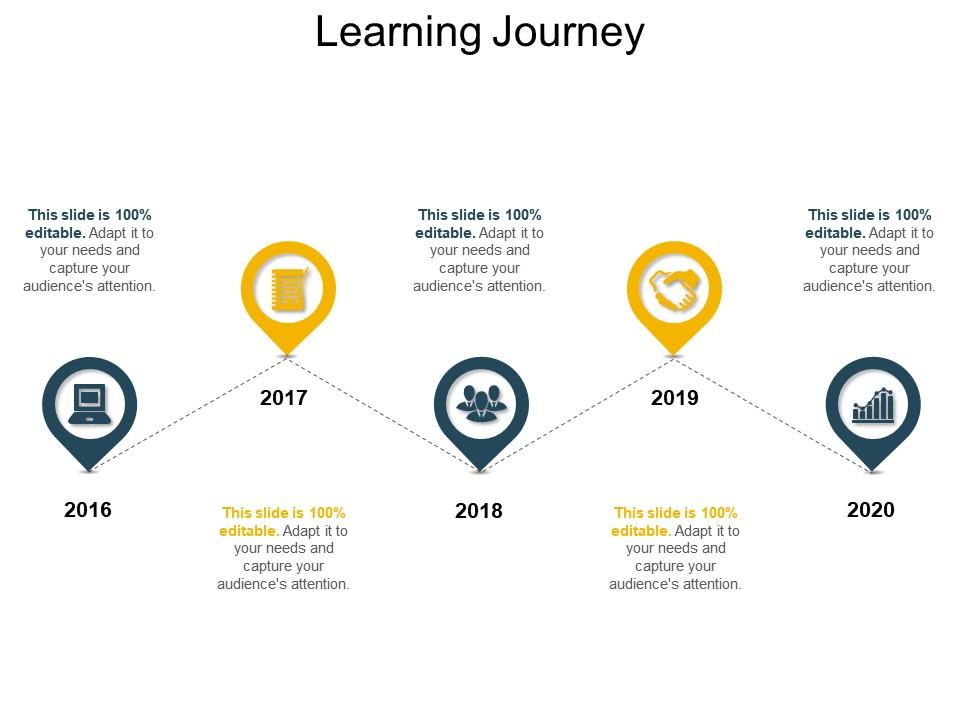
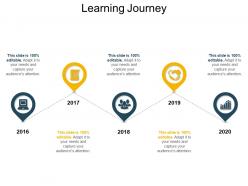
The image is a PowerPoint slide titled "Learning Journey," depicting a timeline from 2016 to 2020. Each year is marked with a different icon, suggesting a progression or evolution in learning or development stages:

1. 2016: 

Icon of a computer, possibly indicating the beginning of a digital learning process.

2. 2017: 

Icon of a notebook, could represent a phase of gathering knowledge or academic study.

3. 2018: 

Icon with three people and a gear, likely symbolizes collaborative learning or team development.

4. 2019: 

Icon of a handshake within gears, suggesting partnerships or practical application of learned skills.

5. 2020: 

Icon with a graph inside a location marker, indicating reaching a goal or measuring the impact of the learning journey.

Use Cases:

This template could be relevant across various sectors:

1. Corporate Training:

Use: Showcasing employee skill development over time.

Presenter: Training Coordinator

Audience: Employees, management

2. Educational Institutions:

Use: Illustrating academic curriculum progression.

Presenter: Academic Dean

Audience: Students, faculty, educational board

3. Healthcare:

Use: Tracing the evolution of medical training programs.

Presenter: Medical Education Director

Audience: Medical students, hospital staff

4. Technology:

Use: Mapping out technology skill acquisition and project milestones.

Presenter: Chief Technology Officer

Audience: Technical teams, stakeholders

5. Non-Profit Organizations:

Use: Demonstrating volunteer or staff training and growth.

Presenter: Program Director

Audience: Volunteers, donors, board members

6. Professional Services:

Use: Detailing continuing education for professionals like lawyers or accountants.

Presenter: Continuing Education Coordinator

Audience: Firm partners, associates

7. Government:

Use: Outlining the development of training programs for public servants.

Presenter: Human Resources Manager

Audience: Government employees, policy makers

FAQs for Learning journey

Honestly, just reading stuff won't cut it - you gotta actively engage with whatever you're learning. I'd set weekly goals that are actually measurable so you don't just drift along aimlessly. Spaced repetition is clutch for making things stick, and here's something that sounds weird but works: try explaining concepts to other people. It's like magic for retention or something. Oh, and don't get stuck using just one method. Videos, articles, actually doing the thing - mix it up based on what works for your brain. Keep some kind of progress log too. Doesn't matter if it's fancy - even a basic journal helps you see how much you've improved.

Dude, your brain literally processes images in milliseconds but text takes way longer. Charts and diagrams give people different ways to get the same info - some people are just wired more visually anyway. Most complex stuff makes way more sense when you can actually *see* how the pieces connect. Honestly? I'd swap out at least one text-heavy slide for a simple diagram. You'll probably notice people actually paying attention instead of scrolling Instagram under the table (which, let's be real, happens more than we want to admit). Visual stuff just hits different.

Dude, you really need feedback - it's like having GPS for learning. Otherwise you're just wandering around making the same dumb mistakes forever. The good stuff tells you what's actually working and gives you real ways to get better. Can you imagine trying to learn guitar without anyone telling you your fingers are in the wrong spots? Get feedback early and often, not just during those awkward formal review meetings. Ask mentors, friends, whoever. Even just reflecting on your own stuff helps. Don't sit around waiting for people to offer it up.

Start with something super basic - even bullet points in a notebook work. I use a spreadsheet where I dump topics I'm studying, resources, main takeaways, plus I rate how confident I feel about each thing. Weekly check-ins help too, just to see what actually stuck vs what didn't. Honestly, some people get fancy with Notion or take photos of handwritten notes, but whatever. The main thing is just doing it consistently rather than making it perfect. Oh, and don't overthink the system - you can always change it later if it's not working.

Honestly, procrastination's gonna be your biggest enemy. Plus that overwhelming feeling when there's just too much stuff to learn - I hate that. You'll also hit these annoying plateaus where nothing clicks anymore. Break everything into tiny pieces so it doesn't feel impossible. Daily goals work way better than just "I'll study more" (which never happens lol). When you get stuck, switch methods - videos instead of books or whatever. Oh and expect to feel like crap sometimes - that's totally normal. I track my progress weekly because otherwise I forget how much I've actually improved. Trust me, you're probably doing better than you think.

Honestly, Coursera and edX are solid if you like structured stuff. YouTube's great for quick fixes when you're stuck. GitHub is where the real practice happens though - way better than just watching videos. Khan Academy still slaps for fundamentals, even if it makes me feel like I'm 12 again lol. Don't just bounce between random tutorials though. Pick something and actually stick with it for a week minimum. Take notes too - I know it's boring but it helps. Reddit communities are clutch for getting unstuck, and you'll see what everyone else is struggling with. Just block out time weekly or you'll never do it.

Look, taking time to actually think about your day changes everything. I used to just barrel through life making the same dumb mistakes over and over. Now I spend like 10 minutes weekly writing down what went well and what sucked. Sounds boring, but you start seeing your own patterns - like why you always stress about certain things or nail others. It's weird how much clearer everything becomes. Plus you get way better at handling people and new situations once you know your own tendencies. Honestly wish someone told me this earlier.

Working with other people honestly speeds up learning so much. You'll hear completely different ways to tackle problems that would never occur to you. There's that whole thing where explaining stuff to someone else actually makes YOU understand it better too. Your friends will spot knowledge gaps you missed or share random shortcuts they picked up. The discussions make you think harder about everything - way more than just reading alone. I'd definitely set up study sessions or even grab coffee and just talk through ideas. It's way less boring than grinding solo all the time.

Honestly, Notion or Obsidian are total game changers - they let you link ideas together instead of just dumping stuff in folders. I've been using Readwise lately for saving articles and highlights, which is pretty clutch. Anki's solid too if you need to actually memorize things (though I kinda hate flashcards lol). File storage is whatever - Google Drive works fine. The real magic happens when you can connect concepts across topics. Oh and here's the thing - pick ONE system and commit for at least a month. I used to hop between apps constantly and it just kills your momentum. Start with just one this week.

Dude, stories are like magic for boring presentations. Your audience actually pays attention when you share a real failure or start with "picture this..." instead of diving straight into data. I literally watch people lean in when I do this. Plus stories give you that natural setup-problem-solution flow, which beats endless bullet points any day. Personal anecdotes work great, but even made-up scenarios can hook people. Oh, and here's something that works really well - open with a quick story that proves your main point, then bring it back at the end. It's way more memorable than just facts.

Honestly, break stuff down into tiny wins and actually celebrate them - even if it's just treating yourself to good coffee after a rough chapter. I'm awful at this but visual progress tracking really does work. Cross things off lists, use those little progress bars, whatever. Find people learning similar things because misery loves company (and it genuinely helps). Write down one small thing you learned each day - you'll be shocked how fast it adds up. When everything feels impossible, go back to why you started this whole thing in the first place.

Honestly, just start building stuff right away instead of cramming theory first. I used to think I needed to learn everything before touching a real project - total waste of time. Mini-projects are your friend, even the ugly ones that barely work. There's this 70-20-10 thing I discovered: spend most of your time actually doing the work (70%), learn from other people (20%), and only 10% on textbooks or whatever. Wrestling with real problems teaches you way more than reading about them. Pick something small this week and just mess around with it. You'll figure it out.

Honestly, having clear goals is such a game changer - you actually know where you're headed instead of just bouncing around hoping stuff clicks. I used to do that tutorial hopping thing too and got nowhere fast. Now when I set specific targets, I can see real wins happening. Keeps me way more motivated. Plus you stop wasting time on random "interesting" stuff that doesn't actually help. Like, sure that advanced topic looks cool but does it get you closer to what you want? Write down 2-3 concrete things you want to nail this quarter. Makes planning so much easier.

First thing - find your spot. Kitchen table corner, bedroom desk, whatever works with decent lighting and fewer distractions. I suck at this part too, but try blocking 30-minute chunks in your calendar like actual appointments. Finding people helps a ton. Online groups, study buddies, someone to keep you honest when you're slacking. Honestly, accountability makes such a difference. Don't be harsh on yourself when you inevitably miss days - we all do it. Small wins count more than you think. Just start tomorrow with 30 minutes of something new and see how it goes.

Honestly, curiosity is everything - plus being adaptable when things don't go as planned. You'll want to get comfortable with that awkward feeling of not knowing stuff yet. Critical thinking matters more than ever with all the BS information out there. Pattern recognition is weirdly useful too, because what you learn in one area often clicks somewhere totally random later. Don't try to perfect everything upfront. Instead, get good at testing ideas quickly and scrapping what doesn't work. Oh, and try learning something completely new this month using a method you've never used before - podcasts if you're a reader, videos if you hate those, whatever feels different.

Ratings and Reviews

80% of 100
Review Form
Write a review
Most Relevant Reviews
  1. 80%

    by Chet Cox

    Very unique and reliable designs.
  2. 80%

    by Chuck James

    Awesome presentation, really professional and easy to edit.

2 Item(s)

per page: