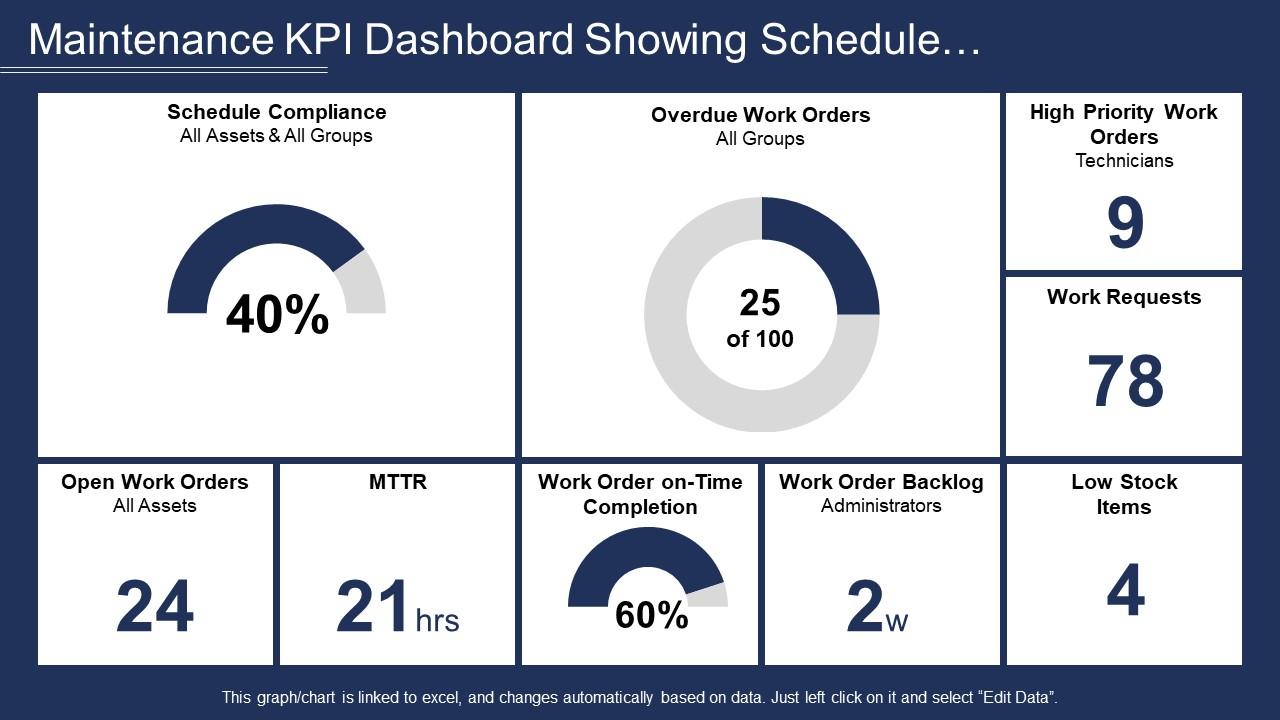
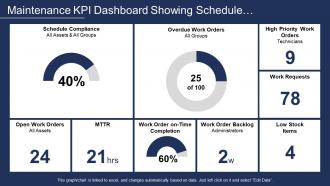
Painel de manutenção Kpi mostrando conformidade com cronograma e Mttr

Rating:
90%
Slide 1 of 6
Favourites Favourites

Try Before you Buy Download Free Sample Product

Audience Impress Your
Audience
Editable 100%
Editable
Time Save Hours
of Time
The Biggest Sale is ending soon in
0
0
:
0
0
:
0
0
Rating:
90%

Recursos desses slides de apresentação do PowerPoint:

Apresentando este conjunto de slides com o nome - Painel Kpi de manutenção mostrando conformidade com o cronograma e Mttr. Este é um processo de nove estágios. As etapas neste processo são Manutenção, Preservação, Conservação.

FAQs for Maintenance kpi dashboard showing schedule

Honestly, stick with the basics first - equipment uptime, MTTR, and your planned vs unplanned maintenance ratio. OEE is clutch too. I'd track maintenance costs as a percentage of asset value, plus work order completion rates (those numbers are way more revealing than most people realize). But seriously, don't go metric-crazy at the start. I've seen teams get so wrapped up in fancy dashboards they forget to actually wrench on stuff. These six will give you solid insight without drowning in data.

So a maintenance KPI dashboard is basically your early warning system - catches issues before they turn into those nightmare 3am emergency calls. You'll see equipment health, maintenance schedules, all that stuff in real time. But here's the cool part: instead of just reacting when things break, you can actually predict problems. Like when pump vibrations start creeping up or preventive maintenance gets missed. Honestly beats the hell out of scrambling around during production hours. My advice? Don't overcomplicate it at first. Pick 3-4 metrics like MTBF and planned vs unplanned downtime, then build from there.

Honestly, most people go with Power BI, Tableau, or just plain Excel. Power BI connects really nicely to CMMS systems and you get decent real-time dashboards. If you want something flashy, Tableau's your best bet - though it's probably way more than you need for basic maintenance stuff. Don't sleep on Excel though! Works great for smaller setups. I know it's not sexy but whatever gets the job done, right? Before you buy anything new, check if your current maintenance software already has dashboard features built in. Fiix and UpKeep both do. Might save you some headache and money.

So grab the main stuff first - equipment health scores, failure probabilities, remaining useful life estimates. Get those feeding into your dashboard widgets through APIs or whatever automated reports your maintenance system spits out. The annoying part? Making sure predictions actually refresh in real-time, not showing you yesterday's data. I'd focus on trend lines showing how your assets are degrading, plus alert thresholds for when you need to jump in. Honestly, start with just your most critical equipment. Don't go crazy trying to monitor every single thing or your dashboard becomes useless noise.

Dude, real-time data is a game changer for maintenance dashboards. You're not waiting around to find out something broke - you get alerts the second performance starts dropping. Way better than playing catch-up after the fact. Honestly, catching issues before they turn into expensive disasters is worth its weight in gold. You can tweak maintenance schedules as things happen and make decisions based on actual current data instead of old reports. My advice? Start with your most important equipment first, then expand from there. Don't try to do everything at once.

Honestly, most errors happen during manual data entry - that's where everything goes sideways. Set up automated collection wherever you can. Your team should do weekly spot checks, comparing dashboard numbers to actual work orders. I've seen so many dashboards that looked perfect but were totally off because nobody bothered checking the source data. Make sure everyone's measuring KPIs the same way by defining them clearly upfront. Train your techs on proper entry and build it into their daily routine. Monthly audits help catch problems early. Oh, and don't let data entry become an afterthought - that never ends well.

Time series line charts are your best bet for tracking trends like MTTR and uptime - you can actually see patterns developing. Gauge charts? Perfect for availability percentages since they give you that quick visual health check. Heat maps are fantastic for spotting which assets are crying for attention across different locations or time periods. Bar charts work well when you're comparing performance between teams or equipment. Honestly, skip pie charts completely - they're pretty much useless for maintenance data. Oh, and don't go crazy with too many visuals at first. Start with maybe 3-4 key ones, then build from there once everyone's comfortable.

Dude, you need this dashboard - it shows you exactly what's breaking and when, so you're not just throwing money at random repairs. Spot downtime patterns before they kill your budget. Honestly, I wish I'd started tracking this stuff years ago because the data makes it so much easier to convince the boss you need more maintenance budget. You can finally prioritize which machines actually need attention instead of guessing. Plus you'll see cost trends that'll surprise you. Start simple though - pick like 3-5 metrics that matter most to your operation and build from there.

Put your big three up top first - equipment uptime, MTTR, and planned vs unplanned downtime. Make it super visual with charts and colors so people can quickly spot what's broken. I can't tell you how many terrible dashboards I've seen that just dump data everywhere. Group similar stuff together and keep your time periods consistent. Real-time updates are pretty much essential these days. Oh, and think about who's actually using this thing - if techs need it on their phones, design for mobile first. Run it by a couple people before you launch it. You'll catch weird layout issues that way.

Start with what your company actually cares about - if they're all about cutting costs, track stuff like maintenance spend per unit or downtime expenses. Reliability-focused? Go with uptime percentages and failure rates. Honestly, I've watched teams build these gorgeous dashboards that just... sit there unused. Total waste. Ask your leadership what their biggest headaches are first, then build around those problems. Oh, and make sure you're tracking things your maintenance crew can actually do something about. There's nothing worse than being judged on metrics you can't control.

Honestly, the messiest part is always your data - it's scattered everywhere, inconsistent formats, missing info. Total headache. Getting people to actually care about the dashboard is another beast entirely. Everyone gets excited at first, then ignores it completely after like two weeks. Also, don't get overwhelmed picking KPIs because there are literally hundreds you could track. My buddy made that mistake and his dashboard looked like a NASA control room. Start with maybe 3-4 metrics that actually matter. Oh, and definitely get your boss on board first - makes everything so much easier when you're not fighting uphill.

Dig into your old maintenance records first - that's where the good stuff is hiding. Pull at least 12 months to see real patterns. Your past repair times, failure rates, and costs per asset become your baseline KPIs. Honestly, seasonal trends are huge and most people miss them completely. Check which maintenance strategies actually saved you money versus the ones that just sounded smart. Equipment degradation curves will show you what's coming next. Oh, and use your downtime history to figure out which metrics deserve the biggest spots on your dashboard.

Honestly, you want to get ahead of problems instead of just tracking them after they happen. Ditch the "oh crap, it's broken" approach. Start watching equipment health scores, weird vibration patterns, temperature stuff - anything that screams trouble before it actually breaks. Digital twins are everywhere now too (basically fancy virtual copies of your machines that predict when they'll die). Oh, and sustainability metrics aren't optional anymore - energy per unit, waste reduction, all that fun stuff. Companies are obsessed with it. Just pick one predictive thing to add first though. Don't overwhelm yourself trying to revamp everything at once.

Look, user feedback is what separates dashboards people actually use from those fancy ones collecting digital dust. Ask your team monthly what metrics help their daily decisions and which charts are just confusing noise. You'll be surprised how wrong your assumptions were about what they need. I've watched so many dashboards flop because someone built them in a vacuum. The feedback lets you tweak alert thresholds, swap out useless KPIs for better ones, and reorganize everything so it flows with their actual workflow. Trust me - those check-ins are worth it.

Dude, mobile access is huge for field teams. When your techs are out there fixing stuff, they need data RIGHT THEN - not three hours later back at the office. Picture this: they spot a problem and can instantly pull up performance trends, maintenance history, all that good stuff on their phone. Makes decisions way easier on the spot. They can prioritize what's actually urgent and update work orders immediately instead of playing the guessing game. Honestly, if your dashboard isn't mobile-friendly, you're basically sending people out there half-blind. Worth the investment for sure.

Ratings and Reviews

90% of 100
Review Form
Write a review
Most Relevant Reviews
  1. 100%

    by Dominick Pierce

    Very unique, user-friendly presentation interface.
  2. 80%

    by Williams Morales

    Excellent work done on template design and graphics.

2 Item(s)

per page: