Marcos Alcançados Desenvolvimentos Ppt Apresentação em Powerpoint Background

Milestones achieved developments ppt powerpoint presentation background
Slide 1 of 2
Favourites Favourites

Try Before you Buy Download Free Sample Product

Audience Impress Your
Audience
Editable 100%
Editable
Time Save Hours
of Time
The Biggest Sale is ending soon in
0
0
:
0
0
:
0
0

Características destes slides de apresentação do PowerPoint:

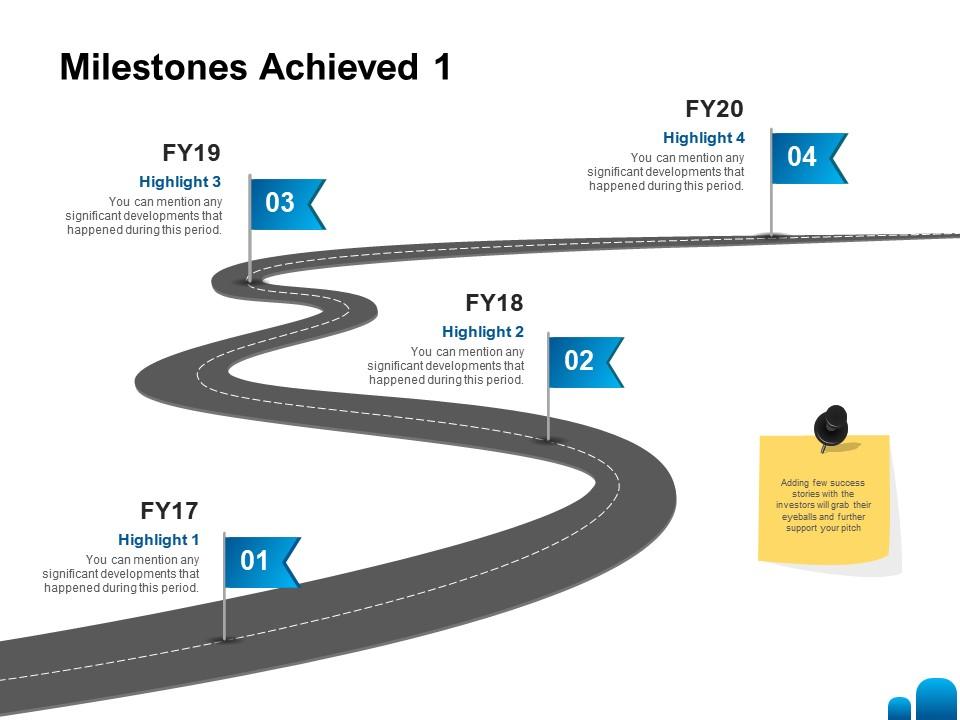
Apresentando este conjunto de slides com o nome Marcos Alcançados Desenvolvimentos Ppt Apresentação em Powerpoint Background. Este é um processo de quatro etapas. As etapas desse processo são Marcos Alcançados. Esta é uma apresentação PowerPoint completamente editável e está disponível para download imediato. Baixe agora e impressione seu público.

FAQs for Milestones achieved developments ppt

Honestly, the cloud collaboration stuff changed everything - no more emailing versions back and forth like savages. AI design suggestions are pretty sick too, they'll actually fix your layouts and suggest content based on your data. Real-time co-editing means everyone can jump in at once without breaking anything. Oh, and presentations don't look like garbage on phones anymore, which is nice since half the time people are viewing them mobile anyway. The AI formatting tools will save you so much time it's ridiculous. Whatever platform you're using, definitely mess around with those features first.

The whole professional landscape shifted crazy fast, and these milestones show exactly how people are adapting. Everyone's scrambling for data skills and cloud knowledge they never needed before. Remote work changed everything - honestly, half the tools we use daily didn't even exist a few years ago. Traditional specialized roles? They're becoming way less important than being adaptable and tech-savvy. Cross-functional abilities are where it's at now. Continuous learning isn't just nice to have anymore, it's survival. Check what milestones people in your field are actually hitting, then figure out which emerging skills you should tackle next.

Honestly, the coolest stuff right now is AI that suggests layouts automatically based on what you're writing about. Real-time collab is huge too - no more "wait, which version are we using?" nonsense. The data viz tools are pretty slick now, they'll turn your boring Excel dumps into actual interactive charts without much work. Oh, and templates finally auto-resize for different screens which is about time. There's also way better multimedia embedding that doesn't break everything. Start with the AI design assistant though - I'm not even exaggerating, it'll save you like 3 hours of fidgeting with alignment and fonts.

Oh totally - user demographics changed everything about template design. Gen Z and millennials want bold visuals that work on phones, while corporate folks still need those boring (but effective) clean layouts for meetings. Different countries need different fonts too, which is honestly kind of a pain. Remote work was the game-changer though. Now everything has to look decent on Zoom calls and laptop screens. You should definitely check your analytics to see which templates actually work for your specific audience - the data might surprise you.

Honestly, it's wild how much presentation tools have changed. Back in the '80s, desktop publishing was revolutionary - you could finally do more than just basic text slides. PowerPoint was a game changer with actual design features and templates you could reuse. But the internet? That's when things got crazy. Suddenly there were thousands of templates online instead of just the boring pre-installed ones. Now with cloud stuff, your templates follow you everywhere. AI's even starting to create designs automatically based on what you write (kind of scary tbh). Just don't get so obsessed with flashy templates that you forget what you're actually trying to say.

Oh man, these collaborative templates are a lifesaver! Your team can all jump into the same deck at once - no more of that version control hell where nobody knows which file is current. Real-time editing means you'll see changes as they happen, plus you can drop comments right on slides and divvy up sections. Honestly, it beats emailing PowerPoints back and forth like it's 2005. The tracking feature shows who edited what, so you can undo things if someone goes rogue. Just claim your slides early so people aren't accidentally messing with each other's work.

Honestly, minimalism changed everything - those early 2000s slides look so cluttered now. Data viz became huge too, so templates started including better chart layouts and infographic stuff. Mobile changed the game since people view presentations on their phones all the time now (which is kinda annoying but whatever). Brand storytelling also shifted how templates flow - more like actual stories instead of just bullet points everywhere. Oh, and white space became king. Look at your current templates and see where they feel outdated. Most need serious updates.

Honestly, analytics are like peeking behind the curtain to see how people *actually* use your templates. Heat mapping shows where users click first - super helpful for figuring out if your layout makes sense. You'll spot patterns like everyone ditching slide 3 or spending forever on the same section. The data reveals which designs actually work versus the ones you thought were genius but totally flop. Click tracking is probably the easiest place to start. Sometimes the results are wild though - I once saw data showing people completely ignored this elaborate header design and went straight to the boring bullet points instead!

Presentation design has changed so much lately! Modern templates are way more minimalist now - nobody wants those cluttered slides anymore. Mobile viewing changed everything too since people watch on phones and tablets constantly. Oh, and diverse imagery is huge now instead of those weird generic stock photos from before. Templates focus on storytelling rather than just dumping data everywhere, which honestly makes sense. The whole "death by PowerPoint" complaint really worked. Clean visuals, less text, more authentic content - that's what audiences expect. Pick something that matches how your audience actually thinks and views stuff, not just whatever looks "professional."

So first, reliable internet became standard around 2008-2010. Google Slides and Office 365 launched their web versions after that - total game changer for real-time collab. Cloud storage got cheap enough that file sizes stopped mattering (god, we used to email PowerPoints back and forth like savages). Mobile editing got decent too, so your templates had to work everywhere. Most companies have ditched desktop entirely now with AI integration and instant sharing. Honestly? If you're still stuck on desktop-only templates, you're missing collaboration features that'll save your team serious time. Worth switching imo.

Honestly, user feedback is like having a cheat sheet for what to build next. People will straight up tell you what they need - specific industries, layouts, whatever's missing from your current stuff. The complaints are actually super valuable (I know, sounds weird) because they show you exactly where you're falling short. Here's something interesting though - track which templates get downloaded vs. actually used in real presentations. There's usually a gap there. Set up surveys and maybe do some user interviews to catch both the obvious requests and those subtle issues people can't quite put into words. It's way more helpful than just guessing what'll work.

Yeah, I've heard some pretty good stories! This fintech startup got their Series A after switching to one of those pitch deck templates - apparently it made their investor story way clearer. Oh, and some marketing agency boosted their client win rate by like 40% with the proposal ones. Pretty impressive honestly. A SaaS company mentioned their internal meetings got way more engaging too after they started using the templates. What's funny is everyone basically says the same thing - their stuff finally stopped looking amateur. You should definitely peek at their case studies section, they've got the real examples there.

Look, accessibility milestones are basically checkpoints to make sure your templates work for everyone. Alt text for images, good color contrast, keyboard navigation - these small tweaks open up your content to people with visual or motor disabilities. Honestly surprised me how much impact tiny changes have. Plus you'll stay compliant with WCAG standards, which matters more now. I'd start by auditing what you've got against those guidelines. You'll probably spot some easy fixes right away that'll expand who can actually use your stuff. Worth the effort.

Ugh, templates go stale SO fast. Data shifts, priorities change, and suddenly last quarter's slides look completely irrelevant. I swear executives change their minds about what matters every other week. Maintaining quality is a nightmare too - someone has to review everything constantly, which is a huge time sink. What actually works? Build modular stuff with placeholder sections you can easily swap out. Way better than creating static slides that need total rebuilds every few months. Trust me, you'll save yourself so much headache down the road.

So basically you can set up these presentation templates like stages - students start with simple text stuff, then unlock cooler features like data viz once they nail the basics. Kids actually eat up that whole "leveling up" thing, it's honestly pretty genius. Faculty love it too because they can standardize how they grade without being super rigid about creativity. The trick is matching each milestone to actual learning goals - that way students see they're getting somewhere real instead of just... doing busywork, you know? Makes tracking progress way less of a headache.

Ratings and Reviews

0% of 100
Review Form
Write a review
Most Relevant Reviews

No Reviews