

Online learning platform pitch deck ppt template




Try Before you Buy Download Free Sample Product
 Impress Your
 Audience
 100%
100% Editable
 Save Hours
 of Time


Online learning platform is a webspace or portal for educational content and resources that provide students with everything they need in one location, including lectures, resources, opportunities to meet and chat with other students, etc. In the Online Learning industry globally, the fastest-growing market in the Asia Pacific APAC and the largest market in North America. Check out our professionally designed Online Learning platform pitch deck that presents a summary of the platform Market, showing challenges and solutions offered by Online Learning Platforms, etc. This PPT template presents global market trends, top market players, growth drivers, etc. The PowerPoint presentation also exhibits information on pitfalls, challenges, and market segmentation of Online Learning Platforms. Also, this deck provides details of Online Learning Platforms application overview, Online Learning Platforms key activities, Online Learning Platforms value proposition, competitive analysis, and business model of Online Learning Platforms. Additionally, this pitch deck provides information about the most popular Online Learning Platforms and critical people involved in Online Learning Platform Leadership, addressing SWOT analysis for Online Learning Sector and future initiatives by Online Learning Platforms. Customize the deck now.
People who downloaded this PowerPoint presentation also viewed the following :
Content of this Powerpoint Presentation
Slide 1: This slide displays title i.e. 'Online Learning Platform Pitch Deck'.
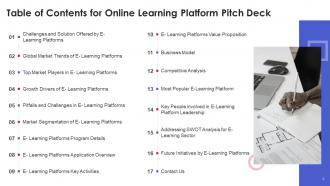
Slide 2: This slide presents table of contents.
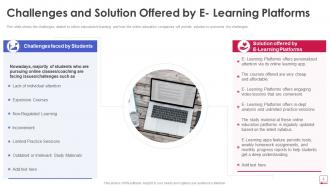
Slide 3: This slide shows the challenges related to online education/e-learning and how the online education companies will provide solution to overcome the challenges.
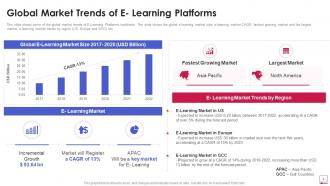
Slide 4: This slide shows some of the global market trends of E-Learning Platforms worldwide.
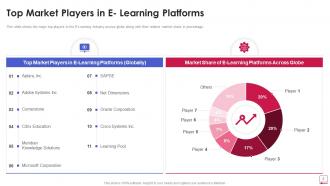
Slide 5: This slide shows the major top players in the E-Learning industry across globe along with their relative market share in percentage.
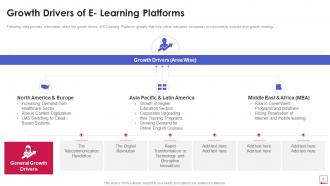
Slide 6: This slide provides information about the growth drivers of E-Learning Platforms globally.
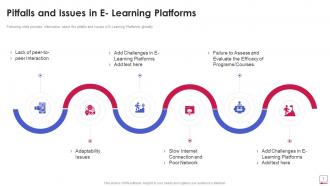
Slide 7: This slide provides information about the pitfalls and issues in E-Learning Platforms globally.
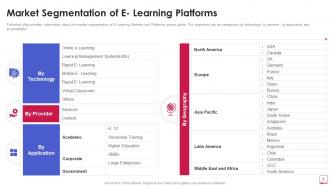
Slide 8: This slide provides information about the market segmentation of E-Learning Markets and Platforms across globe.
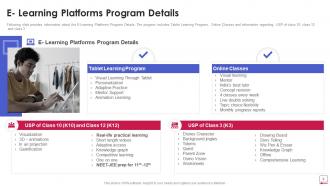
Slide 9: This slide provides information about the E-Learning Platforms Program Details.
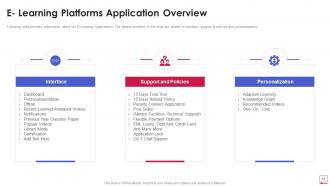
Slide 10: This slide provides information about the E-Learning Applications.
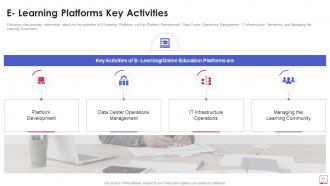
Slide 11: This slide provides information about the key activities of E-Learning Platforms such as Platform Development, Data Center Operations Management, etc.
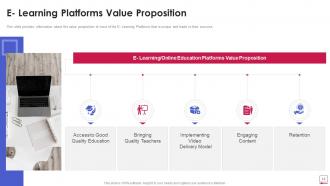
Slide 12: This slide provides information about the value proposition of most of the E- Learning Platforms that is unique and leads to their success.
Slide 13: This slide illustrates information about well defined business model of majority of E- Learning/Online Education Platforms.
Slide 14: This slide will help the presenter to show the investors or audience a complete view of competitive landscape.
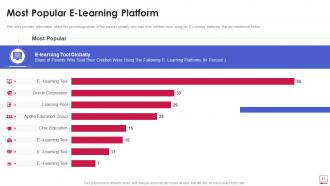
Slide 15: This slide provides information about the percentage/share of the parents globally who said their children were using the E-Learning platforms.
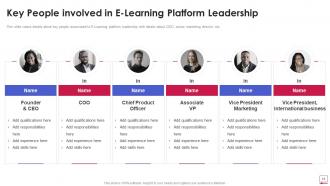
Slide 16: This slide caters details about key people associated to E-Learning platform leadership with details about CEO, senior marketing director, etc.
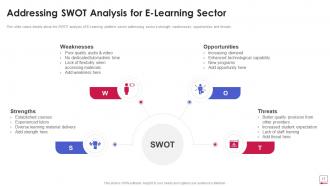
Slide 17: This slide caters details about the SWOT analysis of E-Learning platform sector addressing sector’s strength, weaknesses, opportunities and threats.
Slide 18: This slide caters details about future initiatives by e-learning platforms that will focus on leveraging relationships.
Slide 19: This slide presents contact details of company.
Slide 20: This is the icons slide.
Slide 21: This slide presents title for additional slides.
Slide 22: This slide presents your company's vision, mission and goals.
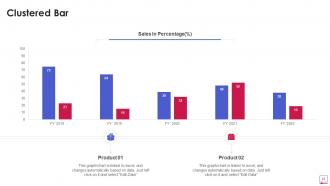
Slide 23: This slide exhibits yearly clustered bar charts for different products. The charts are linked to Excel.
Slide 24: This slide shows targets of the company.
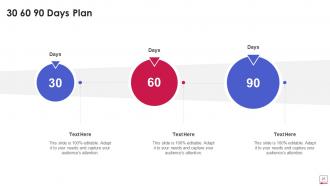
Slide 25: This slide depicts 30-60-90 days plan for projects.
Slide 26: This slide displays puzzle.
Slide 27: This slide depicts important notes for past experiences of clients.
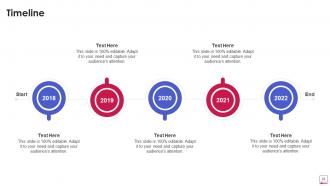
Slide 28: This slide exhibits yearly timeline.
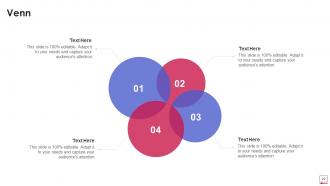
Slide 29: This slide displays Venn.
Slide 30: This slide shows roadmap.
Slide 31: This is thank you slide & contains contact details of company like office address, phone no., etc.
Online learning platform pitch deck ppt template with all 36 slides:
Use our Online Learning Platform Pitch Deck Ppt Template to effectively help you save your valuable time. They are readymade to fit into any presentation structure.











FAQs for Online learning platform pitch
Honestly, it comes down to three big things: intuitive navigation, mobile-friendly design, and pages that actually load quickly. Users shouldn't have to dig through weird menus just to find basic stuff. A decent dashboard helps too - show progress, deadlines, recent activity. Most platforms totally overthink this part. Search needs to work properly, and you want easy access to forums plus messaging with instructors. Oh, and offline downloads are clutch when wifi's spotty. Best ones mix up content formats - videos, PDFs, interactive stuff. Don't get fancy with unnecessary features though.
Honestly, gamification is just brilliant psychology - it tricks your brain into thinking you're playing instead of studying. You rack up points and badges that hit the same dopamine centers as mobile games. Plus those progress bars actually show you're getting somewhere, which traditional learning never does well. The instant feedback keeps you hooked way longer too. What's really cool is how it transforms boring abstract stuff into actual achievements your brain can latch onto. Definitely hunt for courses with achievement systems. I was skeptical at first, but man, you'll feel way more motivated than you expect.
Honestly, mobile accessibility can make or break your online learning platform. Most people will probably use their phones like 70% of the time anyway - I know I do. Your learners need to access stuff during their commute or random breaks throughout the day. Nobody's chained to their desktop anymore. The mobile version can't just be a shrunky desktop site though. Touch-friendly buttons are huge, plus readable text and quick loading. Test the mobile experience first when you're checking out platforms. That's where most of your actual usage will happen, so don't mess around with a clunky mobile setup.
First thing - vet your instructors hard. Check credentials, experience, teaching samples, the whole deal. Set clear content standards upfront so people know what you expect. Most platforms totally blow this part and pay for it later. Get subject experts reviewing courses before launch, then keep checking quality ongoing. Student feedback systems are gold - actually use that data though, don't just collect it. Oh and be proactive about catching problems. Way better than students finding issues first and complaining about it later. Trust me on this one.
Honestly, mix it up with automated quizzes plus real projects where they actually build something. Quick polls work great for checking if anyone's lost. I've found peer feedback is surprisingly good - students don't sugarcoat things like we do. Track who's actually participating, not just test scores. Traditional exams are pretty useless online anyway since cheating is so easy. Oh, and those exit tickets at the end of class? Super helpful for catching confusion early. The combo of ongoing feedback and final grades gives you the full picture of who's really getting it.
Yeah, most platforms have pretty solid collaboration features built in. You've got shared whiteboards, breakout rooms for group work, discussion boards - the usual stuff. Real-time document editing is clutch (like Google Docs but everything stays in one place). Video chat and project boards help track what everyone's doing. Oh, and peer reviews are actually way more useful than they sound - I was surprised by that. The main thing is finding a platform that doesn't make you bounce between a million different apps. Definitely test out the group features if there's a free trial or whatever.
Dude, personalization is a total game-changer for keeping students hooked. We're talking 40-60% better completion rates when your course actually adapts to how people learn. Simple stuff works too - just remembering where someone left off or adjusting difficulty based on their pace makes them feel like the platform actually cares about them specifically. It beats the old "spray and pray" approach where everyone gets the same content. Honestly, I'd start with basic progress tracking and maybe some custom learning paths. Your dev team won't hate you, and you'll still see solid engagement bumps.
So basically AI watches how you learn and adjusts the difficulty as you go. It spots where you're struggling before you even realize it. The cool part? It figures out when you study best and what format clicks for you - like videos vs reading or whatever. You get instant feedback instead of waiting days for grades, which honestly saves so much time. Plus it creates practice questions tailored to your weak spots. Some platforms even predict what'll trip you up next. Just make sure you pick ones that actually use AI well, not just slap it on for marketing.
Honestly, online students drop out mostly because they feel isolated - like they're just staring at a screen talking to nobody. You've gotta recreate those random campus moments somehow. Discussion boards help, but breakout rooms during live sessions work even better. Study groups are gold too. I remember one course where we had this casual Slack channel just for quick questions, and suddenly people were actually chatting about assignments and helping each other out. Sounds cheesy, but once students feel connected to classmates, they stick around. Even simple intro posts make a huge difference in retention rates.
Build accessibility right from the start - trust me on this one. Screen readers, keyboard nav, video captions, adjustable text. Way cheaper than fixing it later (learned that the hard way). Your content people need to nail alt text and use proper headings. But here's the thing - test with real users who actually have disabilities. They'll spot stuff your devs miss every time. Oh, and keep running audits plus have a way for people to give feedback. Short bursts work better than trying to overhaul everything at once.
Honestly, chat is gonna be your lifesaver here. Mix things up constantly - throw in videos one day, polls the next, maybe some breakout rooms when you're feeling ambitious. Quick quizzes work too. I always do these little check-ins where I ask everyone to drop one thing they learned in the chat... sounds cheesy but it actually works! Try gamifying stuff with points or badges if you can swing it. The whole trick is making sure they don't feel invisible behind their screens. Oh, and feedback fast - like, really fast. Just pick one new interactive thing each session so you don't overwhelm yourself.
Honestly, blended learning is pretty great because you get flexibility from the online stuff but still have that real connection when you meet in person. Students can go through materials at their own speed online, then you bring everyone together for discussions or hands-on work that actually makes it stick. The digital part handles all the basic knowledge transfer efficiently. Then your face-to-face time focuses on application and deeper thinking - way more valuable that way. I'd probably start with like 70% online and 30% live sessions. That split seems to work well for most things I've seen.
Microlearning is where it's at right now - people want quick lessons that actually fit their crazy schedules. AI personalization is getting really impressive too, like it genuinely adapts to how you learn best. Most students are glued to their phones anyway, so mobile-first design is basically mandatory now. VR and AR are finally taking off for hands-on stuff. But honestly? The coolest shift I'm noticing is how learning's becoming more social - way less sitting alone with content, more collaborating with other people. I'd start by checking how terrible your mobile experience is, then chop up longer courses into focused bite-sized pieces.
So basically, analytics shows you exactly where students are getting stuck or losing interest. Track stuff like completion rates, quiz scores, and time on each section. The dropout patterns are honestly gold - they tell you everything you need to know. When you see where people bail, you can fix those sections or make them more interactive. A/B test different course elements to see what actually clicks with people. You'll also catch struggling students before they completely fail out, which is huge. Oh, and don't go crazy with data at first - pick like 3-4 key metrics to focus on so you don't get overwhelmed.
Honestly, the tech stuff is the worst part - you'll feel like you're drowning in new software at first. Plus connecting with students through screens? Super awkward when you're talking to black boxes all day. Look for platforms that aren't complicated to figure out. Built-in polls and breakout rooms are lifesavers for engagement. Oh, and make sure they have decent training that doesn't assume you're some coding wizard. I'd say just mess around with basic features first. Don't jump into all the bells and whistles right away. Find something that handles the technical headaches so you can actually focus on teaching instead of troubleshooting.
-
Unique research projects to present in meeting.
-
Awesome presentation, really professional and easy to edit.