category-banner

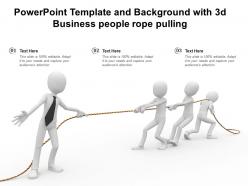
Powerpoint template and background with 3d business people rope pulling

Rating:
92%
Powerpoint template and background with 3d business people rope pulling
Slide 1 of 2
Favourites Favourites

Try Before you Buy Download Free Sample Product

Audience Impress Your
Audience
Editable 100%
Editable
Time Save Hours
of Time
The Biggest Sale is ending soon in
0
0
:
0
0
:
0
0
Rating:
92%
Templates act as productivity boosters as they help in getting more work done in a lesser time frame. They are also great design frameworks with everything pre designed. This Powerpoint Template And Background With 3d Business People Rope Pulling is one such layout that can help you meet your goals and expectations in no time. It will provide you with great design elements that are suitable for any scenario consulting marketing sales personal agenda or any other. Not only this but this template layout will help you navigate the most important ideas and streamline your way of presenting. With everything pre laden and fully equipped this design is an absolute steal. The high resolution graphics and images used will empower your message and catch the audiences attention in minutes thereby helping you deliver inspiring presentations. The biggest advantage of this template is that it can be manipulated as per your business understanding. So feel free to adjust it to your terms and conditions once you click on the download button.

People who downloaded this PowerPoint presentation also viewed the following :

FAQs for Powerpoint template and background with 3d business

A 3D business people rope-pulling concept delivers enhanced visual engagement, clear teamwork symbolism, dynamic movement representation, and memorable metaphorical impact that transforms abstract collaboration concepts into tangible imagery. This approach enables presenters to illustrate strategic alignment, collective effort dynamics, and competitive scenarios while creating deeper audience connection, with many organizations finding that dimensional visuals significantly improve message retention and stakeholder buy-in.

Incorporating a 3D template enhances audience engagement by creating visual depth, improving information retention, and making complex concepts more memorable through dynamic imagery. These templates help presenters capture attention more effectively than flat designs, with many organizations finding that three-dimensional elements increase audience focus and participation during critical business meetings.

**INPUT**: What types of business scenarios are best illustrated by a 3D rope-pulling concept? **OUTPUT**: 3D rope-pulling concepts effectively illustrate team collaboration, competitive market dynamics, resource allocation challenges, organizational change management, and strategic goal achievement scenarios. These visual metaphors enhance presentations by demonstrating collective effort, competitive positioning, and unified direction, with many organizations finding that such imagery strengthens stakeholder engagement and clarifies complex business relationships.

The rope-pulling metaphor demonstrates teamwork by illustrating unified effort, coordinated timing, shared goals, collective strength, and synchronized leadership across departments. Corporate presentations leverage this visual to showcase collaborative projects like cross-functional product launches, merger integrations, or organizational restructuring initiatives, with many companies finding that such metaphors enhance stakeholder understanding and reinforce strategic alignment.

Presenters can communicate key messages through strategic positioning of content alongside the dynamic 3D figures, using the rope-pulling metaphor to illustrate teamwork, competition, or collaborative effort while ensuring text placement complements rather than competes with the visual elements. The action-oriented imagery naturally draws attention to key points, with many executives finding that this template effectively reinforces messages about collective achievement, overcoming challenges, and strategic alignment across departments.

Essential design elements include realistic 3D character modeling, dynamic rope tension visualization, balanced color schemes, strategic lighting effects, and clear perspective angles. These elements work together by creating depth through shadows and highlights, emphasizing team dynamics with varied character poses, and ensuring visual hierarchy guides viewer attention, ultimately delivering engaging presentations that effectively communicate collaboration, competition, or collective effort concepts across business contexts.

A 3D rope-pulling template visually represents competitive dynamics through opposing teams, tension visualization, strategic positioning, and power imbalances between market players. This approach enables organizations to illustrate market competition, resource allocation battles, and strategic rivalries in presentations, with many companies finding that such visual metaphors effectively communicate competitive landscapes, stakeholder conflicts, and collaborative challenges to investors and teams.

3D visuals in business presentations deliver enhanced engagement, improved concept clarity, stronger emotional connection, and increased memorability compared to traditional 2D templates. These dynamic elements help presenters illustrate complex relationships, hierarchies, and processes more effectively, with many organizations finding that 3D presentations generate higher audience retention and more compelling storytelling for strategic initiatives.

The template can be customized by adjusting colors to match brand guidelines, replacing generic figures with industry-specific representations, modifying backgrounds to reflect company environments, and incorporating logos or brand elements seamlessly. Organizations across sectors, from financial services to manufacturing, find that these visual customizations enhance employee engagement and reinforce cultural values, ultimately delivering more impactful presentations that resonate with both internal teams and external stakeholders.

3D presentations enhance audience retention by creating deeper visual engagement, triggering spatial memory pathways, and reducing cognitive load through intuitive three-dimensional representation. These immersive elements help audiences process complex business concepts more effectively, with studies showing significantly improved recall rates, while the rope-pulling metaphor specifically reinforces teamwork messages through memorable visual storytelling.

**INPUT**: How can you ensure that 3D elements do not distract from the main message of the presentation? **OUTPUT**: You can maintain focus by using 3D elements strategically as supporting visuals, keeping color schemes consistent with your brand, and ensuring proportional sizing that complements rather than overwhelms text content. These design principles enable presenters to enhance engagement while preserving message clarity, with many organizations finding that balanced 3D integration ultimately delivers stronger audience retention and more memorable business communications.

User feedback highlights this template's effectiveness in visualizing teamwork dynamics, competitive scenarios, strategic alignment, and collaborative challenges across presentations. Many presenters find that the 3D rope pulling metaphor resonates strongly with audiences in corporate training, team building sessions, and strategic planning meetings, ultimately enhancing engagement and message clarity.

Industries requiring strong teamwork emphasis particularly benefit from 3D rope-pulling presentations, including healthcare, construction, manufacturing, financial services, and consulting. These sectors frequently use such visuals during merger integrations, cross-departmental projects, and crisis management scenarios, with many organizations finding that the metaphor effectively communicates unity of purpose and collective effort needed for strategic initiatives.

**INPUT**: How can a presenter effectively transition between slides when using a dynamic 3D template? **OUTPUT**: Effective transitions with 3D templates require coordinating verbal cues with visual elements, maintaining consistent pacing, and using subtle animations that complement the dimensional design. Presenters should practice timing their narration with 3D movements, employ strategic pauses during complex visual shifts, and ensure transitions enhance rather than distract from key messages, ultimately delivering seamless storytelling that keeps audiences engaged throughout the presentation.

Best practices for integrating text and data with 3D imagery include maintaining visual hierarchy, using contrasting colors for readability, positioning text strategically around 3D elements, limiting font varieties, and ensuring data visualization complements rather than competes with imagery. These approaches enhance audience comprehension by creating clear focal points, improving information retention, and delivering more engaging presentations, with many organizations finding that balanced integration significantly increases stakeholder engagement and message clarity.

Ratings and Reviews

92% of 100
Write a review
Most Relevant Reviews
  1. 80%

    by Edison Rios

    Awesome presentation, really professional and easy to edit.
  2. 100%

    by Dan Marshall

    Designs have enough space to add content.
  3. 100%

    by Dillon Payne

    Very unique, user-friendly presentation interface.
  4. 80%

    by Jones Adams

    Thanks for all your great templates they have saved me lots of time and accelerate my presentations. Great product, keep them up!
  5. 100%

    by Craig Moreno

    Great quality slides in rapid time.

5 Item(s)

per page: