Modelo PPT del tablero del proyecto
Try Before you Buy Download Free Sample Product
Audience
Editable
of Time
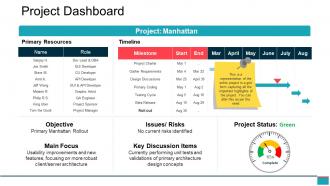
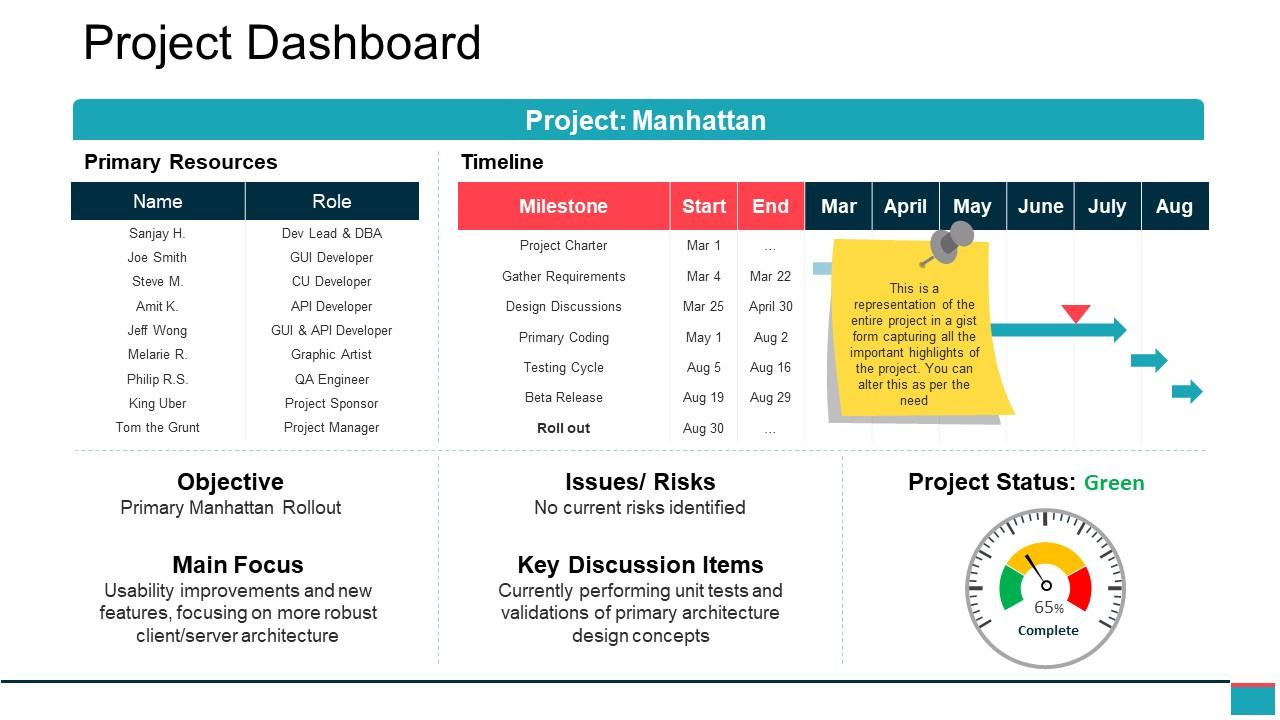
Proporcione a las partes interesadas una descripción general del progreso de un proyecto con nuestro modelo PPT del tablero del proyecto. Esta diapositiva de presentación PPT del panel de administración de proyectos ha sido diseñada por nuestro equipo de miembros profesionales del equipo y es útil para capturar y recopilar datos sobre el desempeño del equipo para los logros importantes. Nuestro panel de estado del proyecto se puede utilizar para mostrar métricas del progreso y rendimiento general de un proyecto o para resaltar problemas que requieren mayor atención. Este diseño PPT del panel de seguimiento de proyectos es útil para mostrar el progreso del proyecto con datos a ejecutivos, miembros del equipo o un cliente importante. Este panel de KPI de la diapositiva de power point del proyecto puede ser útil para monitorear a departamentos individuales que desean monitorear el éxito de proyectos y campañas. Esta plantilla de informe de estado de varios proyectos ofrece la forma de realizar un seguimiento y medir el progreso continuo mediante una presentación de diapositivas de gestión de proyectos. Descargue esta plantilla y facilite la visualización de datos en tiempo real para el equipo y los miembros del proyecto. Nuestro modelo Ppt de panel de proyectos tiene un efecto armonioso. Los sentimientos amistosos comienzan a fluir.
Características de estas diapositivas de presentación de PowerPoint:
Presentación del modelo PPT del panel de control del proyecto. Entrada de datos simple como logotipo, nombre o marca comercial de la empresa. Este tema de PowerPoint es totalmente compatible con las diapositivas de Google. La calidad de la imagen de estas diapositivas no cambia incluso cuando se proyecta en una pantalla grande. Los formatos y la velocidad de descarga rápida se pueden cambiar fácilmente a aplicaciones JPEG y PDF. Esta plantilla es adecuada para marketing, vendedores, gerentes comerciales y emprendedores. Ajuste el diseño, la fuente, el texto y el color de PPT según sus necesidades
People who downloaded this PowerPoint presentation also viewed the following :
Contenido de esta presentación de Powerpoint
Project Dashboard Ppt Model con las 5 diapositivas:
Refuerce sus pensamientos con nuestro modelo Ppt de panel de proyectos. Serán una ventaja adicional.
FAQs for Project dashboard
You need five things: project status overview, timeline with milestones, budget tracking, how work's distributed across your team, and alerts for risks or blockers. I've watched so many teams build dashboards that show everything and therefore show nothing useful. Focus on metrics that actually matter to whoever's looking at it. Quick red flag detection is crucial - budget going sideways, deadlines getting missed, that stuff. Oh and make it dead simple. If someone can't glance at it for 30 seconds and know exactly what's happening, you've overcomplicated it.
Honestly, visual dashboards are a game changer for project tracking. You can spot problems before they blow up instead of staring at endless spreadsheet rows. Progress bars and trend charts make everything obvious at a glance. Your stakeholders will actually understand what's happening too - no more explaining why the numbers mean what they mean. I always start simple with basic progress tracking and trend lines. Way better than scrambling when something goes sideways because you missed the warning signs buried in data. Plus you look way more on top of things in meetings.
Honestly, just stick to the basics - velocity, sprint burndown, and cycle time. These actually show if your team's moving or stuck. Story completion rates matter too, but blockers are what really screw everything up (trust me on this one). Skip the BS metrics like hours logged or lines of code - they don't tell you anything useful. Your dashboard should show sprint progress at a glance plus any major red flags. Daily updates keep everyone on the same page about what's really going down.
Honestly, dashboards are a game-changer for keeping everyone on the same page. Your team can see who's doing what, what deadlines are coming up, and where things might be stuck. No more of those annoying "wait, what's happening with that thing?" messages every five minutes. It really cuts down on people accidentally duplicating work too. Oh, and definitely set up automatic updates if you can - otherwise someone will forget to update it and it becomes useless pretty quickly. Having everything visible like that just makes communication so much smoother.
So you've got Microsoft Project which is crazy powerful but honestly kind of a pain to learn. Trello's the opposite - super simple with those card boards that are weirdly satisfying to move around. Asana and Monday.com are probably your best bet though, they're not too complicated but still do everything you need. Oh and there's Smartsheet if you're one of those people who loves Excel. Really depends if your team likes the visual board thing or prefers timelines and lists. Just grab the free trials first - way better than committing to something that'll annoy everyone daily.
Daily updates are your best bet, though real-time is even better if you can swing it. Weekly? Way too slow - you'll be flying blind half the time. Match it to how fast your project moves, honestly. Teams that live in their dashboards need fresh data constantly for quick calls. Longer projects can probably get away with every few days. I'd start daily and see how much your team actually uses it - no point updating constantly if they only check it once a week, you know? Real-time sounds fancy but daily usually does the trick for most stuff.
Honestly, the hardest part is getting people to actually check the thing regularly. I've been on teams where we spent weeks building this elaborate dashboard and then... crickets. Data quality becomes a nightmare when half your team forgets to update project statuses. Plus everyone wants to track literally everything at first - I swear I once saw a dashboard with like 50 charts that made zero sense together. Technical integration between tools can be a pain too, but that's manageable. Start with maybe 3-4 metrics that actually move the needle on your goals. Way better than overwhelming people right out the gate.
Dashboards are like visual storytelling for your stakeholders - way better than drowning them in spreadsheets. You can show real-time progress and catch risks early. Honestly, most people's eyes glaze over during Excel presentations anyway. The visual format keeps everyone engaged and builds trust since they see what's actually happening. ROI becomes clearer too. Oh, and definitely set up automated reports so you're not stuck creating manual updates every single week - learned that one the hard way! It really does make stakeholder meetings way smoother.
Honestly, dashboard customization is a game changer. You get to focus on the metrics that actually matter for your job instead of scrolling through tons of useless stuff. I always hide the widgets I never touch and move my most-used ones to the top. Different views for different projects? Total lifesaver. My morning routine used to be hunting around for basic info - now everything's right there. It's kinda like cleaning your room... once it's organized, you wonder how you lived in that chaos before. Way less clicking around, more time for real work.
Look, real-time data is what separates useful dashboards from pretty decorations. You're basically driving blind if you're looking at yesterday's numbers when trying to hit today's deadlines. Live updates on task progress and bottlenecks? That's how you actually solve problems instead of just discovering them too late. The automation part is crucial though - I learned this the hard way when I spent half my time manually updating charts instead of, you know, actually managing the project. Get your data feeds automated or you'll hate yourself later.
Honestly, dashboards are lifesavers for catching problems before they blow up. You'll spot budget issues or missed deadlines way earlier than if you're just buried in spreadsheets all day. The visual stuff makes patterns super obvious - like when one team keeps hitting bottlenecks or whatever. I used to miss so much just reading through status reports. Now everything's in one spot so you can see how risks might mess with your other projects too. Oh, and definitely set up alerts for the big stuff so you're not obsessively checking every five minutes.
Honestly, just start with what people actually need to know right away - progress, budget, deadlines. That's it. I've watched so many teams create these monster dashboards that are basically information overload (seriously, nobody needs 47 different charts). Your colors and spacing should make sense together, and visualizations need to be scannable in like 2 seconds. Oh, and definitely test it with your team first - they'll spot the weird stuff you totally missed. Simple beats fancy every single time.
Most dashboards hook up through APIs or those built-in connectors - stuff like Jira, Asana, Monday, Microsoft Project. Data syncs automatically so you're not stuck copy-pasting everything (seriously a lifesaver). Some have quick integrations you can flip on in minutes. Others need tweaking, which honestly can be annoying but worth it. The whole point is getting real-time updates from wherever your team's actually doing work. I'd check what your current PM tool supports first - might save you a headache when picking your dashboard.
Skip the boring overview meetings - just dive into hands-on workshops with real project scenarios from your actual dashboard. People retain way more that way. Pick champions from each team to help others and catch problems early. Here's the thing though - don't try covering every single feature or everyone zones out completely. Stick to what actually matters for their specific roles. Oh, and definitely schedule follow-ups after a few weeks once they've had time to mess around with it. The key is weaving dashboard check-ins into meetings you're already having. Otherwise it just becomes another thing on their to-do list that never gets done.
Get some users to actually test your dashboard - watch them struggle through it in real time. That's where you'll find the good stuff. Run surveys too, but honestly nothing beats seeing someone click around looking totally lost. I've watched people spend like 5 minutes hunting for a basic filter button that seemed "obvious" to the designer. Once you spot those frustrating moments, fix the layout and simplify your navigation. Don't wait until everything's "perfect" either. Test messy early versions - you'll save yourself tons of headaches later.
-
Good research work and creative work done on every template.
-
Top Quality presentations that are easily editable.