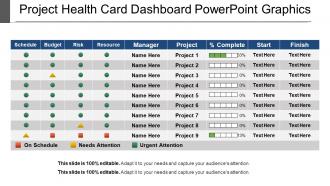
Gráficos do PowerPoint do painel do cartão de saúde do projeto
Try Before you Buy Download Free Sample Product
Audience
Editable
of Time
Navegue por nosso slide de diagrama de PowerPoint do painel do cartão de integridade do projeto. O modelo de apresentação foi projetado por nossos designers apaixonados para atender às suas necessidades de negócios. Tomar decisões valiosas sempre foi importante em qualquer organização empresarial e essas decisões agora podem ser feitas facilmente com a apresentação de slides do painel do projeto. Ao incluir este slide visual de status do projeto em suas apresentações, você pode gerenciar o status de seus projetos, faturas de clientes, despesas comerciais, metas de receita, etc. qualquer coisa de sua escolha de maneira eficiente. Todas essas funções de negócios devem ser executadas regularmente e agora você pode executá-las com facilidade incorporando nosso design PPT de painel. Este formato PPT fornece relatórios críticos e informações de métricas e é parte integrante do gerenciamento de desempenho de negócios. Você pode fornecer à sua equipe e gerentes informações comerciais valiosas e permitir que eles realizem uma análise comercial precisa. Portanto, nosso slide PPT será o meio perfeito para você representar seu conceito de uma maneira significativa. Então, basta fazer o download e começar a explorar este gráfico maravilhoso. Cimente os bons sentimentos com nossos gráficos do Powerpoint do painel do cartão de saúde do projeto. Certifique-se de que eles continuem existindo por muito tempo.
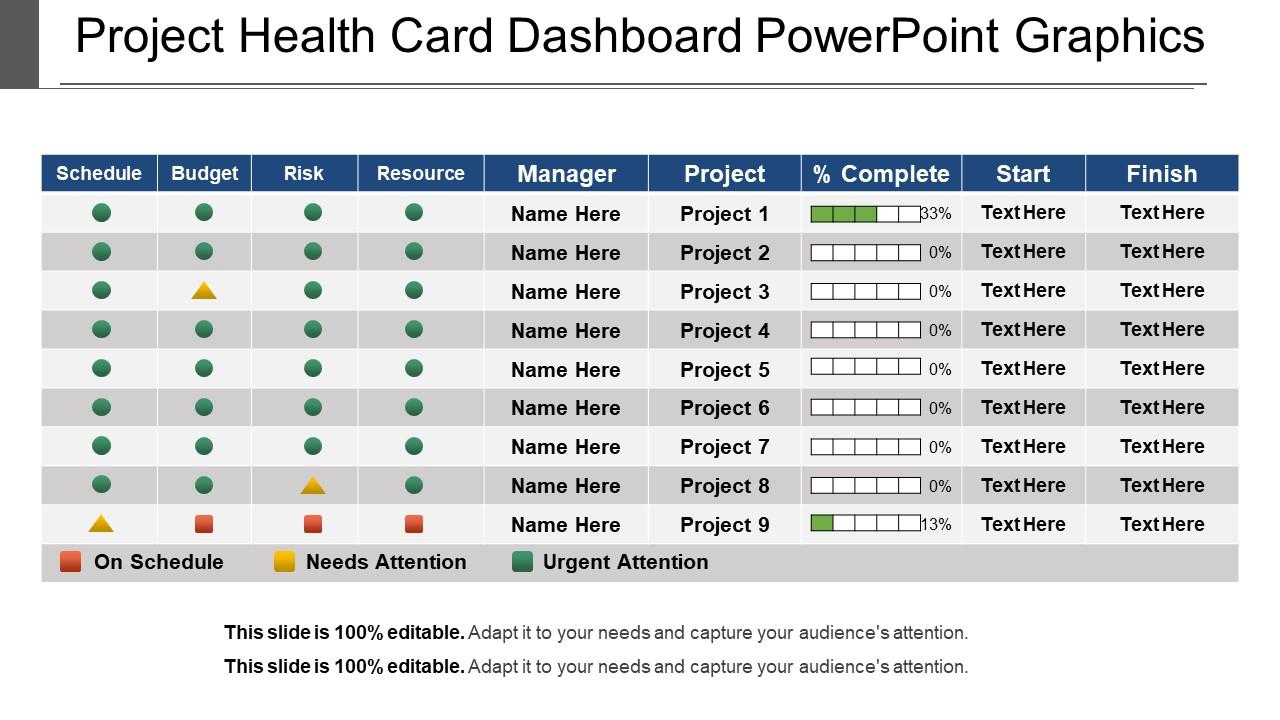
Recursos desses slides de apresentação do PowerPoint:
Slide de gráfico do PowerPoint do painel do cartão de integridade do projeto. Liberdade total para qualquer tipo de edição manual. Inclusão ou exclusão de dados e texto desejados. Slides de apresentação em alta resolução. Disponível também no modo Widescreen. Conversão sem esforço para o formato PDF / JPG. Fácil inserção do nome comercial ou logotipo da empresa. Modelo de PowerPoint amigável e modificável. Pode ser facilmente inserido em apresentações em andamento. Afinado com slides do Google. Benéfico para empreendedores, aspirantes a empresários, gerentes de suprimentos, varejistas, financiadores, professores, estudantes. Simples de baixar e inserir em suas apresentações de negócios.
People who downloaded this PowerPoint presentation also viewed the following :
Gráfico do Powerpoint do painel do cartão de integridade do projeto com todos os 5 slides:
Nossos gráficos do PowerPoint do painel do cartão de saúde do projeto garantem que você não vá em frente às cegas. Eles garantem que você esteja ciente do que está por vir.
FAQs for Project health card
Track your schedule first - what's on time vs what's falling behind. Budget's obvious too, actual spend against what you planned. Don't forget scope changes because those sneak up on you. Team velocity matters a lot, plus any risk flags popping up. Oh and stakeholder happiness - sounds fluffy but trust me, angry stakeholders will torpedo everything else. Quality stuff like defect rates and milestone completion keep everyone honest. Set up red/yellow/green levels for each metric so issues jump out immediately. Start there, then tweak based on whatever your project actually throws at you.
Honestly, visual dashboards are a lifesaver for this stuff. Raw spreadsheet data is just brutal to parse through. Color-coded charts and heat maps show you instantly what's working and what isn't. Those red/yellow/green traffic lights? Perfect for showing executives without getting into the weeds. Progress bars give you completion percentages right away. Trend lines help you spot patterns over time - super useful for catching problems early. Oh, and definitely set up automated alerts for your key metrics. Trust me, you'll thank yourself later when you catch issues before they blow up. Way better than constantly checking everything manually.
Honestly, visual hierarchy is everything - color code stuff with green/red/yellow so problems jump out immediately. Too many dashboards are just cluttered garbage that nobody wants to look at. Put your most important metrics up top, group similar things together. Each section should tell its story without making people think too hard about it. Progress bars beat raw numbers every time. Keep text super minimal. Oh, and test it with real users first because what seems obvious to you might be confusing as hell to everyone else. Start basic, then add bells and whistles later if you actually need them.
Weekly is definitely the way to go - same day every week so you don't forget. Daily will just drive you crazy with all that tracking, and monthly? Way too long. Problems can blow up fast if you're not paying attention. I actually think Friday afternoons work best because you can look back at the whole week and get your thoughts together before Monday meetings. Your stakeholders are gonna want those regular check-ins anyway. The consistency really helps you catch patterns too. Just pick whatever day works and don't overthink it.
Yeah, stakeholder feedback is super important - without it you're just guessing at what people actually need. I'd set up regular check-ins (maybe monthly?) to see which metrics they care about and how they want stuff displayed. Honestly, I've watched so many pretty dashboards sit there collecting dust because nobody asked users what they wanted upfront. The trick is making it ongoing, not just during setup. Ask what's missing, what's confusing, what would help them make better decisions. Otherwise you'll build something that looks great but serves no one.
So basically these dashboards track all your project metrics in one spot - budget burn, missed deadlines, how your team's actually performing. When stuff starts going sideways, you'll see red flags pop up before everything falls apart. It's like having x-ray vision for your project honestly. The cool part is seeing how one delayed thing ripples into budget problems or resource crunches. I'm kicking myself for not using one on my disaster project last year! Set alerts for the critical stuff and check it weekly. Way better than scrambling when it's too late.
Honestly, I'd just start with whatever your team's already using for project stuff. Power BI is solid - cheap and connects to basically everything. Tableau and Looker are great too but can get pricey. Monday.com and Smartsheet have decent dashboards built right in if you want something simple. Oh, and definitely automate your data feeds from day one. Trust me on this - updating dashboards manually will make you want to quit your job. I learned that the hard way at my last company. Short answer: Power BI for most situations.
Honestly, these health card dashboards are game-changers for cutting through meeting hell. Red/yellow/green indicators show your budget, timeline, and deliverable status instantly - no more hour-long check-ins where half the team zones out. Anyone can spot bottlenecks fast and jump in to help where needed. The visual format keeps everyone on the same page about priorities without endless explanations. Set up notifications so people actually check it (otherwise it'll just collect digital dust). I've seen teams save like 3 hours a week just by having this stuff visible upfront.
Look, benchmarking data is what makes your dashboard actually useful instead of just a bunch of random numbers. Say your team's hitting 25 story points per sprint - cool, but what does that even mean? You need something to compare it against. Past projects, team averages, whatever makes sense for your situation (though honestly, generic industry stats are pretty useless). That's how you catch problems before they blow up. Without benchmarks, you're just guessing whether things are going well or falling apart. The trick is picking ones that actually match your context.
Honestly, real-time data is a game changer for project dashboards. You'll catch problems right when they happen instead of weeks later when it's too late to fix anything. Stale data is pretty much worthless for decision-making - like using last month's weather report to pick today's outfit. Your team can spot budget issues or schedule problems immediately. Then actually do something about it. The dashboard becomes this living thing that's genuinely useful, not just another report that's already outdated. Oh, and definitely set up alerts for the critical stuff so you don't have to constantly check.
Honestly, those dashboards are pretty clutch for catching stuff before it spirals. You'll see right away if someone's drowning in work while others are twiddling their thumbs, or if you're blowing through budget way faster than planned. The visual aspect is huge - way easier to scan than spreadsheets (which I hate). Plus tracking those patterns over time actually helps you get better at planning future sprints. I'd probably check it weekly during planning meetings, maybe even pull it up mid-sprint if things feel chaotic. Keeps you ahead of the rebalancing game instead of always playing catch-up.
So your dashboard's historical data is basically a goldmine for spotting patterns. Check out your past sprint velocity, defect rates, delivery times - all that stuff. Most dashboards will crunch those numbers and show you predictive analytics that highlight potential trouble spots ahead. Honestly, it's pretty wild how accurate these predictions can get. I'd start by pulling data from the last 3-6 months to get solid baseline trends. Once you've got that foundation, you'll be able to forecast bottlenecks before they actually hit your team.
Honestly, the hardest part is convincing people it's not just another reporting nightmare they have to deal with. Get your team leads involved in picking the metrics from day one - they'll actually use something they helped create. Don't go crazy with the dashboard at first. Three or four simple metrics that actually tell you something useful, not just pretty numbers that look good in meetings. I've seen way too many overcomplicated dashboards that end up ignored. Make it fit into what people already do daily instead of adding more work. Quick wins early on will shut up any skeptics pretty fast.
Honestly, most project dashboards can pull straight from whatever tools you're already using - Slack, Jira, GitHub, all that stuff. Just hook up the APIs or use their built-in connectors. Way better than constantly bugging people for updates (we've all been there). Start with the tools your team actually lives in daily - no point connecting something nobody uses. Map those to your health metrics like how fast you're closing issues or team communication patterns. Takes maybe an afternoon to set up but you'll get real-time visibility without the endless "what's the status?" messages cluttering your channels.
Track your defect rates and customer satisfaction scores first - those are the big ones. Code review pass rates help too. Test coverage percentages are solid indicators, plus check how many bugs slip into production vs getting caught during testing. Production bugs will absolutely torpedo your credibility with stakeholders, trust me on that. Rework percentages show when your team's spinning their wheels redoing stuff. Oh, and compliance scores if you're dealing with regulatory stuff. Set up alerts so you're not constantly babysitting dashboards.
-
Informative design.
-
Easy to edit slides with easy to understand instructions.