

Informe de estado de la tarjeta de salud del proyecto Powerpoint Slide





Try Before you Buy Download Free Sample Product
 Impress Your
 Audience
 100%
100% Editable
 Save Hours
 of Time


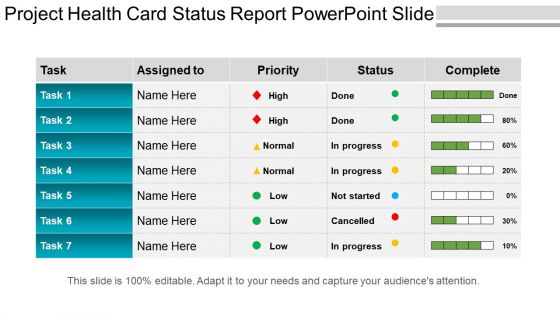
Aproveche esta oportunidad de oro de conocer el estado actual de los proyectos en curso en su empresa utilizando nuestra diapositiva de PowerPoint del informe de estado de la tarjeta de salud del proyecto. Esta presentación de diapositivas de PowerPoint de gestión de proyectos le ayudará a mostrar una serie de procesos relacionados con el negocio, como el nombre del proyecto, el nombre de la persona a la que se le ha asignado, el nivel de prioridad, el estado de la tarea, si está completa o no, etc. La plantilla PPT de tablas y matrices ha sido diseñada utilizando diapositivas de alta resolución y calidad premium que le ayudarán a hacer su presentación mucho más simple y satisfactoria. Nuestros expertos en negocios saben que no todos tienen tiempo para diseñar la presentación de diapositivas ellos mismos, por eso les traemos a todos ustedes esta plantilla de tarjeta de salud de proyecto ya preparada, ya que lo ayudará a ahorrar tiempo y energía. Así que dé una impresión eterna a su audiencia utilizando este diagrama de modelo de revisión posterior, ya que las diapositivas son muy atractivas y llamativas. Enfréntese a las frustraciones a través de nuestra diapositiva de PowerPoint del Informe de estado de la tarjeta de salud del proyecto. Concéntrese en ellos de una manera eficaz.
People who downloaded this PowerPoint presentation also viewed the following :
Informe de estado de la tarjeta de salud del proyecto Diapositiva de PowerPoint con las 5 diapositivas:
Nuestro informe de estado de la tarjeta de salud del proyecto Powerpoint Slide se enfoca en todos los ángulos imaginables. No se le ocurrirán ideas a medias.
FAQs for Project health card status
So your project health card needs the basics - status (red/yellow/green), budget vs what you've actually spent, timeline stuff, and any major risks or roadblocks. Resource allocation and milestone updates go on there too, plus scope changes if you've had any. Oh and stakeholder feedback - which honestly tells you more about reality than all the other metrics combined. The whole point is giving leadership a quick view without making them read through tons of project documentation. Just keep it updated and flag anything urgent that needs their attention right away.
Think of it like a dashboard for your project's vital signs. Budget, timeline, resources, scope changes - it tracks all that stuff with simple red/yellow/green alerts. Way better than finding out you're screwed during some monthly meeting when it's already too late. The visual cues catch budget overruns and resource issues while you can still fix them. Honestly, most people set these up and then never look at them again, which defeats the whole purpose. Update yours weekly and actually check it - that's where the magic happens.
Honestly, Project Health Cards are game-changers. Instead of digging through reports or sitting in boring update meetings, stakeholders can just glance at the dashboard and see everything - status, risks, metrics. Red flags become obvious right away. No more "oh I had no idea that was a problem" drama because everyone's looking at the same info. It builds trust too since you're being upfront about what's working and what isn't. The accountability factor is huge - people actually pay attention when everything's transparent like that. Start using one and I guarantee your stakeholder conversations will get way smoother.
Weekly updates work great for most projects, but honestly? Twice a week isn't overkill when things get crazy or you're hitting big milestones. Early planning phases are chill - stick with weekly then. Just be consistent about it so people actually trust what they're seeing. Major risks or scope changes though - update that thing immediately, don't wait. I always forget stuff like this, so definitely set a calendar reminder. Oh and always refresh it before steering meetings because someone will definitely ask about something outdated otherwise.
Focus on schedule variance, budget variance, and scope creep percentage first. Team velocity matters too - basically how fast you're hitting milestones. Risk exposure and stakeholder satisfaction are solid if you have external clients. Don't go crazy with metrics though. I've watched teams drown in data that doesn't help. Quality stuff like defect rates? Super important for software projects. Oh, and milestone completion rates give you early warning signs before things explode. Start with those core ones. Only add more if they're actually helping your team make smarter calls.
Honestly, color coding is your best friend here - red/yellow/green tells the whole story without anyone having to actually read anything. Charts and progress bars are clutch for showing trends quickly (saves so much time in those brutal status meetings). Icons help people jump straight to what they care about. But here's the thing - don't go overboard with visuals or it just becomes visual chaos. I learned that one the hard way. Your goal is making everything scannable in like 30 seconds max. Focus on your most critical stuff first, then build everything else around that.
So basically, a Project Health Card is like a cheat sheet for talking to stakeholders. Instead of drowning them in boring details, you get this clean visual that shows red/yellow/green status for stuff like budget, timeline, risks. Game changer for meetings - no more rambling explanations that put people to sleep. Everyone can see what's broken at a glance. Honestly saves my butt during those steering committee presentations where executives have the attention span of goldfish. Super practical for keeping everyone on the same page without the usual confusion.
Just match the metrics to what actually matters for your project phase and industry. Early on? Track stuff like how clear your requirements are and if stakeholders are aligned. Later phases need delivery-focused metrics instead. Software projects should watch code quality and how often you're deploying, but construction needs safety compliance and material tracking. Those standard templates are honestly pretty useless - way too generic. Figure out what specific things could tank your project, then build metrics around those risks. I always tell people to list what's keeping them awake at night about the project first. That's where your real indicators should be.
Simple is better - go with traffic light colors so people can spot issues instantly. Only track what actually matters: budget variance, timeline, resources, major risks. That's it. I've watched so many teams create these monster cards that nobody wants to look at. Four to six metrics tops, otherwise it's just noise. Make sure updating doesn't become a pain - if it takes forever, you'll skip weeks and then it's pointless. Oh, and definitely test it with a couple projects first. Get feedback from both the PMs doing the work and the executives who'll be staring at these things in meetings.
Honestly, data analytics will completely change your Project Health Cards. Instead of just basic status updates, you'll spot trends showing if problems are getting worse. Risk scoring catches projects before they crash and burn - which is honestly a game changer. It's like going from a basic thermometer to one of those fancy health monitors. Pattern recognition works across your whole portfolio too. You can benchmark against similar projects and actually see what makes them succeed. Just plug in your existing data first though. The patterns that pop up will probably surprise you.
Honestly? People just stop updating them once things get crazy. Everyone's pumped at first, then deadlines hit and suddenly nobody remembers to touch the dashboard for weeks. Plus you'll get folks who mark everything green when it's obviously a dumpster fire. My advice - stick to maybe 3-5 metrics tops. Any more and people's eyes glaze over. Bake the updates into meetings you already have so it doesn't feel like extra homework. Oh, and make sure people won't get roasted for showing red status. If someone marks something as struggling, focus on fixing it instead of playing the blame game. That mindset shift makes all the difference.
Honestly, color coding is a game changer for project health cards. Red for critical stuff, yellow for warnings, green when things are good - basically like traffic lights but for your project. Your brain picks up on colors way faster than reading through text, so people instantly know what needs attention. Works great in meetings too when half the room is squinting at the screen from the back. I'd stick with just three colors to start - keeps it simple. Oh, and definitely explain what each color means upfront or you'll get confused questions later.
Honestly, just start with Excel or Google Sheets - everyone's got access and they work fine for basic tracking. PowerBI and Tableau are solid if you want fancy automated stuff later. I've seen teams get weirdly creative with Notion too, though that feels like overkill to me. Monday.com works but eh, might be too much for simple health metrics. The real trick is making sure your whole team can actually update it regularly. Beautiful dashboards are useless if you're the only one who knows how to add data. Start simple, see what you actually need, then maybe upgrade if Excel starts feeling too basic.
Honestly, dig into your old project post-mortems first - that's where the gold is. What keeps killing your projects? Scope creep? People getting pulled onto other stuff? Communication falling apart? Those are your red flags to track. I've watched teams build these elaborate dashboards that miss the obvious stuff that tanked their last project. Pretty pointless, right? Grab your last 5-10 projects and figure out what went sideways. Use those failures to set your alert thresholds. Focus on metrics that would've actually helped you catch problems before they exploded.
Agile completely changes how your Project Health Card works. You're tracking sprint velocity and burndown rates instead of those old waterfall milestones. The whole thing becomes a living dashboard that updates every couple weeks - way more responsive than quarterly reports. Story point accuracy and backlog health become your new best friends. Honestly, retrospective action items tell you more about team momentum than most traditional metrics. Short cycles mean everything moves faster. Pro tip: automate the data pulls from your sprint tools. Trust me, you don't want to be updating numbers manually during every standup meeting.
-
Awesome use of colors and designs in product templates.
-
Very unique, user-friendly presentation interface.