Projektname Kosten-Baseline-Portfolio-Dashboards
Try Before you Buy Download Free Sample Product
Audience
Editable
of Time
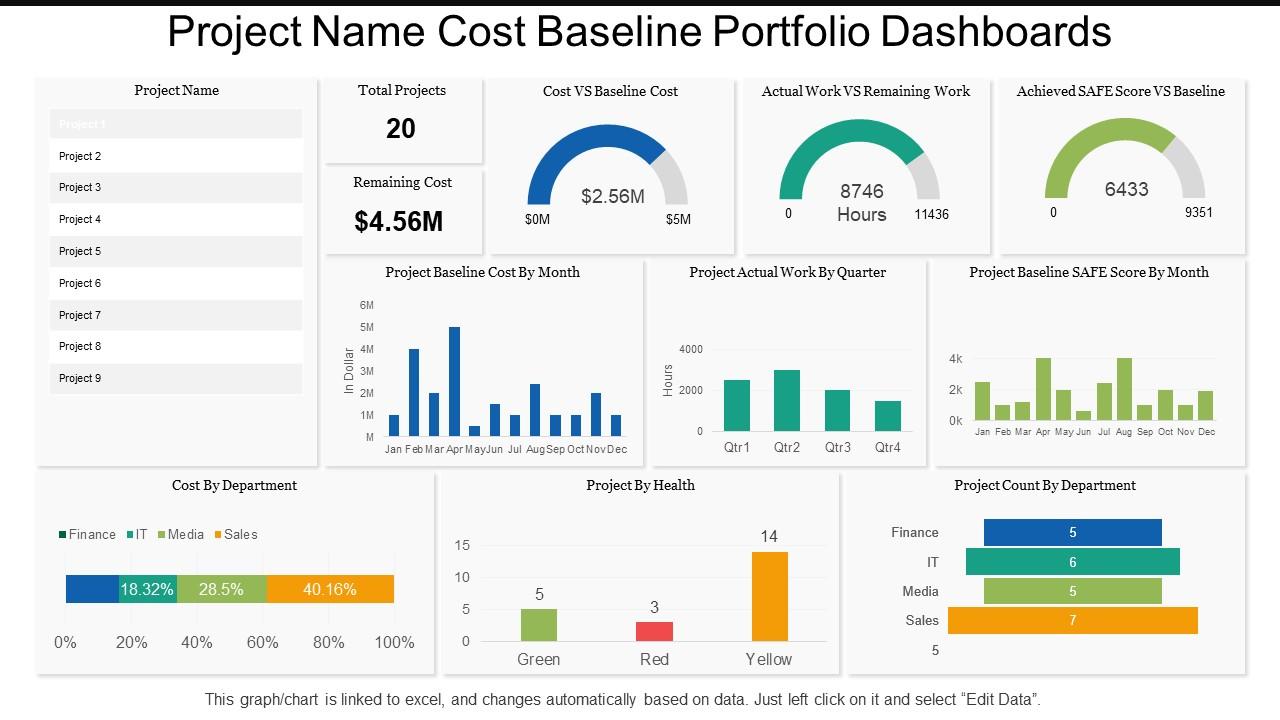
Machen Sie Ihren Teammitgliedern klar, wie wichtig es ist, den Geschäftsfortschritt zu überwachen. Unsere PowerPoint-Folie mit Projektnamen-Kosten-Baseline-Portfolio ist der perfekte Weg, um Ihren Mitarbeitern zu zeigen, wie unabdingbar es ist, den Status Ihrer Geschäftsaufgaben und -ziele zu messen. Unsere PPT-Vorlage für das Projektnamen-Kosten-Baseline-Portfolio besteht aus mit Excel gezeichneten Diagrammen und Grafiken, die anzeigen, wie viel von einem Projekt abgeschlossen wurde und wie viel es noch übrig hat. Die Diagramme können auch nach Ihren eigenen Anforderungen angepasst werden, da diese vollständig modifizierbar und mit Excel verknüpft sind. Die visuelle Hervorhebung des Fortschritts macht es Ihnen und Ihrem Team leicht, die Leistung zu messen und bei Bedarf Korrekturmaßnahmen einzuleiten. Durch die Verwendung unserer Excel-verknüpften Kostenbasisportfolio-Präsentationsgrafik können Sie interessante PPT-Vorlagen erstellen. Laden Sie also einfach das Vorlagendiagramm herunter und machen Sie es dann zu einem Teil Ihrer nächsten Präsentation. Arbeiten Sie immer effizient mit unseren Projektnamen-Kosten-Baseline-Portfolio-Dashboards. Sie erreichen die gewünschte Konsistenz.
Funktionen dieser PowerPoint-Präsentationsfolien:
Präsentation der Projektnamen-Kosten-Baseline-Portfolio-Dashboards PPT-Vorlage. Der Download ist schnell und kann einfach geteilt werden. Vermittelt ein Gefühl der Veränderung im Laufe der Zeit. Geeignet für Unternehmensführer und Geschäftspartner. Flexibler PPT-Schlitten, der bei Bedarf verwendet werden kann. PowerPoint-Design kann in der Standard- und Breitbildansicht geteilt werden. Hochwertige Grafiken und Visuals, die im PPT verwendet werden. Option zum Einbinden von Geschäftsinhalten, dh Name, Logo und Text. Mühelose Konvertierung in das PDF/JPG-Format. Kann problemlos mit Ihren laufenden Präsentationsfolien zusammengeführt werden.
People who downloaded this PowerPoint presentation also viewed the following :
Projektname Kostenbasis-Portfolio-Dashboards mit allen 6 Folien:
Übernehmen Sie das Ruder mit unseren Projektnamen-Kosten-Baseline-Portfolio-Dashboards. Legen Sie den korrekten Kurs fest, der aufgezeichnet werden soll.
FAQs for Project name cost
Start with your baseline budget vs actual costs - that's your foundation. Then add variance analysis and spending trends over time. The visual timeline comparing planned to actual is honestly the most useful thing you'll build - I reference mine constantly. Budget consumption rate and CPI give you quick health snapshots. Milestone markers help too. Don't overthink the forecast piece initially, just get the basics working first. Your stakeholders need to spot problems fast without drowning in data. You can always add fancy stuff later if people actually use it, but most teams don't need complexity upfront.
Honestly, charts beat spreadsheet hell every time. When you're drowning in cost data, visuals save your sanity - red bars instantly show where you're bleeding money, line graphs reveal spending patterns you'd miss otherwise. Heat maps are clutch for spotting which categories are torching your budget fastest. I always start basic with planned vs actual bar charts, then add trend lines to see where things are heading. The visual stuff just clicks faster than scanning endless rows of numbers. You'll catch outliers and weird variances right away instead of hunting through data for hours.
Track these four main ones: Cost Variance (CV), Schedule Variance (SV), Cost Performance Index (CPI), and Schedule Performance Index (SPI). Yeah, the acronyms are a pain at first but you'll get used to them. They show if you're over budget or behind schedule. CPI is honestly the most useful - anything under 1.0 means you're spending too fast. Also watch your Estimate at Completion (EAC) versus Budget at Completion (BAC) to see how you're tracking against the original plan. Set up some alerts when these hit certain levels so problems don't sneak up on you.
Dude, cost baseline dashboards are seriously helpful for budget forecasting. You get this solid reference point to compare actual vs planned spending, so you'll catch variance trends way earlier - like when marketing keeps going 15% over every month. The visual stuff is clutch because execs eat up those trend charts (honestly makes your life so much easier in meetings). Set up alerts when variances hit certain thresholds. That way you can fix things before they spiral. Oh and it gives you actual data to back up budget requests instead of just guessing. Trust me, stakeholders respect the numbers way more than hunches.
Honestly, keep it simple at first - too many metrics just creates noise. The worst thing you can do is mix data from different sources or time periods because then nothing makes sense when you compare stuff. Oh, and don't let leadership pressure you into setting fake baselines that look good on paper but aren't realistic (been burned by that before). Check your actuals against baseline weekly, not just at big milestones. Clean charts work way better than fancy ones that nobody understands. You can always add more complexity later once people actually start using what you built.
Honestly, weekly is the sweet spot for most projects - daily if you're burning through cash fast or have zero margin for error. Monthly? Way too slow, you'll catch problems after they've already blown up. I learned this the hard way on a project last year. Match it to your burn rate basically. Got a massive budget with daily expenses? You need that daily pulse check. Smaller stuff can get away with weekly no problem. I'd start weekly and see how it feels - if your numbers are jumping around a lot between updates, bump it up to daily.
Honestly, you've got to talk to the people who'll actually be using this thing. Different folks care about totally different stuff - like executives just want the big picture budget numbers while project managers are digging into every little cost detail. I've watched so many dashboards crash and burn because someone assumed they knew what users wanted (spoiler: they didn't). Get in there early and ask about their workflows, what reporting formats they like, current headaches with cost tracking. Build a quick prototype first too. Way easier to fix things before you've built the whole dashboard.
Dude, these software tools will save your sanity. No more copying data between fifty different spreadsheets every month - they pull everything automatically from your project systems and accounting software. You'll actually see what's happening in real time instead of finding out about budget issues weeks later. The visual stuff is pretty sweet too, makes spotting problems way easier. Most come with templates so you're not building from zero. Oh, and whatever you pick, make sure it plays nice with what you're already using. Trust me on the training part - I've seen too many teams buy expensive software just to use it like a glorified Excel sheet.
Go with the traffic light thing - green, yellow, red. Works every time. Show both percentages AND dollar amounts since your finance people obsess over different numbers than operations does. I always throw in a trend line because honestly, today's small problem usually becomes next month's disaster. Put your worst variances right at the top where nobody can ignore them. Compare against your original baseline, not last month's numbers - that's where people mess up. Oh, and definitely add quick explanations for anything showing red. Trust me, you don't want executives freaking out over something that's actually fine.
Look at your last few similar projects and see what actually happened vs what you planned. Most people just wing it with baselines, which is honestly why everything goes over budget. Check out maybe 3-5 projects from the past couple years - where did costs blow up? Any seasonal stuff that bit you? I'd pull the real numbers on resources, vendors, recurring expenses, all that. The patterns will tell you way more than guessing. Oh and don't just look at totals - dig into where the overruns typically happened so you're not surprised again.
Waterfall charts are your best bet for cost baselines - they show exactly how variances stack up over time. Super helpful for budget vs actual spending. Line charts work well when you're tracking trends across different cost categories. Bar charts are honestly perfect for department or project comparisons (people sleep on them but they're so clean). Heat maps? Total game changer if you've got tons of cost centers and need to spot issues fast. Oh, and I'd probably start simple - just do baseline vs actual on a line chart first. You can always make it fancier once people get used to reading the data.
So basically, when you connect your cost dashboard to project management tools like Jira or Asana, it becomes this live control center instead of just a boring static report. Real-time data flows in automatically as tasks get done and resources move around - no more tedious manual updates, thank god. You can actually see how schedule delays mess with your budget in real time. Plus you'll spot problems way before they blow up your whole project. I always set up alerts when costs drift too far from baseline - maybe 10% or whatever makes sense. Honestly saves so much headache down the road.
Predictive analytics are a game changer - they'll show you budget variances before they hit. Set up automated alerts so you're not constantly checking thresholds manually. Drill-down features let you dig into specific cost categories when something looks off. Variance analysis charts are honestly my favorite because trends jump out immediately. Earned value management metrics are solid too, plus scenario modeling for those "what happens if we spend X on Y" moments. Oh, and resource allocation tracking saves so much headache. Start with whatever your team checks daily, then add the bells and whistles that'll cut down on manual reporting later.
Honestly, user feedback is what makes or breaks your dashboard. Without it, you're just guessing at what people actually need. I'd set up quick feedback sessions to ask about their daily workflows and what frustrates them most. Which metrics do they care about? Where do they get lost navigating? Too many dashboards look pretty but sit unused because they're missing crucial stuff. Short surveys work too - just don't make them annoying. The key is iterating based on what you learn rather than assumptions. Your dashboard will actually get used when it solves real problems people have.
So if you're public, SOX compliance is gonna be your biggest pain point - plus whatever industry rules apply to you. Audit trails for all data changes are non-negotiable. Same with user access controls and retention policies. Privacy laws matter too if you're showing employee costs or vendor info. Your dashboard needs timestamps, approval workflows, and easy export options for when auditors come knocking. Honestly, compliance stuff makes my head spin sometimes, but you can't skip it. Get legal and compliance to look at your design upfront - trust me, it's way less of a nightmare than trying to fix everything later.
No Reviews