Project Timeline Powerpoint Slides

Rating:
80%
Slide 1 of 5
Favourites Favourites

Try Before you Buy Download Free Sample Product

Audience Impress Your
Audience
Editable 100%
Editable
Time Save Hours
of Time
The Biggest Sale is ending soon in
0
0
:
0
0
:
0
0
Rating:
80%

Merkmale dieser PowerPoint-Präsentationsfolien:

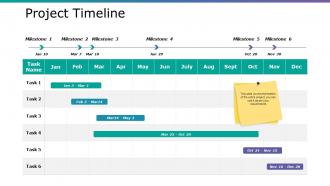
Diesen Foliensatz mit dem Namen präsentieren - Project Timeline Powerpoint Slides. Dies ist ein sechsstufiger Prozess. Die Phasen in diesem Prozess sind Geschäft, Marketing, Planung, Liste, Strategie.

FAQs for Project

Honestly, just focus on the big stuff first - kickoff, major deadlines, when stakeholders need to review things, and your final delivery. Those approval processes from other teams? They'll definitely take twice as long as you think. Build in buffer time for testing and revisions because something always goes sideways. I learned this the hard way on my last project lol. You want enough detail so everyone knows what's happening, but don't get crazy with every tiny task. Hit those major milestones first. You can always add smaller ones later if your team actually needs them.

Honestly, Gantt charts are game-changers for project management. They're like a visual timeline that shows when stuff happens AND how tasks connect to each other. Way better than drowning in spreadsheets (trust me on this one). You can spot bottlenecks early, see your critical path, and actually explain timelines to your boss without confusing everyone. Plus they make it super easy to show what happens when things inevitably get delayed. Start simple though - Monday.com works great, or even Excel if you're feeling old school. The visual aspect alone will save you so many headaches.

Start by breaking everything down into tiny pieces - that's honestly the only way estimates don't completely suck. Look at similar stuff you've done before if possible. Always pad your timeline because I promise something random will blow up. Actually talk to whoever's doing the work instead of just guessing. I usually do three scenarios: dream case, nightmare case, and what'll probably happen. Write down what you're assuming so when things change (they will), you're not scrambling. Oh, and speak up the second you see red flags - don't wait until you're already behind.

Think of dependencies like a recipe - you can't frost a cake until it's baked, right? When Task B needs Task A finished first, any delay in A automatically pushes everything back. I learned this the hard way on my last project actually. The domino effect is real and it sucks. Your critical path tasks are the worst offenders since they have zero buffer time. Map everything out early so you can see which tasks will block others. Then build in some padding where you can, especially around those bottleneck activities that'll mess up your whole timeline.

Dude, if your company already has Microsoft Project, that's honestly your best bet - nothing beats it for complex scheduling stuff. Gantt charts are super helpful for seeing how everything connects. But if you want something everyone will actually use without complaining, go with Asana or Monday.com. Way less intimidating. I know people who just use Google Sheets too, which works fine if you're not dealing with crazy timelines. Oh, and Notion's pretty solid if your team's already into that. Don't overthink it though - whatever tool your team won't abandon after two weeks is the right choice.

Oh man, agile is such a game changer! Instead of planning this massive timeline upfront, you work in these short 2-4 week chunks called sprints. Each sprint has its own mini-deadline and deliverable. Way better than those old waterfall methods where you're locked into everything from day one. The cool thing? You can pivot super easily when stuff changes (which it always does). Your timeline stays flexible - you're basically reassessing after every sprint. I'd suggest mapping out your first couple sprints in detail, then keep everything else pretty high-level for now. Trust me, you'll thank yourself later.

Look, your timeline basically lives or dies by how many people you've got and what they can actually do. More skilled folks means you can run things at the same time and move way faster. But honestly? Sometimes adding more people just makes everything messier with all the extra coordination stuff. I learned this the hard way on my last project - total nightmare. Focus on getting the right resources on your most critical tasks first. Then be real about what your current team and budget can handle. Don't kid yourself about capacity because you'll just end up behind schedule anyway.

Build in buffer time from day one - like 20-30% extra for each big milestone. The stuff that'll bite you? Dependencies on other teams or tech you haven't touched before. Pad those sections way more. Honestly, projects finishing early is basically a myth lol. Document your assumptions too when you're making timelines. When everything goes sideways (and it will), you'll need proof of why delays happened. Oh and definitely flag potential delays early instead of crossing your fingers you can magically catch up later. Trust me on this one.

Mix up your formats since different people want different things. Gantt charts hit well with detail people, but executives just want milestone calendars - way cleaner. Email updates? They're basically useless, honestly. People don't read them. Set up regular meetings with consistent agendas instead. Shared dashboards work too since stakeholders can check whenever. Always show current status plus what's next - that combo's key. Oh and don't go crazy with options. Pick maybe 2-3 methods and stick to a schedule. Predictability's everything.

Honestly, timelines are game-changers because nobody can play dumb about deadlines anymore. Break your project into weekly chunks with specific people owning each piece - suddenly everyone knows exactly what they're supposed to deliver and when. Those "how's everything going?" meetings become way more useful too since you're checking real progress against actual milestones. I learned this the hard way on a project that dragged on forever because we had zero structure. It's basically like giving your team a GPS instead of saying "head north-ish." Trust me, you'll see people step up once there's clear expectations.

Dude, biggest mistake is totally underestimating how long stuff actually takes. Always add buffer time because random crap WILL come up. Also don't chain a bunch of dependent tasks together - one delay and everything falls apart like dominoes. Actually talk to your team about realistic timeframes instead of just winging it. I swear, people think something's a 2-day job when it's really gonna take 2 weeks. Pad each milestone by like 15-20% and get estimates from whoever's actually doing the work, not just your gut feeling.

Ugh, scope changes are the worst but you gotta deal with them fast. Map out how the new stuff affects what you're already doing - some tasks will balloon, others are brand new headaches. I've watched so many projects completely implode because people just crammed changes into the old timeline like magic would happen. Look at everything again and figure out what can get pushed back or axed completely. Your stakeholders need to know about timeline shifts ASAP - nobody likes surprises. Document the impact first, then give them a few realistic options for moving forward.

Dude, you NEED buffer time - it's literally a lifesaver. Trust me, I learned this one the hard way. Projects never go smoothly. Someone gets sick, tasks drag on forever, or random stuff just breaks. Without that cushion? You're constantly scrambling and stressed. What I do now is tack on 15-20% extra time to whatever timeline I think is realistic. Sounds like a lot but it's not really. When things go sideways (and they will), you can handle it without looking like an idiot to your boss or missing deadlines. Way better than explaining why everything's late again.

Honestly, timelines are a game changer because everyone knows what's happening and when. No more awkward "wait you needed that yesterday?" conversations lol. Dependencies become obvious too, which cuts down on so much confusion. When people can see the bigger picture, they'll actually help out when things get stuck - I've seen it happen. The key is putting everything in a shared tool where your team can check progress. Short sentences work. But also let people update their own stuff so it stays current and everyone stays in the loop about delays or whatever.

Track your Schedule Performance Index first - below 1.0 means you're behind. Milestone completion rates matter too, plus how far off your time estimates were. Budget variance is huge since delays always mean cost overruns (finance will hate you). Resource utilization shows if your team planning was realistic. Oh, and I personally count how many panic "all hands" meetings we're having - that's honestly the best unofficial measure! Check these weekly. The patterns will help you build better timelines next time.

Ratings and Reviews

80% of 100
Review Form
Write a review
Most Relevant Reviews
  1. 80%

    by Courtney Griffin

    Visually stunning presentation, love the content.
  2. 80%

    by Dean Dixon

    Informative design.

2 Item(s)

per page: