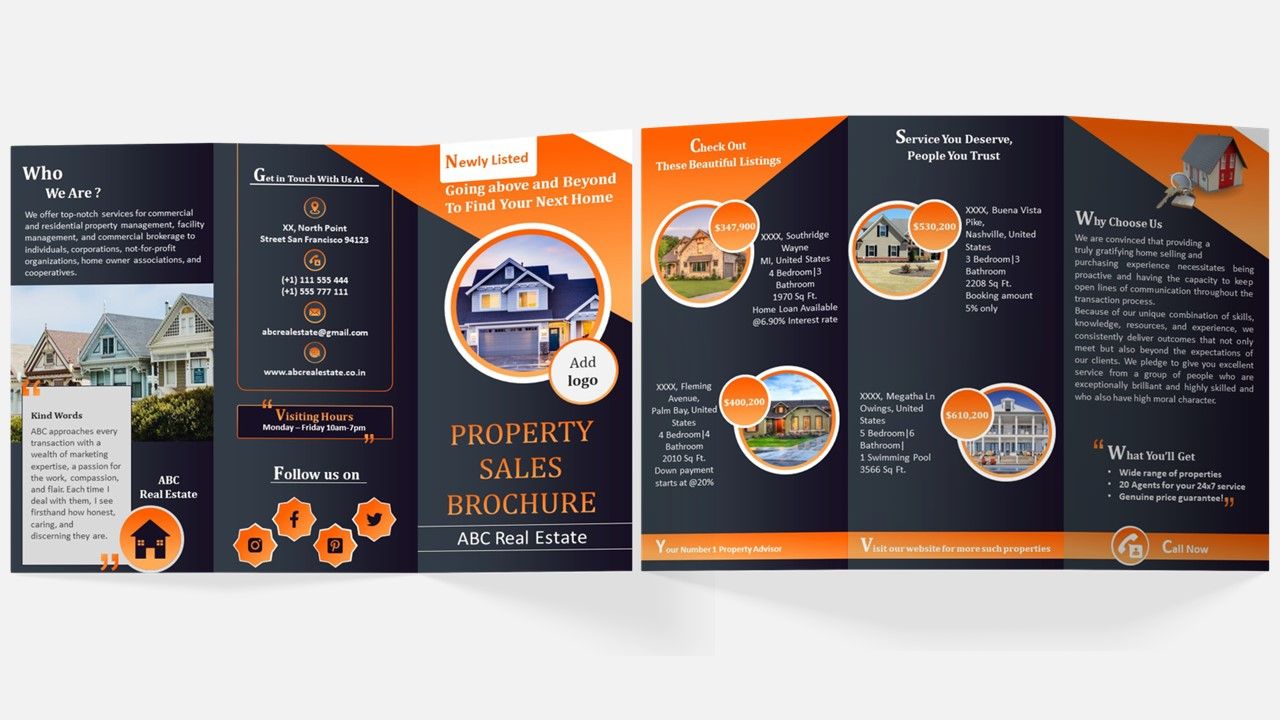
Property Sales Brochure Trifold

Rating:
90%
Property Sales Brochure Trifold
Slide 1 of 1
Favourites Favourites

Try Before you Buy Download Free Sample Product

Audience Impress Your
Audience
Editable 100%
Editable
Time Save Hours
of Time
The Biggest Sale is ending soon in
0
0
:
0
0
:
0
0
Rating:
90%
Communicating with your audience on a one to one basis can become extremely challenging. Whats best is to put together this brochure PowerPoint presentation and address a group in one go. This can become a success if you settle for our customized Property Sales Brochure Trifold template design. By investing in this template design you can ensure better planning, transparency, spot on feedback, improved productivity and bottom lines in the days to come. Additionally, our template bestows upon you the right to modify data and graphics to suit your individual interests and understanding. Time to put your hands on this brochure template right away. An investment you are going to be proud of.

FAQs for Property

Definitely start with killer photos - exterior plus your best interior shots. Make sure the price is super visible, along with basics like square footage, beds/baths, lot size. Your headshot and contact info are crucial too since people need to trust who they're buying from. Floor plans work well if you've got room. Add a quick neighborhood rundown and mention any cool features that set it apart from other listings. Oh, and honestly? Less is more with the text - nobody wants to read a novel on a brochure. Print a test copy first because what looks good on screen doesn't always translate to paper.

Put your best feature right on that front panel - whatever makes people stop and stare. Then use each inside section for different wow factors with good photos and short descriptions that actually sell it. Think movie trailer vibes, you know? Show off what makes this place special compared to everything else nearby - could be the architecture, location, cool amenities, whatever. Don't waste space on boring generic stuff. Lead with things that'll make buyers go "okay that's actually pretty cool." Oh and keep descriptions short - people's attention spans are terrible these days.

Photos are everything - seriously, don't cheap out here. Make them big, bright, and super crisp. I'd focus on the property's best angles and lighting. For the layout, less is definitely more. White space is your friend, and please don't cram every detail onto one page (I've seen some truly awful trifolds lol). Stick with clean colors that match your photos and keep fonts consistent. Oh, and make your contact info easy to spot - people shouldn't have to hunt for it. Print a test copy first because colors can look totally different on paper than your screen.

Oh totally, testimonials are huge for building trust. People basically won't work with you without seeing what others say first - it's just how we operate now. Real quotes from past clients hit different than you just saying you're good at your job, you know? Focus on ones that tackle specific worries buyers have. Like communication issues or whether you'll actually fight for them in negotiations. Names and neighborhoods make them feel authentic too. I always tell people it's basically free marketing that does half the selling for you.

Okay so market stats on your trifold are basically proof you know your stuff. Throw in local data like median prices, how long homes sit on the market, recent comps - that kind of thing. People eat up numbers because it feels like getting the inside scoop, you know? Plus it backs up whatever price you're suggesting and shows sellers you actually get their neighborhood. Oh and definitely use fresh data - nothing older than like 3 months or you'll look clueless. The stats become great conversation starters too when you're presenting.

Skip the boring features list and tell actual stories instead. Like how the Johnsons searched for months before finding their perfect home - that stuff sticks way better than square footage numbers. Before/after scenarios work great, or show the whole journey from first meeting to getting keys. Add some quick testimonials that actually tell a story, not just "great service!" Photos help too, obviously. The whole point is getting people to picture themselves in those situations. Honestly, most trifolds are so generic - yours doesn't have to be.

Put your best feature right on the front - that's your hook. Inside, I'd go with key details on the left, amazing photos dead center (don't cheap out here, get a pro), and neighborhood stuff plus your contact on the right. Back panel needs your headshot and credentials. Oh, and throw in a QR code for virtual tours if you're feeling fancy. Use bullet points because nobody reads paragraphs anymore. People literally spend like 30 seconds on these things, so every inch matters. Quick test: hand it to someone and see how fast they find your number. If they're hunting around, you've got a problem.

Hey! So one thing that's worked really well for me - dedicate a whole panel to tackling their biggest worries upfront. Like if they're thinking "what's the catch with the price?" throw in some recent comps. Or address the classic "what's broken?" with inspection reports and maintenance stuff. Way better than scrambling during the actual showing, you know? I structure it like FAQs with real data backing everything up. Honestly, people appreciate the transparency. The trick is figuring out what's already bugging them and putting proof right there. Just don't make it sound all corporate and defensive - keep it chill.

Definitely go for those golden hour exterior shots - they make everything look so warm and inviting. Wide-angle photos that capture the whole property are key, plus grab some interior shots of the best rooms like an updated kitchen or main living area. Drone footage is amazing if you can swing it, especially for bigger lots or cool locations. Seriously though, blurry phone pics will tank a listing faster than anything. Oh and lifestyle shots help too - like a nice patio setup or maybe kids in the yard. Just skip the generic stock stuff and focus on what actually makes this place stand out.

Your CTAs need to pop - use bright colors that contrast with your background. Skip boring "Contact Us" and go with something like "Schedule Your Showing Today!" One CTA per panel works great, but don't spam them everywhere. Bold buttons or text boxes naturally catch people's attention. I swear, half the trifolds I see bury their contact info in microscopic text at the bottom - what's the point? Give people options since everyone's different - phone, email, maybe a QR code. Sometimes plain "Call Now" beats fancy wording. Oh, and make those phone numbers big enough that people can actually read them.

Honestly? Just go with something boring and readable - Arial, Helvetica, Calibri. You know, fonts that won't make people think you're running some sketchy operation. Body text should be 11-12pt because nobody wants to squint at tiny print when they're house hunting. Headlines can be bigger, like 16-18pt. Skip anything that looks like it belongs on a wedding invite - this isn't the time to get all artistic. Two fonts max or it'll look messy. The whole point is making it dead simple for buyers to scan through without their eyes getting tired. Trust me on this one.

Dude, color choice can make or break those trifolds. Blues and greens work great for family homes - they feel trustworthy and calm. Warmer tones like orange or gold scream luxury, so save those for high-end listings. I swear I've seen some absolutely brutal color combos that ruined perfectly good designs. Gray and navy are your safest bet for commercial stuff since they look professional. Think about what vibe your buyers want. Like, what's gonna make them actually pick up the phone? Oh, and definitely run a couple options past your coworkers first - they'll catch things you miss.

Put your best stuff on the front - killer property photo, price, and whatever makes it special like "waterfront" or "totally updated." That's your movie trailer right there. Honestly, I hate when agents waste that space on their giant headshot... nobody cares yet! Save contact stuff for inside. Your address should be big and clear. Don't overthink the text since people are just glancing anyway. Make sure that exterior shot is large enough to actually see details when you're holding it at normal distance. Oh, and definitely test how it looks from a few feet away before printing.

Digital trifolds work great everywhere online - throw them on listing sites, email them to prospects, post on Facebook and Instagram. Mobile optimization is key since everyone's scrolling on their phones anyway. I'd start with a basic PDF first, way easier. Virtual tours are perfect for linking them too. Oh, and interactive versions with clickable stuff are cool if you're feeling ambitious, but honestly the simple versions work just fine. They're so much more flexible than the old printed ones we used to lug around to showings.

Don't cram a wall of text on there - people are just scanning anyway. Use decent photos of the actual house, not some random stock image (I swear some agents think we won't notice). Make your font big enough that people can actually read it without squinting. Put the important stuff like price and bedrooms where they'll jump out immediately. Also, write normal sentences instead of that weird realtor-speak nobody understands. Oh, and don't forget your contact info - sounds obvious but you'd be surprised. Print a test copy first to make sure it looks right.

Ratings and Reviews

90% of 100
Review Form
Write a review
Most Relevant Reviews
  1. 80%

    by Brown Baker

    Their designing team is so expert in making tailored templates. They craft the exact thing I have in my mind…..really happy.
  2. 100%

    by Jacob White

    Illustrative design with editable content. Exceptional value for money. Highly pleased with the product.

2 Item(s)

per page: