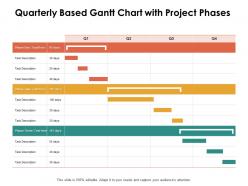
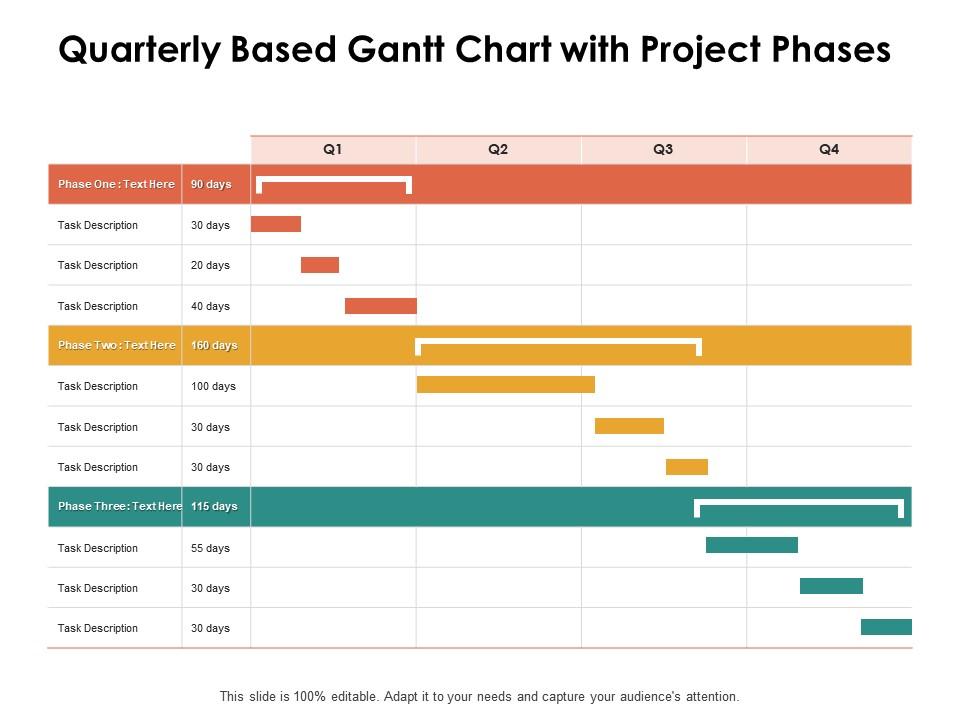
Gráfico de Gantt com base trimestral com fases do projeto Ppt Powerpoint Presentation Styles
Try Before you Buy Download Free Sample Product
Audience
Editable
of Time
Permita que as pessoas sejam lucrativas com nosso gráfico de Gantt com base trimestral com estilos de apresentação Ppt Powerpoint de fases do projeto. Ser capaz de instituir novos empregos.
Características destes slides de apresentação do PowerPoint:
Planeje, acompanhe e sincronize as tarefas mais importantes de um projeto específico com este formato PPT de gráfico de Gantt bem formatado. Com base no princípio de longa data do modelo de gráfico de Gantt, este modelo pode ajudá-lo a acompanhar e gerenciar seu projeto com eficiência. Você pode inserir todos os componentes vitais de um projeto, como datas de início, duração, status, etc. de cada tarefa e manter a responsabilidade dos proprietários sob controle usando este modelo de apresentação de Powerpoint de gráfico de Gantt. Crie um plano de agendamento altamente eficiente e meça seu progresso com este layout. Ideal para gerenciamento de projetos, planos de negócios, projetos de alunos, tarefas e outros, este modelo atua como uma ferramenta altamente competitiva para ser incluída em sua estrutura de negócios. Basta adicionar suas atividades nas barras de tarefas fornecidas neste modelo e editá-las de qualquer maneira para torná-las adequadas para o gerenciamento do seu projeto.
People who downloaded this PowerPoint presentation also viewed the following :
Gráfico de Gantt Trimestral Com Fases do Projeto Ppt Estilos de Apresentação em Powerpoint com todos os 2 slides:
Institua novos trabalhos com nosso gráfico de Gantt trimestral com estilos de apresentação Ppt Powerpoint de fases do projeto. Permita que as pessoas tenham um emprego remunerado.
FAQs for Quarterly based gantt chart with project phases ppt
So you need tasks on the left side, timeline across the top. Then draw horizontal bars showing when each task starts and ends. Dependencies are crucial - those arrows between tasks that show what needs to happen first. That's honestly where most people screw up initially. Add milestones for big deliverables too. Oh, and assign people to tasks so everyone knows their role. Critical path is helpful if you can figure it out, but don't stress about it right away. Just start basic and build from there once you get the hang of it.
So Gantt charts are basically visual timelines that show you everything happening in your project. Pretty handy for catching bottlenecks before they screw you over. You'll see which tasks are on the critical path and how delays mess with your whole schedule. I got weirdly obsessed with mine once I figured them out properly - maybe that's just me though. The real win is reallocating resources quickly and keeping people updated without those soul-crushing status meetings. Just start simple with Monday or Excel. Don't go crazy with features right away.
Honestly depends what you're dealing with. Microsoft Project is the heavy hitter but way too much if you just need basic stuff. Asana's probably your best bet for most situations - super clean interface. Trello's good too, especially with their timeline thing. Monday.com is solid but can get pricey quick. Already have Microsoft 365? Then Project for the Web makes sense. Hell, I still use Excel sometimes when I'm being lazy and need something fast. Just grab a few free trials and see what doesn't make you want to pull your hair out. Team size matters too.
So a timeline is just the basic "this happens, then this" version. Pretty straightforward. Gantt charts though? They're like timelines on steroids - you get all the dependencies between tasks, who's doing what, how far along everything is. Way more detail. Honestly, if you're just showing executives some key dates, save yourself the headache and go with a simple timeline. But if you actually need to track all the moving pieces and keep tabs on progress, Gantt's your friend. It's messier to set up but you'll thank yourself later when things inevitably get complicated.
Look, Gantt charts are lifesavers when you've got complex stuff with deadlines that mess with each other. Construction, software sprints, big events - anything where one delay screws up everything downstream. I swear they're also perfect for showing your boss why you can't just "speed things up" magically. You'll spot bottlenecks way before they bite you. The visual timeline thing? Game changer for seeing how tasks connect. Start using one whenever you're juggling multiple deadlines that actually impact each other. Trust me on this one.
Okay so Gantt charts are basically visual timelines that show who's doing what and when. Super helpful for seeing how tasks connect to each other. Like, if Sarah's part is delayed, you can instantly see how that messes up Mike's deadline. They're honestly pretty clutch during those chaotic moments when nobody knows what's happening. Your team meetings become way smoother because everyone can actually see the progress instead of just talking in circles. I'd start small - just map out your main milestones first, then add the connections between tasks. Trust me, it makes everything click into place way faster than those endless email chains.
Honestly, the two big killers are making it way too complicated and setting yourself up with impossible deadlines. You'll waste hours cramming every little detail in there until it's this unreadable monster. Been there! Build in buffer time because stuff ALWAYS takes longer than you think - holidays happen, people get sick, random fires pop up. I've watched so many pretty charts completely collapse after like a week because someone forgot real life exists. Also don't go crazy with dependencies that are super rigid. Keep it simple, update it when things change, and actually make something your team will use instead of ignore.
Yeah totally! Some Agile purists will roll their eyes, but honestly Gantt charts work great for the bigger picture stuff. I use them for release planning and showing timelines to management - way easier than explaining sprint velocity to executives who just want dates. Your daily work still lives in sprint boards though. The trick is keeping your Gantt loose and updating it as you learn stuff. Don't let it become this rigid thing that stresses everyone out. Jira's pretty solid for switching between views, or Monday if you want something cleaner. Just remember it's more of a communication tool than gospel.
Honestly, I update mine every Friday with my afternoon coffee - partly because it's kind of boring but mostly so I don't forget. Mark off what's done first, then update percentages on stuff that's still going. Dependencies are where it gets tricky though - one delayed task screws up like three others. Most PM tools let you just drag things around to reschedule, which is nice. Weekly works for me, but if something major shifts mid-week, I'll jump in and fix it. Your stakeholders will thank you for keeping dates accurate, and you'll catch problems before they snowball into disasters.
Color code everything - different colors for phases, departments, whatever makes sense for your project. Don't cram text into those task bars either, nobody wants to squint at tiny fonts all day. Milestone markers work great as diamonds or little stars for important deadlines. Progress bars inside tasks are pretty useful too if you want to show how much is done. Oh, and definitely include a legend so people aren't guessing what your colors mean. Just don't go overboard with fancy graphics - I've seen timelines that look like rainbow explosions and they're honestly useless.
Look for spots where a bunch of tasks all feed into one activity - that's where things usually blow up. I learned this the hard way on my last project lol. Critical path tasks with zero wiggle room are red flags too since any delay there screws your whole timeline. The Gantt makes it pretty obvious where you're asking too much of your resources or creating weird dependency pile-ups. Once you spot these trouble areas, throw more people at them or just rearrange stuff. Way easier to fix before it becomes a real headache.
Milestones are basically your project's big checkpoints - like when major stuff is supposed to be done. They show up as little diamonds on your Gantt chart. Super useful for tracking if you're actually hitting your deadlines. I always think of them as the "oh shit, this better be finished by now" moments, you know? Short bursts keep stakeholders happy since they can see real progress. You'll want to set them for anything other teams are waiting on. Also good for major phase completions. Honestly helps you catch delays before they totally derail everything.
Gantt charts are perfect for this! Map your team members against tasks on the timeline and you'll instantly see who's swamped vs who has bandwidth. Color-code different people so patterns jump out at you. The visual makes it super obvious when someone's overbooked or when you need extra help. You can even track equipment and budget stuff too - honestly, once you start doing this you'll wonder how you managed projects before. It's like having x-ray vision into your resource mess. Catches bottlenecks early too, which saves your sanity later.
Honestly, Gantt charts are perfect for tracking completion percentages and seeing if tasks are running behind schedule. The visual timeline thing? Game changer - you can spot delays instantly without digging through spreadsheets. I always track milestone progress and how workload's distributed across the team. Resource utilization's huge too, especially if you're juggling multiple projects (been there). You can even add budget tracking if you integrate cost data. Oh, and comparing your baseline timeline to what actually happened shows you where things went sideways. My advice though - don't go crazy tracking everything. Pick like 2-3 metrics your stakeholders actually care about first.
Honestly, Gantt charts are game-changers for keeping everyone in the loop. You can literally point to a visual timeline instead of explaining everything verbally - saves so much time in meetings. Stakeholders see who's doing what and when without needing to understand project speak. If something's delayed, they'll spot how it affects other tasks right away. I swear by sharing mine in every update because it cuts down on those random "so what's the status?" emails. The transparency thing is huge too. People trust you more when they can see the actual constraints you're dealing with. Way better than just telling them "we're waiting on design" or whatever.
No Reviews