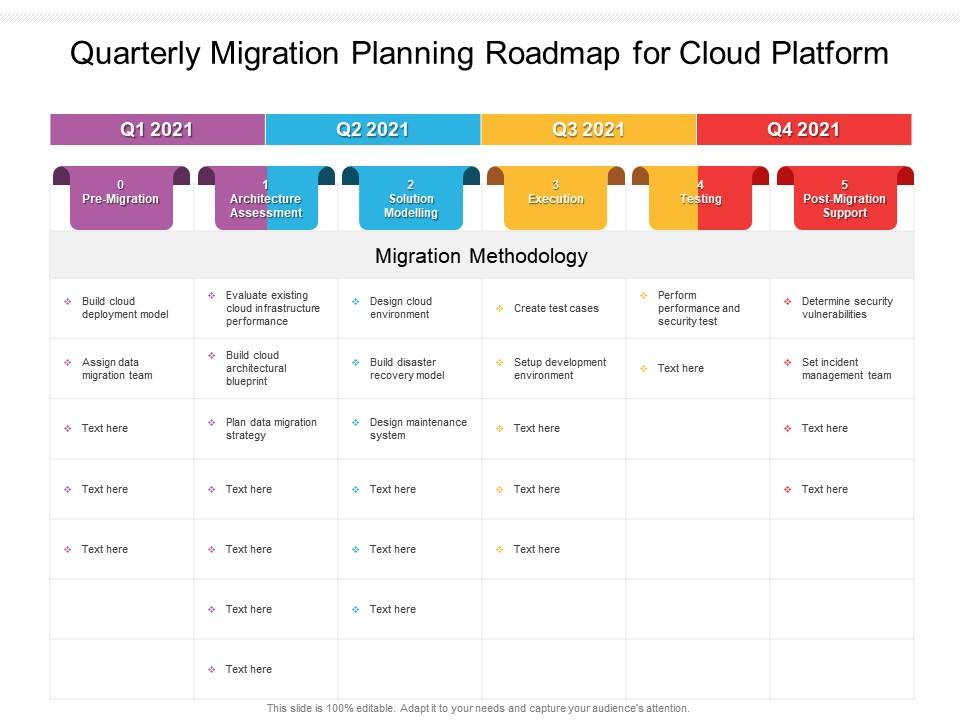
Roadmap für die vierteljährliche Migrationsplanung für die Cloud-Plattform

Quarterly migration planning roadmap for cloud platform
Slide 1 of 2
Favourites Favourites

Try Before you Buy Download Free Sample Product

Audience Impress Your
Audience
Editable 100%
Editable
Time Save Hours
of Time
The Biggest Sale is ending soon in
0
0
:
0
0
:
0
0

Merkmale dieser PowerPoint-Präsentationsfolien:

Presenting Quarterly Migration Planning Roadmap For Cloud Platform PowerPoint Template. Diese PPT-Präsentation ist mit Google Slides kompatibel und daher leicht zugänglich. Sie können dieses PowerPoint-Layout in verschiedenen Formaten wie PDF, PNG und JPG herunterladen und speichern. Dieses PPT-Design ist in den Seitenverhältnissen 4,3 und 16,9 verfügbar. Diese PowerPoint-Vorlage ist anpassbar, sodass Sie die Schriftgröße, den Schriftarttyp, die Farbe und die Formen gemäß Ihren Anforderungen ändern können.

FAQs for Quarterly migration planning roadmap

So there's basically four main steps: assess, plan, migrate, then optimize. First thing is figuring out what you've got and what can actually move to the cloud. Planning comes next - deciding which stuff goes first, timelines, budget (ugh, budgets). Don't even think about moving everything at once though, that's a disaster waiting to happen. Do it in phases instead. Once it's all running up there, you'll want to tweak performance and costs. Oh, and definitely start with your less important apps first to work out the kinks before you mess with anything critical.

Ok so first thing - you gotta map out everything you're currently running. Systems, apps, all the dependencies. Boring as hell but super necessary. Then figure out what can actually handle the cloud, what your team knows, compliance stuff, the usual headaches. Honestly, I'd pick some random non-critical app and migrate that first just to see what breaks. Make a simple scoring system for prioritizing - like complexity vs business impact vs how much money you'll save. Don't overthink it at the start.

Honestly, start with the boring stuff - what's it actually gonna cost you, including all those sneaky fees they love hiding. Security certs matter big time, especially if you're in a regulated industry. Check where their data centers are (latency can bite you), and seriously test their customer support before you commit. I learned that one the hard way. Look at how well it plays with your current systems, their backup situation, and whether you'll be stuck with them forever if things go south. Oh, and make a list of deal-breakers versus nice-to-haves. Performance track record's huge too - nobody wants downtime.

Definitely encrypt everything - in transit and at rest. Your cloud provider's tools work fine, but adding your own keys gives you more control. MFA is a must, no exceptions there. I can't tell you how many companies get screwed by weak access controls, it's honestly ridiculous. Back up your data regularly during the move and actually test your disaster recovery beforehand (not when things go sideways). Oh, and set up monitoring so you'll spot anything sketchy right away. Think of it like moving houses - you don't leave the front door wide open while unpacking boxes.

Start with non-critical stuff first - it's like a test run to catch problems early. Blue-green deployments are clutch for this, basically running old and new systems side by side before flipping the switch. Database replication helps a ton too. Most people skip the boring prep work and regret it later. Get your rollback plan sorted before you even start. Off-peak hours are obvious but worth mentioning. Oh, and actually tell users what's happening - saves you angry emails later. Load balancers can redirect traffic smoothly. Test twice, migrate once. Trust me on that.

Honestly, just break your apps into three groups: easy stuff, mission-critical, and the old messy ones nobody wants to touch. Start with simple web apps or dev environments - basically anything that won't cause a meltdown if it goes sideways. Once you've got a few wins, move to the important business apps. Those legacy systems? Save them for last because they're usually a total pain. I'd make a quick scoring chart - rank stuff by how complicated it is, business impact, and your risk tolerance. Oh, and pick apps with decent docs and fewer dependencies first. Trust me on this one.

Honestly, training your team is make-or-break for this whole thing. I've watched migrations completely tank just because nobody knew how to actually use the new systems - talk about a nightmare. Start way earlier than you think you need to, and skip the boring PowerPoint stuff. Get people's hands dirty with the actual tools instead. Find a few tech-savvy people who can become your go-to champions when others inevitably get stuck. Oh, and don't cheap out on this part - proper training takes real time and money, but it's way better than dealing with angry, confused employees later.

Track both the tech stuff and business impact - cost savings, performance, downtime vs your baseline. Business metrics matter too: deployment speed, scalability, availability targets. Most teams totally skip user satisfaction which is honestly a mistake. Monthly dashboards help but don't just check once and forget about it - cloud optimization never really ends, you know? Oh and this is crucial: get your baseline numbers *before* migrating. Otherwise you're just guessing if things actually improved. I've seen too many teams skip that step and regret it later.

Dude, costs will absolutely explode on you - budget way more than you think. Train your people BEFORE you migrate, not during the chaos. Data egress fees are sneaky expensive too, learned that one the hard way. Don't try moving everything at once, that's just asking for trouble. Plan for downtime because it's gonna happen. Security configs get rushed and forgotten about constantly. Honestly, start small with stuff that won't kill you if it breaks. Test your whole process first, work out the bugs on something that doesn't matter.

Dude, first thing - don't just copy-paste everything to the cloud without rightsizing. Get your cost monitoring set up from day one or you'll hate yourself later. Reserved instances will save you tons on predictable stuff, and honestly? Clean out all that old crap before you migrate. I've seen companies move ancient servers they forgot existed lol. Once you're there, check usage patterns regularly and kill anything sitting idle. Oh, and create some spending rules early so your dev teams don't accidentally spin up a thousand instances over the weekend.

Honestly, you've got tons of options here. AWS has Migration Hub and Database Migration Service that'll handle most of the heavy lifting. Azure Migrate is pretty solid if you're going that route, and Google's got Migration Center too. I'd probably stick with whatever platform you're already leaning toward - their native tools just work better together, you know? Third-party stuff like CloudEndure works fine but feels like extra complexity. Oh, and definitely grab something like CloudWatch or Datadog to watch performance during the move. First thing though - run a discovery scan to see what mess you're actually working with. Trust me on that one.

Don't even think about picking a cloud provider until you've mapped out your compliance stuff first - trust me on this one. Figure out what regulations hit your data (GDPR, HIPAA, whatever applies), then find providers that already have those certifications. The big platforms usually have compliance frameworks ready to go, but you'll still need to set things up right on your side. Document absolutely everything during migration so auditors can see you didn't mess up compliance along the way. Oh, and get your monitoring going early - catching compliance drift before it becomes a problem will save you major headaches later.

Yeah, cloud migration totally changes how your IT team operates day-to-day. Instead of babysitting physical servers, they'll focus on cloud architecture and automation stuff. Your sysadmins basically become cloud engineers. Network people get into virtual networking - which honestly can be way more interesting than dealing with dusty server rooms. The learning curve sucks at first, but most people adapt pretty quick. Don't just hire new people though. Figure out what skills your current team needs and get them trained up. Way cheaper and they already know your systems.

Look, don't make the same mistake I see everyone make - build disaster recovery right into your migration plan instead of scrambling later. Map out your RTO and RPO requirements first. Then use cloud-native stuff like automated backups and cross-region replication to hit those targets. Honestly? Cloud DR is way less painful than on-prem once you figure it out. Test your recovery procedures every few months (we do quarterly but whatever works). Document everything so your team isn't panicking when things go sideways. The whole point is making DR part of the migration, not some separate headache project.

Set up monitoring dashboards first - track your performance, costs, and security stuff constantly. Automate your scaling policies because doing it manually is honestly just begging for problems later. Monthly cost reviews are huge for catching unused resources and figuring out where you can optimize. Oh, and definitely use proper tagging so you can actually track what's what. Cost spike alerts will save your sanity immediately - trust me on that one. The whole thing needs to be ongoing though, not just something you do once and forget about. Get feedback loops going with your teams too.

Ratings and Reviews

0% of 100
Review Form
Write a review
Most Relevant Reviews

No Reviews