

RAD Methodology Powerpoint Presentation Slides





Try Before you Buy Download Free Sample Product
 Impress Your
Audience
 100%
Editable
 Save Hours
of Time


RAD Methodology is an adaptive software development technique in which a software model is immediately modified based on user feedback. Check out our professionally designed RAD Methodology template that gives a brief idea about current problems faced by the company. In this PowerPoint Presentation, we have covered the need for RAD by showcasing details of its business benefits and market size. Along with this, it also talks about the right time for implementing RAD in the company. In addition, this RAD Methodology PPT contains the RAD model, usage process, life-cycle, and the architecture of RAD methodology. Also, the presentation includes standard phases of the RAD model such as requirement planning, user design and prototypes, rapid construction, and cutover. Moreover, it contains different RAD tools, platforms, and how to implement RAD in the company. Furthermore, this template compares the RAD model with other models such as Agile, Waterfall, and traditional SDLC. In addition to this, it also caters to use-cases of RAD and a budget to implement RAD in the organization. Lastly, this RAD Methodology deck comprises impacts of RAD implementation on business, a timeline, etc. Download it now.
People who downloaded this PowerPoint presentation also viewed the following :
Content of this Powerpoint Presentation
Slide 1: This slide introduces RAD Methodology. State your company name and begin.
Slide 2: This slide states Agenda of the presentation.
Slide 3: This slide shows Table of Content for the presentation.
Slide 4: This is another slide continuing Table of Content for the presentation.
Slide 5: This slide shows title for topics that are to be covered next in the template.
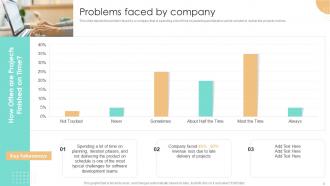
Slide 6: This slide depicts the problem faced by a company that is spending a lot of time on planning.
Slide 7: This slide shows title for topics that are to be covered next in the template.
Slide 8: This slide represents the reasons that why we should choose the rapid application development model.
Slide 9: This slide shows the business benefits of the rapid application development methodology.
Slide 10: This slide presents Market Size of Rapid Application Development.
Slide 11: This slide defines when an organization can use rapid application development based on prototype testing.
Slide 12: This slide shows title for topics that are to be covered next in the template.
Slide 13: This slide depicts the rapid application development model in detail consisting of business modeling.
Slide 14: This slide presents Process of Using Rapid Application Development Methodology.
Slide 15: This slide represents the rapid application development life-cycle, including planning, analysis, design, etc.
Slide 16: This slide shows title for topics that are to be covered next in the template.
Slide 17: This slide displays architecture of rapid application development that consists of backend systems.
Slide 18: This slide represents rapid application development architecture that is consists of user interface components.
Slide 19: This slide showcases Phases of Rapid Application Development Methodology.
Slide 20: This slide depicts the requirement planning phase of the rapid application development model.
Slide 21: This slide illustrates the second phase of the RAD model that is user-design and prototypes.
Slide 22: This slide presents third phase of the rapid application development model that is rapid construction.
Slide 23: This slide depicts the cutover phase of the rapid application development model.
Slide 24: This slide shows title for topics that are to be covered next in the template.
Slide 25: This slide depicts the various design and prototype tools of RAD, such as adobe experience design.
Slide 26: This slide represents a list of user testing and feedback tools of the RAD model such as conjure.
Slide 27: This slide depicts the rapid application development tools such as alpha software.
Slide 28: This slide shows title for topics that are to be covered next in the template.
Slide 29: This slide presents low-code development platforms for the RAD model.
Slide 30: This slide depicts the no-code development platform for the RAD model, including Apple Pie.
Slide 31: This slide displays Workplace Innovation Platforms for RAD.
Slide 32: This slide shows title for topics that are to be covered next in the template.
Slide 33: This slide presents Checklist to Determine Team’s RAD Readiness.
Slide 34: This slide describes the RACI matrix for rapid application development implementation in the organization.
Slide 35: This slide displays rapid application development challenges, including being heavily reliant on the client.
Slide 36: This slide showcases Checklist to Implement Rapid Application Development.
Slide 37: This slide shows title for topics that are to be covered next in the template.
Slide 38: This slide represents a comparison between rapid application development and software development models.
Slide 39: This slide describes a comparison between the RAD model and the traditional SDLC model based.
Slide 40: This slide showcases Rapid Application Development vs. Agile Methodology.
Slide 41: This slide shows a comparison between the rapid application development model and the waterfall model.
Slide 42: This slide represents a comparison between the RAD model and the waterfall model.
Slide 43: This slide shows title for topics that are to be covered next in the template.
Slide 44: This slide presents Automobile Industry and Rapid Application Development.
Slide 45: This slide depicts the application of rapid application development in the online retail industry.
Slide 46: This slide represents the role of RAD in banking, financial services, and insurance.
Slide 47: This slide shows title for topics that are to be covered next in the template.
Slide 48: This slide showcases Budget for Rapid Application Development Implementation.
Slide 49: This slide shows title for topics that are to be covered next in the template.
Slide 50: This slide presents Impacts of RAD Implementation on Business.
Slide 51: This slide shows title for topics that are to be covered next in the template.
Slide 52: This slide displays timeline for RAD implementation in the company.
Slide 53: This slide shows title for topics that are to be covered next in the template.
Slide 54: This slide depicts the 30-60-90 days plan to implement RAD in the company.
Slide 55: This slide contains all the icons used in this presentation.
Slide 56: This slide is titled as Additional Slides for moving forward.
Slide 57: This slide represents what is rapid application development.
Slide 58: This slide showcases Advantages and disadvantages of rapid application development.
Slide 59: This is a Timeline slide. Show data related to time intervals here.
Slide 60: This slide shows Post It Notes. Post your important notes here.
Slide 61: This slide represents Stacked column chart with two products comparison.
Slide 62: This is Our Mission slide with related imagery and text.
Slide 63: This slide depicts Venn diagram with text boxes.
Slide 64: This slide presents Roadmap with additional textboxes.
Slide 65: This slide displays Mind Map with related imagery.
Slide 66: This is a Thank You slide with address, contact numbers and email address.
RAD Methodology Powerpoint Presentation Slides with all 71 slides:
Use our RAD Methodology Powerpoint Presentation Slides to effectively help you save your valuable time. They are readymade to fit into any presentation structure.









FAQs for RAD Methodology
So RAD has four core things that set it apart. Users stay involved the whole time - not just at kickoff meetings. Instead of long planning phases, you're constantly prototyping and tweaking stuff. Time limits are brutal but effective (like 60-90 days max). Oh, and you reuse components wherever possible to avoid reinventing the wheel. The timeboxing thing honestly stresses me out just thinking about it, but it prevents scope creep. Bottom line: start small, get user feedback constantly, and don't be stubborn when they want changes.
So RAD is like the middle child between waterfall and agile. Way faster than waterfall's slow sequential thing, but you still get structure (unlike agile which can feel pretty chaotic sometimes). The big thing with RAD is you're constantly getting user feedback while building - not just dumping everything on them at the end like waterfall does. You prototype fast, iterate quick, but there's clearer milestones than agile sprints. Honestly perfect if you've got tight deadlines but your stakeholders want to stay involved throughout the whole process.
Dude, RAD is perfect when you need to move fast and requirements keep changing - web apps, prototypes, that kind of stuff. Small teams work best, plus you need stakeholders who'll actually give feedback regularly. But honestly? Don't even think about it for anything critical like medical or banking systems where one screw-up could be catastrophic. The whole thing revolves around quick prototyping and getting users involved constantly. If your requirements are already locked down and won't budge, just go with waterfall instead. RAD shines when speed trumps having every single detail documented perfectly.
RAD basically lives and dies by user feedback - you're constantly building quick prototypes and shoving them in front of people to see what breaks. Way better than spending months on something nobody wants. Each round of feedback feeds directly into your next version, so you're always course-correcting based on real reactions. Honestly, I've seen too many teams fall in love with their first mockup and ignore obvious problems. Start those feedback sessions immediately and don't skip them when deadlines get tight. The whole build-test-refine cycle keeps you from wandering off into fantasy land.
So RAD basically expects requirements to change - that's the whole point. You build quick prototypes, show them to users, get feedback, then tweak things. Those short cycles (like 2-4 weeks) mean you can pivot fast when someone goes "wait, that's not what we meant." Way better than waterfall where changes feel like disasters. The constant back-and-forth with stakeholders actually becomes your biggest advantage. I've seen teams stress about changing requirements, but with RAD you just roll with it. Plan for changes upfront instead of pretending they won't happen.
For RAD, grab visual dev tools like Visual Studio, OutSystems, or Mendix. Figma's great for quick UI mockups too. But honestly? I've watched teams crush it with PowerApps and even custom Python setups - it's more about how fast you can iterate than the fancy tools. Use Slack for team chatter and Jira for tracking those short sprints. My biggest tip though: stick with stuff your team already knows. Learning new software while trying to build fast is like... well, it's a nightmare. You don't want that headache when deadlines are tight.
Okay so daily standups are huge for RAD - you can't skip those. Get your stakeholders involved in everything, like annoyingly involved. Use shared whiteboards or whatever collaboration tools work for your team. The feedback loops are honestly draining at first (I'm not gonna lie), but that's literally what makes the whole thing function. Instead of those massive milestone presentations, do quick demos all the time. Better to over-communicate than have people confused about where you're headed. Just start with daily check-ins this week and watch how much clearer everything gets.
Yeah, RAD can totally backfire on you. Your requirements need to stay somewhat stable - otherwise you're constantly rebuilding. Experienced devs are crucial too. The biggest trap? Stakeholders seeing every prototype and going "this looks done!" when it's nowhere near ready. Been burned by that before. Complex systems needing tons of documentation don't mesh well with this approach either. Oh, and if users aren't around for regular feedback, you're basically flying blind. Regulatory stuff is another headache. Just make sure everyone's actually committed to the process first, or you'll drown in scope creep.
So RAD basically makes users part of the whole process instead of just showing up at the end. They're in design sessions with you, checking out prototypes every couple weeks, giving feedback that actually matters. Way better than the old school approach where users vanish until testing - honestly that never made sense to me. Joint development sessions are pretty cool too since users and devs can hash out requirements together in real time. The whole iterative thing means you build what they actually want, not what you're guessing they want. I'd start doing weekly feedback sessions right away.
Set your success metrics before you even start - saves so much headache later. Track delivery speed vs traditional methods, plus how users actually feel about each iteration. Quality matters too, so watch those defect rates after launch. Budget's obviously important but honestly, RAD gives you feedback so fast you'll spot problems early anyway. Sprint reviews and user testing sessions are your best friends here. The whole point is hitting faster delivery, happy users, and decent quality. Short feedback loops mean you're not flying blind for months like other approaches.
RAD is all about those strict timeboxes - set them and don't budge. Spend your money where it matters: the dev cycles and getting user feedback. Honestly, I've watched teams waste so much cash on tools that just sit there collecting digital dust. Timeline stays fixed, but keep scope flexible. You'll need that contingency plan because requirements will change (they always do). Each sprint should start with crystal clear deliverables. Don't let scope creep sneak in and wreck your momentum - it's a project killer.
Yeah so with RAD you barely document anything upfront - you're just cranking out prototypes instead of writing endless specs. Your team stays on the same page with super lightweight docs, nothing fancy. It felt weird when I first tried it because I was so used to documenting everything beforehand. But here's the thing - you document stuff as it actually gets built, not what you think you're gonna build. Way more accurate that way. Just let your documentation grow with the prototypes instead of trying to map out every detail from day one. Trust me, it works better.
Honestly, RAD falls apart with huge complex systems that need solid architecture from day one. Heavily regulated industries are a no-go too - you can't really skip documentation when compliance is breathing down your neck. Your team needs experienced devs who can handle the fast pace, and the client has to be all-in with constant feedback. Otherwise it's just chaos. Mission-critical stuff like medical devices? Yeah, I'd probably sleep better at night using traditional methods instead of rapid prototyping for something that important. Financial systems fall into that same category.
Honestly, RAD is perfect for this - just start building prototypes right away instead of planning forever. Get something in front of users within like a week or two max. Break everything into tiny pieces you can iterate on quickly. I've watched teams literally cut their timeline by 30-40% doing this (though your mileage may vary obviously). The trick is listening to what users actually want, not what you assume they want. Build fast, test constantly so you don't ship garbage. Oh and tackle your scariest features first - better to fail early than later when it's expensive.
So Microsoft totally crushed it with Visual Basic using RAD - they could pivot super fast when users wanted changes. IBM did something similar for credit card processing (finance stuff is usually such a nightmare, but it worked). DuPont jumped on it too for chemical tracking. The pattern I'm seeing? They all got users involved constantly and weren't precious about scrapping early versions. RAD's perfect when you know requirements will shift and stakeholders can actually show up to regular check-ins. Otherwise you'll just be spinning your wheels.
-
I was never satisfied with my own presentation design but SlideTeam has solved that problem for me. Thank you SlideTeam!
-
Very unique and reliable designs.