Roles And Responsibilities Of Technical Communication Team

Rating:
90%
Roles And Responsibilities Of Technical Communication Team
Slide 1 of 6
Favourites Favourites

Try Before you Buy Download Free Sample Product

Audience Impress Your
Audience
Editable 100%
Editable
Time Save Hours
of Time
The Biggest Sale is ending soon in
0
0
:
0
0
:
0
0
Rating:
90%
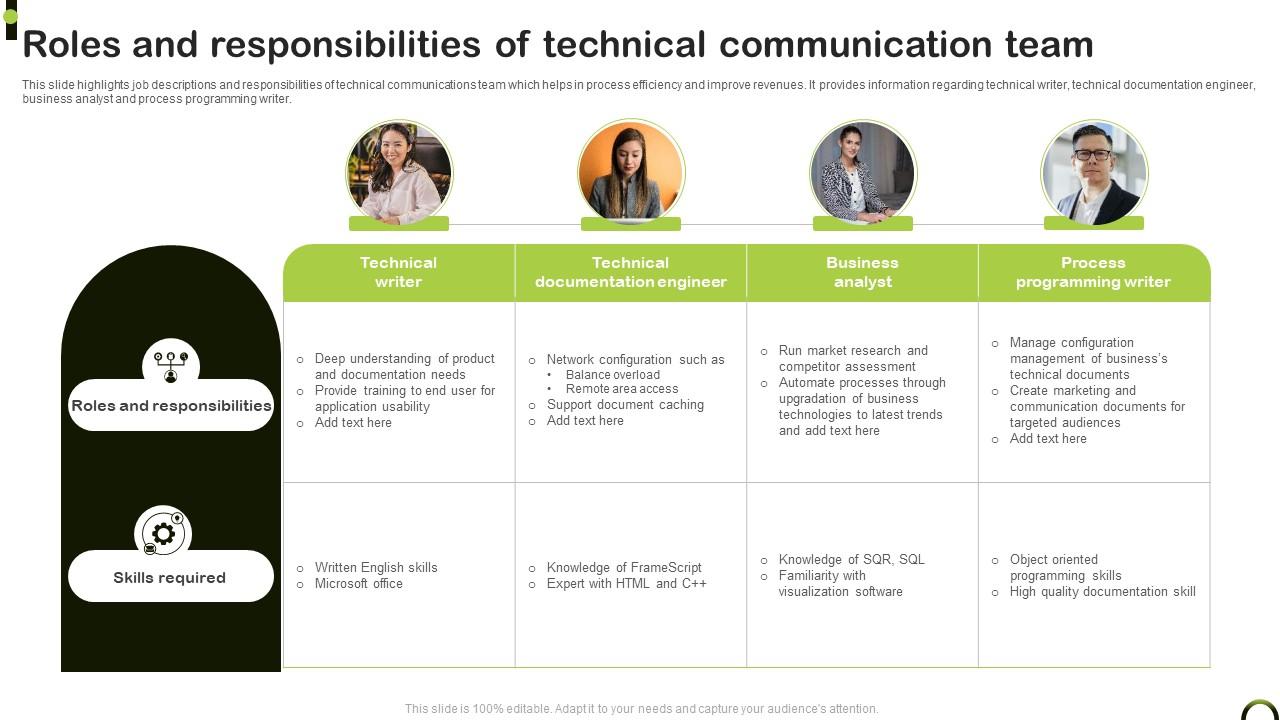
This slide highlights job descriptions and responsibilities of technical communications team which helps in process efficiency and improve revenues. It provides information regarding technical writer, technical documentation engineer, business analyst and process programming writer. Introducing our premium set of slides with Roles And Responsibilities Of Technical Communication Team Ellicudate the Four stages and present information using this PPT slide. This is a completely adaptable PowerPoint template design that can be used to interpret topics like Roles And Responsibilities, Skills Required. So download instantly and tailor it with your information.

People who downloaded this PowerPoint presentation also viewed the following :

FAQs for Roles And Responsibilities Of

So basically you're the translator between the tech team and regular people who actually need to use the software. You write user guides, API documentation, release notes - all that stuff that helps people not lose their minds trying to figure out how things work. Developers are smart but explaining things clearly? Not their strongest skill lol. You'll spend time with product managers and engineers getting the details, then turn it into something readable. Oh and you'll review features before they go live because someone needs to make sure there's actual documentation. It's like being a bridge between two different worlds.

So technical writers make all the docs and tutorials that explain how stuff works. UX designers actually build the user experience inside the product. Writers focus on guides, help articles, API docs - you know, all that documentation that hopefully makes sense when you're stuck. UX people do wireframes and design the actual interface flows. There's definitely overlap though (probably more than either side wants to admit lol). Writers explain the complexity, designers try to design it out entirely. Both need to get users, but writers talk *about* the product while UX talks *through* it. What sounds more appealing to you?

Okay so first thing - write super clearly because engineers need to process complicated stuff quickly. No rambling. Also, get good with visuals since you'll constantly be showing systems and data that only make sense with charts or diagrams. The tricky part is reading your audience and knowing how technical to get. Like, some people want every detail, others just need the overview. Oh and listen way more than you talk - you're basically translating between different groups all day. Here's what helped me: try explaining your hardest project to your mom or something. Sounds weird but it'll make everything else easier.

Honestly, you've gotta be the translator here. Break down all that techy stuff into plain English that actually makes sense to the business people. Skip the technical details - they just want to know what it means for them and their goals. Visuals are your best friend too, like diagrams or simple charts. Nobody wants to read paragraphs of jargon, trust me on that one. Make sure people can ask questions during meetings without feeling dumb. Oh, and write everything down somewhere both teams can find later. It's all about helping the tech folks feel heard while giving business people what they need to make decisions.

Start by writing for your users, not yourself - their skill level is what matters. Clear headings and bullet points help people scan fast. Short paragraphs too. I learned the hard way that testing docs with real users is crucial because what clicks for you might be total nonsense to them. Screenshots are your friend, along with step-by-step examples. Ditch jargon whenever you can. Active voice beats passive every time. Here's the thing - put common tasks first when organizing content. Oh, and audit what you've got already. Ask users what's confusing them most. That feedback is gold.

Honestly, audience analysis is everything in writing. You've gotta figure out who's reading first - are they techies who want code examples, or executives who just need the bottom line? Your whole approach changes. Developers want step-by-step instructions with actual snippets. CEOs? Just give them bullet points about business impact. I learned this the hard way when I wrote super detailed docs for managers who didn't care about technical specs. The language you use shifts too - some people need simple explanations while others can handle complex stuff. Always ask yourself: what does this person already know and what do they actually need from me?

Oh man, it's wild how much tech writing has changed. We're not just doing manuals anymore - now it's interactive help systems, video tutorials, UI copy, content across like five different platforms. The tools are so much better though (RIP FrameMaker lol). You'll need to pick up some HTML/CSS, learn content management systems, maybe some UX basics. Analytics too, which I honestly never thought I'd care about. The whole job is way more collaborative now - you're constantly working with developers and designers. Bottom line: everything has to work on mobile and be super easy to scan. Definitely start learning some web stuff if you haven't.

Accessibility is huge for tech writing - way more than just checking compliance boxes. When you write clear headings, add alt text, use simple language, and check color contrast, literally everyone benefits. I learned this the hard way when my manager couldn't read my "perfectly formatted" doc because the contrast sucked. Try running your next piece through a screen reader yourself. You'll catch problems fast and actually understand how people navigate your content. Plus (weird bonus) focusing on accessibility just makes you write better overall. It forces you to be clearer and more direct.

Put your visuals right next to the text they're explaining - nobody wants to flip back and forth. Screenshots are perfect for tutorials, flowcharts for messy processes. Use arrows and callouts so people actually know what they're looking at. I swear, half the docs I see have gorgeous visuals that do absolutely nothing. Each one should have a purpose beyond looking nice. Keep file sizes decent for loading, add alt text for screen readers. Oh, and test with real people - you'll be shocked how often what seems obvious to you... isn't.

Ugh, the worst part is missing all those random hallway conversations where developers drop important info. You'll be updating docs at the last second because nobody thought to loop you in earlier. Getting feedback takes forever too - what used to be a quick "looks good" now turns into this whole email chain that drags on for days. Time zones are such a pain. Oh, and virtual meetings make it way harder to tell when someone's totally lost during interviews. My advice? Be super clear about communication expectations upfront and schedule regular check-ins, even if they feel excessive.

Honestly, good documentation can make or break a product launch. People need to actually understand how to use what you've built - user guides, API docs, release notes, all that stuff. I've watched amazing products tank because the docs were garbage and nobody could figure anything out. Get your tech writers involved early, not three days before launch when everyone's panicking. Document features while you're building them, and definitely test everything with real users first. Even small startups mess this up constantly. Your brilliant code means nothing if people can't use it.

Oh man, this is huge for global products! Your users have to actually understand your stuff in their own language, obviously. But it's way more than just translating text - you're dealing with UI changes, error messages, cultural stuff, even colors that mean totally different things in other countries. We had what seemed like a straightforward software launch that completely bombed in three markets because we didn't think it through. Bad localization = confused users and tons of support headaches. Trust me, get your localization people involved early in development. Don't wait until the end!

Honestly, you've gotta be proactive about collecting feedback from everywhere - users, experts, support folks, your analytics. Support tickets are seriously underrated for this btw, they show you exactly where people get stuck. Set up regular touchpoints like surveys or casual user testing sessions. Don't just wait around hoping someone will comment. I'd suggest reviewing everything monthly and picking maybe 2-3 concrete things to actually fix. The trick is making it systematic rather than random. Track the biggest pain points and tackle those first since that's where you'll get the most bang for your buck.

Honestly, just be straight with people - don't sugarcoat stuff even when your boss wants you to make something sound better than it is. Safety comes first when you're writing instructions or describing products. Accessibility is huge now too (which I'm totally here for), so make sure people with disabilities can actually use your content. Respect NDAs and don't steal other people's work, obviously. And be upfront if you've got any conflicts of interest. Here's my test: would I actually want to use this thing based on what I wrote? If not, time to fix it.

Honestly, multimedia just works better because that's how people's brains actually process stuff. Like, nobody wants to slog through paragraphs explaining how to set up API endpoints when you could just show them a quick screen recording instead. Videos are perfect for walkthroughs, infographics make data way less intimidating, and interactive elements keep people engaged during onboarding. Your retention rates will go through the roof when you mix different formats together. I always tell people to look at their most confusing sections first - what's tripping everyone up? Then figure out if a visual or video would fix it. Trust me, your users will thank you.

Ratings and Reviews

90% of 100
Write a review
Most Relevant Reviews
  1. 80%

    by Byrne Cruz

    Great product with highly impressive and engaging designs.
  2. 100%

    by Chung Bennett

    I didn’t expect such a good service for the money I am paying. But, they exceed my expectations. Great work SlideTeam.

2 Item(s)

per page: