


Sales Improvements Powerpoint Presentation Slides





Try Before you Buy Download Free Sample Product
 Impress Your
 Audience
 100%
100% Editable
 Save Hours
 of Time


We are proud to present Sales improvements PowerPoint presentation slides. We have well researched to identify the root causes of subpar sales performance and to focus on the right preferences to improve top-line results. Fueled by profit-based sales targets PPT designs, covers up all the features of a product offerings, services, and financials highlights, featuring your team and their sales compensation plans, we have covered up upcoming projects and actual versus target sales comparisons through intrinsic graphics PowerPoint designs. Sales product performance comparisons and major obstacles elaboration further strengthen your pitch. In an ever changing exchange like today, it is a significant factor to design your business procedures to supremacy in order to achieve the desired objectives. Each step involved uniformly critical and has to be specially dealt with. Bar graphs and line charts are shown here for a better understanding and for your personalization. Include these designs in your business presentations for showcasing improved sales Performance. Halt further damage to the environment with our Sales Improvements Powerpoint Presentation Slides. Campaign for cutting down carbon emissions.
People who downloaded this PowerPoint presentation also viewed the following :
Content of this Powerpoint Presentation
Slide 1: This slide shows Sales Improvements. State Your Company Name and begin
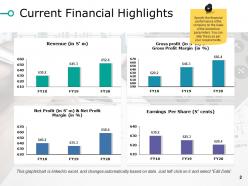
Slide 2: This slide showcases Current Financial Highlights with these parameters- Revenue (in S’ m), Net Profit (in S’ m) & Net Profit Margin (in %), Gross profit (in S’ m) & Gross Profit Margin (in %), Earnings Per Share (S’ cents), Specify the financial performance of the company on the basis of the below four parameters. You can alter these as per your requirements.
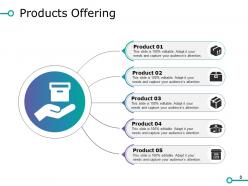
Slide 3: This slide presents Products Offering. You can add the product offerings in the boxes we have provided.
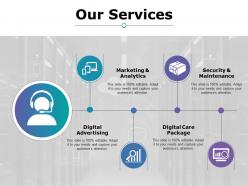
Slide 4: This slide diplays Our Services and also it includes- Digital Advertising, Marketing & Analytics, Digital Care Package, Security & Maintenance.
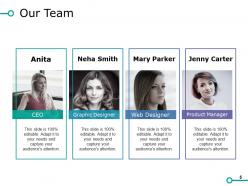
Slide 5: This slide showcases Our Team with name and images. You can use it for putting your company members profile.
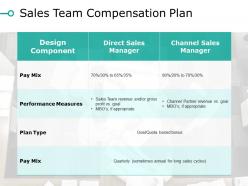
Slide 6: This slide presents Sales Team Compensation Plan. You can edit or add data in it and make the best use.
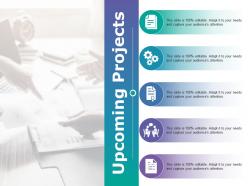
Slide 7: This slide showcases Upcoming Projects. Add the data of your coming new projects and information related to it.
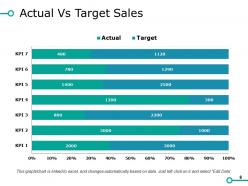
Slide 8: This slide displays Actual Vs Target Sales and also includes actual and target bar charts.
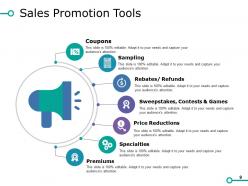
Slide 9: This slide presents Sales Promotion Tools which further includes these parameters- Coupons, Sampling, Rebates/ Refunds, Sweepstakes, Contests & Games, Price Reductions, Specialties, Premiums.
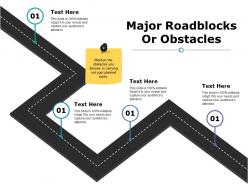
Slide 10: This slide showcases Major Roadblocks Or Obstacles. Mention the obstacles you foresee in carrying out your planned tasks.
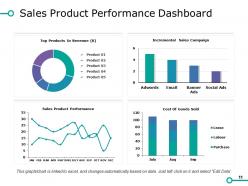
Slide 11: This slide showcases Sales Product Performance Dashboard with these factors- Top Products In Revenue (K), Incremental Sales Campaign, Cost Of Goods Sold, Sales Product Performance.
Slide 12: This slide shows Sales Improvements Icon. You can use it as per your requirements.
Slide 13: This slide shows Coffee Break image.
Slide 14: This slide displays the title Charts & Graphs.
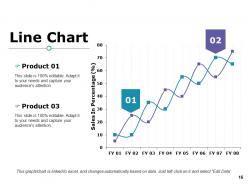
Slide 15: This slide shows a Line Chart for two product comparison.
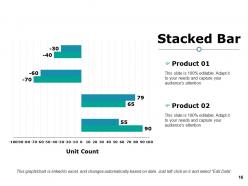
Slide 16: This slide shows a Stacked Line graph in terms of percentage and years for comparison of Product 01, Product 02, Product 03 etc.
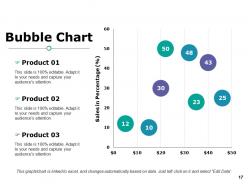
Slide 17: This slide showcases Bubble Chart. You can analyse the comparison by this chart.
Slide 18: This slide is titled Additional Slides.
Slide 19: This slide represents Our Mission and vision. State your mission, goals etc.
Slide 20: This slide helps show- About Our Company. The sub headings include- Creative Design, Customer Care, Expand Company.
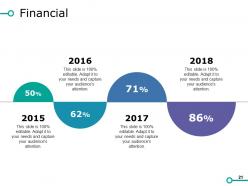
Slide 21: This slide is titled as Financials. Show finance related stuff here.
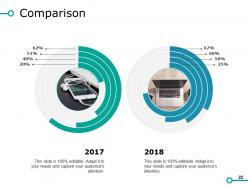
Slide 22: This slide is about Comparison. You can compare your products and business.
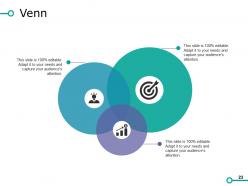
Slide 23: This slide displays a Venn diagram image.
Slide 24: This slide displays a Bulb or idea image.
Slide 25: This is a Thank You image slide with Address, Email and Contact number.
Sales Improvements Powerpoint Presentation Slides with all 25 slides:
Generate conditions that act in your favor with our Sales Improvements Powerpoint Presentation Slides. You will establish an influential edge.



FAQs for Sales Improvements
Honestly, I'd stick to just 5 KPIs: conversion rate, average deal size, sales cycle length, lead-to-customer ratio, and revenue growth. Most teams go overboard tracking everything and end up drowning in useless data. Conversion rate and deal size are your best friends - they'll show you right away if you're closing bigger deals or just more of them. Sales cycle length matters too because shorter cycles = better cash flow, obviously. Oh and don't check these daily like some obsessive maniac. Weekly reviews work fine, but actually DO something with the insights.
Look, templates are lifesavers because they give you a solid structure instead of just winging it. You get that clean problem-solution-outcome flow that actually keeps people listening instead of checking their phones. Honestly? They've saved me from rambling about features for 10 minutes while everyone mentally checks out. The trick is tweaking each one with their specific pain points and success stories that actually matter to their industry. Oh, and map out like 2-3 story arcs you can adapt fast - trust me on this one.
Dude, data analytics is like having x-ray vision for your sales process. You'll catch trends and seasonal stuff you'd totally miss just staring at boring spreadsheets. I love how it shows you exactly where deals die in your pipeline - makes coaching way easier. The cool part? When you connect marketing data with your actual close rates, you finally see what campaigns are worth it (and which ones are garbage). Oh, and don't go crazy trying to track everything at first. Pick like 3-4 metrics and actually stick with them.
Honestly, you need to dig into feedback from deals you both won AND lost - that's where the gold is. Ask customers what clicked, what threw them off, where you moved too fast or left them hanging. One team I know totally flipped their demo after finding out people wanted pricing right upfront instead of this big reveal at the end. Pretty eye-opening stuff. Use what you learn to tweak your pitch timing and qualifying questions. Match what buyers actually care about, not what you think they should. Start simple - survey your last 10 closed deals this week and see what patterns jump out.
Honestly, skip the boring lecture stuff - your team needs hands-on practice. Get them doing role-plays with fake clients and recording their own pitches so they can cringe at themselves later (trust me, it works). PowerPoint's fine for templates they can tweak for different prospects. Even basic screen recording is clutch for this. Regular practice sessions where they present to each other? Gold. The feedback part is huge. I'd literally have them record a 5-minute pitch this week and go from there. Way more effective than sitting through another presentation about presentations, you know?
Honestly, visuals work because people's brains just process pictures way faster than walls of text. Don't tell someone your software boosts efficiency 30% - show them a before/after workflow or throw up a chart that makes it obvious. Each visual should tackle one specific problem they're dealing with. Mockups work great for interface stuff, flowcharts nail process improvements, graphs handle the money side of things. I've seen too many pitches get buried under bullet points when one solid visual would've sealed the deal. Pick your strongest benefit and let the picture tell that story.
Tell a story that connects your solution to their actual problems - don't just rattle off features. Map out their biggest challenge first, then show the consequences, your fix, and proof it works. Make slides super visual because nobody wants to read walls of text (trust me on this one). Real customer examples with hard data crush vague promises. Oh, and practice your transitions so you're not fumbling between slides. The whole thing should flow like you're having a conversation, not reading a script. Work backwards from their pain point and you'll nail it.
A/B test your sales stuff with similar prospect groups - decks, proposals, whatever you're using most. Only change one thing at a time though. Maybe try different opening hooks or switch up how you present pricing. I've watched teams go crazy testing everything simultaneously and then they can't figure out what actually worked (rookie mistake honestly). Track your meeting-to-proposal rates, proposal-to-close rates, stuff like that. Oh, and engagement during presentations if you can measure it. Focus on your biggest materials first since that's where you'll see the most impact from small changes.
Honestly, good design makes a huge difference in sales presentations. People judge you before you even speak - it's just human nature. When your slides look professional instead of like basic PowerPoint templates, prospects automatically see you as more credible. Clean branding sticks in their heads better too. I've seen conversion rates jump because buyers trust polished brands way more than messy ones. It's kinda like that suit analogy - first impressions matter. Plus you'll stand out from competitors who clearly didn't invest in their visual game. Worth the investment IMO.
Honestly, case studies are gold because they're basically your happy customers doing the sales pitch for you. People trust real stories way more than feature lists - it's just human nature. You want to find examples that match your prospect almost perfectly. Same industry if possible, similar company size, facing the exact same headaches. Then you walk them through it: here's what was broken, here's how we fixed it, here's the actual numbers. I always finish with something like "we could probably do something similar for your situation." Works like a charm because you're not just talking about what you *could* do - you're showing what you already *did* do.
Honestly, you've gotta do your homework on each persona first. Build modular sections you can swap around - CFOs only care about ROI, IT wants the technical nitty-gritty, end-users just want something that won't make their lives harder. I keep 3-4 different slide decks prepped because you never know who's gonna show up. Always ask beforehand who's attending and what's bugging them most. Then match your examples and data to what they actually give a shit about. Having that flexible content ready beats scrambling to figure it out on the spot.
Dude, emotions beat logic every single time when people are buying stuff. I've seen conversion rates jump 20-30% just from adding real customer stories instead of boring feature lists. People buy with their feelings first, then scramble to justify it with facts later - it's wild how predictable we are. Start your next demo with how another client solved the exact same problem they're facing. You're basically showing them a blueprint for success without being pushy about it. Way better than just dumping product specs on them. Trust me, you'll see engagement go through the roof once you nail the storytelling part.
For basics, Zoom or Teams work fine, but try interactive stuff like Prezi or Mentimeter - way better than boring static slides. Your prospects can actually click around and engage. Sales platforms like Highspot are super helpful too since you can tweak presentations quickly during calls. Nobody wants to sit through five minutes of "can everyone hear me okay?" Trust me on this one. PandaDoc speeds up follow-ups big time. I'd pick one tool first though - don't overwhelm your team with everything at once.
Honestly, you've gotta think about how people actually absorb info. Start with the problem they're dealing with, then show your solution as the obvious fix. It's like telling a story - problem, solution, proof, what's next. Front-load your best benefits upfront when they're still paying attention. Build credibility in the middle with case studies and real examples. The ending should feel natural, not like you're trying to sell them a timeshare lol. Map it out: problem → your fix → here's proof it works → next steps. Works every time.
Honestly, your biggest headache will be people just not wanting to change. Sales teams get super attached to their routines - I've seen reps literally argue for keeping terrible templates just because they're used to them. Plus there's that awkward period where everyone's fumbling around trying to figure out the new setup. Here's what actually works: let them help pick the templates. Seriously, if they feel like they had a say, half the battle's won. Run some quick training sessions, maybe buddy up your tech-savvy people with the ones who'll struggle more. Show them concrete examples of how it'll make their lives easier once they get past the initial learning curve.
-
Unique design & color.
-
Topic best represented with attractive design.