

Secure Your Digital Assets With Crypto Wallets Powerpoint Presentation Slides




Try Before you Buy Download Free Sample Product
 Impress Your
 Audience
 100%
100% Editable
 Save Hours
 of Time


This Secure Your Digital Assets with Crypto Wallets PPT includes an introduction, advantages, and features of cryptocurrency. It also comprises the crypto wallets introduction, attributes, advantages, and disadvantages of different types of wallets in the market. This Balancing Crypto Security in Hot and Cold Wallets PowerPoint presentation represents different types such as hot and cold wallets. There are a variety of hot wallets available in the market including mobile wallets, web wallets, and desktop wallets. Cold wallets are of two types i.e. paper wallets and hardware wallets. In addition, Role of Blockchain Wallets in the Decentralization module demonstrates the various steps involved in opening the crypto wallet and the key information required to do so. It also discusses the red flags that should be considered while doing transactions in cryptocurrency, such as promises of guaranteed returns, lack of project transparency, pressure to act quickly, etc. Furthermore, the E-Wallets Modernizing Digital Transactions deck discusses how crypto wallets generate money and related techniques. Moreover, this Enhancing Security with Multi-Signature Wallets PPT contains sections about cryptography, two-factor authentications, and multi-signature wallets.
People who downloaded this PowerPoint presentation also viewed the following :
Content of this Powerpoint Presentation
Slide 1: This slide introduces Secure Your Digital Assets with Crypto Wallets. State your company name and begin.
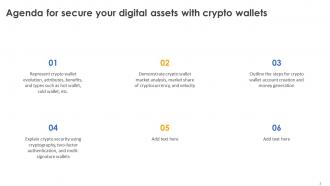
Slide 2: This is an Agenda slide. State your agendas here.
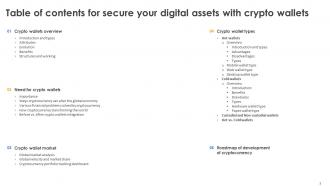
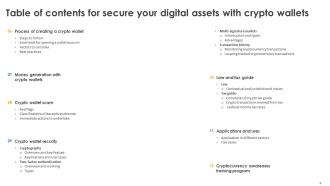
Slide 3: This slide shows Table of Content for the presentation.
Slide 4: This slide continues showing Table of Content for the presentation.
Slide 5: This slide shows title for topics that are to be covered next in the template.
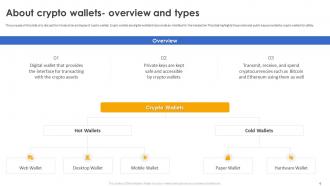
Slide 6: This slide discuss the introduction and types of crypto wallets. Crypto wallets are digital wallets that provide an interface for the transaction.
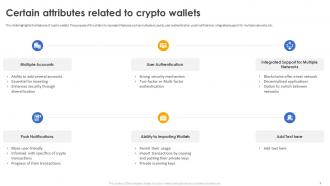
Slide 7: This slide highlights the features of crypto wallets. This slide represent features such as multiple accounts, user authentication, push notifications etc.
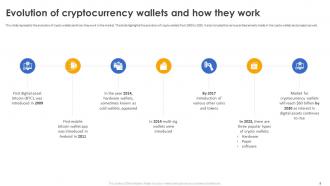
Slide 8: This slide represents the evolution of crypto wallets and how they work in the market. This slide highlights the evolution of crypto wallets from 2009 to 2030.
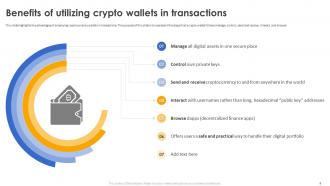
Slide 9: This slide highlights the advantages of employing cryptocurrency wallets in transactions. This slide represent the steps that a crypto wallet follows manage, control and more.
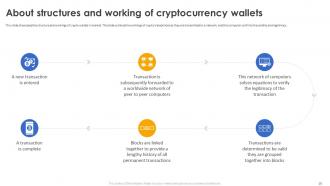
Slide 10: This slide showcases the structure and workings of crypto wallets in market. This slide outlines the workings of crypto transactions.
Slide 11: This slide shows title for topics that are to be covered next in the template.
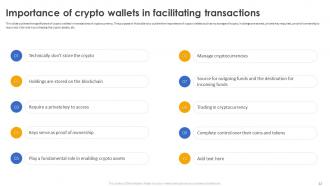
Slide 12: This slide outlines the significance of crypto wallets in transactions of cryptocurrency. This slide outline the importance of crypto wallets.
Slide 13: This slide showcases the ways cryptocurrency can alter the global economy. This slide highlight different ways of altering the global economy.
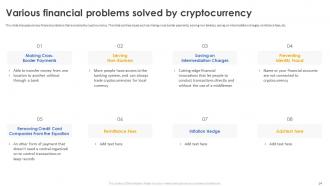
Slide 14: This slide discusses various financial problems that are solved by cryptocurrency. This slide outlines issues such as making cross-border payments, serving non-bankers etc.
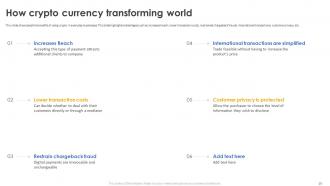
Slide 15: This slide showcases the benefits of using crypto in everyday businesses. This slide highlights advantages such as increased reach, lower transaction costs etc.
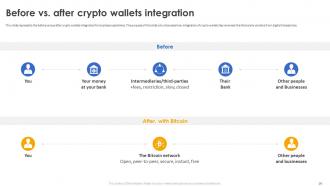
Slide 16: This slide represents the before versus after crypto wallets integration for business operations. This slide showcase how integration of crypto wallets has removed the third party vendors.
Slide 17: This slide shows title for topics that are to be covered next in the template.
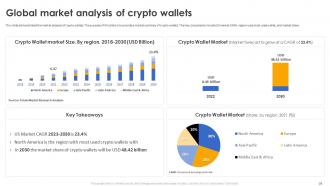
Slide 18: This slide demonstrated the market analysis of crypto wallets. This slide provide a market summary of crypto wallets. The key components include US market CAGR etc.
Slide 19: This slide depicts the velocity and market share of different end users in the market.
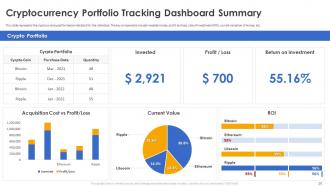
Slide 20: This slide represents the cryptocurrency performance indicators for the individual. The key components include invested money, profit and loss.
Slide 21: This slide shows title for topics that are to be covered next in the template.
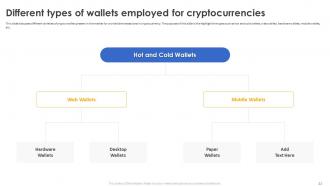
Slide 22: This slide discusses different varieties of crypto wallets present in the market for worldwide transactions in cryptocurrency.
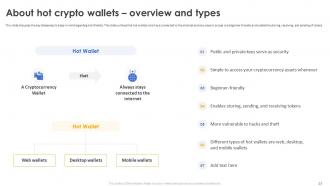
Slide 23: This slide displays the key takeaways to keep in mind regarding Hot Wallets. This slide outlines that hot wallets which are connected to the internet.
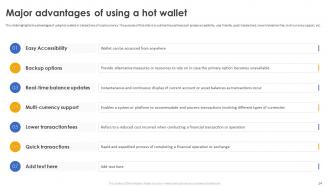
Slide 24: This slide highlights the advantages of using hot wallets in transactions of cryptocurrency. This slide outline the positives such as easy accessibility, user friendly etc.
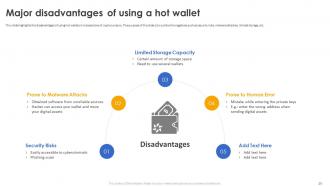
Slide 25: This slide displays the disadvantages of using hot wallets in transactions of cryptocurrency. This slide outline the negatives such as security risks, malware attaches etc.
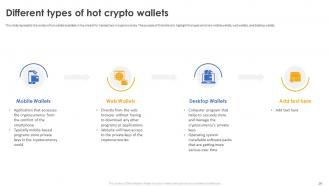
Slide 26: This slide represents the variety of hot wallets available in the market for transactions in cryptocurrency.
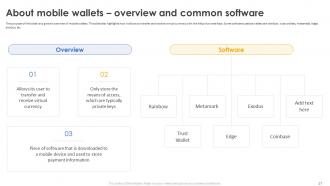
Slide 27: This slide give an overview of mobile wallets. This slide also highlights how it allows to transfer and receive virtual currency with the help of private keys.
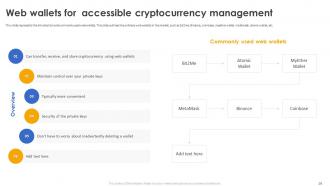
Slide 28: This slide represents the introduction and commonly used web wallets. This slide outlines the ordinary web wallets in the market, such as bit2me, Binance etc.
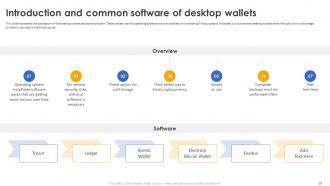
Slide 29: This slide presents the perception of the desktop wallets and some software. These wallets use the operating systems that are installed on the desktop.
Slide 30: This slide shows title for topics that are to be covered next in the template.
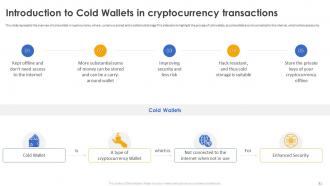
Slide 31: This slide represents the overview of cold wallets in cryptocurrency. where currency is stored and is called cold storage.
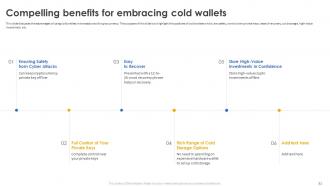
Slide 32: This slide discusses the advantages of using cold wallets in transactions of cryptocurrency. This slide highlight the positives of cold wallets which, are safety etc.
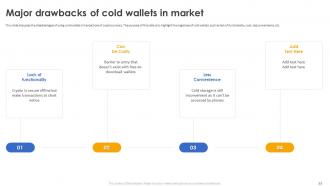
Slide 33: This slide displays the disadvantages of using cold wallets in transactions of cryptocurrency. This slide highlight the negatives of cold wallets.
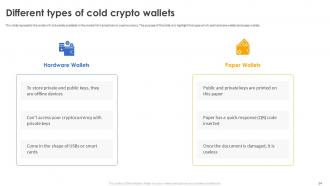
Slide 34: This slide represents the variety of cold wallets available in the market for transactions in cryptocurrency.
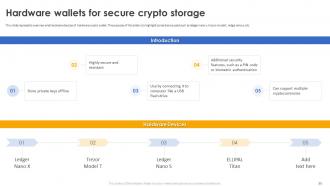
Slide 35: This slide presents overview and hardware devices of hardware crypto wallet. This slide highlight some device used such as ledger nano x, trezor model t etc.
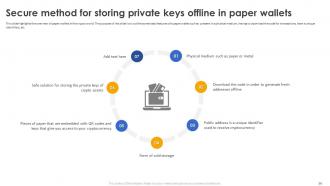
Slide 36: This slide highlights the overview of paper wallets in the crypto world. This slide outline some basic features of a paper wallet.
Slide 37: This slide shows title for topics that are to be covered next in the template.
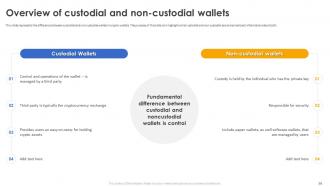
Slide 38: This slide represents the difference between custodial and non-custodial wallets in crypto wallets. This slide highlight what custodial and non-custodial are.
Slide 39: This slide shows title for topics that are to be covered next in the template.
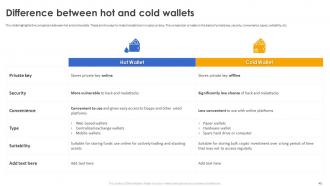
Slide 40: This slide highlights the comparison between hot and cold wallets. These are the ways to make transactions in cryptocurrency.
Slide 41: This slide shows title for topics that are to be covered next in the template.
Slide 42: This slide displays the roadmap for the development of cryptocurrency. The key steps include planning and research, design and development, testing etc.
Slide 43: This slide shows title for topics that are to be covered next in the template.
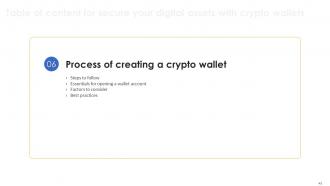
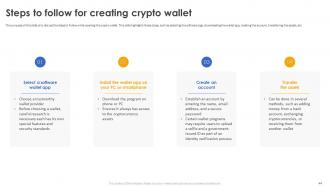
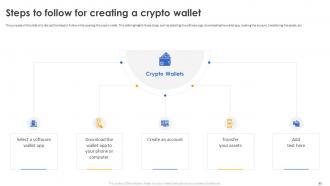
Slide 44: This slide discuss the steps to follow while opening the crypto wallet. This slide highlights those steps, such as selecting the software app etc.
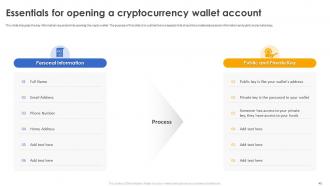
Slide 45: This slide presents the key information required while opening the crypto wallet and outlines two aspects that should be considered.
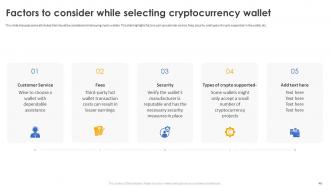
Slide 46: This slide discusses some attributes that should be considered while buying crypto wallets. This slide highlights factors such as customer service, fees etc.
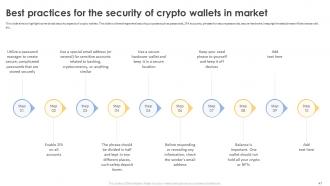
Slide 47: This slide aims to highlight some broad security aspects of crypto wallets. This slide outlines the general security purposes such as passwords, 2FA accounts etc.
Slide 48: This slide shows title for topics that are to be covered next in the template.
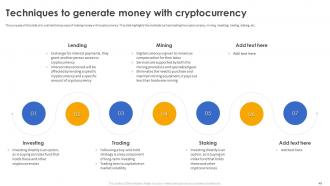
Slide 49: This slide outline the top ways of making money with cryptocurrency. This slide highlights the methods such as lending the cryptocurrency, mining etc.
Slide 50: This slide shows title for topics that are to be covered next in the template.
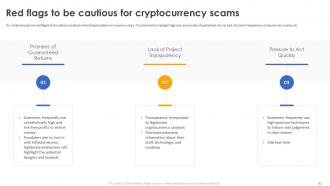
Slide 51: This slide discusses the red flags that should be considered while doing transactions in cryptocurrency.
Slide 52: This slide represents different categories of cryptocurrency scams in the market. This slide highlight scams such as Ponzi schemes, phishing scams etc.
Slide 53: This slide outline the steps to follow after the scam. This slide also highlights the actions to be taken after the fraud, such as maintaining calm and composure etc.
Slide 54: This slide shows title for topics that are to be covered next in the template.
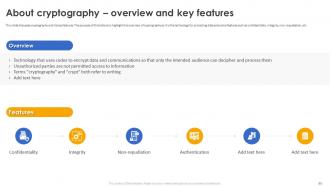
Slide 55: This slide discusses cryptography and its key features. This slide highlight the overview of cryptography as it is the technology for protecting data.
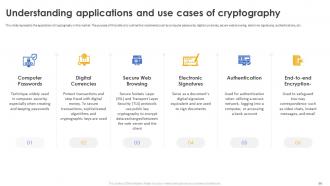
Slide 56: This slide represents the application of cryptography in the market. This slide outline the implements such as computer passwords, digital currencies etc.
Slide 57: This slide shows title for topics that are to be covered next in the template.
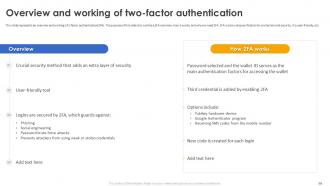
Slide 58: This slide represents an overview and working of 2-factor authentication(2FA). This slide outline a 2FA overview, how it works, and why we need 2FA.
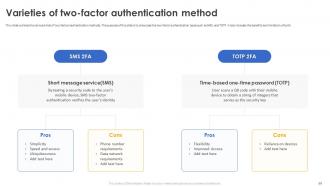
Slide 59: This slide outlines the various kinds of two-factors authentication methods. This slide showcase the two factor authentication types such as SMS, and TOTP.
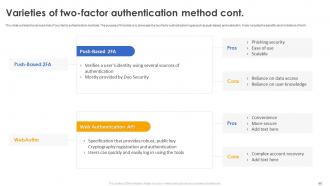
Slide 60: This slide also outlines the various kinds of two-factor authentication methods. This slide showcase the two factor authentication types such as push-based, and webAuthn.
Slide 61: This slide shows title for topics that are to be covered next in the template.
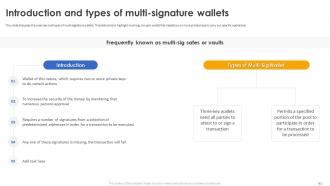
Slide 62: This slide discusses the overview and types of multi-signature wallets. This slide aims to highlight multi-sig, a crypto wallet that needs two or more private keys.
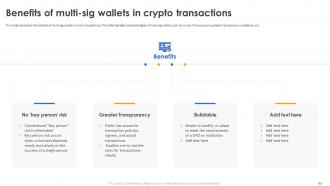
Slide 63: This slide represents the benefits of multi-sig wallets in crypto transactions. This slide highlights the advantages of multi-sig wallets.
Slide 64: This slide shows title for topics that are to be covered next in the template.
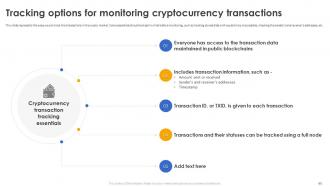
Slide 65: This slide represents the ways we can track the transactions in the crypto market. Some essentials should be kept in mind before monitoring.
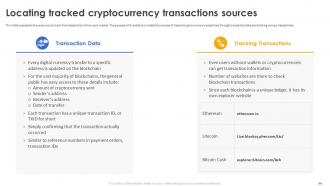
Slide 66: This Slide represents the ways we can track the transactions in the crypto market. This slide locate the sources of tracked cryptocurrency transactions through.
Slide 67: This slide shows title for topics that are to be covered next in the template.
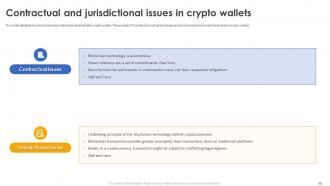
Slide 68: This slide highlights the contractual and jurisdictional issues faced by crypto wallets. This slide outline the issues such as contractual and jurisdictional.
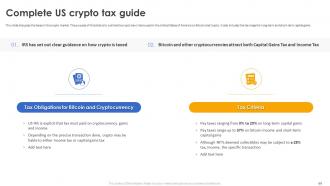
Slide 69: This slide discusses the taxes in the crypto market. This slide outline the crypto tax criteria used in the United States of America on Bitcoin and Crypto.
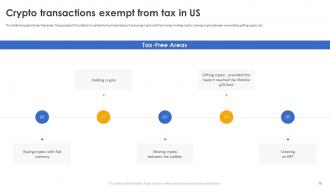
Slide 70: This slide discusses the tax-free areas. This slide outline the tax free areas such as buying crypto with fiat money, holding crypto etc.
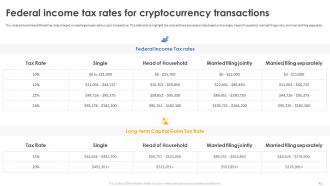
Slide 71: This slide demonstrates different tax rates charged on capital gains earned by crypto transactions.
Slide 72: This slide shows title for topics that are to be covered next in the template.
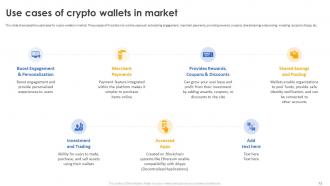
Slide 73: This slide presents the used cases for crypto wallets in market. This slide outline uses such as boosting engagement, merchant payments, providing rewards etc.
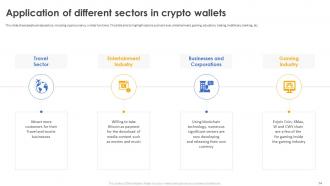
Slide 74: This slide showcases business sectors, including cryptocurrency, in daily functions. This slide aims to highlight sectors such as travel, entertainment etc.
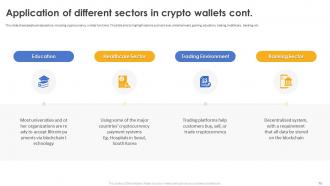
Slide 75: This slide also showcases business sectors, including cryptocurrency, in daily functions. This slide aims to highlight sectors such as travel, entertainment, gaming etc.
Slide 76: This slide shows title for topics that are to be covered next in the template.
Slide 77: This slide represents the training program for cryptocurrency awareness which will help individuals. This slide outline the mode, cost, agenda and more.
Slide 78: This slide shows all the icons included in the presentation.
Slide 79: This slide is titled as Additional Slides for moving forward.
Slide 80: This slide discuss the steps to follow while opening the crypto wallet. This slide highlights those steps, such as selecting the software app, downloading the wallet app etc.
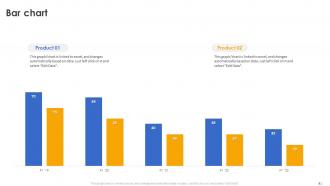
Slide 81: This slide presents Bar Graph with two products comparison.
Slide 82: This is a Timeline slide. Show data related to time intervals here.
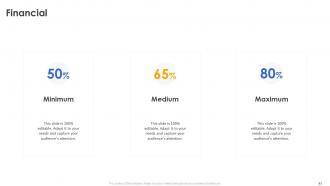
Slide 83: This is a financial slide. Show your finance related stuff here.
Slide 84: This slide contains Puzzle with related icons and text.
Slide 85: This is Our Goal slide. State your firm's goals here.
Slide 86: This is an Idea Generation slide to state a new idea or highlight information, specifications etc.
Slide 87: This slide provides 30 60 90 Days Plan with text boxes.
Slide 88: This slide presents Roadmap with additional textboxes. It can be used to present different series of events.
Slide 89: This slide shows Post It Notes for reminders and deadlines. Post your important notes here.
Slide 90: This is a Thank You slide with address, contact numbers and email address.
Secure Your Digital Assets With Crypto Wallets Powerpoint Presentation Slides with all 98 slides:
Use our Secure Your Digital Assets With Crypto Wallets Powerpoint Presentation Slides to effectively help you save your valuable time. They are readymade to fit into any presentation structure.





















FAQs for Secure Your Digital Assets With Crypto Wallets
So there's four main types you'll run into. Hardware wallets are those little physical devices - super secure since they're offline, but you gotta buy one. Most people honestly just start with software wallets (apps on your phone/computer) since they're free and easy to use. Web wallets work through your browser on sites like Coinbase. Then there's paper wallets, which is literally printing out your keys - kinda old school but impossible to hack. The whole thing's always a balance between security and convenience, which is annoying but whatever. I'd grab a decent software wallet first to mess around with, then maybe get hardware later if you're holding real money.
Hardware wallets store your private keys offline on a physical device - way safer than keeping them on your phone or laptop. Software wallets are vulnerable to malware attacks, which honestly happens more than people think. Even if your computer gets hacked, the hardware wallet stays protected since it's not connected to the internet. You have to physically press buttons on the device to approve transactions too. I mean, if you've got serious money in crypto, spending like $100-200 on one is a no-brainer. The security boost is huge.
Honestly, security should be your main focus - get something with 2FA and seed phrase backup. The interface needs to be decent too because accidentally sending crypto to the wrong address is a nightmare (trust me). Some wallets only do Bitcoin while others support tons of different coins, so figure out what you actually need. Fees can add up quick depending on which one you pick. Oh and decide if you want full control of your keys or if you're cool with the company holding them. I'd probably start with Exodus or Electrum - they're solid and won't overwhelm you.
Dude, seriously - never put those private keys anywhere digital. I know it's tempting but don't screenshot them or save them on your phone. Write them down on actual paper instead. Keep copies in different safe spots, like a safe or bank deposit box. Hardware wallets are clutch if you're holding decent money - way better than keeping everything in one place. Oh and obviously don't tell anyone your keys, that should go without saying. Think of them like cash basically. Once someone gets them, your crypto's gone for good.
Your recovery phrase is like the master key to your crypto wallet. If your phone dies or you forget your password, those 12-24 random words can restore everything. Write them down on paper - never just take a screenshot, that's asking for trouble. Store it somewhere safe because anyone who finds it basically owns your crypto. I learned this the hard way when my friend lost his phone and didn't have his phrase backed up. Poof, gone forever. It's honestly wild how much power those random words have over your money.
Honestly, mobile wallets are just way more practical day-to-day. You can pay at stores, send money instantly, check balances - all from your phone. Having crypto actually accessible when you need it is huge. Desktop wallets are definitely more secure for storing large amounts long-term, but mobile apps are so much faster and easier to use. Most support QR scanning and contactless payments now too, which is pretty cool. I mean, if you're actually spending crypto instead of just holding it forever, you'll probably want a mobile option. Maybe start with both?
So your wallet doesn't actually pay the fees - it just calculates them and adds them to your transaction. Miners and validators get that money for processing everything on the blockchain. Pay more, get faster processing. Pay less, you might be waiting forever (trust me on this one). Most wallets give you like three options - cheap/slow, normal, or expensive/fast. But honestly? Some wallets are garbage at guessing the right fee amount. Always check what you're about to pay before you hit send, especially when the network's busy and fees go crazy.
Dude, online wallets are risky because you're basically handing your keys to someone else. They're always online so hackers love targeting them. If that company gets hacked or just disappears, your money's gone. Some of these services honestly have terrible security too - it's wild. You don't actually control your crypto since they hold everything. If you're gonna use one anyway, go with Coinbase or Blockchain.com. Turn on 2FA for sure. But seriously, only keep small amounts there like you would cash in your regular wallet. Don't put your life savings in there or you'll regret it.
So multi-sig wallets need multiple private keys to approve any transaction instead of just one. Way better security. You can do 2-of-3, 3-of-5, whatever setup works. Even if someone hacks one key or you lose a device, they're still screwed without the other signatures. It's like that nuclear missile thing where two people have to turn keys at once - except obviously way less intense and just for your crypto. Honestly, if you've got serious money in there, I'd set one up with people you trust or spread it across devices you control. Game changer for peace of mind.
Hey! So you'll need the recipient's wallet address first - copy it super carefully because one wrong letter and your crypto's gone forever (learned that the hard way with fees). Enter how much you want to send, check the network fees, then hit confirm. Bitcoin transfers can take like 30+ minutes depending on how busy the network is, but Solana's usually under a minute. Oh and definitely send a tiny test amount first if you're moving big money. Trust me on that one.
Honestly, your seed phrase is basically your only lifeline here. When you first set up the wallet, it gave you those 12-24 words - hopefully you wrote them down somewhere safe? Don't store them digitally where someone could hack in. If you've got the phrase, just grab any compatible wallet app, hit "restore wallet," and punch in your words in the right order. Your funds should pop right back up. But yeah... no seed phrase usually means you're screwed. I learned that the hard way with a smaller wallet once. Always back those words up!
Dude, the main thing is you don't actually control your private keys - someone else is holding your crypto. These third-party wallets get hacked all the time. Or they just vanish overnight with everyone's money. You're stuck with whatever crappy security they decide to use too. I swear, every week there's another story about an exchange randomly freezing accounts or demanding crazy verification docs. Honestly? Only keep small amounts there. Anything serious should go on a hardware wallet where you actually own the keys. Trust me on this one.
So your wallet's basically the gateway to all this DeFi stuff. Connect it to platforms like Uniswap or Aave and you can trade, lend, whatever. MetaMask works great since it has that browser built right in. Honestly, it's pretty crazy - you just click around and suddenly you're earning money on your crypto. The wallet signs all your transactions and keeps your keys safe while you're doing this financial wizardry. Oh, and double-check those URLs before connecting. Scammers love making fake sites that look identical to the real ones.
Dude, write that seed phrase on actual paper and stick it somewhere secure - safe, safety deposit box, whatever. Screenshots are a terrible idea. Digital storage? Nah, that's how people lose everything. Before you actually need it, test your backup by restoring like $20 to a new wallet. Sounds paranoid but trust me on this one. If you've got serious money involved, maybe split the phrase between different hiding spots. Oh, and tell someone you trust where it's hidden. Your family shouldn't have to play treasure hunt if something happens to you.
So basically wallets support different cryptos depending on what blockchain they're designed for. You've got Bitcoin-only wallets, then multi-currency ones for the big names, plus those universal types that handle everything. Hardware wallets like Ledger are honestly your best bet if you want variety. Software ones are all over the place though - MetaMask focuses on Ethereum stuff, while something like Exodus supports a bunch of random coins. Oh and definitely check what your wallet can actually store before you buy anything. Trust me, you don't want to be stuck holding coins you can't even access.
-
I never had to worry about creating a business presentation from scratch. SlideTeam offered me professional, ready-made, and editable presentations that would have taken ages to design.
-
Excellent template with unique design.