


Shiplyst Investor Funding Elevator Pitch Deck Ppt Template





Try Before you Buy Download Free Sample Product
 Impress Your
 Audience
 100%
100% Editable
 Save Hours
 of Time


Check out our professionally designed Shiplyst Investor Funding Elevator Pitch Deck. This Startup Presentation covers a pitch deck for a company that deals with logistics management and addresses customers concerns about safe transportation and warehousing. Additionally, the Pitch Presentation involves a problem statement and a key solution the company offers. Moreover, the Investor Pitch Deck involves products and services, key facts, unique selling points, significant milestones achieved, client testimonials, and the business model. Also, the Logistics Management Pitch Deck covers revenue streams, competitive analysis, financial performance, projections, and an investment pitch deck for investor funding. Lastly, the Fund Raising Deck involves the exit strategy, the team managing the company, the organizational structure, and the company shareholding pattern after obtaining funding from potential investors. Get access to this powerful template now.
People who downloaded this PowerPoint presentation also viewed the following :
Content of this Powerpoint Presentation
Slide 1: The slide introduces Shiplyst Investor Funding Elevator Pitch Deck. State your company name.
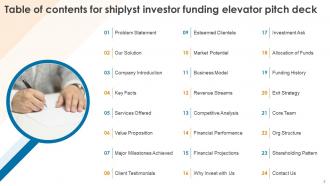
Slide 2: The slide displays Table of contents for shiplyst investor funding elevator pitch deck.
Slide 3: This slide mentions the problems faced by customers that the organization aims to solve.
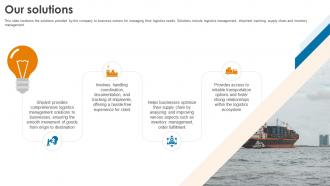
Slide 4: This slide mentions the solutions provided by the company to business owners for managing their logistics needs.
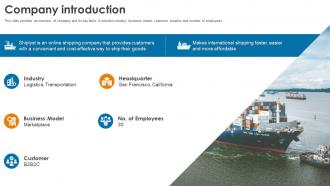
Slide 5: This slide provides an overview of company and its key facts. It includes industry, business model, customer, location and number of employees.
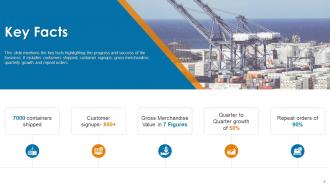
Slide 6: This slide mentions the key facts highlighting the progress and success of the business.
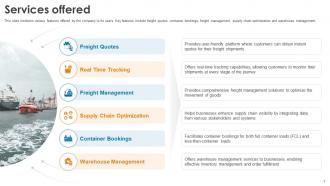
Slide 7: This slide mentions various features offered by the company to its users.
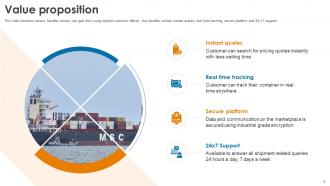
Slide 8: This slide mentions various benefits owners can gain from using logistics services offered.
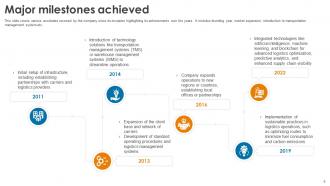
Slide 9: This slide covers various accolades received by the company since its inception highlighting its achievements over the years.
Slide 10: This slide covers various testimonials from customers that use company’s services to manage their logistics requirements.
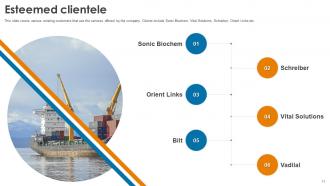
Slide 11: This slide covers various existing customers that use the services offered by the company.
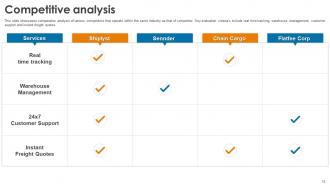
Slide 12: This slide showcases comparative analysis of various competitors that operate within the same industry as that of competitor.
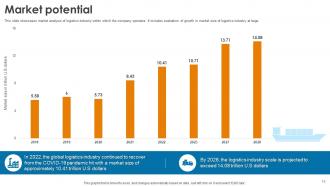
Slide 13: This slide showcases market analysis of logistics industry within which the company operates.
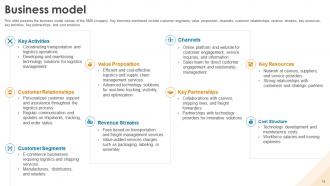
Slide 14: This slide presents the business model canvas of the SMS company.
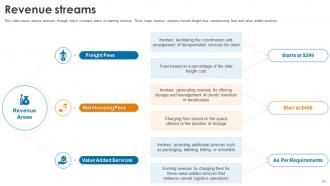
Slide 15: This slide covers various avenues through which company plans on earning revenue.
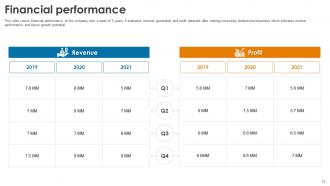
Slide 16: This slide covers financial performance of the company over a span of 3 years.
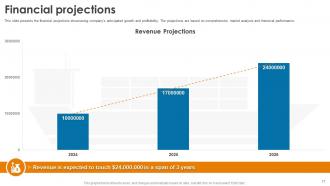
Slide 17: This slide presents the financial projections showcasing company's anticipated growth and profitability.
Slide 18: This slide mentions the various reasons why potential investors should be investing with the company.
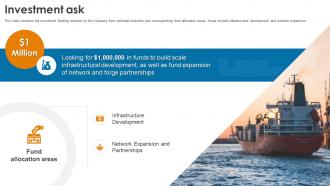
Slide 19: This slide mentions the investment funding required by the company from potential investors and corresponding fund allocation areas.
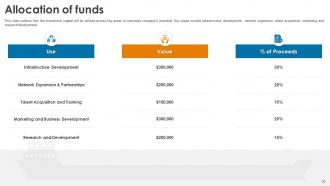
Slide 20: This slide outlines how the investment capital will be utilized across key areas to maximize company's potential.
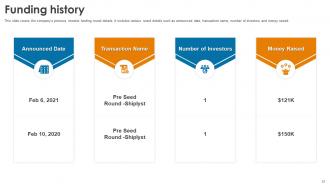
Slide 21: This slide covers the company’s previous investor funding round details.
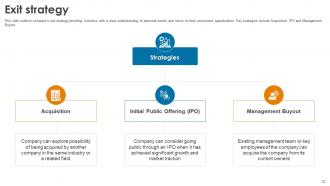
Slide 22: This slide outlines company’s exit strategy providing investors with a clear understanding of potential events and return on their investment opportunities.
Slide 23: This slide covers various members that constitute a part of founding team of the company. Key positions include Co founder, CEO, CMO and CTO.
Slide 24: This slide covers organizational structure of the organization to understand authority-responsibility flow.
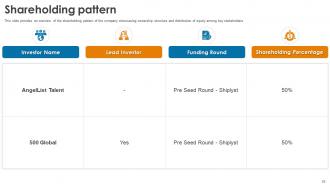
Slide 25: This slide provides an overview of the shareholding pattern of the company showcasing ownership structure and distribution of equity among key stakeholders.
Slide 26: This is a Thank You slide with address, contact numbers and email address.
Slide 27: This slide shows all the icons included in the presentation.
Slide 28: This slide is titled as Additional Slides for moving forward.
Slide 29: This is a Financial slide. Show your finance related stuff here.
Slide 30: This slide depicts Venn diagram with text boxes.
Slide 31: This slide displays Funnel with additional textboxes.
Slide 32: This slide contains Puzzle with related icons and text.
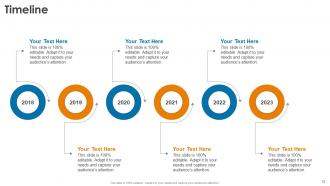
Slide 33: This is a Timeline slide. Show data related to time intervals here.
Slide 34: This slide presents Roadmap with additional textboxes.
Shiplyst Investor Funding Elevator Pitch Deck Ppt Template with all 42 slides:
Use our Shiplyst Investor Funding Elevator Pitch Deck Ppt Template to effectively help you save your valuable time. They are readymade to fit into any presentation structure.

















FAQs for Shiplyst Investor Funding Elevator Pitch
Dude, Shiplyst's templates are actually made for shipping stuff, not just random business slides. They've got working cost calculators built right in, plus interactive maps and real industry data already loaded. The coolest part? Everything updates automatically with current shipping rates and transit times - no manual work. Plus they connect to the major shipping APIs which is clutch. I mean, I'm usually skeptical about these tools but their demo really shows how much time it saves vs doing it all yourself. Worth checking out for sure.
Oh Shiplyst's actually pretty beginner-friendly! Everything's drag-and-drop, so you just click stuff around without needing to code. They've got these pre-made components you can swap out easily. The tutorials are helpful too - they walk you through everything and suggest what looks good together. Honestly, their popular templates are where I'd start since they're the most straightforward. Even if you're not design-savvy, the layouts are already optimized so you won't end up with something that looks like garbage. My friend used one last month and it turned out surprisingly professional.
So Shiplyst has tons of different presentation categories - business strategy, marketing stuff, sales decks, project updates, financial reports. They've got templates for team meetings and product launches too. What caught me off guard was all the niche stuff like investor pitches and training materials. You can filter by industry which is super helpful. Honestly, their quarterly review templates are pretty solid from what I've seen. I'd definitely poke around their template library first before you start building something from zero - might save you a bunch of time.
Oh absolutely! You can totally customize their templates - colors, fonts, logos, the whole thing. I was actually shocked at how easy the tools are to use once you mess around with them for like 10 minutes. Just start with their basic templates and tweak from there instead of going crazy building something from scratch. The cool part is once you make changes, they automatically show up on all your shipping stuff. You can even save different versions if you're running multiple brands or whatever. Honestly saves me so much time now.
Yeah, Shiplyst handles basically any media you throw at it - videos, images, GIFs, audio, even interactive stuff like charts. MP4s, PNGs, JPEGs, PDFs all work fine. The drag-and-drop thing is honestly a lifesaver compared to other platforms I've messed with. It auto-optimizes file sizes too, which is nice since nobody wants a laggy presentation. Oh, and definitely test everything beforehand - learned that one the hard way during a client meeting once. The whole setup's pretty straightforward though.
So Shiplyst basically walks you through everything with these guided workflows - super helpful when you're starting out. It auto-fills stuff based on what you've done before, which honestly is a game changer for saving time. You can preview templates before going live too, so no nasty surprises. Oh, and there's this analytics thing that shows which templates actually work for your situation (not just random metrics). I'd probably start with their popular ones first - way easier than building from scratch. Once you get the hang of it, then you can mess around with customizing things.
Yeah, they've got templates for different industries - e-commerce, manufacturing, retail, all that stuff. The dropshipping and subscription box ones are pretty solid from what I've seen. Each template comes with shipping rules and carrier settings already set up for your specific type of business, which honestly beats starting from zero. You can tweak them however you want afterward, but having that foundation there from the start is clutch. I think they even have wholesale operation templates too, though I haven't messed with those personally.
There's a feedback button right in the app where you can drop suggestions. Also check their community forum first though - people post ideas there and vote on stuff they want. I've actually had good luck with that, their team responds way more than you'd expect. If your idea's already there, just upvote it instead of reposting. You can always email support too but honestly the forum's probably your best bet. They seem to actually pay attention to what gets traction there.
They drop new templates monthly, usually mid-month. Expect around 5-10 fresh ones each time - different industries, styles, whatever. Honestly their design team stays pretty on top of current trends, which is nice. Check the "Recently Added" section to see what's new, or turn on email notifications if you're into that. I usually peek every couple weeks so I don't miss good stuff. Oh and they cover all sorts of business presentations, not just the boring corporate ones.
So Shiplyst is perfect if you're doing like 50-500 orders monthly - past the "throw it in a bubble mailer" phase but nowhere near Amazon territory. Most small online shops get bogged down comparing shipping rates manually (honestly such a time suck). Works great for Shopify stores or anyone selling physical stuff online. If you're spending hours each week figuring out cheapest shipping options, it'll probably save your sanity. Not worth it for tiny operations though. The cost comparison features are clutch when you're at that awkward middle size where every dollar counts but you don't have enterprise budgets.
Shiplyst's templates come with all the accessibility stuff already built in - proper color contrast, semantic HTML, keyboard navigation. Pretty smart since clients always ask about compliance later anyway. They follow WCAG 2.1 guidelines, so you get alt text placeholders, focus indicators, and screen reader markup without thinking about it. You can still customize everything how you want. The accessible foundation just stays intact. Oh, and definitely use their accessibility checker before launching - catches anything you might've broken while tweaking things.
Nah, Shiplyst doesn't have any analytics built in - kinda annoying tbh. You'd have to track stuff manually or use outside tools. Google Analytics works if you're hosting online, or just monitor whatever platform you're using. Like if you post on SlideShare, check the view counts there. Email click rates if you're sending decks around. It's definitely a missing piece in their setup. I usually just track the stuff that actually matters - how many follow-up meetings I get or if people convert after seeing my pitch.
Yeah, Shiplyst has pretty solid help resources actually. Their video tutorials are in the help center and walk you through customizing templates - honestly way better than trying to figure it out yourself. There's also a knowledge base with guides for different scenarios. Oh, and they do weekly webinars where you can ask their team questions directly, which is cool. I'd definitely start with their "Template Mastery" series though. It's basically a crash course that'll save you from all the random trial and error stuff I went through when I started.
Yeah, Shiplyst has multi-language templates which is actually pretty useful. Go into your language settings and switch it - all the templates automatically update to whatever language you picked. Works great if you're shipping internationally or dealing with suppliers who need docs in their own language. Honestly, I was surprised how well the formatting stays consistent across different languages. Nothing breaks or gets weird when you switch. Though definitely test out a template in your target language first, just to make sure it looks right for what you need. Better safe than sorry, you know?
Oh Shiplyst is perfect for this! Multiple people can edit the same deck at once without that annoying "someone else is editing" lockout. The commenting feature is honestly my favorite part - you tag people and have actual conversations right on the slides. There's version control so if someone accidentally deletes something important, you can just roll it back. You can also set different permission levels, like some people only get to comment while others can fully edit. I'd start by creating your workspace and getting everyone invited with the right access levels first.
-
Extensive range of templates! Highly impressed with the quality of the designs.
-
The design is very attractive, informative, and eye-catching, with bold colors that stand out against all the basic presentation templates.