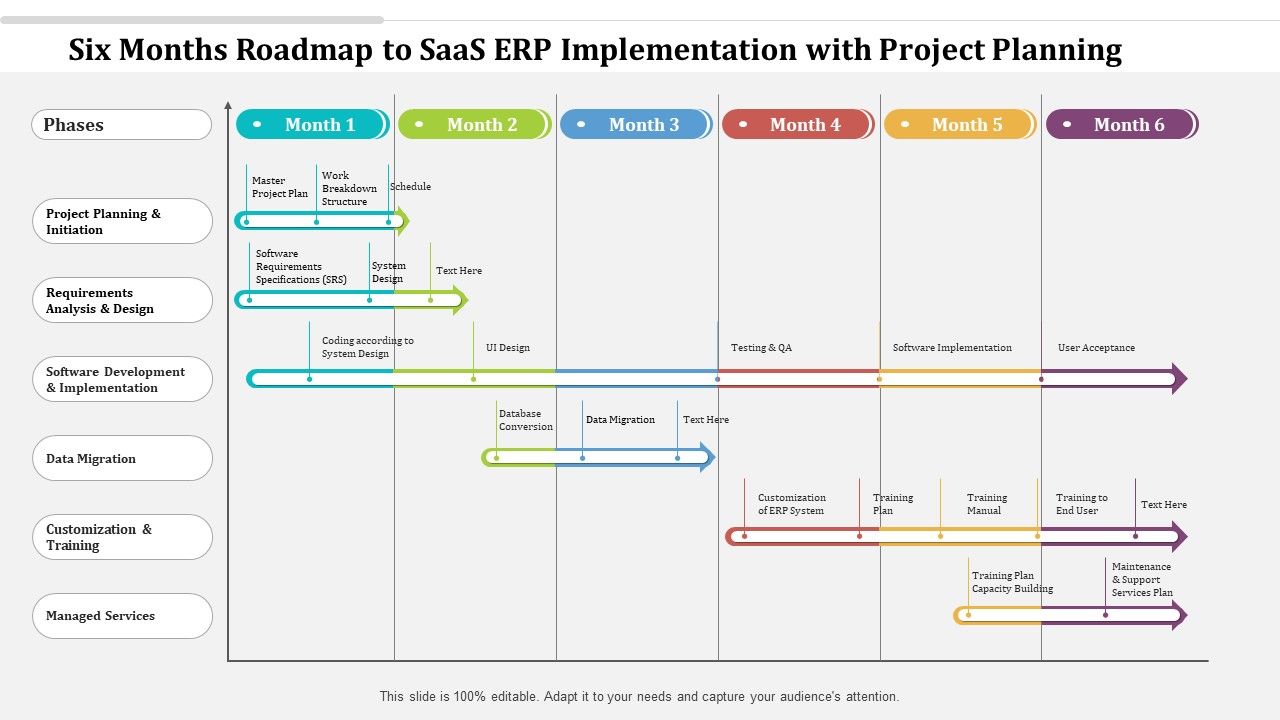
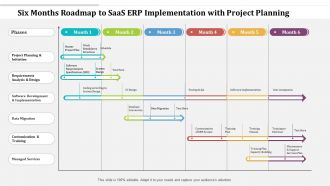
Feuille de route de six mois pour la mise en œuvre de l'ERP SaaS avec planification de projet

Slide 1 of 2
Favourites Favourites

Try Before you Buy Download Free Sample Product

Audience Impress Your
Audience
Editable 100%
Editable
Time Save Hours
of Time
The Biggest Sale is ending soon in
0
0
:
0
0
:
0
0

Caractéristiques de ces diapositives de présentation PowerPoint :

Présentation de la feuille de route de six mois pour la mise en œuvre de l'ERP SaaS avec la diapositive PowerPoint de planification de projet. Cette présentation PPT est compatible avec Google Slides et est donc facilement accessible. Ce thème PPT est disponible dans les formats 4,3 et 16,9. Ce modèle PowerPoint est personnalisable afin que vous puissiez modifier la taille de la police, le type de police, la couleur et les formes selon vos besoins. Vous pouvez télécharger et enregistrer cette mise en page PowerPoint dans différents formats tels que PDF, PNG et JPG.

FAQs for Six months roadmap to saas erp implementation

Okay so there are basically 5 main phases you'll hit. First is Discovery & Planning - that's mapping out what you have now and figuring out what you actually need. Then Design & Configuration where you set everything up to match how you work. Data Migration comes next and honestly? It's always way messier than anyone thinks it'll be. After that you've got Testing & Training to make sure stuff actually works and your team knows what they're doing. Finally Go-Live & Support. Don't skip ahead to the fun configuration part too fast - that discovery phase really matters. Budget like 6-12 months depending on how complex your setup is.

Start with figuring out what systems you actually have vs what you need - like a full inventory. Your team's tech skills matter too (some people pick this stuff up way faster than others, just how it goes). Budget's obviously huge for setup and monthly costs. Honestly, the data migration part is where most companies get screwed - if your current data's a mess, clean it first or you'll regret it later. Organization readiness is key too since change management can be brutal. Make yourself a little scorecard with all these factors. Helps you see the real picture before diving in.

Ugh, data migration is gonna be your biggest pain point - seriously, double whatever timeline you're thinking. Your team will probably push back hard on new workflows too. Integration with current systems gets messy fast. SaaS stuff isn't as customizable as what you're used to, which is annoying but manageable. Performance hiccups happen, and you're kinda stuck depending on your vendor after that. Honestly? Invest big in training from day one. People adapt better when they actually know what they're doing. Oh, and backup everything before you even think about migrating - learned that one the hard way.

You're basically fitting your data into their box instead of building your own. SaaS ERP means using their preset data models - less flexible but way easier since you don't deal with servers and all that mess. They give you migration tools or APIs rather than direct database moves. The catch? Your old data has to squeeze into their format, which honestly can be a pain. Map out how your current fields match theirs right away. I'd also hunt down any weird custom data early - trust me, those edge cases will bite you later if you don't plan for them now.

Dude, user training can totally make or break your ERP rollout. Companies blow thousands on solid software then wonder why nobody uses it right - usually because they rushed through training or skipped it entirely. Pretty frustrating to watch, honestly. Start identifying your power users now. They'll become your go-to people for helping everyone else. Plan multiple sessions, make materials specific to different roles, and don't forget ongoing support after launch. Your team will resist change if they don't know what they're doing. Trust me on this one.

For customizing your SaaS ERP, I'd start with the basic configuration stuff - workflows, data fields, user permissions. Most platforms let you tweak these pretty easily. Custom fields and modules come next if you need industry-specific features. APIs are huge for connecting your existing tools (learned this the hard way on my last project). Check out their marketplace add-ons first though - might save you tons of dev time. Some platforms allow deeper custom development if you really need it. Oh, and definitely list your must-haves vs nice-to-haves upfront. Trust me, scope creep will destroy your budget otherwise.

Get your executives using the system first—nobody trusts change when leadership doesn't walk the walk. People hate surprises way more than actual change, so communicate the "why" early and often. Find your tech-savvy employees and make them your champions (they love feeling important anyway). Don't train everyone at once—do it in waves and celebrate the small victories. Oh, and set up feedback channels so you can squash complaints before they spiral. Honestly, half the battle is just making people feel heard throughout the whole mess.

Honestly, you gotta look at both the numbers and how people actually feel about it. Track stuff like how long processes take now, data accuracy, and whether people are even using the damn thing. ROI matters too - are you hitting those targets you promised the bosses? But here's the thing - employee surveys and support tickets tell you way more about real life than spreadsheets do. I'd wait at least 3-6 months before judging it properly since everyone needs time to adjust. Monthly check-ins work well. Short sentences mixed with longer ones keep things interesting, and catching problems early beats scrambling later.

Okay so first thing - make sure their features actually fit what you do. Not all ERPs are the same, trust me on that one. Check how well it plays with your current systems and if it can grow with you. Don't just look at the upfront cost either, factor in everything long-term. Security's huge, especially if you're in something regulated. Their support better be solid too - you'll need it during implementation. Oh and see how often they update things. Honestly? Make a simple scoring sheet and demo your top 3 with real scenarios from your business.

Start talking to people from day one - seriously, don't wait. Weekly check-ins work great during the crazy phases, and I'd send updates every two weeks even if nothing major happened. Radio silence is project death because everyone assumes the worst. Get actual users testing stuff early so they can complain before it matters. Oh, and demos at big milestones are clutch. The steering committee thing with key stakeholders is pretty standard but works. Most important though? Find champions in each department who'll back you up when you're not around.

Dude, add like 15-20% buffer on top of whatever you estimate - scope creep happens every single time. Weekly check-ins on spending, not monthly ones. Trust me on this. Data migration and training always cost way more than you think. Always. Don't forget your own team's hours either when they're stuck in endless workshops and testing sessions. Oh and set up some kind of approval process for change requests over X amount. Otherwise you'll be bleeding money on random "quick fixes" that aren't quick at all. I've watched so many projects go sideways because of this stuff.

Honestly, cloud security is gonna completely change how you approach your whole deployment timeline. Budget way more time upfront for security assessments and encryption setup - trust me on this one. If you're dealing with healthcare or finance stuff, compliance validation becomes a total nightmare with all their regulations. Most decent SaaS ERP vendors have already handled the infrastructure side (thank god), but you'll still need to sort out user access controls and multi-factor authentication. Oh, and backup protocols too. My advice? Create that security checklist right at the start so you're not panicking when executives start grilling you about data protection later.

Honestly, the worst part is dealing with API limits and when your data formats don't match up between the new SaaS and your old systems. Your legacy databases probably have totally different field structures - it's like trying to fit a square peg in a round hole. Real-time syncing gets messy too since systems don't always want to cooperate timing-wise. Plus you'll hit authentication headaches connecting everything securely. Oh, and definitely start by mapping out your current integrations first. Focus on the mission-critical ones that could cause major downtime if they break.

Honestly, don't wait until the end to think about improvements - bake it right into your roadmap from the start. Track your key metrics as you go and set up feedback loops with users early on. I'd do quarterly reviews too, just to catch stuff before it becomes a bigger problem. Most teams I've worked with totally regret treating this as an afterthought. Make sure you've got time buffers built in for changes and a process that won't bog you down. Oh, and start documenting what's working (and what's not) from week one - you'll thank yourself later. The whole thing should feel natural, not like some forced exercise.

Honestly, start with the basics - uptime and how fast transactions run. Order-to-cash cycles are huge for showing real impact. Track user adoption too, because if people aren't using it, what's the point? Data accuracy percentages and support tickets tell you a lot about pain points. ROI comparing before/after costs is obvious but necessary. User satisfaction surveys quarterly - the automated dashboards are great for tech metrics, but you've gotta actually talk to people using the system. Oh, and definitely get baselines before you implement anything, otherwise you're just guessing if things improved. Response times under 30 seconds or users will hate you.

Ratings and Reviews

0% of 100
Review Form
Write a review
Most Relevant Reviews

No Reviews