

Stage gate product development model powerpoint presentation slides





Try Before you Buy Download Free Sample Product
 Impress Your
 Audience
 100%
100% Editable
 Save Hours
 of Time


Are you making a presentation related to product development? And are stuck with new ideas for how to present this? Keeping a record of all the ideas for new products model and deciding which amongst them are best the presentation imposing task. That is why our team of expert designers have come up with 61 slides pre-made Stage Gate Product Development Model Powerpoint Presentation Slides that will help you with a a professional and crisp PPT. There are many slides included in this complete deck sample as innovation process, gate criteria, generate new product ideas, external sources of new product ideas, internal sources, screening, scoping, product strengths and weaknesses, product features and benefits, competitor analysis, product definition, customer needs, customer types and many more. Moreover, you will also be enlightened with various exclusive slides like Porter’s five forces model, the rough research, building business case, market analysis like target market, market size, market share, market segmentation, market attractiveness, pricing assumption etc. Our compete deck sample will save you a lot of time and will make it very easy to present a perfect presentation in front of the audience. So, do not think much and just download our Stage Gate Product Development Model Powerpoint Presentation Slides and present your topic with ease and wow the onlookers too. Give an intelligent account with our Stage Gate Product Development Model Powerpoint Presentation Slides. Display clear comprehension of the fundamentals.
People who downloaded this PowerPoint presentation also viewed the following :
Content of this Powerpoint Presentation
Slide 1: This slide introduces Stage Gate Product Development Model. State your company name and continue.
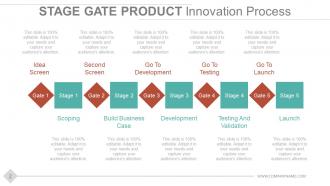
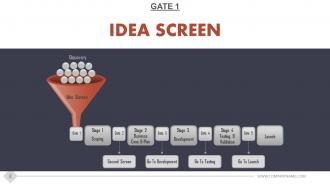
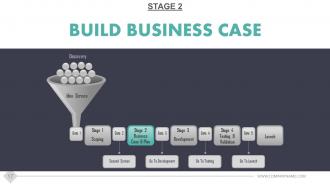
Slide 2: This slide shows Stage Gate Product Innovation Process with the following stages and gates- Scoping, Build Business Case, Development, Testing And Validation, Launch, Idea Screen, Second Screen, Go To Development, Go To Testing, Go To Launch.
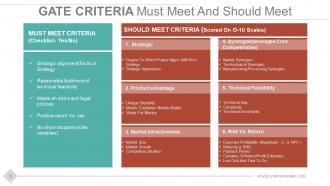
Slide 3: This Gate Criteria Must Meet and Should Meet slide showcased as- MUST MEET CRITERIA (Checklist- Yes/No) Strategic alignment(fits Bu’s Strategy, Reasonable likelihood of technical feasibility, Meets eh and s and legal policies, Positive return Vs. risk, No show stoppers (killer variables). SHOULD MEET CRITERIA (Scored On O-10 Scales) 4. Synergies(leverages Core Competencies) Market Synergies, Technological Synergies, Manufacturing/Processing Synergies. 5. Technical Feasibility Technical Gap, Complexity, Technical Uncertainty. 6. Risk Vs. Return Expected Profitability (Magnitude; E. G. NPV ), Return(e.g. IRR), Payback Period, Certainty Of Return/Profit Estimates, Low Cost And Fast To Do. 1. Strategic Degree To Which Project Aligns With Bu’s Strategy, Strategic Importance. 2. Product advantage Unique Benefits, Meets Customer Needs Better, Value For Money. 3. Market attractiveness Market Size, Market Growth, Competitive Situation.
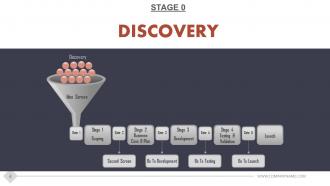
Slide 4: This slide presents STAGE 0 Discovery in a funnel diagram form.
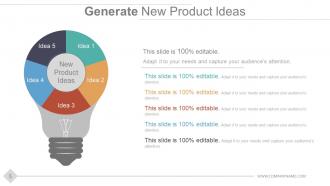
Slide 5: This slide helps Generate New Product Ideas with creative bulb imagery. State your creative, inovative ideas here.
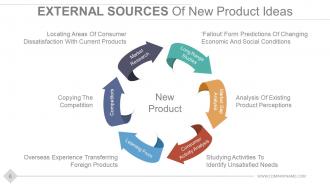
Slide 6: This slide describes External Sources Of New Product Ideas- New Product, Market Research, Long Range Studies, Learning From, Competitors, Market Gap Analysis, Consumer Activity Analysis.
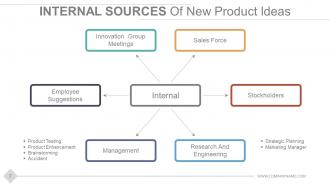
Slide 7: This slide shows the following Internal Sources Of New Product Ideas- Sales Force, Innovation Group Meetings, Employee Suggestions, Management, Stockholders, Research And Engineering.
Slide 8: This slide is titled Gate 1 Idea Screen. You may change the slide content as desired.
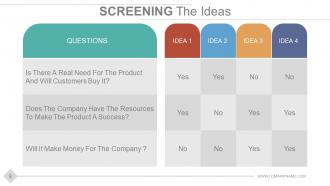
Slide 9: This is Screening The Ideas slide containing three qusestions. Add in your own questions or make use of them mentioned.
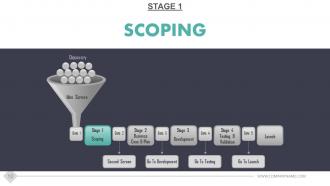
Slide 10: This slide is titled Stage 1 Scoping. You can alter the slide content as per need.
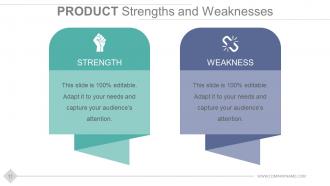
Slide 11: This slide presents Product Strengths and Weaknesses. State both of these aspects here.
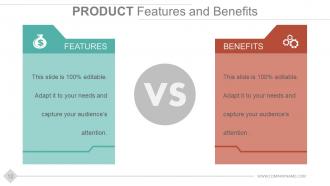
Slide 12: This slide shows two aspects of the PRODUCT- Features and Benefits. Add them here.
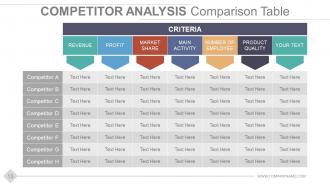
Slide 13: This slide shows Competitor Analysis by making use of the Comparison Table showcased here. Add relevant text in this table and use it as per your business needs.
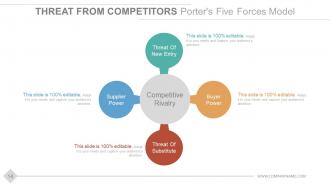
Slide 14: This slide shows Threat From Competitors Porter's Five Forces Model which includes the following four threats- Threat Of New Entry, Buyer Power, Threat Of Substitute, Supplier Power.
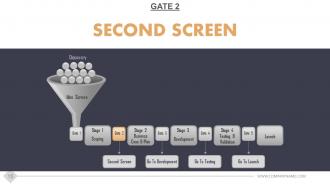
Slide 15: This slide shows Gate 2 Second Screen.
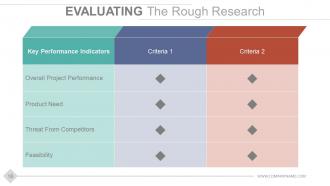
Slide 16: This slide helps in Evaluating The Rough Research on the basis of- Key Performance Indicators and different Criterias to state.
Slide 17: This displays the entire process of Stage 2 Build Business Case.
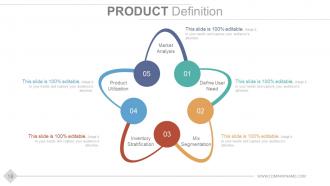
Slide 18: This slide presents Product Definition with the following elements- Market Analysis, Define User Need, Product Utilization, Mix Segmentation, Inventory Stratification.
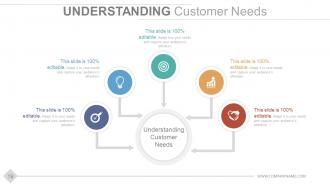
Slide 19: This slide is tilted Understanding Customer Needs with icon imagery. Add in the data that helps understand customer needs in the text boxes provided.
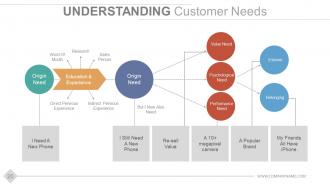
Slide 20: This slide presents Understanding Customer Needs framework with the following components- Indirect Pervious Experience, Direct Pervious Experience, Research, Word Of Mouth, Sales Person, Origin Need, Psychological Need, Value Need, Performance Need, Belonging, Esteem, But I Now Also Need, I Need A New Phone, I Still Need A New Phone, A 10+ megapixel camera, A Popular Brand, My Friends All Have iPhone, Re-sell Value, Education & Experience.
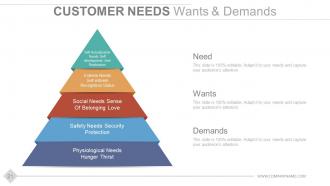
Slide 21: This slide shows Customer Needs Wants & Demands categorized as- Physiological Needs- Hunger Thirst, Esteem Needs- Self esteem, Recognition Status, Social Needs- Sense Of Belonging Love, Safety Needs- Security Protection, Self Actualization Needs- Self development And Realization.
Slide 22: This is Customer Personas slide showing Customer Types & Personas.
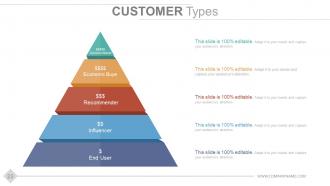
Slide 23: This slide shows Customer Types. These are- Decision Maker, End User, Influencer, Recommender, Economic Buyer.
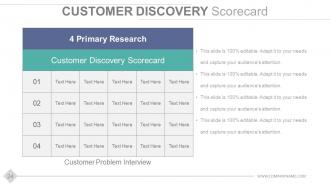
Slide 24: This slide presents Customer Discovery Scorecard which displays- 4 Primary Research, Customer Problem Interview, Customer Discovery Scorecard.
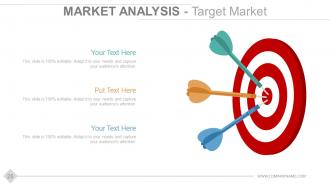
Slide 25: This slide shows Market Analysis - Target Market with three darts and a target imagery to go with.
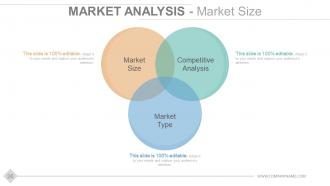
Slide 26: This slide shows Market Analysis - Market Size in a venn diagram image form. Its factors include- Competitive Analysis, Market Size, Market Type.
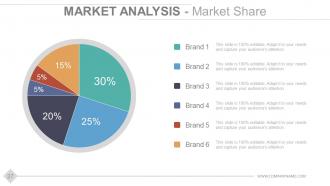
Slide 27: This slide presents Market Analysis - Market Share in a pie chart form. Add in the stats pertaining to different brands you want to showcase.
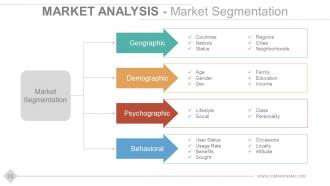
Slide 28: This slide shows Market Analysis - Market Segmentation into Behavioral Psychographic Demographic and Geographic categories.
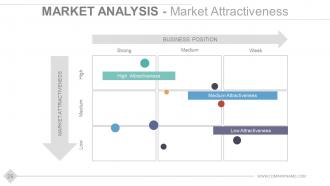
Slide 29: This slide shows Market Analysis - Market Attractiveness matrix displaying- BUSINESS POSITION and MARKET ATTRACTIVENESS.
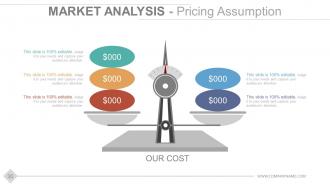
Slide 30: This slide shows Market Analysis - Pricing Assumption with balancing scale imagery.
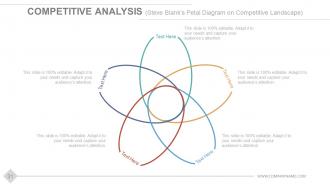
Slide 31: This slide showcases Competitive Analyis (Steve Blank's Petal Diagram on Competitive Landscape).
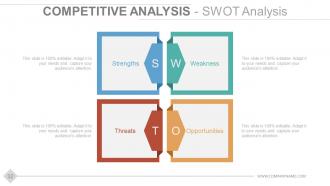
Slide 32: This slide shows Competitive Analyis - SWOT Analysis mentioning the strenghts, weaknesses, threats and opportunities.
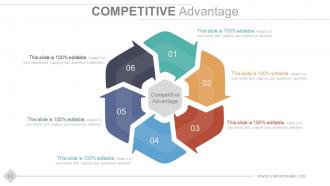
Slide 33: This slide shows Competitive Advantage.
Slide 34: This slide shows Product & Operation Cost Analysis.
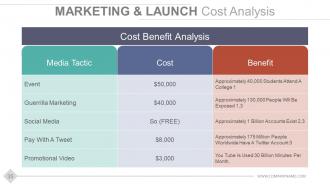
Slide 35: This slide shows Maketing & Launch Cost Analysis with Cost Benefit Analysis table.
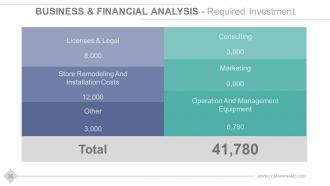
Slide 36: This slide shows Business & Financial Analysis - Required Investment with consists of- Licenses & Legal, Store Remodeling And Installation Costs, Other, Consulting, Marketing, Operation And Management Equipment.
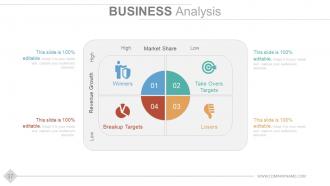
Slide 37: This is BUSINESS Analysis slide in matrix form displaying- High-Low of Market Share, Revenue Growth, Winners, Take Overs Targets, Breakup Targets, Losers.
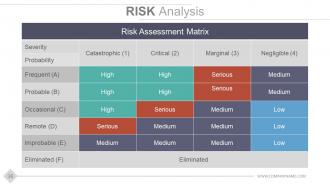
Slide 38: This slide shows Risk Analysis with high, low, medium and serious parameters included in the Risk Assessment Matrix.
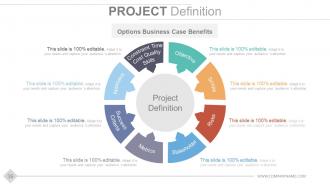
Slide 39: This slide presents Project Definition with Options Business Case Benefits: Constraint Time, Cost Quality, Skills, Objective, Scope, Risks, Stakeholder, Metrics, Success, Criteria, Approach.
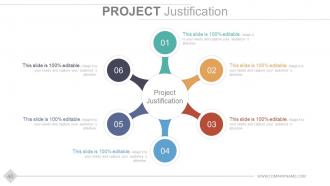
Slide 40: This is a Project Justification slide with text boxes. Provide relevant justifications of your product here.
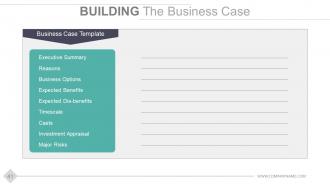
Slide 41: This is Building The Business Case slide with- Business Case Template: Executive Summary, Reasons, Business Options, Expected Benefits, Expected Dis-benefits, Timescale, Investment Appraisal, Major Risks, Casts.
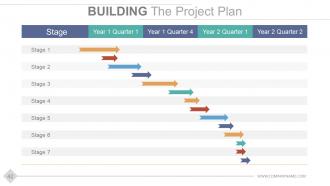
Slide 42: This is Building The Project Plan slide with stages and years to add.
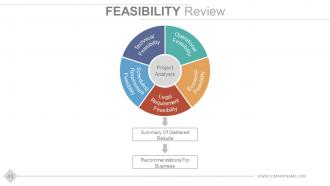
Slide 43: This slide presents Feasibility Review with Project Analysis showing- Operational Feasibility, Economic Feasibility, Legal Requirement Feasibility, Scheduling Requirement Feasibility, Technical Feasibility.
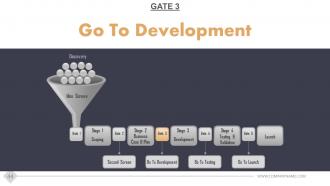
Slide 44: This slide shows Gate 3 Go To Development.
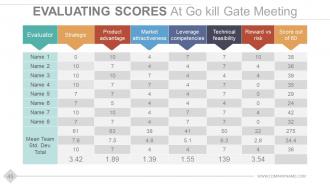
Slide 45: This is Evaluating Scores At Go kill Gate Meeting slide presented in a tabular form.
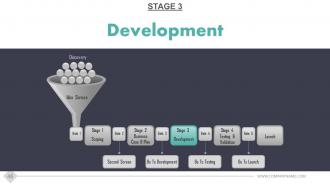
Slide 46: This slide shows STAGE 3- Development.
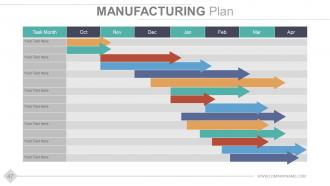
Slide 47: This slide displays Manufacturing Plan slide. Add plan related aspects here.
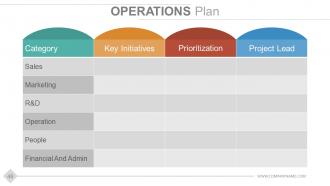
Slide 48: This slide shows Operations Plan stating- Categories Key Initiatives, Prioritization, Project Lead.
Slide 49: This slide showcases Marketing Launch Plan with rocket imagery.
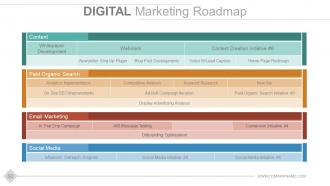
Slide 50: This slide shows Digital Marketing Roadmap.
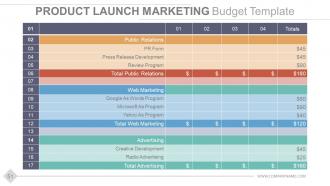
Slide 51: This is PRODUCT LAUNCH MARKETING Budget Template slide presented in a tabular form which shows information related to Public Relations, Web Marketing and Advertising.
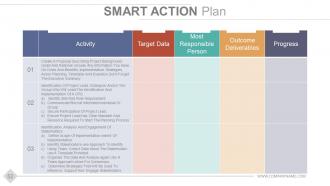
Slide 52: This slide shows Smart Action Plan with Activity, Target Data, Most Responsible Person, Outcome Deliverables and Progress as subheadings to state.
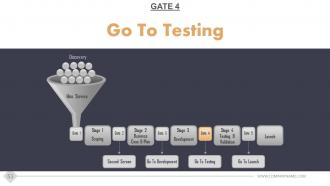
Slide 53: This slide shows GATE 4- Go To Testing.
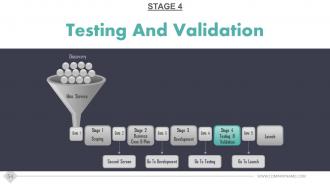
Slide 54: This slide shows STAGE 4- Testing And Validation.
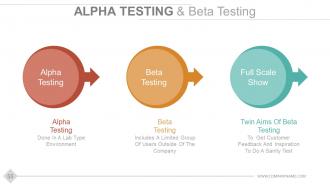
Slide 55: This is Alpha Testing & Beta Testing slide. Present the testing nuances/results etc. here.
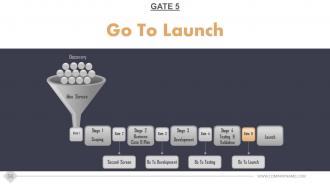
Slide 56: This slide shows GATE 5- Go To Launch.
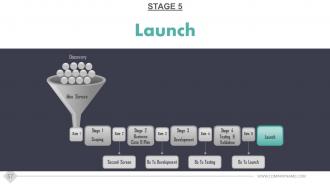
Slide 57: This slide shows STAGE 5- Launch.
Slide 58: This slide is titled Post Launch Monitoring.
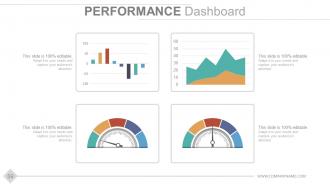
Slide 59: This slide displays Performance Dashboard. Present your performance related aspects in a graphical form here.
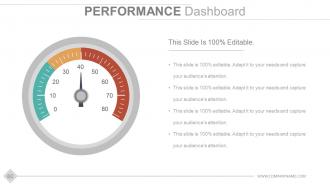
Slide 60: This is also a Performance Dashboard slide with metric imagery and text boxes to add in relevant text.
Slide 61: This is a Thank You slide with Email Address, Contact Numbers and Address to be displayed.
Stage gate product development model powerpoint presentation slides with all 61 slides:
Invite folks to follow a conducive approach with our Stage Gate Product Development Model Powerpoint Presentation Slides. Address issues that jar.
FAQs for Stage gate product development model
So the Stage-Gate Model breaks down into five phases: Discovery, Scoping, Build Business Case, Development, and Testing & Validation. After each phase there's a "gate" where you decide to kill the project, put it on hold, or keep going. Think of it as reality checks built into your timeline. You're forced to validate market needs early instead of finding out later that nobody wants your thing (been there). The phases make you get proper resources and test everything before launch. Honestly, the best part is how it stops you from throwing good money after bad ideas. Just define your gate criteria upfront - trust me on this one.
So the Stage-Gate thing is pretty smart - it makes you hit specific checkpoints before moving to the next phase. At each "gate," you've got to present real evidence (market research, tech studies, financials, whatever) to a review team. They decide if your project goes forward, gets killed, put on hold, or needs rework. Honestly, it's saved my team from some pretty terrible ideas we were way too attached to. Each gate has clear questions you must answer and benchmarks to hit. No more projects just wandering around burning cash without anyone really evaluating them. Just make sure you define what "winning" looks like at each stage upfront.
Honestly, the Stage-Gate thing is pretty solid for catching problems before they get expensive. Each gate lets you kill projects that aren't working instead of pouring more cash into dead ends. Cross-functional teams actually talk to each other too - no more marketing finding out what engineering built at the last minute (been there). Decision-making gets faster since you're not waffling around forever. Plus stakeholders can actually see where projects stand without constantly bugging you for updates. Maybe try it on one smaller project first to see if your team likes the structure?
Make your gates way more flexible instead of those rigid checkpoints everyone hates. Run shorter sprints in each stage, then do quick gate reviews every couple weeks rather than waiting forever between them. The governance stuff just needs to match your sprint timing - takes some getting used to but it actually works pretty well. Keep focusing on the important gate criteria like feasibility and market potential, just evaluate them ongoing instead of those big formal review meetings. Honestly I'd test this hybrid thing on just one project first to figure out what gate timing actually makes sense for how your team works.
So the metrics change at each gate, obviously. Early on you're looking at market size, customer validation, proof-of-concept stuff - basically "is this even worth doing?" Mid-stage gates get into the money side - NPV, ROI projections, what it'll actually cost to build. Later gates are all about execution: staying on timeline, hitting quality targets, being ready to launch. Most companies tweak this based on their industry though. The real trick is picking 3-5 solid metrics per gate so you're not just winging decisions. Focus on stuff that actually predicts success for your specific situation.
So basically, you just tweak the gates and deliverables to fit what you actually do. Pharma companies throw in extra regulatory checkpoints and stretch out timelines. Software teams? They'll crush stages together and obsess over user feedback instead. Start by mapping your normal project flow first - that's the key part. Then slap the Stage-Gate framework on top and change the decision points to match your real world stuff. Honestly, some companies just ditch entire stages if they're pointless. It's way more flexible than people think, and you can adjust the risk levels however makes sense for your business.
Honestly, the worst part is dealing with people who hate change. Your teams will probably grumble about new approval steps, especially if they're used to just winging it. Gate reviews can feel super slow at first while everyone figures things out. Watch out for those gatekeepers who get drunk on power and shoot down perfectly good ideas - ugh, those people are the worst. Oh, and cramming every single project through identical gates? Doesn't really work since innovations are all different. I'd say test it out small first and make sure your key people are actually on board.
Honestly, stakeholder involvement can totally make or break your Stage-Gate process. You'll get way better decisions at each gate when you bring in different perspectives early on. The trick is figuring out who needs to be where - don't drag everyone through every single review (learned that the hard way). Map out your critical people for each stage upfront. I've watched projects completely tank because teams thought they'd save time by skipping this step. Spoiler alert: they didn't save anything. Build that buy-in as you go and implementation becomes so much smoother later.
Dude, you absolutely need those cross-functional teams for Stage-Gate to work. Marketing gives you the market reality check. R&D tells you if it's even technically possible. Finance keeps you from going broke, and ops makes sure you can actually build the thing. I've watched projects crash because they ignored one of these voices early on. Short meetings work better than long ones, by the way. Don't just invite people to check boxes - actually listen when they raise red flags. Each gate review should feel like a real conversation where everyone can push back if needed.
Honestly, tech makes Stage-Gate so much easier. You can automate those gate reviews instead of doing everything manually - saves tons of time. Microsoft Project or Smartsheet work great for tracking deliverables and timelines. The real game-changer though? Real-time dashboards that actually show you what's happening without those soul-crushing status meetings every week. Set up workflows that automatically trigger reviews when you hit certain milestones. Stakeholders can see project health instantly too. My advice? Start with whatever tool your team's already comfortable with and just build Stage-Gate templates on top of it. Way less painful than switching platforms entirely.
Honestly, the worst thing teams do is turn Stage-Gate into this super rigid checklist. People get obsessed with perfect paperwork while their actual project stalls out. Gates become these annoying roadblocks instead of useful checkpoints - drives me crazy! Don't force existing projects into stages that make zero sense. Also, gate reviewers need to actually understand what they're evaluating (obvious but happens way too often). The culture change is huge too. My advice? Start with just one pilot project and tweak things as you go. Way less painful that way.
Schedule those retrospectives after every project - don't just wing it and hope they happen. Pick your team's brains about what actually worked at each gate and what was a total mess. I'd start with just one gate honestly, then build from there once you get the hang of it. Track stuff like how long cycles take and approval rates so you can spot the weird patterns. Here's the cool part though - get teams that are running projects at the same time to share their screwups with each other. Way more useful than learning everything the hard way.
So the Stage-Gate thing is actually pretty solid for managing innovation projects. Basically breaks everything down from initial idea all the way to launch. What I love about it is those decision gates - you can actually kill projects that aren't going anywhere instead of wasting months on them. It forces you to validate stuff and check if there's real market demand at each step. Plus it keeps the creative side balanced with business reality, which honestly most companies suck at. Try mapping your current projects to see where you're missing steps - bet you'll find some gaps.
Honestly, I'd go with Cooper & Associates for the formal Stage-Gate training - they're legit and cover all the basics you need. Get your team familiar with gate review templates and decision frameworks too. Don't jump into something huge right away though. Start with a pilot project first, way less stressful that way. Your gate reviewers need to actually understand what they're doing since they're making the go/kill calls. Oh, and definitely get everyone on the same page with the process upfront. It's tempting to wing it, but trust me - invest in proper training from the start instead of scrambling later.
So the Stage-Gate thing is basically checkpoints for your project - you can't move ahead until you hit certain milestones and deal with risks. Each gate makes you look at whether the tech actually works, if people will buy it, and if you have enough resources. Pretty smart since catching problems early saves you money. Bad projects get axed before you blow your whole budget, which honestly happens way too often. You can also pivot when something's not working instead of just powering through. Those gate criteria become your early warning system for when things might go sideways.
-
Editable templates with innovative design and color combination.
-
Wonderful templates design to use in business meetings.