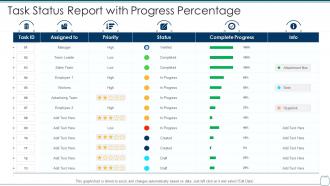
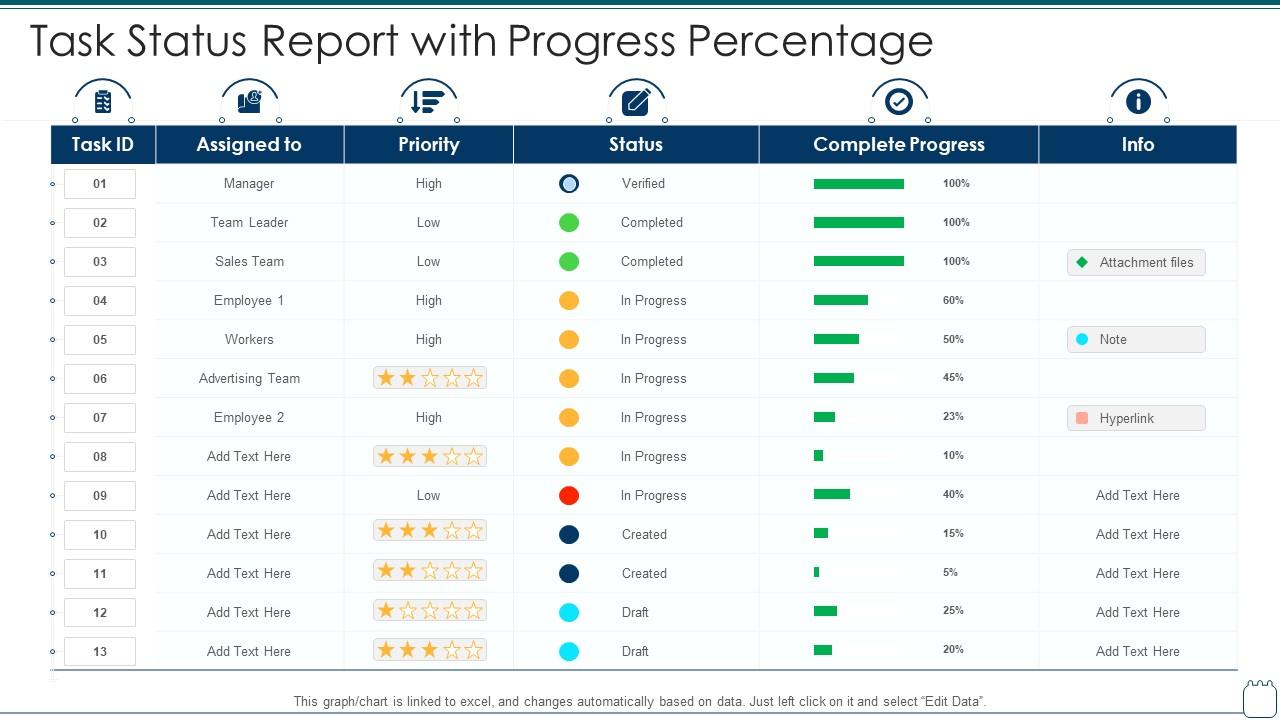
Task status report with progress percentage
Try Before you Buy Download Free Sample Product
Audience
Editable
of Time
Our Task Status Report With Progress Percentage are topically designed to provide an attractive backdrop to any subject. Use them to look like a presentation pro.
People who downloaded this PowerPoint presentation also viewed the following :
Task status report with progress percentage with all 6 slides:
Use our Task Status Report With Progress Percentage to effectively help you save your valuable time. They are readymade to fit into any presentation structure.
FAQs for Task status report
So basically you want to hit five main things: where you're at progress-wise (like milestones or percentages), any roadblocks slowing you down, what you actually got done since last time, and what's coming next. Timeline stuff too - be realistic about it. Oh and seriously, speak up if you need help! Nobody's gonna magically know you're stuck on something. I always do bullet points because honestly? Way easier to skim through. The whole point is giving people enough to know what's happening without drowning them in random details they don't care about.
Honestly, visuals are a game changer for status reports. Nobody wants to dig through walls of text to figure out what's happening. I always do red for blocked stuff, yellow when things are sketchy, green for smooth sailing. Progress bars and charts make it so obvious where you stand. Gantt charts are clutch if you need timeline views - though they can look a bit overwhelming at first. Even just throwing in one simple visual element will make people actually want to read your report. Trust me, once you go visual you can't go back to those boring text dumps.
Honestly, I'd go with weekly. Daily updates are way too much unless everything's on fire, and monthly? That's asking for trouble - too much can go wrong without anyone catching it. Fridays work great because you can recap the week and tease what's next. Though if your project is moving crazy fast or super critical, maybe every two weeks instead. The key thing is just being consistent about it. Pick your schedule and don't flake - people get used to hearing from you at regular intervals and actually appreciate knowing when to expect updates. Makes everyone's life easier, trust me.
Here's the thing - everyone wants different stuff from your status updates. Your PM? They're obsessed with deadlines and what's blocking you. Team leads want all the nitty-gritty technical details since they're juggling everyone's work. Executives honestly just care about big picture progress and whether anything's gonna blow up the timeline. Clients focus on their deliverables and when they'll get them. I learned this the hard way after sending the same boring report to everyone for months. Now I actually customize what I share based on who's reading it. Makes way more sense.
Don't be that person who says "things are going well" and calls it a day - nobody knows what that actually means! Focus on the stuff your audience cares about, not every tiny detail. I've seen so many reports that read like robot manuals... just talk normally. Call out problems early instead of pretending everything's perfect. Oh, and make it scannable - people are busy and won't read walls of text. Honestly, the best reports are the ones that clearly say "here's what we did, here's what's blocking us, here's what we need from you."
Dude, automation is a game-changer for status reports. Monday or Asana can pull updates straight from your team's work - no more hunting people down for info. You can connect apps like Slack and Jira so data flows automatically into your reports. Seriously saves hours each week. Google Sheets with some basic formulas works great too, or go fancier with Tableau if you want pretty visuals. I'd start small though - just link two tools you're already using and see how much time it frees up. The copy-paste life is seriously outdated at this point!
Dude, status reports are honestly a lifesaver for remote teams. Without them you're just guessing what everyone's doing all day. They help you spot problems early and figure out priorities without having to bug people constantly. Way better than micromanaging, which nobody wants. Keep them short though – bullet points work best. I learned this the hard way after writing these massive updates nobody read lol. Set up a weekly thing and actually pay attention to what your teammates post. You'll catch delays before they become disasters and stay way more connected to the bigger picture.
Skip the tech jargon completely - they don't care about "dependencies" or whatever. Just say things are delayed and explain why it matters to the business. Red/green status indicators are your friend here. I made this mistake with our CEO once, threw around API terms and got blank stares. Focus on what keeps them up at night: timelines, budget, how this impacts their big picture goals. Short sentences work better than long explanations. Oh, and always end with next steps - they need to know what's actually happening next week.
So I'd go with completion percentage and milestone tracking - those are your bread and butter. Timeline stuff is critical too, like are you actually hitting deadlines or not? Resource usage always impresses the higher-ups since they want to see their money's being spent right. Quality metrics matter if your project has that component. Honestly, less is more here - pick maybe 3-4 solid metrics that actually show progress instead of drowning everyone in numbers. Charts make everything look way more professional and the wins pop more. Oh, and definitely flag any blockers that are screwing with your timeline.
Honestly, just match your status reports to whatever methodology you're using. Agile teams care about sprint progress and blockers, not traditional milestones. With Waterfall, show phase completion percentages and timeline stuff. Kanban's all about workflow bottlenecks and cycle times - those visual boards are actually pretty sweet for updates. Scrum wants velocity numbers and retrospective insights. I learned this the hard way after sending the wrong type of report to a Scrum team once. Basically, speak their language and track what they actually value.
Honestly, "any thoughts?" is way too vague - people don't know what you want from them. Ask specific stuff instead: "Does this timeline make sense?" or "What am I missing here?" Send it a day early and give them a deadline for feedback. But here's what really works - skip the email back-and-forth entirely. Just schedule 15 minutes to talk through it. People actually engage when they can discuss things live instead of staring at a document. Oh, and highlight the parts where you really need their input. Makes their job easier. Be direct about what kind of feedback you're after.
Just rip the band-aid off and tell them what's delayed upfront. Don't hide it in paragraph three or whatever. Explain exactly why it happened and when you'll realistically get back on track. People actually respect honesty way more than you think they will. I learned this the hard way lol. Tell them what you're doing to fix it and if you need help from anyone. Oh, and if your delay screws up other people's stuff, give them a heads up so they can plan around it. The worst thing is when your manager finds out about problems before you tell them.
Honestly, clear objectives are like having a map before you start driving - otherwise you're just wandering around reporting random stuff. Your team needs to know what "winning" actually looks like, you know? I always restate my main goal at the top of each report, then connect every single update back to it. Makes such a difference. Short updates become way more powerful when people can see you're actually moving toward something that matters. Plus it keeps me from getting distracted by all the busy work that feels productive but doesn't really help. Try it next time!
So templates basically stop people from giving you those useless "still working on it" updates that tell you nothing. Everyone has to hit the same points - what they did, what's blocking them, deadlines, next steps. Makes everything so much easier to skim through since it's all organized the same way. Your team won't waste time figuring out how to structure their updates either. I'd start simple - maybe 4 or 5 sections max. You can always add more later once you see what info you're actually missing. Honestly, it's one of those things that seems obvious but most teams just wing it.
Skip the boring activity lists - talk about what you actually got done and why it matters. Charts and progress bars save everyone's sanity because nobody wants to read paragraphs of updates. Put the scary stuff up front too. If something's blocked or risky, don't hide it at the end where people might miss it. Throw in real numbers and dates so there's no confusion about timelines. When shit goes sideways (or really well), explain why. People appreciate the context. Always wrap up with what's happening next - saves you from a million follow-up emails asking "so... what now?"
-
Much better than the original! Thanks for the quick turnaround.
-
Content of slide is easy to understand and edit.