


Time Optimization PowerPoint Presentation Slides




Try Before you Buy Download Free Sample Product
 Impress Your
 Audience
 100%
100% Editable
 Save Hours
 of Time


Our Time Optimization PowerPoint Presentation Slides are topically designed to provide an attractive backdrop to any subject. Use them to look like a presentation pro.
People who downloaded this PowerPoint presentation also viewed the following :
Content of this Powerpoint Presentation
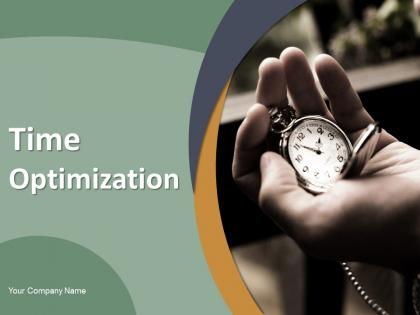
Slide 1: This slide introduces Effective Time Planning. State Your Company Name and begin.
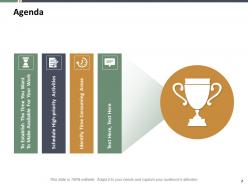
Slide 2: This is an AGENDA slide. State your agendas here.
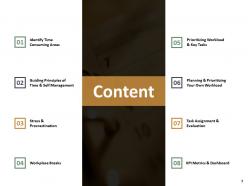
Slide 3: This slide shows Content for the presentation.
Slide 4: This slide displays Identify Time Consuming Areas with related imagery and text boxes to show information.
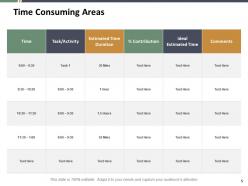
Slide 5: This slide presents Time Consuming Areas in a table form to show information.
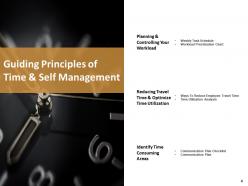
Slide 6: This slide represents Guiding Principles of Time & Self Management with- Planning & Controlling Your Workload, Reducing Travel Time & Optimize Time Utilization, Identify Time Consuming Areas.
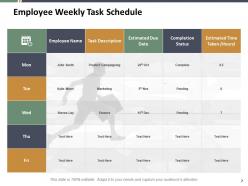
Slide 7: This slide showcases Employee Weekly Task Schedule with employee name, task description, estimated due date etc.
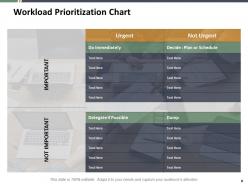
Slide 8: This slide shows Workload Prioritization Chart with categories as DELEGATE IF POSSIBLE, DUMP, URGENT, NOT URGENT.
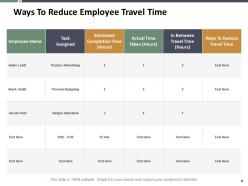
Slide 9: This slide suggests Ways to Reduce Employee Travel Time in a table form with categories as- employee name, task assigned, actual time taken etc.
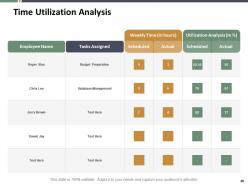
Slide 10: This slide presents Time Utilization Analysis in a table form with categories as- tasks assigned, utilisation analysis etc.
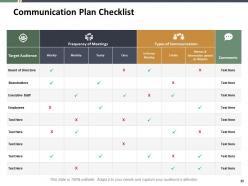
Slide 11: This slide displays Communication Plan Checklist describing- Target audience, board of directors, shareholders, employees etc.
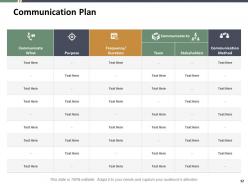
Slide 12: This slide represents Communication Plan describing- communicate what, purpose, frequency duration etc.
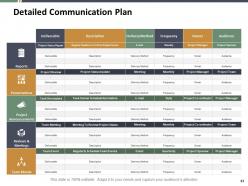
Slide 13: This slide showcases Detailed Communication Plan with- Reports, Team Morale, Project Announcements, Presentations, Reviews & Meetings.
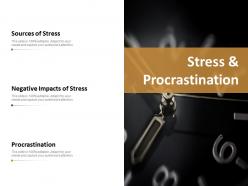
Slide 14: This slide shows Stress procrastination describing- Sources of stress, Negative impacts of stress and procrastination.
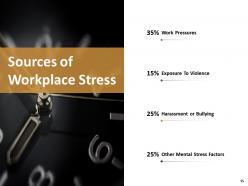
Slide 15: This slide presents Sources of Workplaces Stress describing- Work Pressures, Exposure to Violence, Harassment or Bullying, Other Mental Stress Factors.
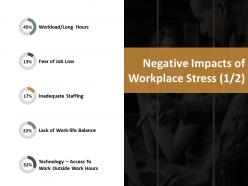
Slide 16: This slide showcases Negative Impacts of Workplace Stress describing- Workload/long Hours, Fear of Job Loss, Inadequate Staffing, Lack of Work-life Balance, Technology – Access to work Outside Work Hours.
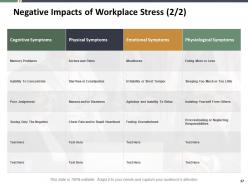
Slide 17: This is another slide on Negative Impacts of Workplace Stress describing- Cognitive Symptoms, Physical Symptoms, Emotional Symptoms, Physiological Symptoms.
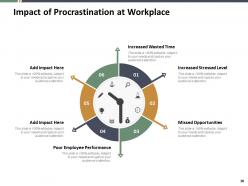
Slide 18: This slide shows Impact of Procrastination at Workplace which includes- Increased Wasted Time, Missed Opportunities, Increased Stressed Level, Poor Employee Performance etc.
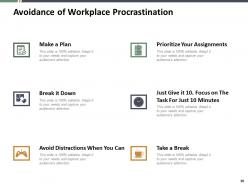
Slide 19: This slide presents Avoidance of Workplace Procrastination describing- Make a Plan, Break it Down, Prioritize your Assignments, Take a Break, Avoid Distractions when you can, Just give it 10. Focus on the task for just 10 minutes.
Slide 20: This slide displays Workplace Break with related imagery and text boxes to show information.
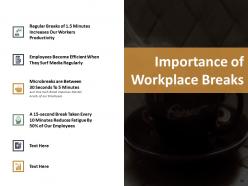
Slide 21: This slide represents Importance of Workplace Breaks with imagery and text boxes.
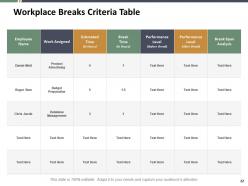
Slide 22: This slide showcases Workplace Breaks Criteria Table with categories as employee name, work assigned, estimated time, performance level etc.
Slide 23: This slide shows Prioritizing Workload & Key Tasks describing- Key Assignments Tasks Table, Priority Task Table etc.
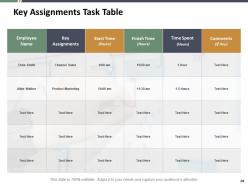
Slide 24: This slide presents Key Assignments Task Table with categories as employee name, key assignments, start time, finish time etc.
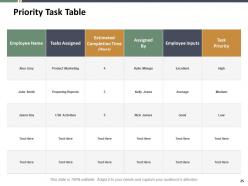
Slide 25: This slide displays Priority Task Table with categories as tasks assigned, estimated completion time, employee inputs etc.
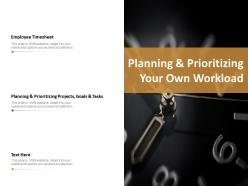
Slide 26: This slide represents Planning & Prioritizing Your Own Workload describing- Employee Timesheet, Planning & Prioritizing Projects, Goals & Tasks etc.
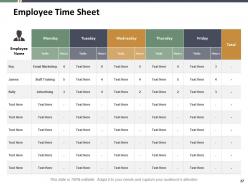
Slide 27: This slide showcases Employee Time Sheet in a table form with related text.
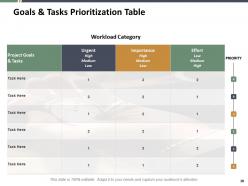
Slide 28: This slide shows Goals & Tasks Prioritization Table with categories as- Project goals, importance, effort etc.
Slide 29: This slide presents Task Assignment & Evaluation describing- Team Skills Matrix, Team Based Evaluation, Employee Time Management Evaluation Chart.
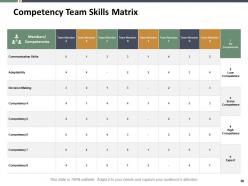
Slide 30: This slide displays Competency Team Skills Matrix with members, communication skills, adaptability, decision making etc.
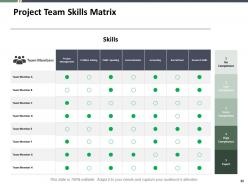
Slide 31: This slide represents Project Team Skills Matrix with team members, project management, problem solving, public speaking etc.
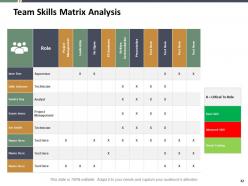
Slide 32: This slide showcases Team Skills Matrix Analysis with team members, role, leadership, presentation etc.
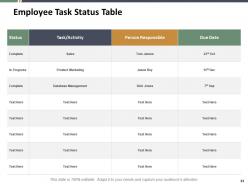
Slide 33: This slide shows Employee Task Status Table with status, activity, person responsible and due date.
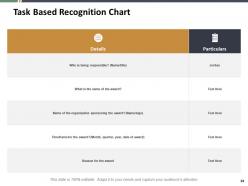
Slide 34: This slide presents Task Based Recognition Chart with related text boxes.
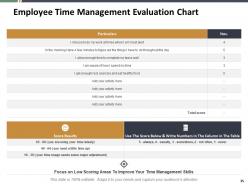
Slide 35: This slide displays Employee Time Management Evaluation Chart in a table form with text boxes to show information.
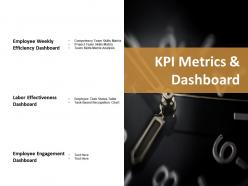
Slide 36: This slide represents KPI metrics dashboard describing- Employee weekly efficiency dashboard, Labour effectiveness dashboard and employee engagement dashboard.
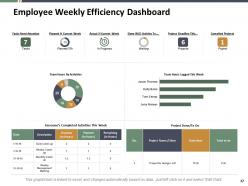
Slide 37: This slide showcases Employee Weekly Efficiency Dashboard with donut chart, pie chart, bar graph and table to show information.
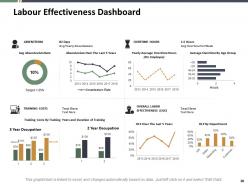
Slide 38: This slide shows Labour Effectiveness Dashboard with bar and line graphs to show information.
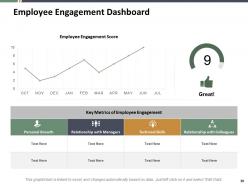
Slide 39: This slide presents Employee Engagement Dashboard describing- Technical Skills, Personal Growth, Relationship with Managers, Relationship with Colleagues.
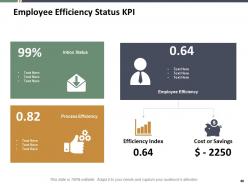
Slide 40: This slide displays Employee Efficiency Status KPI describing- Efficiency Index, Cost or Savings, Employee Efficiency, Process Efficiency, Inbox Status.
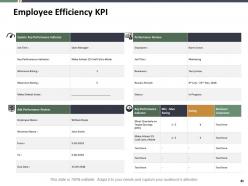
Slide 41: This slide represents Employee Efficiency KPI with- Key Performance Indicators and performance review etc.
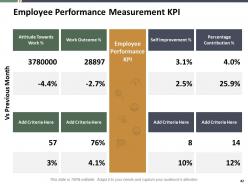
Slide 42: This slide showcases Employee performance measurement KPI describing- Percentage Contribution, Attitude Towards Work, Work Outcome, Self Improvement etc.
Slide 43: This slide shows Time optimisation Icons.
Slide 44: This slide is titled as Additional Slides for moving forward.
Slide 45: This is Our Mission slide with related imagery and text.
Slide 46: This is Meet Our Team slide with names and designation.
Slide 47: This is About our company slide to show company specifications etc.
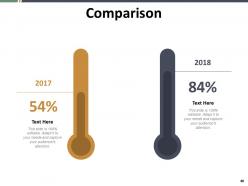
Slide 48: This is a Comparison slide to state comparison between commodities, entities etc.
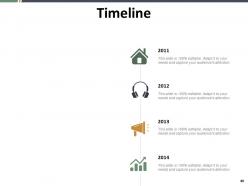
Slide 49: This is a Timeline slide. Show information related with time period here.
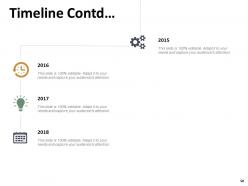
Slide 50: This is another slide continuing Timeline.
Slide 51: This is a Financial slide. Show finance related studd here.
Slide 52: This is a Target slide. Show your targets here.
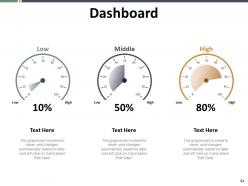
Slide 53: This is a Dashboard slide with text boxes to show information.
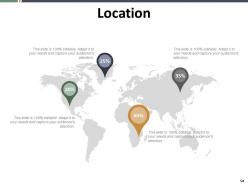
Slide 54: This is a Location slide with country maps to show data of different locations.
Slide 55: This slide displays Post it Notes. Post your important notes here.
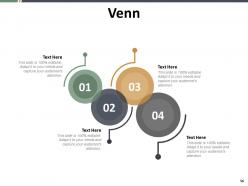
Slide 56: This is a Venn slide with text boxes.
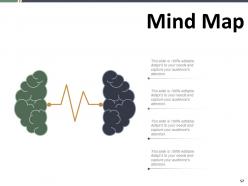
Slide 57: This slide shows Mind map for representing entities.
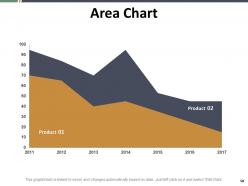
Slide 58: This slide presents Area Chart with two products comparison.
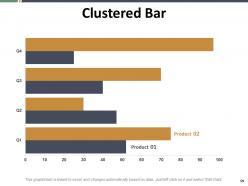
Slide 59: This slide displays Clustered Bar chart with two products comparison.
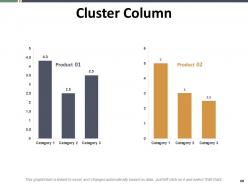
Slide 60: This slide displays Cluster column chart to compare two different products.
Slide 61: This is a Thank You slide with address, contact numbers and email address.
Time Optimization PowerPoint Presentation Slides with all 61 slides:
Use our Time Optimization PowerPoint Presentation Slides to effectively help you save your valuable time. They are readymade to fit into any presentation structure.


FAQs for Time Optimization
Honestly, I swear by the priority matrix thing - sort your tasks by what's urgent vs important. Tackle the urgent/important stuff obviously, but don't skip those important-but-not-urgent ones since they're usually what moves the needle long-term. I used to just wing it too and felt constantly behind. Try timeboxing where you block out specific hours for tasks instead of staring at endless lists. The Eisenhower Matrix is clutch for this. Each morning, pick your top 3 and knock out the hardest first when you're fresh. Works way better than bouncing around randomly.
Dude, just use a template. Seriously saves so much time because you're not sitting there staring at blank slides forever. You can actually focus on the content instead of fiddling with fonts and colors for three hours (been there). Templates keep everything structured too, which stops me from rambling about random stuff. Your whole team ends up with decks that actually look decent without endless "can we move this box two pixels left" conversations. Honestly? It'll probably cut your prep time in half. Way better than starting from scratch every single time.
Honestly, tech can totally save your butt with time management if you don't go overboard. I'd start with just a calendar app and maybe one task tracker - those time tracking ones are eye-opening because you'll realize you're spending way more time on random stuff than you think. Automation's pretty clutch for the boring repetitive tasks too. But here's the thing - I've definitely fallen into that trap where you spend more time downloading productivity apps than actually getting stuff done lol. Pick like 2-3 max and actually stick with them instead of constantly switching.
Block out personal stuff in your calendar like actual meetings - otherwise work just swallows everything. I'm obsessed with batching similar tasks together because constantly switching gears is exhausting. Say no to random stuff that doesn't really matter (harder than it sounds, I know). That 80/20 thing is legit - figure out which tasks actually move the needle and focus there. Oh, and you have to literally schedule downtime or it won't happen. Sounds obvious but most people skip this step then wonder why they're burned out.
Ugh, social media is the worst culprit - I swear I check Instagram "for 5 minutes" and suddenly an hour's gone. Multitasking kills productivity too, even though it feels like you're getting more done. Those pointless meetings that should've been emails? Just decline them honestly. Try batching similar tasks instead of jumping around constantly. Set specific times for email rather than checking every few minutes. Website blockers help during deep work sessions too. Actually track what you do for a day first though - you'll be shocked where time goes. I did this once and spent 2 hours reading random Wikipedia articles without realizing it.
Honestly, start with shared calendars - game changer for knowing who's actually free. Time-blocking helps too, where you block chunks for deep work. I swear by quick daily check-ins, like 10 minutes max to sync up on what everyone's doing. Oh and the "two-pizza rule" is solid - if your meeting needs more than two pizzas to feed everyone, it's way too big. Try batching similar stuff together instead of jumping around. Buffer time is clutch when setting deadlines because something always goes wrong. Those two things alone will cut down on so many last-minute fires.
Honestly, SMART goals just make everything less messy. You stop spinning your wheels on stuff like "work on presentation" and actually get specific - like "finish slides 1-5 by 2pm Tuesday." Way easier to plan around, right? The whole Specific, Measurable, Achievable, Relevant, Time-bound thing forces you to think through realistic timelines. I'm a huge fan of the deadlines part because it keeps you from procrastinating forever. Try taking one of your current goals and breaking it down this way. You'll probably be surprised how much clearer your next steps become when you're not being all vague about it.
Ugh, bad time management is honestly the worst - it's like this endless spiral. Your brain goes into total panic mode when you're always behind schedule. Can't focus on anything properly. Then you start avoiding tasks because everything feels too overwhelming, which obviously makes it ten times worse. The stress just destroys your ability to make decent decisions too. You're never really "present" for what you're doing, so even basic stuff drags on forever. I swear, just pick one tiny thing and actually finish it today. Breaking that cycle somewhere helps more than you'd think.
Okay so take your hardest stuff and chop it into 25-minute chunks with 5-minute breaks. Mornings are perfect for 2-3 rounds when you're not brain-dead yet. I was super skeptical at first but there's something about that ticking timer that tricks your brain into focus mode. During those 25 minutes you can't touch your phone or check messages - like, seriously don't cheat on this part. Do 4 rounds then take a real break, maybe 20-30 minutes. Oh and definitely beats trying to juggle five things at once which never works anyway. Just try it for a week, you'll be shocked how much you actually finish.
Honestly, deadlines are like having a roadmap when everything feels chaotic. They force you to actually break stuff down instead of just staring at this massive project going "uhh, where do I even start?" Without them, I swear everything just becomes this vague blob of "I should probably do that sometime." Setting deadlines - even fake ones for tasks that don't really have them - keeps you moving. Plus you can use them as an excuse when people try to dump more work on you. "Sorry, already committed to this timeline." Works every time. The whole thing just makes saying no way easier.
Honestly, regular check-ins are a game-changer for catching time sinks early. I do quick 15-minute reviews every week or two - just asking what took way longer than I thought it would. Used to think these were pointless meetings (my bad), but they actually prevent way bigger headaches later. Scope creep? You'll catch it fast. Resources getting stuck somewhere dumb? You can shift things around. Way better than just crossing your fingers and hoping everything works out. Oh, and you get actual data instead of just guessing at timelines next time.
Dude, set an agenda and actually follow it. Start on time even if half your team's missing - waiting just teaches people they can be late. Give each topic a time limit and cut people off when it's up (sounds harsh but trust me). When someone goes on a tangent, just say "let's circle back on that later" and move on. Oh, and assign someone to take notes because you'll forget half the stuff otherwise. I always end meetings 5 minutes early too - people need time to get to their next thing. You gotta be the bad guy sometimes, but honestly? Everyone secretly appreciates when meetings don't suck.
Okay so mindfulness basically trains your brain to actually stay focused instead of bouncing around everywhere. I used to have like 10 thoughts going at once - total mess. But when you practice it regularly, you get way better at noticing when your mind starts wandering and pulling it back. Plus you'll actually see how you're spending time vs. how you think you are (spoiler: probably not the same). Just 5-10 minutes of breathing exercises or meditation daily makes a real difference. Honestly try doing some deep breathing before your biggest task tomorrow and see what happens.
Block your biggest tasks when you're actually awake and functioning - mornings work for most people but you know yourself. Don't jam everything together though, you'll hate life. I always leave 15 minutes between stuff because calls run over and sometimes you just need a second to think. Batch similar things like emails or calls so you're not jumping around constantly. Color-coding your calendar sounds dumb but it actually helps you see patterns. Oh and treat those blocks like real meetings - don't just blow them off when something else comes up.
Honestly, you'll be shocked at how differently you actually spend time vs what's in your head. I check my time tracking monthly (set a calendar reminder or you'll forget) and it's wild - like realizing I thought I was productive in the afternoon but mornings are actually when I crush everything. Those fancy apps you downloaded? Half of them you probably stopped using without noticing. Weekly or monthly reviews catch the time-wasting stuff before it becomes your new bad habit. Plus you'll spot which tasks always take way longer than expected. Just be real about what's not working and switch it up.
-
Great designs, Easily Editable.
-
Unique and attractive product design.
-
Best way of representation of the topic.
-
Colors used are bright and distinctive.