Transition plan training plan for transition project

Rating:
100%
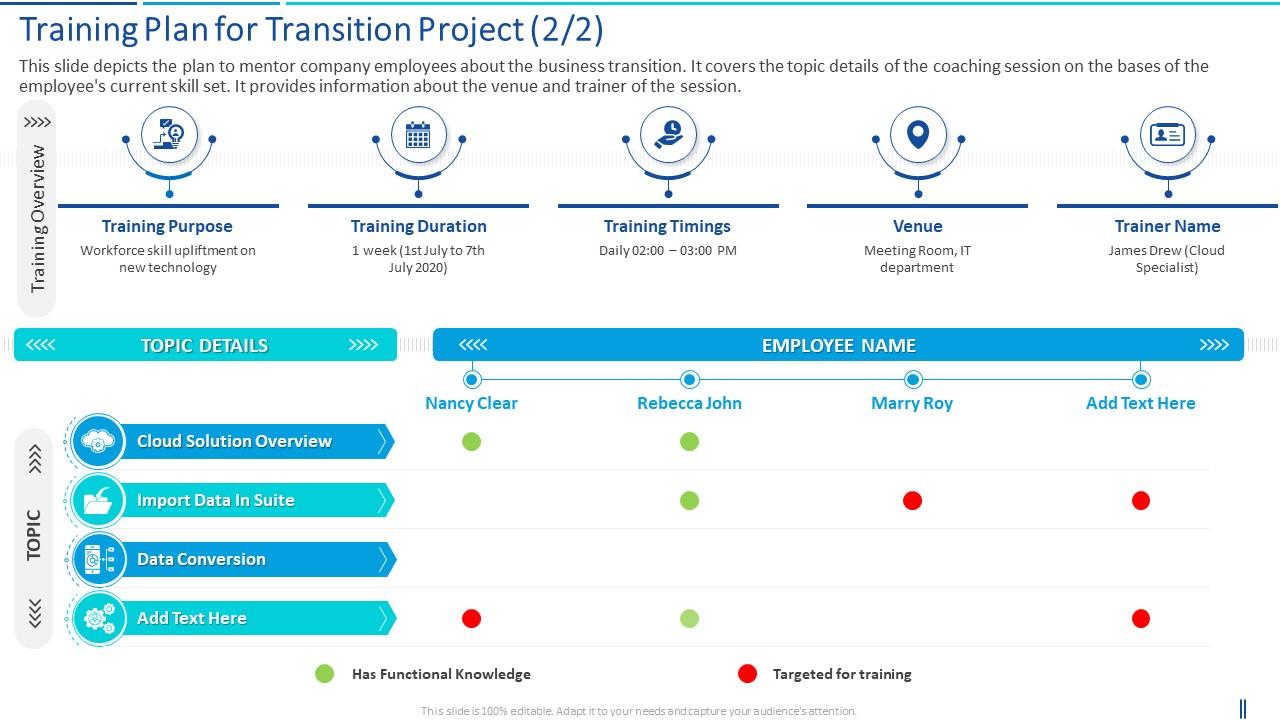
A training plan slide detailing a one week session from July 1st to July 7th, focusing on workforce skill upliftment in new technology
Slide 1 of 6
Favourites Favourites

Try Before you Buy Download Free Sample Product

Audience Impress Your
Audience
Editable 100%
Editable
Time Save Hours
of Time
The Biggest Sale is ending soon in
0
0
:
0
0
:
0
0
AI-Ready
Upload this template to AI and ask it to make any changes to content or color
100% editable Powerpoint Template for AI-assisted presentations. Finish your work in less time. ​
Works with
Microsoft PowerPoint
Microsoft 365
Claude for PowerPoint
ChatGPT
Google Slides
Microsoft Copilot
Rating:
100%
This slide depicts the plan to mentor company employees about the business transition. It covers the topic details of the coaching session on the bases of the employees current skill set. It provides information about the venue and trainer of the session.Deliver an outstanding presentation on the topic using this Transition Plan Training Plan For Transition Project Dispense information and present a thorough explanation of Training Purpose, Training Duration, Training Timings using the slides given. This template can be altered and personalized to fit your needs. It is also available for immediate download. So grab it now.

FAQs for Transition plan training plan

So for your transition training plan, hit these four things: get knowledge from people leaving, develop skills for new roles, document all the processes (super boring but you'll thank yourself later), and map out your timeline with milestones. Honestly, the documentation is the worst part but don't skip it - trust me on this one. Also build in communication plans for stakeholders and figure out what could go wrong ahead of time. I'd start by listing what knowledge you need first, then work backwards from your launch date. Oh, and maybe grab coffee with the outgoing folks while you can still pick their brains.

Start by figuring out who your key people are and what kind of training actually makes sense for each group. Get them involved in building the curriculum - honestly, they know where things go wrong way better than you do. Set up feedback sessions while you're rolling everything out so you can fix stuff that's not working. Oh, and definitely do those "train the trainer" things for department heads since they'll actually push for people to use it. The whole point is making them feel like they're part of creating this, not just having it dumped on them. Makes a huge difference.

First thing - figure out what skills your team currently has vs what they'll need after the change. Talk to the people actually doing the work, not just management. They know where the real problems are. Map out your new processes, then spot where people might get stuck. Oh and definitely check how people prefer to learn - some hate classroom training and need to just dive in hands-on. I'd survey everyone about how confident they feel with what's coming. Honestly, the more homework you do upfront, the less you'll be panicking later trying to teach critical stuff while everything's falling apart.

Honestly, start with a solid backbone but don't make it too rigid - I've watched so many programs fall apart that way. Survey people first about their pace and learning style, then build maybe 2-3 different tracks they can pick from. Some folks want those intense all-day sessions, others need it broken into smaller pieces over time. Buffer time between modules is clutch - lets the quick learners jump ahead while giving stragglers room to breathe. Oh, and definitely record the important stuff so people can go back and review. The flexibility thing really makes or breaks these programs.

Honestly, you gotta look at both the numbers and the feelings. Completion rates and test scores are obvious ones to track. But here's what I've learned - the soft feedback is huge. Send out surveys, do quick check-ins with people. Are they actually confident after training or just going through the motions? Error rates in the weeks after training tell you everything. Also watch if people are sticking around - high turnover after training is a red flag. Time-to-competency is clutch too. Set up some basic tracking monthly so you can pivot fast when something's not working.

Honestly, just switch things up every 15-20 minutes or people will zone out completely. I'd start with live polls during your presentations - saves you from the dreaded death-by-PowerPoint vibe. Breakout rooms are clutch for getting people talking in smaller groups. Kahoot's surprisingly fun for knowledge checks (even adults get weirdly competitive). Virtual whiteboards work well for collaborative stuff too. Oh, and definitely record the heavy concept sessions so people can go back later. Don't try everything at once though - pick one or two tools you're comfortable with first, then add more as you figure it out.

Change management is basically the foundation of your whole training plan. Without it, people just go through the motions instead of actually adopting new stuff. It helps you spot where resistance will pop up and communicate why changes matter in the first place. Look, I've watched so many rollouts crash because teams skipped this step entirely. You can use it to figure out training order based on who's ready and create frameworks for handling pushback. Quick wins are huge for momentum - oh, and don't forget feedback loops throughout the process.

Break it down by who's doing what, honestly. Execs just want the big picture and change management stuff. Power users need deep dives since they'll be your go-to people internally. Regular folks? Just show them what's different in their daily routine and where to get help. Your IT team is gonna get slammed with questions though - don't leave them hanging! Skip the one-size-fits-all training. Map out how each group currently works, then walk them through exactly what changes. Role-specific modules work way better than trying to cram everyone into the same session.

Honestly, I'd start with whatever feels easiest for your group - maybe just Google Forms or even paper if they're not super tech-savvy. The "one thing that worked, one thing that didn't" method is gold because people don't overthink it. Quick pulse checks during breaks work great too. Sometimes I'll grab a few people right after for an informal chat while it's all fresh. Oh, and following up a week later? That's when you get the real tea about whether they actually used anything. Mix it up based on your crowd - some groups love surveys, others will actually talk more in person.

Hey! So first thing - grab the actual project timeline and figure out which skills you'll need by what dates. Then just work backwards from there. I always share a calendar with the PMs because honestly, stuff changes every five minutes and you don't want to be caught off guard. Make sure you finish training before you actually need those skills - like, give yourself some breathing room. Weekly check-ins are clutch too, that way if timelines shift (and they will), you can speed up or slow down your training. Oh and don't pack everything too tight, you'll hate yourself later.

Honestly, the worst part is always people hating change - they're so used to doing things their way. Resource issues suck too, obviously. Get your key people involved from day one so they don't feel like you're just dumping this on them. Oh, and definitely pad your timeline because stuff WILL go wrong. I'd start by figuring out who's gonna push back the hardest and have that awkward conversation early. Quick wins help a ton - people need to see it's actually working. Also make sure you've got backup trainers lined up because someone will definitely bail last minute.

Blended training is honestly the way to go. Have people knock out the basic stuff online first - way better than trapping everyone in a conference room for 8 hours straight (been there, it's painful). Then you can actually use your in-person time for the good stuff like practice scenarios and working through real problems together. Break the knowledge transfer into smaller online chunks, maybe even throw in some videos if you're feeling fancy. After that, bring the team together for focused workshops where they can ask questions and tackle challenges specific to whatever you're rolling out. Trust me, people retain way more when they're not brain-dead from information overload.

Check out the internal template library first - tons of pre-approved slide decks and workbooks in there. Articulate 360 is solid for interactive stuff, and honestly Camtasia's your friend for screen recordings. People eat up those step-by-step videos. Miro's clutch when you need to brainstorm learning paths with the team. Oh, and grab those brand guidelines before you start designing anything - trust me, saves so much headache later when you don't have to redo everything. Build your main content with templates first. Then you can get fancy with interactive elements once that's locked down.

Don't just abandon people after training - that's the worst. Set up a Slack channel where they can ask questions and celebrate wins together. Peer support honestly works better than formal help half the time. Monthly check-ins for three months, then maybe quarterly? Also create some quick reference docs and screen recordings they can pull up whenever. Oh, and actually ask your last batch of trainees what would've helped them most - they'll tell you exactly what's missing. The whole thing should feel approachable, not like some corporate maze.

Your trainers are basically the MVPs here - they're not just dumping information, they're actually changing how people think about the whole process. Have them ask for feedback after every session and tweak things that aren't landing. Honestly, some stuff will totally bomb and that's fine. They should celebrate the small victories and make it okay for people to say "I have no clue what's happening." Give them time between sessions to figure out what worked. That's where they'll crack the code. The goal isn't perfection, it's getting everyone comfortable with adapting as they go.

Ratings and Reviews

100% of 100
Review Form
Write a review
Most Relevant Reviews
  1. 100%

    by Dario Freeman

    Easily Editable.
  2. 100%

    by Dane Harrison

    Unique research projects to present in meeting.

2 Item(s)

per page: