

Types Of Data Center Cooling Techniques Data Center Types It Ppt Show Background Designs




Try Before you Buy Download Free Sample Product
 Impress Your
 Audience
 100%
100% Editable
 Save Hours
 of Time


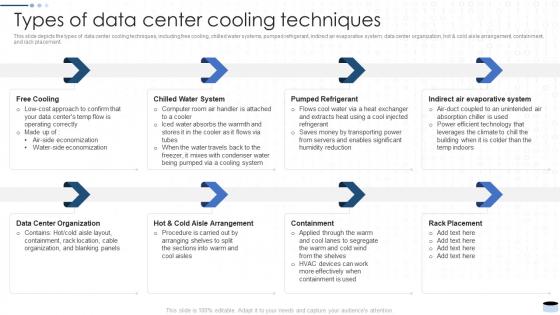
This slide depicts the types of data center cooling techniques, including free cooling, chilled water systems, pumped refrigerant, indirect air evaporative system, data center organization, hot and cold aisle arrangement, containment, and rack placement.
People who downloaded this PowerPoint presentation also viewed the following :
Types Of Data Center Cooling Techniques Data Center Types It Ppt Show Background Designs with all 6 slides:
Use our Types Of Data Center Cooling Techniques Data Center Types It Ppt Show Background Designs to effectively help you save your valuable time. They are readymade to fit into any presentation structure.





FAQs for Types Of Data Center Cooling Techniques Data Center Types It Ppt
So basically liquid cooling is way better at pulling heat away from stuff - like dramatically better per square inch. With air cooling you're literally trying to air condition your whole server room, which gets crazy expensive fast. Liquid systems either pump coolant straight to the hot components or use these rear-door heat exchangers that grab the heat right where it's made. Way quieter too - trust me on that one. If you've got dense equipment or your power bills are killing you, definitely check out liquid cooling when you upgrade. Short answer: it's just more efficient at getting heat out.
Dude, server placement makes a massive difference for cooling. You want hot and cold aisles - rack all the server fronts facing one way, backs the other. Hot exhaust stays separate from cool intake air. Otherwise you get this messy mixing situation that absolutely murders your efficiency and power bills. Some data centers go crazy with containment systems, but honestly the basic aisle setup works great. Just don't let hot and cold air mingle - that's cooling death. Check your current setup for any obvious hot spots first.
So containment systems separate your hot and cold air to stop them from mixing - makes cooling way more efficient. You've got two options: hot aisle (enclosing server exhaust) or cold aisle (enclosing the intake side). Hot aisle usually works better from what I've seen, though it depends on your setup. The whole point is preventing that expensive cold air from getting wasted by hot exhaust before it hits your servers. Your CRAC units won't work as hard, and you'll actually know where your cold air's going. Oh, and definitely measure your current hot spots first - that'll tell you which approach makes sense for your layout.
So ambient air cooling can cut your energy bills by like 20-40% versus regular mechanical systems. Pretty solid savings, right? Basically you're using economizers to pull in filtered outside air directly, or run it through your water loops instead of cranking chillers and CRACs all day. Works best in cooler climates obviously, but even hot places save decent money in winter. Oh, and check if your HVAC already has economizer modes - tons of facilities have the gear but just aren't using it. Honestly such a waste when it's just sitting there.
Honestly, free cooling can cut your energy bills by like 20-40% which is pretty sweet. Basically you're using outside air instead of cranking those chillers 24/7. But here's the thing - geography matters big time. Works awesome if you're somewhere cooler, but forget about it during Arizona summers lol. You'll need decent filtration and humidity stuff upfront though. Plus your whole facility design gets trickier. The magic number is keeping temps under 65°F for good chunks of the year. I'd definitely crunch the numbers based on your actual location and what you're spending now on cooling.
So you basically put up barriers between where servers suck in cold air versus where they blow out hot air. Stops the hot stuff from getting recycled back into the intake - which honestly happens way more than it should. Your racks face the right directions (cold aisle gets the front, hot aisle gets the back), then you add panels or doors to keep them separate. Way less work for your AC units that way. Temperature stays way more consistent too. I'd measure your current setup first though - see where you're getting the worst hot spots and focus there. Makes a huge difference once it's done right.
Yeah so humidity's a bigger deal than most people think. Keep it between 40-60% or you're gonna have problems. Below that and static electricity starts frying stuff - learned that one the hard way. Above 60% and suddenly everything's working overtime plus you risk water condensation which is obviously bad news. Most facilities use separate humidity control that runs with the main HVAC system. Honestly though, I always tell people to check those humidity sensors first when cooling gets weird. Nine times out of ten that's your issue right there.
Look, monitoring basically lets you see what's actually happening instead of just hoping your cooling works. You'll get real temp readings, airflow numbers, energy usage - all that good stuff broken down by zone. Honestly the granular detail you can get now is pretty sick. Main thing is catching hot spots early and adjusting based on what your servers are actually doing, not just blasting AC at full power 24/7. Oh and you can tweak things dynamically which saves a ton on power bills. I'd say start with temp sensors in your most critical spots first, then expand from there.
So basically immersion cooling lets you cram way more servers into smaller spaces. They literally dunk everything in special fluid that pulls heat away but won't fry your electronics - honestly seemed sketchy to me at first but the results are nuts. You'll cut cooling energy by like 95% compared to air systems. No more dealing with fan noise or worrying about airflow either. PUE drops from 1.4+ down to around 1.03, which is huge for your power bills. If you're doing AI or high-performance stuff, definitely worth running some numbers on it.
Honestly, edge data centers are way different from those huge facilities. Skip the complex stuff - direct air cooling works great, plus liquid cooling if you've got high-density racks. The whole point is making it autonomous since nobody's gonna babysit these smaller sites. Traditional centers can get away with fancy chilled water systems and all that redundancy, but edge locations? Keep it simple and reliable. Oh and definitely check your local climate first - I learned that one the hard way. You want compact solutions that basically run themselves without constant tweaking.
Yeah you don't have to tear everything out - most people go hybrid at first. Keep your existing CRAC units running and just add liquid cooling to your hottest racks. Honestly the plumbing setup is where it gets annoying, plus you gotta make sure your facilities guys aren't gonna freak out about the new system. I'd run separate loops initially so you're not risking your air-cooled stuff if something goes wrong. Start small with like 2-3 racks to prove it works and the numbers make sense before going bigger.
Start with ASHRAE TC 9.9 - seriously, this'll solve most of your headaches right away. It's got all the temp and humidity ranges for different equipment classes. ISO/IEC 30134 covers energy efficiency stuff (your facilities people will love you come budget time). For infrastructure and cooling distribution, check ANSI/TIA-942. Oh, and don't forget NFPA 75 for fire protection since cooling can mess with suppression systems. I'd say ASHRAE gets you like 80% there though. Layer in the others once you figure out what weird challenges your specific design throws at you.
So here's the deal - cooling eats up most of your data center's power, which makes it the perfect place to hit your sustainability targets. Free air cooling, liquid cooling, hot aisle containment - all that stuff cuts your energy use AND saves you money. Honestly, the ROI on these upgrades is pretty solid since they pay for themselves through lower bills. Your PUE numbers will look way better for reporting too. I'd start with an audit of what you've got now. That'll show you where to focus first and which changes will actually move the needle on your carbon footprint.
Dude, immersion cooling is finally taking off - they're literally dunking servers in special fluids that pull heat way better than air. Chip-level liquid cooling is everywhere now too, especially with all these crazy AI workloads burning through power. The smart stuff blows my mind though. AI systems that predict and adjust cooling in real-time, plus heat recovery tech that actually uses your waste heat for other things. Pretty clever if you ask me. You should check this out soon - early birds are seeing 30-40% cuts in cooling costs. Worth a look.
Dude, you've gotta stay on top of maintenance or you'll get burned. Small stuff like changing filters and checking coolant levels prevents those total meltdowns where everything overheats. I've watched entire server rooms go down - absolutely brutal. Your energy bills will thank you too since everything runs smoother. Set up monthly filter checks, quarterly deep dives, and get pros in once a year. Way less painful than emergency calls at 2am. Oh, and cheaper than explaining to your boss why half the network just died.
-
Spacious slides, just right to include text. SlideTeam has also helped us focus on the most important points that need to be highlighted for our clients.
-
I am glad to have come across Slideteam. I was searching for some unique presentations and templates for my business. There are a lot of alternatives available here.