Usa flag powerpoint presentation ppt template

Rating:
87%
Usa flag powerpoint presentation ppt template
Slide 1 of 2
Favourites Favourites

Try Before you Buy Download Free Sample Product

Audience Impress Your
Audience
Editable 100%
Editable
Time Save Hours
of Time
The Biggest Sale is ending soon in
0
0
:
0
0
:
0
0
Rating:
87%
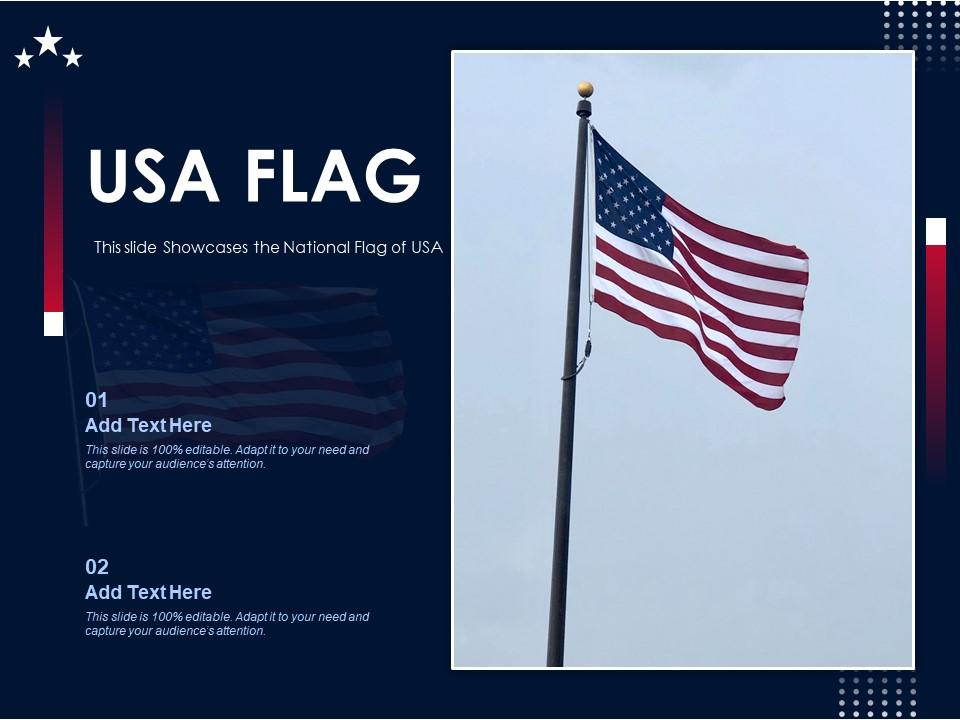
This USA Flag Powerpoint Presentation PPT Template contains silhouette maps that can be used to outline a country or city region. Use this template to create a more state-focused presentation and deliver it in front of a large audience with utmost confidence. Display, the educational, political, and other facets of the state using this PowerPoint presentation slide. It comes in an editable format, which makes its application very easy and user-friendly. Not only this, our PowerPoint design can be reproduced in different formats be it PNG, PDF, and JPG, thus serving a large variety of users. The colors and sizes of shapes can be altered to enhance the aesthetic appeal of your presentation. By using different colors, you can also showcase data, stats, and reports that are easily understandable. Therefore, download it now.

People who downloaded this PowerPoint presentation also viewed the following :

FAQs for Usa flag powerpoint

An effective USA flag PowerPoint template incorporates patriotic color schemes, clean typography, professional layouts, strategic flag imagery placement, and versatile slide designs. These elements work together by enhancing visual impact, maintaining audience engagement, and delivering clear messaging, with many organizations finding that well-designed patriotic templates significantly strengthen presentations for government meetings, civic events, and national celebrations.

You can customize a USA flag PowerPoint template by adjusting color schemes, modifying layouts, replacing placeholder text with your content, and incorporating your brand elements like logos or fonts. These templates enable seamless integration with business presentations, educational materials, or patriotic events, with many organizations finding that strategic customization enhances audience engagement while maintaining professional credibility and thematic consistency.

**INPUT**: What are the best color schemes to pair with a USA flag design in a presentation? **OUTPUT**: Effective color schemes for USA flag presentations include navy and gold, charcoal and silver, white and cream, burgundy and tan, and muted patriotic tones. These combinations enhance readability while maintaining visual harmony, with many corporate and government organizations finding that subtle accent colors streamline content focus, minimize visual competition, and ultimately deliver professional presentations that respect patriotic elements while ensuring audience engagement.

Presidential campaigns, corporate investor meetings, government agency briefings, educational civics lessons, and patriotic event presentations benefit most from USA flag PowerPoint templates. These designs enhance credibility and emotional connection for political candidates, multinational corporations addressing American markets, and educational institutions teaching civic responsibility, while delivering visual authority that resonates with audiences and strengthens message impact.

Animations can enhance USA flag PowerPoint slideshows by creating dramatic flag-waving effects, smooth transitions between patriotic content, and dynamic text reveals that emphasize key messages. These visual techniques engage audiences more effectively during presentations, with corporate events, educational institutions, and government agencies finding that strategic animations increase audience retention and reinforce patriotic themes, ultimately delivering more memorable and impactful presentations.

Classic American fonts like Times New Roman, Georgia, and Helvetica complement USA flag templates effectively, while bold sans-serif options such as Arial Black and Franklin Gothic enhance readability against patriotic backgrounds. These fonts deliver professional presentation aesthetics while maintaining strong visual contrast, with many organizations finding that serif fonts work particularly well for formal governmental or corporate presentations requiring authoritative, trustworthy communication.

A USA flag presentation should include the Revolutionary War origins, Constitutional founding principles, territorial expansion milestones, Civil War preservation struggles, and major constitutional amendments. These historical elements enhance patriotic presentations by connecting past sacrifices to present freedoms, while educational institutions and civic organizations find that comprehensive historical context delivers deeper audience engagement and meaningful connections to American democratic values.

You can incorporate multimedia elements by embedding patriotic videos, audio clips of national anthems or historical speeches, interactive maps showing American landmarks, animated flag transitions, and infographics displaying national statistics. These elements enhance audience engagement through visual storytelling, emotional connection, and dynamic content flow, with many presenters finding that strategic multimedia integration significantly improves message retention and creates more memorable, impactful presentations.

Common mistakes include using low-resolution flag images, overcrowding slides with excessive patriotic elements, choosing poor color contrasts that reduce readability, ignoring proper flag etiquette and proportions, and selecting templates that don't align with your presentation's professional tone. These design oversights can diminish audience engagement and credibility, with many presenters finding that balanced, high-quality flag integration enhances rather than overwhelms their core message.

Using royalty-free USA flag PowerPoint templates from reputable sources like SlideTeam, government websites, or verified stock photo platforms ensures copyright compliance, while avoiding unauthorized images from search engines or social media. These licensed templates provide legal protection for commercial and educational use, with many organizations finding that investing in properly licensed presentation assets minimizes legal risks while delivering professional, compliant visual content.

The ideal slide count for USA flag presentations typically ranges from 10-15 slides, depending on your audience, time allocation, and content depth. Patriotic presentations, whether for corporate meetings, educational sessions, or ceremonial events, benefit from focused messaging that maintains engagement while honoring the flag's significance, with many presenters finding that concise, impactful delivery resonates more effectively than lengthy formats.

**INPUT**: How can I effectively engage my audience while using a USA flag PowerPoint template? **OUTPUT**: Effective audience engagement with USA flag templates involves strategic storytelling, interactive elements, clear messaging, and purposeful design choices that resonate with patriotic themes. Corporate presentations, political campaigns, and educational institutions find success by incorporating audience polls, compelling narratives about American values, and visual consistency that enhances rather than overwhelms content, ultimately delivering memorable presentations that inspire action.

**INPUT**: What design principles should I follow to maintain professionalism in a USA flag-themed presentation? **OUTPUT**: Professional USA flag presentations require balanced color usage, clean typography, strategic flag placement as accents rather than backgrounds, and consistent spacing throughout slides. These design principles enhance credibility by maintaining visual hierarchy, ensuring readability, and respecting patriotic symbolism, with many organizations finding that subtle flag elements ultimately deliver greater impact than overwhelming red-white-blue schemes. *[Word count: 54]*

Using USA flag imagery becomes inappropriate in presentations targeting international audiences where it might suggest bias, in commercial contexts that could appear exploitative of national symbols, or when discussing sensitive political topics where flag usage might seem manipulative. Many organizations find that neutral, professional templates work better for global business communications, diplomatic presentations, or academic research, ultimately delivering broader appeal and avoiding potential cultural insensitivities that could distract from core messaging.

USA flag-themed presentations can incorporate statistics through patriotic color schemes using red, white, and blue charts, graphs with star or stripe design elements, and data visualizations framed by flag motifs. Financial services, government agencies, and educational institutions often combine statistical data with flag imagery for economic reports, demographic studies, and performance metrics, ultimately creating compelling presentations that resonate with American audiences while delivering clear insights.

Ratings and Reviews

87% of 100
Review Form
Write a review
Most Relevant Reviews
  1. 100%

    by Duncan Berry

    Great experience, I would definitely use your services further.
  2. 100%

    by Davies Rivera

    Awesome presentation, really professional and easy to edit.
  3. 80%

    by Dwight Pena

    Great product with highly impressive and engaging designs.
  4. 80%

    by William Harris

    The content is very helpful from business point of view.
  5. 80%

    by Smith Flores

    I discovered this website through a google search, the services matched my needs perfectly and the pricing was very reasonable. I was thrilled with the product and the customer service. I will definitely use their slides again for my presentations and recommend them to other colleagues.
  6. 80%

    by Thomas Carter

    Innovative and Colorful designs.

6 Item(s)