

Virtual Meetings Purpose Importance Statistics And Tools Training Ppt




Try Before you Buy Download Free Sample Product
 Impress Your
 Audience
 100%
100% Editable
 Save Hours
 of Time


These slides highlight the purpose and importance of online meetings in business communication. It also contains information on facts and figures and software used to conduct online meetings.
People who downloaded this PowerPoint presentation also viewed the following :
Content of this Powerpoint Presentation
Slide 1
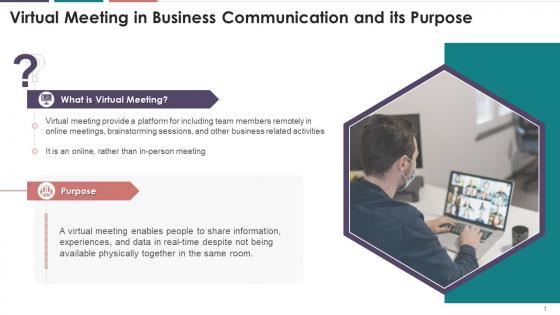
This slide showcases the definition of virtual meeting. It also provides information about the purpose of online meeting in business communication.
Slide 2
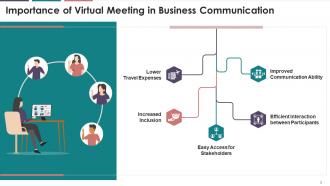
This slide illustrates the importance of the virtual meeting, such as improved communication ability, efficient interaction between participants, easy access for stakeholders, increased inclusion, and lower travel expenses.
Instructor’s Notes:
The significance of online meeting are as follows:
- Improved Communication Ability:
- A virtual meeting is an effective communication tool for businesses as they provide a reliable platform to communicate
- An employee's business presentation can be shared across the globe, increasing the reach of businesses
- Efficient Interaction between Participants:
- All participants attending the virtual meeting can interact, which might not be achievable in physical sessions where some individuals dominate or hog the limelight
- Easy Access for Stakeholders:
- The virtual meetings made it easier to assemble all the stakeholders digitally as everyone can attend these meetings with comfort and convenience
- Increased Inclusion:
- The online meeting provides an opportunity for everyone to present their viewpoints resulting in enhanced inclusivity in discussions
- Lower Travel Expenses:
- Online meeting results in cost saving as travel expenses such as airline tickets, hotel accommodation, and food are lower and can be used in business activities
Slide 3
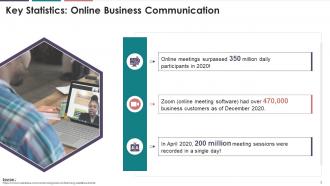
The purpose of this slide is to highlight major statistics of online business communication across the globe.
Slide 4
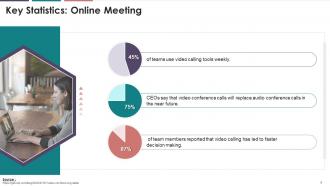
This slide illustrates major statistics for the online meeting signifying their importance in business communication.
Slide 5
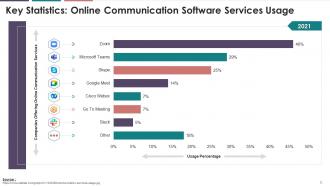
This slide visually compares the usage of multiple online business meeting software.
Instructor’s Notes:
- The graph shows the usage of online communication services of different companies around the world in 2021
- Zoom is the most preferred tool for online communication, followed by Microsoft teams and Skype
Slide 6
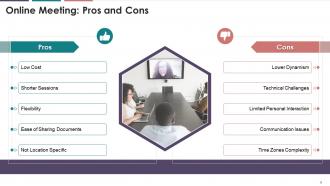
The slide illustrates the pros and cons of online meetings in business communication. The multiple pros highlighted are low cost, shorter sessions, flexibility, easy documents sharing, not location-specific. The various cons listed are lower dynamism, technical challenges, limited personal interaction, communication issues, and different time zones.
Instructor’s Notes:
The multiple pros of online meeting are as follows:
- Low Cost:
- Online meeting helps reduce travel cost such as hotel bookings, air ticket expenses, car rental expenses, etc.
- Shorter Sessions:
- In a virtual meeting, sessions are shorter and end immediately as soon as the discussion is over so that the team members can get back to work
- Flexibility:
- Online meetings are flexible as they can be conducted from any place at any time. One can drop in and out of the meeting at will, without any hindrance
- Ease of Sharing Documents:
- In an online meeting, participants can see the required documents on their computer screen with a few clicks
- Not Location Specific:
- The best thing about the online meeting is that it can be conducted from anywhere globally, whether it’s Tokyo or Toronto, Melbourne or Manilla, or even sitting at home. Also, employees can join the meeting from any place without changing their schedules and location
The multiple cons of online meetings are as follows:
- Lower Dynamism:
- It is challenging to keep track of every team member during online meetings, whether they are paying full attention to the discussion or not. There will always be just one person talking to the entire group, and the conversation becomes less productive if every member is not contributing
- Technical Difficulties:
- Even if a digital workspace is set up just for meeting purposes, there is always the possibility of technical errors such as display issues, connectivity issues, audio problems, etc.
- Limited Personal Interaction:
- Online meetings provide limited personal interaction due to lack of human touch
- Communication Issues:
- Noise disturbance and internet glitches can disturb the communication flow in online meetings
- Time Zones Complexity:
- People worldwide work remotely, so it is difficult to manage virtual meetings in different time zones as per each participants’ time preferences
Slide 7
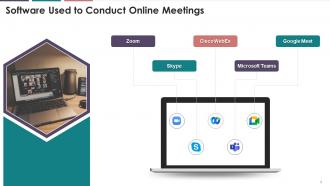
The slide provides information regarding major communication software used in online meetings such as Zoom, Microsoft Teams, Skype, Google Meet, and Cisco WebEx.
Virtual Meetings Purpose Importance Statistics And Tools Training Ppt with all 23 slides:
Use our Virtual Meetings Purpose Importance Statistics And Tools Training Ppt to effectively help you save your valuable time. They are readymade to fit into any presentation structure.










FAQs for Virtual Meetings Purpose Importance Statistics And
Best practices for engaging virtual meeting participants include interactive polls, breakout rooms, screen sharing, chat features, and regular check-ins with attendees. These techniques enhance collaboration by encouraging active participation, maintaining attention spans, and creating meaningful connections, with many organizations finding that structured engagement strategies deliver higher productivity and stronger team cohesion.
Visual presentation templates enhance virtual meeting communication by providing structured frameworks that organize information clearly, maintain audience engagement through consistent design elements, and minimize technical distractions. These templates enable presenters to deliver more focused messaging while participants benefit from improved comprehension and retention, with many organizations finding that standardized visual approaches significantly reduce meeting times and increase actionable outcomes.
Essential virtual meeting tools include video conferencing platforms like Zoom or Teams, screen sharing capabilities, digital whiteboards, breakout room functionality, and automated recording systems. These technologies streamline collaboration by enabling real-time interaction, seamless content sharing, and enhanced participant engagement, with many organizations finding that integrated platforms ultimately deliver improved productivity and reduced travel costs.
Presenters maintain audience interest through interactive polls, breakout discussions, multimedia integration, frequent Q&A segments, and varied presentation formats that encourage active participation. These engagement strategies work by creating two-way communication, incorporating visual storytelling, and providing regular interaction points, with many organizations finding that shorter segments with built-in activities significantly boost attention and retention rates.
Common virtual meeting pitfalls include poor audio quality, lack of engagement, technical difficulties, unclear agendas, and inadequate follow-up protocols. Organizations can minimize these challenges by investing in reliable technology, establishing clear participation guidelines, and implementing structured communication processes, with many companies finding that proactive preparation and interactive formats significantly enhance productivity and participant satisfaction.
Screen sharing significantly enhances audience engagement by enabling visual storytelling, real-time demonstrations, interactive content navigation, and collaborative document editing during virtual presentations. Through shared screens, presenters can deliver more dynamic experiences with live polls, multimedia integration, and immediate feedback collection, while audiences remain actively involved rather than passive listeners, ultimately creating more memorable and effective virtual communications.
A moderator ensures virtual meeting success by managing participant engagement, maintaining agenda focus, facilitating smooth technology usage, and encouraging balanced participation from all attendees. Through strategic questioning, time management, and conflict resolution, moderators help organizations streamline remote collaboration, minimize technical disruptions, and ultimately deliver more productive outcomes, with many companies finding that skilled moderation increases meeting effectiveness by up to 40%.
Companies ensure inclusivity during virtual meetings by establishing clear participation protocols, rotating speaking opportunities, providing multilingual support, accommodating different time zones, and using accessible technology platforms. These approaches enhance engagement by encouraging diverse perspectives, minimizing cultural barriers, and creating equitable participation opportunities, with many global organizations finding that structured inclusivity practices ultimately deliver stronger team collaboration and more innovative outcomes.
Strategies include interactive polls and breakout rooms, designated speaking opportunities, collaborative document sharing, visual engagement tools, and structured check-ins with remote attendees. These approaches enhance participation by creating multiple touchpoints for contribution, reducing virtual meeting fatigue, and ensuring equitable involvement, with many organizations finding that intentional facilitation techniques significantly improve remote engagement and meeting outcomes.
Feedback mechanisms can be integrated through real-time polls, post-meeting surveys, breakout room evaluations, and automated sentiment analysis tools. These systems enable organizations to track engagement levels, identify communication gaps, and refine meeting formats, with many companies finding that structured feedback loops enhance participation rates and ultimately deliver more productive virtual collaborations.
A well-structured agenda ensures virtual meetings remain focused, productive, and time-efficient by clearly defining objectives, topics, and time allocations for each discussion point. It enhances participant engagement and accountability while minimizing technical distractions and meeting fatigue, with many organizations finding that structured agendas reduce meeting duration by 25-30% while significantly improving decision-making outcomes and follow-through rates.
Presentation templates can be customized by adjusting layouts for screen sharing, incorporating interactive elements like polls and breakout room slides, optimizing text sizes for digital visibility, and adding virtual backgrounds or branding elements. These customizations enhance participant engagement across webinars, team meetings, and client presentations, while streamlining content delivery and maintaining professional consistency in increasingly remote business environments.
Security considerations for virtual meetings include end-to-end encryption, secure access controls, waiting room features, participant authentication, and data privacy compliance. These measures protect against unauthorized access, data breaches, and meeting disruptions by implementing password protection, restricting screen sharing permissions, and ensuring secure data transmission, ultimately delivering safer collaboration environments and maintaining organizational confidentiality standards.
Time zone differences can be managed through rotating meeting schedules, asynchronous collaboration tools, strategic timing that accommodates key participants, and shared digital workspaces for continuous updates. Organizations increasingly use meeting recordings, follow-up summaries, and regional coordination hubs to ensure global teams stay aligned, while many companies find that hybrid synchronous-asynchronous approaches ultimately deliver better participation and operational efficiency.
Interactive elements in virtual presentations include polls, Q&A sessions, breakout rooms, screen sharing, and real-time collaboration tools. These features enhance audience engagement by encouraging active participation, improving information retention, and creating memorable experiences, with many organizations finding that interactive presentations deliver significantly higher attendance rates and stronger business outcomes than traditional formats.
-
Satisfied with the way SlideTeam resolved my query regarding the right business PPTs that I was having difficulty finding. I found the perfect match with their assistance.
-
What a stunning collection of customizable templates! Really a time-saver..